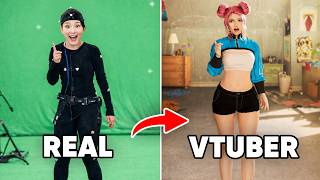

I Built a Hollywood Motion Capture Studio
50sThe reveal of a professional-grade OptiTrack system in a home setup is shocking and aspirational for VTuber fans.
▶ Play Clip"Delivers on the promise of building a dream VTuber setup with impressive tech, though some fluff in the demo section."
The creator documents the build of a professional-grade OptiTrack motion capture system in their living room, using 17 infrared cameras and a reflective marker suit to achieve Hollywood-level VTuber tracking. The video covers hardware setup, calibration, facial tracking, and real-time interaction with both a second person and tracked objects, culminating in a live demo using the Code Miko VTuber model.
The creator showcases their professional motion capture studio mounted on walls, explaining they can now bring anything into their virtual world.
The system is described as a Hollywood-grade filmmaking mocap system, with 17 cameras total.
Cleared out living room, mounted cameras on walls, and wired them together with cable management (though messy).
Cameras use infrared light to reflect off reflective markers; at least 3 cameras needed per marker for XYZ coordinates.
Two ethernet ports on computer: one for internet, one for mocap volume.
Suit is accurate with markers at joints (bends, knees, hips); automatically recalibrates when re-entering volume after removal.
T-pose calibration; selects 50 white dots (markers) to create a skeleton.
Live Link facial tracking with 52 blend shapes (morph targets) capturing subtle expressions.
Opens Modeler software showing cameras as stars; can view grayscale video from each camera.
Uses a calibration stick to wand around volume; masks reflections from objects like necklace.
Second person (Pineapple) wears another suit; system tracks both simultaneously, e.g., handshakes and spinning.
Tracking a plush toy (patat) by placing reflective markers on it; creates a rigid body.
Spawns a 3D scanned patat into virtual world; interacts with it via Code Miko character.
Code Miko VTuber model interacts with patat, crossing legs without issues; system works smoothly.
The setup successfully delivers real-time, high-quality motion capture for VTubing, with robust multi-person and object tracking capabilities, though it requires significant space and wiring effort.
How many OptiTrack cameras were used in the setup?
17 cameras
00:33
What type of light do OptiTrack cameras use for tracking?
Infrared light
01:21
What is the minimum number of cameras required to track a single reflective marker?
3 cameras
01:21
How many blend shapes (morph targets) does the facial tracking model use?
52 blend shapes
02:47
What pose is used for calibrating the motion capture suit?
T-pose
02:32
How many reflective markers are selected during calibration to create the skeleton?
50 markers
02:32
What software did the creator use to view camera feeds and set up the capture volume?
Modeler (part of OptiTrack's Motive software)
03:15
Can the motion capture system track multiple people at the same time?
Yes, as demonstrated with a second person named Pineapple.
04:47
How does the system handle objects like a plush toy?
Reflective markers are placed on the object to create a rigid body for tracking.
06:15
Automatic Recalibration
Demonstrates that the suit can be removed and put back on without manual recalibration, saving time.
02:18Facial Tracking Detail
52 blend shapes capture nuanced facial expressions, enhancing VTuber realism.
02:47One-to-One Tracking Precision
The system accurately mirrors real-world movements to the virtual model, eliminating delay.
05:45Object Tracking Integration
Tracking everyday objects expands interactive possibilities beyond just body movement.
06:44[00:02] professional motion capture studio and it's all permanently mounted onto my walls. But now I can bring anything into my virtual world. And before I show you everything that this setup can do, let me show you how I built it.
[00:21] This is a huge game changer. It's not a big thumb kit. This is OptiTrack. This is Hollywood grade filmmaking motion capture system
[00:33] grade filmmaking motion capture system and I'm getting a total of 17 and I'm getting a total of 17 cameras. This is such game changer. First, I had to clear out my living room.
[00:52] so they couldn't move. And this is what they all look like around the room. And then after I had to wire them all together, I tried my best to keep it all neat. That's the beautiful cable
[01:05] management. Stop laughing, my mother Okay, it was very hard to do. So this here is an OptiTrack camera. These cameras use infrared light to bounce off reflection from these specialized mocap reflective balls. They're placed around
[01:21] the volume so that each camera can get the XYZ coordinates of a specific marker. So you need at least three cameras to see one marker, otherwise it's going to disappear from the software. So we need at least three
[01:35] cameras to know where the XYZ coordinates of this marker is. have, the better the tracking. Now you don't need to go overboard because sometimes, you know, if it's too many cameras then it's kind of redundant. It
[01:50] cable. And that's how you see my terrible cable management over there. And then connects to the computer. I have two ethernet ports on my computer. One is for the internet, and one is for all of this
[02:03] mocap volume. Now, this suit is super accurate and impressive. It marks places where I bend, where my knees are, where my legs are, where my joints are. You hips are. I have these reflective markers all around me, and each of these
[02:18] cameras are catching what my movements are doing. So, the coolest thing about this is that once I'm out of volume, and I've taken the suit off, and I put it back on, and I come back into the volume, it actually
[02:32] to recalibrate, which is really freaking cool. This is me calibrating. I get into this T-pose, and I wait and wait and I record until basically I have these I just select the white dots and make sure that there's 50 of them.
[02:47] And then, I create the skeleton, and it looks like this. This is facial tracking. This is my live link. That is my face, and it is model has around 52 blend shapes [music] or morph targets, and when I move my
[03:01] face, it tracks all the subtle movements of my expressions. from calibration to wanding to everything. Okay, from start to finish,
[03:15] everything. Okay, from start to finish, how to get into this mocap and perform. Okay, chat, you ready? We're going to go into the software. So, first go to Modeler, and we're going to open it up. I want to show you some cool some some.
[03:29] All right. Chat, do you see a bunch of stars? So, these are cameras. These are individual cameras, chat, that are all around the room. Okay, so if I choose camera two, which is that one, and I say videotape grayscale, do you
[03:46] see what it's looking at? You see that? And then, if I So, if I go to object mode, it only shows what it considers reflective. You want as little guys see that blinking stuff, right? That's That's detecting reflections. So,
[04:01] necklace. Okay, I think this is okay. So, I'm going to go to video type and go oh oh And then now I'm going to mask the whole thing. We're going to start wanding, chat. This is my calibration stick. La
[04:15] la la La la la la Wanding like I'm Harry Potter. Okay, chat. I have a box of balls with Okay, chat. I have a box of balls with me. Let's start putting them on.
[04:47] >> It's so smooth. Chat, say hello to pineapple. He is going to wear the second suit. Chat, okay. So, so like if we're shaking hands
[04:59] Look, see how we See how we actually like knows who we are? So, if we grab like knows who we are? So, if we grab like this, right? And we spin, like
[05:13] fours. Okay, and then get like like No, no, no, like like literally on all your fours. Okay, I'm just going to sit on your back. Wait, wait, stay still. >> What? Oh my god. Wait, wait, wait, wait, wait. Wait, can you actually like Oh.
[05:28] Yeah. You can Wait, wait, wait. Okay, this is going to be kind of weird, but Okay. [laughter] Oh my god. Oh my god, that's so [laughter] cool.
[05:45] You ready, Chad? Yes. [screaming] Yes. [screaming] Okay, guys. So, this is like next level. Holy just one-to-one
[05:59] >> [crying] [screaming]
[06:15] an enemy to problem? Yes. Yes, like a box that lid that opens. Yes, you can. It's so cool. You can track anything. track anything. Put it.
[06:29] there. Okay. Now, we got each on the side. That's All right, look at It's getting all the jitters and everything. 3D scan my chair into the into the world as well. Dude.
[06:44] Dude. Bro.
[07:09] the white markers? So, it's already tracking it. So, I want to grab this and I'm going to put it on the body. Look at that. That's the patat. Okay, see that? We're going to record uh 5 seconds of this, okay? 5 seconds, that's it.
[07:24] There we go. There we go, Chad. There's our rigid body. Okay, here's a cutie patootie. Look at that, Chad. We 3D scanned them. Isn't that cute? I want to spawn it. Okay, amazing. Now, uh this patat asset does not have material.
[07:39] patat asset does not have material. Okay. >> Hello, chatties. My name is Code Miko. Welcome to my house. Here is my dearest Welcome to my house. Here is my dearest friend. His name is Potax and he is so
[07:54] friend. His name is Potax and he is so so cute. Me and him are good friends. Oh my god, that's so cool. He's gone. Where did he go? What? He's back. He's back. I crossed my leg without having it go crazy. Oh my god, that's cool.
[08:07] Chatties, was this cool? Did you have a good time? This was cool, right? I had a good time? This was cool, right? I had a great time.
⚡ Saved you 0h 08m reading this? Transcribe any YouTube video for free — no signup needed.