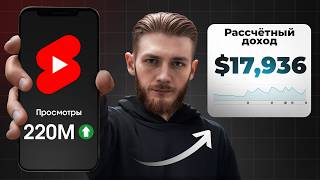

How I Got 230M Views with Reaction Shorts
45sReveals a specific, actionable strategy for creating viral reaction content using a trending cartoon niche, sparking curiosity and debate about ethical content creation.
▶ Play Clip"Title accurately promises earnings from 200 Shorts; video delivers detailed results and strategy."
This video details a step-by-step strategy for building a successful YouTube Shorts channel using reaction content to trending cartoons. The creator shares their journey from zero to 230 million views and $18,000 in two months, including monetization approval and handling copyright strikes.
The channel gained 230 million views and over 200,000 subscribers in two months using reaction videos to a popular Netflix cartoon.
Selecting the right niche is 50% of success. The creator chose the trending K-P Demon Hunter cartoon as the niche.
Instead of creating original stories, the creator reacts to existing videos featuring cartoon characters, which is allowed by YouTube and enables high output.
To succeed, fully immerse in the cartoon, analyze plot twists, and understand why it's popular to replicate its appeal.
Create a YouTube channel, name it after the main character (Roomis Reactions), and use a GPT-generated avatar.
Find engaging videos featuring cartoon characters on TikTok, Instagram, and YouTube, focusing on story quality over view count.
Use GPT chat to create reaction images of characters holding an iPhone, then generate 5-second reaction clips using services like CLK, Veo, Mini Max, or Runway.
Import original video and reaction clips, overlay reactions at top, duplicate original, scale down, add blur, and sync durations.
First day: 1,300 views on first video, 284 on second. After 7 days, one video hit 216,000 views, another 345,000.
Day 14: a video gained 2 million views and 40,000 subscribers. The creator increased output to 3-4 videos daily.
By day 21, the channel had 20 million views. Applied for monetization after seven videos hit 1-4 million views.
35% of audience from USA, 15% from UK, Australia, Canada, Germany – high-paying countries for monetization.
Monetization was initially rejected for using others' content. The creator appealed, citing YouTube's reaction policy, and was approved on day 31.
By day 45, views dropped to ~1 million/day, earning ~$100/day. First two weeks: $1,700. Subscribers exceeded 100,000.
Received a strike from a video creator. Three strikes lead to channel deletion. Learned to modify videos to avoid detection.
Produced 5-6 videos daily with modified content. By November, 25 videos exceeded 1 million views each, earning over $1,000/day.
In two months: 230 million views, 220,000 subscribers, $18,000 income. Channel continues to earn daily.
The creator emphasizes that reaction content alone isn't enough; modifying videos to avoid strikes is crucial. They offer a paid mentorship course to teach their methods.
What is the key to choosing a niche for a YouTube channel?
Choosing the right niche is 50% of the channel's success.
00:16
What format did the creator use for their videos?
Reaction videos to existing content featuring cartoon characters.
00:56
How did the creator generate reaction images?
Used GPT chat to draw characters holding an iPhone on a heart background.
02:26
What editing software was used?
CapCut.
03:07
What was the first day's view count for the first video?
1,300 views.
03:45
What percentage of the audience was from the USA?
35%.
05:22
Why was monetization initially rejected?
For using someone else's content.
05:37
How much did the creator earn in the first two weeks after monetization?
$1,700.
06:18
What happens if a channel receives three copyright strikes?
The channel is automatically blocked and deleted.
07:15
What was the total income after two months?
$18,000.
08:23
Niche is 50% of Success
Emphasizes the critical importance of niche selection for channel growth.
00:16Reaction Format Efficiency
Reaction videos to existing content are allowed and enable high output.
00:56High-Paying Audience Demographics
Over half of views from countries with high CPM, boosting revenue.
05:22Modifying Videos to Avoid Strikes
Key strategy to prevent copyright strikes by editing original content.
07:28Two-Month Results: 230M Views, $18K
Concrete proof of the strategy's effectiveness with specific numbers.
08:23[00:02] short videos [music] created using neural networks. During this time, my channel has gained 230 million views and more than 200,000 subscribers. And right now I will show you all the steps that led
[00:16] video, we'll see how much I managed to earn with monetization. So, stage one. Choosing a niche. Remember, choosing the right niche is 50% of your channel's success. Therefore, you need to approach this wisely. This summer, the
[00:31] new K-P Demon Hunter cartoon was released , which became Netflix's most popular project. And their soundtracks are still tearing up the charts. In simple terms, this is a trend that I took as a niche for my channel. However, one
[00:44] niche is not enough, because you need to understand what format to create videos in. For example, you can create animated stories with cartoon characters using neural networks. And this format always works great. But I found another
[00:56] way, more effective and simpler. Instead of creating my own stories, I will take other people's videos from the Internet and make my own reactions to them with our characters from the cartoon. Let me clarify right away that this is permitted by YouTube's rules. And
[01:09] this is an incredibly cool format, as it allows you to create a lot of videos in a short time. The second and most important stage is watching a cartoon. Don't be an best in a particular field, you need to fully immerse yourself in it, learn all the
[01:23] intricacies, analyze every plot twist, and experience the cartoon at the level of your target audience. After all, by understanding the reasons for this project's enormous popularity, you can incorporate the same principles into your future
[01:35] videos. Great. Let's move on to the next step. Creating a channel. It's all simple here, friends. Log in to YouTube using your Google account and click Create Channel. We come up with a name for it, in my case Roomis Reactions in honor of the
[01:47] main character of the cartoon. Next we need an avatar. I search Google for an image of Rume, post it in the GPT chat, and ask them to draw it on a background with hearts. Ready. We upload it to our channel. And that's all. This is enough to get started. Stage
[02:01] four. Searching for videos that I will do reactions to. Another plus - added to the trendy niche. After all, the Internet is full of such content. I go to TikTok, Instagram, and YouTube to find interesting videos featuring the main
[02:13] characters of our cartoon. I focus on animated stories and engaging videos, but I don't focus on the number of views a video gets, but rather on the engaging nature of the story. I collect a pack of such videos and move on to the next
[02:26] stage. Generating images and videos. Similar to the channel avatar, I first prepare images for my reactions using GPT chat. I take suitable pictures of the three main characters from the internet, throw them into the chat and ask
[02:40] to draw them holding an iPhone in front of hearts. Not bad. Next, open any video generation service: CLK, Veo, Mini Max, or Runway. There are no free generators with acceptable quality left, so you need to buy a
[02:53] subscription. We upload our image to the service. In the prompt, we describe the emotions that correspond to our video. And the first generation is ready for 5 seconds. We continue required amount of generation. For example, if the video is 20 seconds long,
[03:07] then we need four reactions of 5 seconds each. We save and move on to the last stage. Editing in CapCat program. Everything is easy and simple. This can even be done on your phone. First, let's import all the videos into this window. Next, we add the
[03:21] original video to the timeline. On top of it we add reactions in the required order. They need to be placed at the top of the screen. Now we copy the original video and paste it over the main track. We scale down the
[03:33] copied video so that it fits completely in height below the reactions. Next, go to the effects section, find the blur and add it to the main track. All that remains is to adjust the reaction duration
[03:45] so that they match the original video and can be exported. I started publishing videos on the channel until they were perfect, anticipating decent results. And already on the first day my videos got 1,300 views
[03:58] day my videos got 1,300 views on the first one and 284 on the second. Yes, and this is the result I worked hard for for 3 days. However, I know that YouTube only rewards patient creators and needs to be given time to
[04:10] determine my target audience. Let's just keep working. 7 days have passed. I've published a few more new videos. One of them received 216,000 views, and the second one - 345,000. In both videos I made a reaction to an
[04:26] animated story. It was a great result and I knew I was moving in the right direction. Day 14. [music] The animated video has become a trending topic, gaining 2 million views and 40,000 subscribers. This was a huge growth for the
[04:40] channel. All this time I continued to publish one or two videos a day. However, they didn't get more than 15-20,000 views, and that was disappointing. So I decided to create three to four videos daily and refined my reactions to
[04:54] make them more interesting. The twenty- first day. This bore fruit, and by October 4 the channel already had 20 million views. Below in the analytics we can see that seven videos have received between [music] 1 and 4 million views, which
[05:09] means it's time to apply for monetization. After filling out the form, I began to wait for a decision, while continuing to create videos. At that time, the channel was receiving 2 million views daily. And most importantly,
[05:22] analytics show that the main audience of my channel is from the USA, 35%, and another 15% from the UK, Australia, Canada and Germany. In other words, more than half of all views come from countries with the most profitable monetization. That's why I
[05:37] waited with trepidation for monetization to be approved and for me to see my first income from the channel. But monetization was rejected. To say that I was upset is to say nothing. Reason for refusal: use of someone else's content. I
[05:50] was completely confused, because the rules clearly state: "You can use other people's content as long as you create reactions to it." OK? filing an appeal for reconsideration . After all, an employee or
[06:04] YouTube algorithms could simply have made a mistake. Thirty-first day. As a result, a properly drafted appeal, a little patience, and on October 14th, I received approval for monetization. Excellent, we continue working and wait for the
[06:18] first income result. Forty-fifth day. Unfortunately, my views dropped by about half and were around 1 million per day with an income of about $100 per day. In the first 2 weeks I made $1,700. And this is a
[06:33] really high income for short content, because my views come from high-paying countries. On top of that , the number of subscribers on the channel exceeds 100,000, and I'm submitting an application to receive a silver
[06:46] button. A couple of weeks later I already had it in my hands, still just as beautiful, but its size had become smaller compared to the previous button. And everything seems to be fine, views are coming in, money is trickling in, but I missed one important detail. Even though
[07:01] my reaction videos are perfectly monetized and don't violate YouTube's rules, any creator I've used videos from can strike my channel. And the strike arrived. The video was removed and I was given my first
[07:15] warning. Let me remind you that if you receive three strikes, the channel will be automatically blocked and deleted. Fifty-fifth day. I have tried dozens of methods and settings to find a solution to the current problem. As a result, I
[07:28] learned how to edit and modify other people's videos so that they original as possible, but at the same time the author did not receive a notification that I used their video. Accordingly, this greatly
[07:41] reduces the risk of getting a strike. And now I create all my videos using only this strategy. In addition, I optimized my work processes and managed to make five to six videos daily. The results were not long in coming. By
[07:55] November, the channel already had 25 videos. each of which has exceeded a million views. The channel received over 10 million views daily, generating over $1,000 in revenue per day. It was a real breakthrough, with almost every
[08:09] video receiving hundreds of thousands or millions of views. Day sixty-fifth. So, friends, it's time to sum things up. What results did I get in 2 months from a completely zero channel? Let me remind you that I enabled monetization in the first month,
[08:23] and from the second month I started receiving income from views. In total, during this time, the channel has collected 230 million views, 220,000 subscribers and $18,000.
[08:36] Moreover, the channel continues to receive millions of views daily, so the income will be even more pleasing. As you already understand, simply doing reactions is not enough. You can collect millions of views and suddenly lose your
[08:49] channel due to strikes. That's why I created a training course with my personal mentorship, where I examined this niche with reactions in more detail. He showed how to get views from the US, find similarly trending niches, properly
[09:01] compose an appeal for monetization, minimize the risk of strikes, and much more. Over the course of a month, we'll go through each stage together, and you're guaranteed high-quality content, regardless of your level of expertise. So, if you
[09:16] want to do more than just look at other people's results, but create your own, follow the link in the description and sign up for the marathon. See you soon.
⚡ Saved you 0h 09m reading this? Transcribe any YouTube video for free — no signup needed.