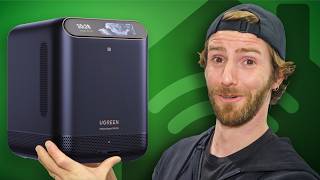

From Chargers to NAS: Ugreen's Wild Rise
45sThe unexpected transformation from a charger company to a NAS giant sparks curiosity and sets up a compelling product reveal.
▶ Play Clip"The title promises a look at Ugreen's biggest NAS product, and the video delivers on that with a detailed unboxing and demo, though it's essentially a sponsored showcase."
Ugreen has unveiled its latest NAS device, the HomeAgent HA100, which combines network storage with smart home hub capabilities and a local AI assistant. The video showcases the device's features, including local processing for privacy, compatibility with various smart home devices, and a range of accessories like cameras and a smart speaker. The presentation includes a hands-on look at the device and its ecosystem, highlighting its potential to centralize and simplify home technology.
The video introduces Ugreen's new NAS product, the HomeAgent HA100, which combines network storage, smart home hub, and a local AI assistant.
The HA100 runs AI locally, ensuring no data is sent to the cloud, addressing privacy concerns.
The unboxing reveals a well-packaged device with accessories like an Ethernet cable, power cord, and mounting kit.
The device can be powered by solar and battery, making it suitable for outdoor use.
The HA100 integrates with smart home devices, including voice-activated curtains and lights, all processed locally.
A demo shows facial recognition for security cameras, identifying friends vs. foes using local reference photos.
The system can detect cars, animals, and packages, simplifying security footage review.
Live demos include alerts for a crying baby and locating a dog, all processed locally.
The HA100 starts at $899 on Kickstarter, with the HA100 Pro at $3,000 and the Master Agent at $10,000, offering varying performance levels.
Ugreen also announced a smart speaker, a smart frame, and security cameras, all compatible with the NAS.
The Megflow Pro uses thermoelectric cooling for faster charging, a unique feature.
Ugreen's HomeAgent HA100 represents a significant step forward in home NAS technology, offering local AI processing for privacy and a wide range of smart home integrations. The device's ecosystem, including cameras and accessories, aims to centralize and simplify home management, though the higher-end models come at a premium price.
Local AI Assistant
Highlights the privacy-centric approach of running AI locally.
00:13Facial Recognition
Demonstrates practical security features with local processing.
06:48Pricing Strategy
Shows the range of options available to consumers.
08:15[00:00] How do you go from selling little battery charging warts to hundreds of millions of dollars of NASs? I don't know. But Ugreen did it, and they are announcing their biggest NAS product ever.
[00:13] This is the HomeAgent HA100, which is a combination NAS, so it handles all of your network-stacked storage, smart home hub, as well as AI assistant that,
[00:25] hold on, hold on, runs locally without sending anything back to the cloud. Ugreen sponsored this video where I'm going to be unboxing it and I'm even going to be going on a little trip where we're going to see all of this new technology in action because there's more.
[00:40] They also have security cameras and some cool new charging and smart home tech. Let's get started. And do we run an intro? Do we run an... And let's run an animated intro. F*** it.
[00:56] Right out of the gate, there's a lot of similarity to Ugreen's other NAS products. And that's a pretty good thing. They've been making absolute waves in the NAS space with their reasonable pricing, their easy-to-use interface,
[01:08] and their lack of a subscription model. Once you buy the hardware, you own the hardware. Inside the box, we get the HA100 itself, as well as an accessory package that...
[01:21] That's some heft here, actually. What have we got in here? This feels like there might actually be, like, a manual in it. Cool little front kit. Get an Ethernet cable, power cord, an AC to DC adapter, screwdriver, how dare they compete with me,
[01:35] and the thickest thermal pad that I think I have ever seen. What the heck? Is it good?
[01:47] Turns out it's for the SSD bay in the bottom of the unit. We also get a little cover plate for if you're not using the AI accelerator compute module, as well as some drive screws.
[01:59] Now let's take a look at the unit itself. We've got USB-C and an SD card reader on the front, which can be useful for ingesting data or expanding your storage. We've also got an NFC reader on the front and a color touchscreen. Up on the top, a microphone array, as well as a microphone mute button,
[02:15] very, very important, and a microphone mute indicator, along with a volume up and down switch. Normally you wouldn't need that on a NAS, but because you'll be using this to interact with their AI assistant, Julia,
[02:27] or another one of your choosing. That's pretty cool. You green guys tend to be pretty open about their hardware. You may want to adjust the speaker volume Around the back ooh magnetic dust mesh filter Large what appears to be 140mm cooling fan power button power in HDMI out for multimedia capabilities
[02:48] a couple of USB 3 ports, 2.5 gig LAN, this is really nice, I'd love to see Gigabit just go the way of the Dodo at this point, and then, four PoE ports, so these are great for powering things like, for instance, home security cameras.
[03:02] Wink, wink, nudge, nudge, hint, hint. What you want to see on the outside anyway is the radios for controlling matter devices, either over Wi-Fi or thread, as well as ZigBee devices.
[03:14] Those are inside. And here we go. Speaking of inside, we've got... These are not normally going to be pre-populated. You will populate them with your own drives.
[03:26] but we've got two days that are dedicated for your network-attached storage. So you can configure these in either in a non-redundant array to match your storage space, or you can set them up with redundancy so that in the event of a drive failure,
[03:42] you will not lose any of your data. We've also got a third drive day that is dedicated to your NVR. So this is for network video recording from your security cameras. Another nice thing about Ugreen, again, you can use their cameras,
[03:54] but they also support industry standards. so you can detect other cameras. Finally, we've got our AI accelerator card. I like that this is a module because in the future, these kinds of things are going to get a lot better,
[04:08] and it would be nice to see them support this device with future upgrades. It looks like it uses actually a standard PCIe x4 interface. I don't know that electrically that's what it is, but that's what the slot is.
[04:20] Finally, at the bottom, we've got our SSD slot. So you put your SSD in there, you throw this absolute chonker of a thermal pad on it, and then this is actually an aluminum plate, so that'll act as a heat spreader.
[04:32] Let's take a look at the cameras now. As you would expect in the year 2026, AI is, of course, front and center. But this is the key. Local AI, where all the processing is done on camera
[04:44] or on the connected device. Very supportive of that. The whole thing where a bunch of footage of my house, even maybe the inside of my house with their indoor camera going to an off-site server,
[04:56] not into that. So I like Ugreen's approach here. This particular unit is an outdoor camera that they're launching with 3-motor pan-choke zoom, so it can... and zoom in giving you a really good look at what going on outside of your house It features up to 4K resolution and is PoE So what that means is that you don have to run any additional wiring to it
[05:22] just the network cable that goes back to your PoE switch, or, of course, your HA-100. If you don't want a wiring cable, it does support Wi-Fi, and it features two-way talk, as well as a flash of light to help deter intruders.
[05:34] So, I guess we'll have to see that in action a little bit later. It includes everything you need to mount it in its various orientations, orientations, but basically it's intended to go like this. This bad boy is pretty much battery and solar powered what we just looked at.
[05:50] No TLE because it's solar powered. Why do you need that? Because you want to run it off solar power. I don't think we need to say too much more about that one, but the indoor camera is a little bit different. This is meant to blend into your indoor spaces a little bit better than a giant pan tilt
[06:05] zoom thing. It's powered by USB-C and uses Wi-Fi for connectivity. Let's see all of this in action. And here we are at the home of the New England Patriots, where Ugreen has basically taken over half of the signage to announce their new product.
[06:23] But what I want to see is the part of the concourse that they took over to set up some real-world demos of how their HomeAge Interstitent and Ulia can integrate with your home and with your life. Let's go check it out. A lot of it's pretty straightforward.
[06:35] Voice-activated curtains, voice-activated lights, smart home stuff, you know? But the difference is that every demo that they've got here is running locally, with no need to send any of your data over the internet.
[06:48] This demo, for instance, uses facial recognition to identify if someone approaching one of Ugreen's security cameras is friend or foe. It achieves this by using reference photos of your face, your family's faces,
[07:01] and anyone you want to be allowed to approach your house. something that not everyone would be comfortable with if it's going to a cloud service somewhere. That same local processing can be used to detect things like cars, animals, and packages,
[07:14] making it easier than ever to find key events when you're scrubbing through security footage, something that, if you have security cameras, I'm sure you understand the pain of. But analyzing footage after the fact is obviously easier, so what about live?
[07:27] They showed a really cool demo with the baby here crying and their Yulia assistant prompting you to, hey, maybe take care of your baby.
[07:39] I also enjoyed the, do you know where your dog is demo? Like, man, if I could find out when the bear broke into my yard by just asking in natural language versus scrubbing for it that would be amazing It supports English German and Mandarin at this time The possibilities are kind of endless because your NAS is going to have access to everything your cameras see every file you store on it which has the potential to be
[08:03] extremely powerful for saving time, like, you know, hey, Julia, find that document, you know? But also really risky if that data is processed off-site. So I really like Ugreen's
[08:15] vision for this. Every demo that we saw today is running on the regular HA100 with just six tops, starting at $899 on Kickstarter. But, for more powerful workflows, the HA100 Pro kicks things up a notch, starting at $3,000 for 160 tops, and the Master Agent over here,
[08:33] featuring NVIDIA Jackson, over 2,000 paraflops, and up to 128 gigs of RAM, can offer much more contextual understanding and easily handle agentic flows. That one won't come
[08:45] Cheap throw at $10,000 with the 50% Kickstarter discount. You don't need to buy that one, though, to see the vision. Basically, NAS isn't just storage anymore.
[08:57] It's smart security, local storage, and home automation in one device. There's a lot more that they're announcing today, though. They have their companion smart speaker for you, Leah, because obviously you're not always going to be right next to your NAS,
[09:09] as well as their Ugreen Gallery smart frame, which offers up six months of battery life and a 13.3 inch display. Oh, right, and the cameras, too. There's an indoor camera as well as a couple of IP-rated outdoor cameras.
[09:21] But the coolest part is that you don't need their cameras. The HomeAgent and MasterAgent are compatible with on-vice compatible cameras and matter-compatible smart home devices. The last piece has nothing to do with smart home,
[09:34] but it goes in your home and is actually a pretty smart little idea. This is their Megflow Pro. It uses T2 charging at up to 25 watts and you guys know I'm such
[09:47] a geek for exotic cooling solutions. It uses a thermoelectric cooler or a Peltier in order to cool the back of the phone and help it maintain those faster charging rates over a longer period of time. I haven't actually heard of an action yet because for every watt
[10:02] that you cool on this side you're going to have to get rid of that heat on the other side but I just love the idea of it and I love thanking you for watching this video you can reserve the Ugreen HA100 right now all it takes is a $50
[10:16] reservation to save 50% off so just go check that out at the link in the video description and if you guys enjoyed this video maybe go check out the time we use a Peltier tech module to cool a phone directly without any of the charging
[10:29] functionality it actually works and stuff really cool


⚡ Saved you 0h 10m reading this? Transcribe any YouTube video for free — no signup needed.