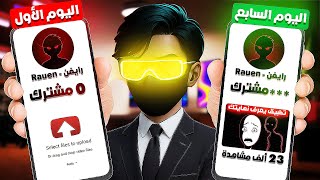

7-Day AI Horror Channel Challenge
45sThe challenge setup and specific view counts (1300, 23K) create curiosity and a clear hook for viewers.
▶ Play Clip"The title promises a 7-day challenge and delivers exactly that—with real results and a clear step-by-step process."
The video documents a seven-day challenge to create an AI-powered horror stories YouTube channel and test if it can attract views. The creator outlines a four-step plan involving video ideas, channel setup, audio quality, and editing, and shares the surprising results.
The creator decided to take on a seven-day challenge to create an AI-powered horror physics channel and see if it could get views. They devised a four-step plan to achieve this.
The first step was to come up with video ideas. The creator looked at trending topics and decided to create horror sketch videos in a unique style.
The second step was to set up the channel professionally. They chose a professional name and used ChatGPT to design a logo for the horror stories channel.
The creator added keywords to the channel and video settings to reach a wider audience. They also mentioned that a previous challenge had led to the creation of this horror story channel.
The first video reached 1,300 views and the second reached 23,000 views. However, the creator drifted away from the channel for a while before working on the third video.
The third step was to ensure professional audio quality. The creator found a website that uses AI to remove background noise and make the voice sound professional.
The creator used ChatGPT to generate a script for a dark web story, specifying a Stickman style and a mysterious red glow. They then recorded the audio.
The creator used an AI tool to remove unwanted sounds from the audio. They could download the edited audio as an MP3 file. The tool can also be used for other purposes like isolating vocals or instrumentals.
The creator also mentioned YouTube Transcript, a tool for extracting scripts from videos. They used it to get a ready-made script.
The fourth step was the editing stage. The creator used AI to convert promos to images for free via the Wisea.ae website with a VPN. They also used ChargeBee to create a professional thumbnail image.
After publishing, the first video reached 500 views in two days, the second 250 views, and the third video gained 300 views on day one, 500 on day two, and 900 on day three, still increasing.
How many views did the first video on the AI horror channel get?
1,300 views
01:06
How many views did the second video on the AI horror channel get?
23,000 views
01:06
What was the purpose of the AI tool used for audio in the video?
To remove background noise and enhance voice quality using AI.
01:34
Which AI tool was used to create the channel logo?
ChatGPT (GPT) was used to design a professional logo for the horror stories channel.
00:34
What were the four steps in the creator's plan to get views?
The four steps were: 1) video ideas, 2) channel setup, 3) audio quality, and 4) editing and thumbnails.
00:19
What was the view progression for the third video?
The third video reached approximately 300 views on the first day, 500 on the second, and 900 on the third.
04:54
Four-step plan for channel growth
Provides a clear, actionable framework for building a YouTube channel from scratch.
00:19Second video hit 23K views
Demonstrates the potential of AI-driven content to achieve significant reach quickly.
01:06AI tool for audio enhancement
Shows a practical solution to a common beginner problem: poor audio quality.
01:34Consistent growth pattern
Highlights the importance of consistency and following a proven workflow for steady view growth.
04:54[00:02] seven-day challenge to create an AI-powered horror physics channel and see if I could actually get views. Many people had asked me to do this challenge, so I agreed. However, it would n't be easy at all, so I devised a plan to get views. It
[00:19] involved four steps, the first being video ideas. Without them, people wouldn't click on the videos because they weren't interested. I started looking at trending topics to create videos about them. But then I decided to create a different style: horror sketch videos like these. To
[00:34] do this, I started with the second step: setting up the channel professionally so the videos would reach people. I chose a professional name and created the logo using a chatbot, GPT. I asked them to design a professional logo for a horror stories channel with a specific name. After creating the logo, I started adding keywords
[00:51] like these to my channel and video settings so that any video would reach a wider audience. And for those who don't know, I did a challenge before So, I created a horror story channel using artificial intelligence, and honestly, I decided to focus on it a bit. The first video reached 1300 views, and the
[01:06] second video reached 23,000 views. But honestly, I drifted away from the channel for a while, so I started working on the third video. However, there was a problem, and this is the third step. But first, do n't forget to like and subscribe because it really
[01:20] helps me a lot. The third step is that the channel needs to be professional in terms of audio recording and everything else. I know you don't have a good microphone that can record in high quality, and every time I record, I find noise from kids playing outside in the street or even the vendor who seems to be waiting for me to start
[01:34] recording so he can talk. That's why I found a website that can talk. That's why I found a website that can make your voice sound very professional and remove any noise. You can record audio from your mobile phone, but believe me, if you really want to succeed, you have to speak in your
[01:48] real voice. But first, I needed to create a script, and of course... To create this Stickman style, I filtered the chatbot GPT and got it to show me the top 10 ideas about the dark web. I found the video idea, which was about a dark web application. I told it to create a
[02:04] professional script for this story and to use a professional promo with Stickman style and a professional promo with Stickman style and a mysterious red glow stick to accurately describe the scene. I also told it to use English for the text. Now I had to write the script and record the audio. After I did that, I
[02:18] went to this website to add my voice. I was sitting alone at night when I suddenly received a message from an unknown account. The
[02:32] unwanted sound using artificial intelligence. I clicked on the first option and added the audio. After about a minute, the audio was working. This is the option and added the audio. After about a minute, the audio was working. This is the
[02:44] sound in the background. This is the alone at night when I suddenly received a message from an unknown account. I could then download the edited audio as an MP3 file. However, this feature can be used for other things, like a
[02:59] specific song where you only want to hear the singer's voice or just the instrumental track. For example, I could add a song, but this time I tried adding the video itself: " itself: " Kahil Al-Ain Nabina Al-Zain, Kahil Al-Ain Nabina Al-
[03:18] Kahil Al-Ain Nabina Al-Zain, Kahil Al-Ain Nabina Al- Zain, Ala Dhahrahu Hassan wa Hussein
[03:30] Instead of downloading the audio, I could also add the video link, and it would play immediately without any problems. There's also a section for things like slowing down the song's sound, or for someone who slowing down the song's sound, or for someone who likes to sing but can't because of the song's speed. But there's
[03:44] something else you'll need: YouTube TRANScript. You'll find it here. The first one is for adjusting the audio quality to a professional level, and the second one is for adding a link to any video and extracting its script. You can also copy it or download a ready-made script. So I worked on my audio and
[03:59] solved its problem. I started converting the promos to images using artificial intelligence. But in order to be able to convert the promo to an image for free, I went to the Wisea.ae website and of course I turned on a VPN so that it would work for me. I started taking each promo and converting it to an image. I moved on to the fourth step, which is the
[04:16] editing stage. I put the images, the audio, and everything and made the video. But I wanted to make a professional thumbnail image so that the click rate on the video would increase, so I went to ChargeBee and told him video would increase, so I went to ChargeBee and told him to make a professional promo for a thumbnail image for this story
[04:30] and to be in the same style as Stickman. I put the promo in Wisea.ae and then made an image and started publishing the video. After two days, the video reached 500 views. I made the second video,
[04:42] but in a different style, to be honest, and it also reached 250 views. The third video was in the same style as Stickman and was about the same idea so that the video would reach people and get
[04:54] views, God willing. The video reached approximately 300 views on the first day, then 500 views the next day, and 900 views the following day, and it's still increasing. So, if you want to get views like this, you have to follow the steps I took, including the
[05:10] website I explained, because it will help you a lot, just as it helped me. You'll find the link in the description and the pinned comment. Thanks for watching, and I hope you liked the video. Peace. M.

⚡ Saved you 0h 05m reading this? Transcribe any YouTube video for free — no signup needed.