
Merge 14 Photos into One with AI!
45sThe visual of combining multiple people into one photo is a mind-blowing hook that showcases AI's capability.
▶ Play Clip"Delivers on the promise of merging images with AI, but the title is generic and the video includes some filler."
This video demonstrates how to merge multiple images into one using an AI-powered tool called bith.ai (base.ai), which is an Arabic-language platform offering various AI tools. The presenter shows practical examples, including combining separate photos of people into a single group photo, swapping a person's face onto a different outfit, and enhancing product images. The video emphasizes that no prior experience is needed, as the tool understands natural language instructions in Arabic.
The video teaches how to merge multiple images into one using AI, such as combining 14 separate character photos into a single group photo, or using AI for photography, design, and work.
The tool is bith.ai (base.ai), an Arabic website containing all AI tools in one place. Users can switch the interface to Arabic by clicking the language option. It requires no experience; users can speak in Arabic, even in dialect, and the tool understands.
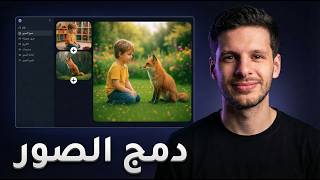
To edit or merge images, users select the 'Photo Editor' feature. Upload the images you want to edit, then add more images as needed. The presenter uploads three images (a girl, a chair, and a painting) and instructs the tool to combine them.
The presenter explains how to describe the desired composition in plain language, e.g., 'combine photo 1 with photo 2 and photo 3' and specify details like lighting, angle, and placement. The tool understands various Arabic dialects.
The presenter recommends using 1K resolution (Full HD) as sufficient, and 4K is unnecessary. They also set the aspect ratio to 16:9 (landscape) for the output image.
After clicking 'Create', the tool generates the image. The result matches the request: the girl is placed with the chair behind her and the painting, in the desired aspect ratio.
The presenter uploads a photo of their face and a photo of a black t-shirt, then instructs the tool to put their face on the t-shirt. They set the aspect ratio to 9:16 (portrait) and generate the image.
The presenter notices a yellow logo on the t-shirt and asks the tool to remove it. The tool successfully removes the logo, demonstrating its ability to edit specific details.
The presenter uploads a photo of a perfume bottle and chooses to generate an image (not video). The tool transforms the simple product photo into a professional-looking image, preserving details like the label and even the air bubble in the liquid.
The tool offers further editing options like downloading, resizing, converting to video, and more. The presenter concludes that with AI, you no longer need a designer or photographer, as the AI can do everything.
The video showcases bith.ai as a versatile AI tool for merging and editing images with simple natural language instructions, making professional image editing accessible to everyone without prior experience.
What is the name of the AI tool demonstrated in the video?
bith.ai (base.ai)
00:42
What feature of bith.ai is used to merge images?
The Photo Editor feature.
01:17
What resolution does the presenter recommend for image generation?
1K (Full HD) is sufficient; 4K is unnecessary.
02:09
What aspect ratio did the presenter use for the group photo?
16:9 (landscape).
02:21
How does the tool understand user instructions?
It understands natural language in Arabic, including various dialects.
00:59
What did the presenter ask the tool to remove from the t-shirt?
A yellow logo at the bottom of the shirt.
03:37
What aspect ratio did the presenter use for the face swap example?
9:16 (portrait).
03:13
All-in-One AI Platform
Introduces a single platform that consolidates multiple AI tools, simplifying access for users.
00:42No Experience Required
Emphasizes that the tool is accessible to beginners, as it understands natural language.
00:59Accurate Image Merging
Demonstrates the tool's ability to follow complex instructions and produce accurate compositions.
02:33Detail Editing Capability
Shows the tool can remove specific elements, highlighting its precision.
03:37Realistic Product Rendering
The tool preserves fine details like air bubbles, indicating high-quality output.
05:12[00:00] بهذا الفيديو رح أعلمك كيف تدمج صور مع بعض باستخدام الذكاء الاصطناعي زي مثلا لو انت عندك الـ 14 شخصية دول كل واحدة فيهم صورة منفصلة تقدر انت اليوم مع الـ AI تجمعهم كلهم بصورة واحدة
[00:14] وحتى لو انت بدك تستخدم الـ AI للتصوير أو للتصميم وللشغل زي هيك مثلا بقدر لو عندك عدة صور منفصلين تقدر تجمعهم كلهم بصورة واحدة وحتى رح أثرجيك لو انت مثلا عندك بروزي زي هيك
[00:27] وانت عندك صورة شخصية إلك زي هيك بقدر اخليك انت تلبس هاي البلوزة وتصير عندك الصورة النهائية انت لابس البلوزة اللي بدك اياها فدما خلينا ندخل مباشرة بالموضوع وعشان تعمل هيك رح تفتح موقع واحد من التليفون او من الكمبيوتر
[00:42] واسم الموقع هو bith.ai base.ai وهذا هو عبارة عن موقع عربي عليه كل ادوات الذكاء الاصطناعي بموقع واحد وعشان انت تستخدم الموقع باللغة العربية بس يكبس فوق عندك اللغة هي مكتوب انجليز تكبس على العربي وموقع بصير بالعربي
[00:59] وبرطوة حلوة بهذا الموقع انه حرفيا ما بحتاج منك اي خبرة لانك لو حكيت باللغة العربية بسام عليك وحتى لو حكيت حكي الداعية رح يسام عليك فنحن هلا عشان نعدل صور او نجمع صور مع بعض رح نستخدم خاصية محرر الصور اللي هي بتعدل الصور موجودة هون وحتى موجودة تحت
[01:17] سوف نكبس عليها من هنا و ندخل مباشرة سوف تخبرني ارفع الصور التي أريد ان ابدل عليها
[01:35] الموقع باخدها وبحكيلي ايش عدل عليها. انا رح اضيف هلأ صورة ثانية. هي صورة البنت هي من تحت بقى ده اضيف اكثر من صورة. رح اعمل تحميل. بحنفتح ليها الصور بتاعوني. هي صورة الكرسي. وبعدها بعمل كمان مرة تحميل بضيف كرسي اللوحة وهيصير ضيف الثلاث صور وحكي الكلام تاعي
[01:52] عم بحكي له يركب الصورة الفوتوغرافية بالصورة واحد مع الصورة اثنين مع الصورة ثلاث وبشرح للتفاصيل كيف بده الصورة زي مثلاً الإضاءة الزاوية وين يخط الكرسي وين يخط اللوحة هذا الكلام قلت لنا بتشكيل بشكل عامي يعني بلهجة سعودية مصرية أردنية
[02:09] اللعبة حتى غير مهمة يعني مش ضروري تحكي باللغة العربية الخاصة بس اشرح اللي تبالك فبعد ما شرحت اللي تبالي هون بحكي هلأ كيف الدقة انا بنشبيه 1K بكفي لان هال1K هي FULL HD
[02:21] فال 4K مش ضروري تستخدم هال1K بكفي وهون ابعاد الصورة يعني الصورة مربعة بالطول بالعرض انا بده الصورة هون بالعرض فهي 16 اتفعى اخترت ابعاد الصورة والوضوح وحكيت الكلام وحطيت الصور
[02:33] بس هلأ بكبس انشاء وخلص ببلش يعمل لي فيهم الصور وهي الصورة صارت جاهزة زي ما طلبتها منه بالضبط اعطاني صورة البنت بسك الكرشي وراها اللوحة وعطانيها بالبعد البديه
[02:46] بقدر هلأ حتى اعدل الصورة بزيادة
[03:00] بدي اجرب اجيد صورتي هالصورة وجهي واركب على حالي انا هاي البلوزة لان مش حابب هاي البلوزة بدي اغيرها وحط هاي فعشان اعمل هيك رح برضو هلا اقفع صورة وجهي هون على الموقع واغفع بعدين صورتي البلوزة
[03:13] واحكي له كلام جدا بداي الموجود في الصورة 2 حكي بسيط بحط الابعاد بديها بالطولة 9-16
[03:25] حطيت كل اشي هلا بس بعمل انشاء وهي الصورة صارت جاهزة هي بالضبط بنفس كل اشي وحطي لي هاي المغة تي شيرت هيك كانت وهيك صارت بس انا هالمغة مو عجبني اللوغو الاصفر تحت لانه الصورة
[03:37] لانه لما كنت حاططها الصورة فيها تحت لوغو اصفر فحطي ليها بالصورة لانه الاي هات بطل ينسى التفاصيل فانا بدي اعدل هلا سوف اقوم بإزالة الشعال الجمل الأصفر الموجود أسفل القمير
[03:51] كلام جدا بدايي وهي صارت محدوثة هاي هون كان موجود اللوجو الجمل الأصفر تحت هون صارت محدوثة بعد ما حكيت له يحذفها وهيك أنا كنت لابس لأبد البلوز السوداء وهلأ كنت لابس الشعال الأسود من دون اللوجو اللي كنت بديش إياه
[04:06] وهيك بكل بساطة انت تتجمع صوتين مع بعض سواء كنت انت وإشي أو أشياء تصوير وهلأ رح أفرجيك إشي أسهل منهم كلهم
[04:47] العطر اللي انا اخترته هاي تعتبر انسب اشي منتج على سطح غمي ذافق رح ارفع هلا صورة العطر اول اشي بديشها فيديو بديها صورة هده اختار اني بدي النتيجة صورة مش فيديو بكبس هون هايو العطر وبس بعمل انشاء اول اللي رفع العطر
[05:00] وبيشيرك العطر من هاي الصورة لهاي الصورة الاحترافية في كبسة واحدة وهي النتيجة قاعد جاهزة هاي العطر الاسمه موصوح كل تفاصيله وكل كلمة مكتوبة عليه طلعت فاح حتى الفيزيائيات يعني
[05:12] فوق كانت فقاعة الهواء لان المنشوق العطر بالطول لان بعدين انه صار العطر نايم فقاعة الهواء صارت هون يعني حتى التفاصيل اعملها واقعية بادر انا هلا احمل الصورة اعدل الصورة اعملها تكبير او تحريك
[05:26] احولها لفيديو اكبر اعدل بدا عمسيها اي ايش الصورة وهيك انت تبدل تستخدم الذكاء الاطنائي كل الادوات اللي انت قد تحطر على بالك موجودة في موقع واحد اسمه best.ion فانت اليوم بطلت تحتاج لمصمم او مصور او حد يعملك منتاج لان الذكاء الصناعي يعمل عنك كل اشي
[05:44] فانت هلأ اجرب موقع بيس بوس اي اي واحكيلي شو كان رأيك عنه بالكومنتات
⚡ Saved you 0h 05m reading this? Transcribe any YouTube video for free — no signup needed.