
Why a simple chatbot is harder than you think
45sRelatable pain point of building a chatbot with context and memory hooks viewers.
▶ Play Clip"The title promises a component breakdown and building a chatbot, which the video delivers with a lab walkthrough."
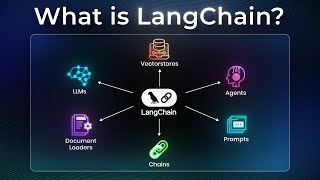
LangChain is an abstraction layer that simplifies building AI agents with memory, tools, and knowledge retrieval. It addresses the complexity of managing context, model switching, and vector databases, enabling developers to create production-ready chatbots with minimal code.
A company needs a chatbot with chat history and knowledge base. Using OpenAI's SDK alone lacks context; you need to store messages, maintain conversation history, and base answers on internal knowledge. Switching models later adds complexity.
LangChain provides tools to address pain points like memory, retrieval, and model switching. It allows building agents with minimal code using pre-built components.
An LLM is a static brain answering based on training. An agent has autonomy with memory and tools to decide how to accomplish tasks. Agents can understand intent, store knowledge, retrieve data, search databases, generate answers, and remember chat history.
LangChain includes components for LLM providers (OpenAI, Anthropic), memory, tools, vector databases, and RAG. Switching models is a one-line change (e.g., from ChatOpenAI to ChatAnthropic).
LangGraph extends LangChain for more complex workflow automation and can interoperate with LangChain.
The lab covers installing LangChain ecosystem, prompt templates, connecting to multiple LLMs via a proxy, using LCEL (LangChain Expression Language) for pipelines, implementing memory, and RAG (Retrieval-Augmented Generation).
The final application combines memory, knowledge retrieval, and multi-model support, launching on port 7860. LangChain provides vendor independence and coherent framework for production-ready AI apps.
LangChain drastically reduces development time for building agentic software by providing pre-built modules for memory, retrieval, and model switching. It enables developers to focus on logic rather than reinventing infrastructure.
What is the main difference between an LLM and an agent?
An LLM is a static brain that answers based on training; an agent has autonomy with memory and tools to decide how to accomplish tasks.
00:59
What are the six capabilities of an agent mentioned in the video?
1) Understand intent using LLM, 2) Store knowledge base in vector database, 3) Retrieve from vector database, 4) Search internal database, 5) Generate answer based on product and policy, 6) Know chat history with memory.
01:40
How does LangChain simplify switching between LLM providers?
It provides a unified interface; changing from OpenAI to Anthropic is a one-line code change (e.g., from ChatOpenAI to ChatAnthropic).
02:56
What is LCEL and what are its key features?
LCEL (LangChain Expression Language) is a way to build composable pipelines using pipe operators. Key features: streaming-first, async native, batch processing, and type safety.
08:40
What is the purpose of memory in LangChain?
Memory keeps track of conversation history (past user inputs and AI responses) so the model can provide natural, coherent, and contextual answers.
10:09
What does RAG stand for and what does it do?
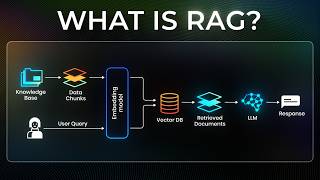
RAG stands for Retrieval-Augmented Generation. It loads documents, splits them into chunks, creates embeddings, stores them in a vector database, retrieves relevant information for a query, and generates informed responses.
10:46
What is the role of temperature in model configuration?
Temperature controls randomness: set to 0 for precise, consistent answers; higher values for more creative responses.
08:12
Agent vs LLM Distinction
Clarifies a fundamental concept: agents have autonomy and tools, unlike static LLMs.
00:59Vendor Independence via LangChain
Shows how LangChain enables switching LLM providers with a single line of code, a key practical benefit.
02:56LCEL Pipeline Simplicity
Demonstrates how LCEL creates clean, readable pipelines using pipe operators, making complex workflows manageable.
08:40RAG Implementation
Illustrates the complete RAG pipeline from document loading to question answering, a core pattern for knowledge-based chatbots.
10:46Production-Ready Deployment
Shows how LangChain provides a coherent framework for deploying a chatbot with memory, retrieval, and multi-model support.
11:11[00:00] Your company needs a chatbot on their
[00:01] site where customers can ask questions.
[00:04] The chatbot needs to store and retrieve
[00:06] all chat history as well as company
[00:08] knowledge base so that the agent can
[00:10] help your customer. And you might be
[00:11] wondering, how am I going to make this
[00:12] happen? Maybe your first instinct is to
[00:14] use OpenAI's SDK to write up a quick
[00:16] software and create and simulate a chat.
[00:19] But you soon realize that there's a huge
[00:21] missing piece which is context. You
[00:23] realize that you need to store these
[00:24] chat messages somewhere and maintain
[00:26] conversation history. And most
[00:28] importantly, you need the agent to base
[00:30] their answer from company's internal
[00:32] knowledge base to answer questions
[00:34] accordingly. Also, you're not so sure
[00:36] that the company will later change from
[00:38] OpenAI to a different model like
[00:39] Anthropic or Gemini. And now all of a
[00:42] sudden, this all seems like a massive
[00:44] undertaking. Lang Chain is an
[00:45] abstraction layer that helps you build
[00:47] agents with minimal code. In other
[00:49] words, all the pain points that we
[00:51] identified earlier, Langchain gives you
[00:52] the tools to address them using their
[00:54] library. And you might be wondering at
[00:56] this point, what's the difference
[00:57] between an agent and an LLM?
[00:59] Understanding agent is a critical piece
[01:01] in knowing why Langchain is a necessary
[01:04] tool for you to learn. When you use LLMs
[01:06] like OpenAI GPT, Anthropex Claude, or
[01:08] even Google's Gemini, you're using these
[01:10] models out of the box, meaning the model
[01:12] is rather like a static brain that
[01:14] answers questions based on what it
[01:16] learned during training. On the other
[01:18] hand, an agent has full autonomy with
[01:20] memory and tools to do whatever it
[01:22] thinks it needs to get the job done. So
[01:24] in the earlier case, let's say the
[01:26] customer asked this question. What's
[01:27] your company's policy on refunding my
[01:29] product that arrived damaged? Now,
[01:31] traditionally, you might code something
[01:32] custom for this specific need. Now, with
[01:34] agents, things look a little bit
[01:36] different. An agent will have these
[01:37] capabilities for them to perform. First,
[01:40] ability to understand your intent using
[01:42] an LLM. Two, ability to store a
[01:44] company's knowledge base in a vector
[01:45] database. Three, ability to perform
[01:47] retrieval from vector database to find
[01:49] relevant data. Four, ability to search
[01:51] internal database to find what product
[01:54] the customer actually ordered. Five,
[01:56] ability to generate an answer based on
[01:57] the product they ordered according to
[01:59] the company's policy that we gathered.
[02:01] And lastly, ability to know the chat
[02:03] history with the memory. The biggest
[02:05] difference between traditional software
[02:07] and agentic software that you build
[02:09] using lang chain is this. In traditional
[02:11] software, these are typically programmed
[02:13] to run sequentially or conditionally
[02:15] based on code that determines how it's
[02:17] run. In the case of Langchain, these are
[02:19] rather developed in components and
[02:21] provided to an agent for it to decide
[02:23] how best to use its ability to deliver
[02:25] the task. Thankfully, Langchain comes
[02:27] with a large set of pre-built
[02:29] components. In our earlier example, to
[02:31] set up lane chain for your company's
[02:33] chatbot, Langchain allows you to use
[02:35] their existing tool that gives you
[02:36] direct access to LLM providers like
[02:39] OpenAI and Enthropic. This means that
[02:41] setting up an API to OpenAI can easily
[02:43] be done using a single line of code that
[02:45] says LLM equals chat openAI instead of
[02:48] writing your own implementation of API
[02:50] connection or even using the provider
[02:52] SDK tools which keeps you locked in and
[02:54] difficult to switch in the future. So
[02:56] later if the requirements change to use
[02:58] anthropic instead of OpenAI, you simply
[03:00] need to change the code to say LLM
[03:02] equals chatanthropic open bracket quote
[03:05] model equals cla 3 sonnet. A similar
[03:08] process just like this applies to all
[03:10] other abilities that we laid out
[03:11] earlier. Meaning components that we
[03:13] identified in what typically goes into
[03:15] chatbots like memory, tools, MCP, vector
[03:18] databases, rag, all of these can be set
[03:20] up and configured using Langchain's
[03:22] pre-built libraries. Now, there's an
[03:24] extension of Langchain that helps you do
[03:26] more workflow automation called
[03:27] Langraph. And Langraph can interoperate
[03:30] with Langchain, which is covered in the
[03:32] next video just dedicated towards
[03:33] Langraph for you to check out. So
[03:35] similar to earlier when we had to write
[03:37] code to manage API calls to LLM without
[03:39] lang chain you would have to write your
[03:41] own logic to convert your company's
[03:43] document into semantic meaning through
[03:44] text embedding store these embedding
[03:46] into a vector database like pine cone or
[03:48] chroma using their SDK implement your
[03:50] own semantic search and then inject
[03:52] these results into prompt at runtime and
[03:54] on top of that managing state managing
[03:56] memory managing tool writing logic as
[03:58] you can see the scope of writing and
[04:00] maintaining these can get out of hand
[04:01] really fast thankfully for lang chain
[04:04] inside lang chain's library. You can
[04:06] import modules like Chroma for
[04:07] components related to vector database,
[04:09] OpenAI embedding for components related
[04:11] to text embedding, conversation buffer
[04:13] memory for components related to keeping
[04:15] memory in chat. And there are so many
[04:17] more components like this that help
[04:19] alleviate development efforts that go
[04:21] into building agentic software like
[04:23] company chatbots that assist customer
[04:25] with return policy. With agents becoming
[04:27] the new way of building software,
[04:29] learning how to develop agentic software
[04:31] is becoming a critical skill set to have
[04:33] and libraries like Langchain can help
[04:34] your team drastically reduce development
[04:37] time and accelerate your path to market
[04:39] by using pre-built modules instead of
[04:41] reinventing the wheel on tasks related
[04:43] to building agentic software. Now that
[04:45] we covered the conceptual elements of
[04:47] Langchain, let's look at how it looks
[04:49] like on a practical level. We can look
[04:51] over at this lab specifically geared
[04:53] towards how to use lang. All right,
[04:55] let's start with the labs. In this lab,
[04:57] we'll build our way up from installing
[04:58] Langchain to deploying a fully
[05:00] functional chatbot that combines memory,
[05:03] knowledge retrieval, and multiple AI
[05:05] models. Use the link in the description
[05:07] below to access the lab environment to
[05:09] follow along with me. The first question
[05:11] presents us with this scenario. Our
[05:12] company needs a chatbot, but we're
[05:14] realizing that it's more complex than
[05:16] just calling an API. We need to install
[05:18] the complete langchain ecosystem. We
[05:21] start by creating a workspace called
[05:23] Langchain-lab. and setting up a Python
[05:25] virtual environment to keep everything
[05:27] isolated and clean. After upgrading our
[05:29] package tools, we installed a core
[05:31] langchain libraries that form the
[05:33] backbone for building AI powered apps
[05:35] along with LLM provider integrations
[05:37] like OpenAI, Enthropic, and Google so we
[05:40] can plug in different models easily. For
[05:42] storage and retrieval, we'll use FISS or
[05:45] Fias, which is the vector database used
[05:47] for semantic search and embeddings.
[05:49] We'll also install Python-Env
[05:51] to manage environment variables
[05:53] securely. And finally, Graddio to
[05:55] quickly build interactive demos and user
[05:57] interfaces. Next, we dive into prompt
[06:00] templates, which are really the
[06:01] foundation of Langchain. This shows how
[06:03] prompt techniques work. You start with
[06:05] templates like tell me about a certain
[06:06] topic, fill in variables like topic
[06:09] equals lang chain, and get the final
[06:10] prompt, tell me about lang chain, ready
[06:12] to send to the LLM. We have four example
[06:15] templates here. We start with basic
[06:16] templates that use variable
[06:18] substitution. Think of them like Python
[06:20] fst strings but for AI prompts. This
[06:22] code shows how to use Langchain's prompt
[06:24] template. First, we create a template
[06:26] with placeholders for product and
[06:28] feature. Then, we fill it with values
[06:30] like lang chain and AI orchestration to
[06:33] generate a marketing slogan prompt.
[06:35] After that, we test it with different
[06:36] examples, smartphone, electric car, AI
[06:39] assistant. Each time replacing the
[06:41] placeholders to produce new prompts.
[06:43] Finally, it saves a small progress flag
[06:45] in the file called basic-templates.txt.
[06:49] Then we move to chat templates that
[06:50] structure entire conversations with
[06:52] system, human, and assistant messages.
[06:55] This is how we maintain context and flow
[06:57] in our chatbot conversations. The fshot
[06:59] learning section is particularly
[07:01] interesting. Here we're teaching the AI
[07:03] through examples. We show it patterns
[07:05] like happy to sad and tall to short and
[07:08] it learns to apply this to new inputs.
[07:10] The code demonstrates this beautifully
[07:12] with a template that learns from
[07:14] examples and applies the patterns to new
[07:16] words. Take some time to explore the
[07:18] advanced templates sections yourself. It
[07:20] covers validation and structured outputs
[07:23] that are essentially for production
[07:24] applications. Make sure to create the
[07:27] files and execute them using the given
[07:29] commands before checking your work.
[07:32] Now, we connect to multiple LLMs through
[07:34] a unified interface. What's clever here
[07:36] is we're using a proxy server that gives
[07:39] us access to various models like OpenAI
[07:41] compatible APIs. It's an API that looks
[07:44] and behaves like OpenAI's API, but it
[07:46] doesn't have to come directly from
[07:47] OpenAI. This is where proxy server comes
[07:50] in. It makes the other models like
[07:52] Enthropic, Google, open source LLMs and
[07:55] etc behave as if it was from OpenAI. We
[07:58] start with a simple connection, then
[08:00] explore how messages work in Langchain
[08:02] using system message and human message
[08:04] objects to structure our conversations.
[08:06] The code shows us building conversation
[08:08] history that the AI can reference. The
[08:10] model configuration section demonstrates
[08:12] something crucial which is temperature
[08:14] control. Set it to zero for precise
[08:16] consistent answers or higher for
[08:19] creative responses. We create different
[08:21] models instances for different purposes.
[08:23] a fast model for simple tasks, a
[08:26] reasoning model for complex logic, a
[08:28] coding expert for programming questions.
[08:30] The code even shows us how to enable
[08:32] streaming for real-time responses.
[08:34] Create the script files and execute
[08:36] them. Once done, check your work and
[08:38] move on to the next question. Here's
[08:40] where it gets powerful. LCEL, the lang
[08:43] chain expression language. It's a new
[08:45] way of building and chaining components
[08:47] in Langchain. Instead of writing long
[08:49] complex code, LCAL lets you create
[08:51] simple composable pipelines using pipe
[08:54] operators. We chain components together
[08:56] elegantly. With streaming first, you
[08:58] don't have to wait for the whole answer.
[09:00] The response starts flowing in
[09:02] immediately. Async native means
[09:04] everything runs without blocking, giving
[09:05] you smoother and faster performance.
[09:07] With batch processing, you can handle
[09:09] multiple inputs at the same time, making
[09:12] things more efficient. And type safety
[09:14] ensures that all your inputs and outputs
[09:16] follow the right structure so nothing
[09:18] breaks unexpectedly. The code literally
[09:20] shows prompt piping into model piping
[09:22] into parser. It's clean, readable, and
[09:25] makes complex workflows manageable. We
[09:27] build a chain that takes a question,
[09:29] formats it into a template, sends it to
[09:31] a model, and parses the output allin-one
[09:34] flowing pipeline. Here's what's
[09:35] happening with LCL in that snippet. We
[09:38] first define a model chat openai that
[09:40] connects to GPT through a proxy. Then we
[09:42] create a prompt template with a
[09:44] placeholder question so that we can
[09:45] reuse it for different inputs. Next, we
[09:48] add a parser that converts the model's
[09:50] output into plain string. Finally, using
[09:52] LCL's pipe operator, we link these
[09:55] components together. Prompt to model to
[09:57] parser. There are other chains such as
[09:59] parallel execution, dynamic routing, and
[10:01] advanced LCL that I'll let you explore
[10:03] by yourself. Create and execute the
[10:05] script and check your work and proceed
[10:07] to the next question. In lane chain,
[10:09] memory is the system that keeps track of
[10:11] conversation history, the context. It
[10:13] stores past user inputs and AI responses
[10:16] so that the model can give you answers
[10:18] that feel natural, coherent, and
[10:20] contextual just like a human would in an
[10:22] ongoing conversation. For memory
[10:23] systems, we implement in-memory chat
[10:26] message history wrapped with runnable
[10:28] with message history that maintains
[10:30] context across interfaces. The example
[10:32] demonstrates this perfectly. The AI
[10:34] remembers that the user introduced
[10:36] themselves as Alice and loves Python and
[10:38] can recall this information later in the
[10:40] conversation. This persistent context is
[10:43] what makes conversations feel natural.
[10:45] The rag implementation is where we
[10:46] connect our chatbot to actual knowledge.
[10:49] We load a document about lang chain
[10:51] itself, split it into chunks, create
[10:53] embeddings and store them in a vector
[10:54] database. When user asks question, the
[10:57] system retrieves relevant information
[10:59] and generates informed responses. The
[11:01] code shows the complete pipeline from
[11:03] document loading to question answering.
[11:05] By the way, if you haven't learned Rag
[11:07] yet, check out the video we launched
[11:09] last week on our YouTube channel. Okay,
[11:11] finally, everything culminates in
[11:12] deploying our chatbot. The lab has
[11:14] prepared a complete application that
[11:16] combines all these elements. When we run
[11:18] it, it launches on port 7860 as a fully
[11:22] functional chatbot with memory,
[11:23] knowledge retrieval, and multimodel
[11:26] support. What makes this powerful isn't
[11:28] just the individual components. It's how
[11:30] lang chain provides a coherent framework
[11:32] for productionready AI application.
[11:34] Without it, you'd be writing custom
[11:36] implementation for custom memory,
[11:38] building semantic search from scratch,
[11:40] and managing complex model switching
[11:42] logic. The beauty of Langchain is vendor
[11:44] independence. If your company decides to
[11:46] switch from OpenAI to Enthropic, it's a
[11:48] oneline change instead of rewriting
[11:50] everything. As you work through the lab,
[11:52] experiment with different temperature
[11:53] settings and model configurations.
[11:55] You'll quickly develop an intuition for
[11:57] when to use precise versus creative
[11:59] models. For more in-depth courses and
[12:01] hands-on labs, check out our AI learning
[12:03] path on CodeCloud. Let us know what
[12:05] you'd like to learn from us in the
[12:06] comments below. And don't forget to
[12:08] subscribe to our channel and to be
[12:09] notified when we release new content.
⚡ Saved you 0h 12m reading this? Transcribe any YouTube video for free — no signup needed.