
Setting Up Tech for Non-Tech Parents
35sRelatable and humorous scenario of tech-savvy kids helping parents, with a clear mission and stakes.
▶ Play Clip"Delivers a solid, practical setup guide with genuine improvements, though some fluff and sponsor talk pad the runtime."
This video documents the process of setting up a professional work-from-home Zoom call desk for the creator's father, who is not tech-savvy. The setup centers around the Insta360 Link 2C webcam and includes a teleprompter, lighting, and a simplified single-cable audio solution, emphasizing ease of use and high-quality output.
The creator is setting up a work-from-home desk for his dad, who recently moved nearby. The goal is a professional studio look with simple, one-button operation.
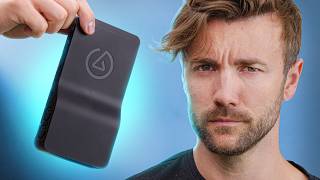
The centerpiece is the Insta360 Link 2C webcam, priced at $150, offering near-mirrorless quality. It's plug-and-play with auto exposure, autofocus, and white balance.
The creator shows what a Zoom call looks like with just a laptop webcam, highlighting poor quality and lighting, setting the stage for the upgrade.
The desk is angled diagonally to utilize natural light for depth, and an Elgato Key Light Mark 2 is added for nighttime calls, though mounting challenges arise.
The Insta360 Link 2C produces excellent image quality out of the box, with 4K30 or 1080p60 options, and features gesture control and auto-framing.
The dad requested a teleprompter, so an Elgato Prompter is added, allowing him to read scripts while looking at the camera.
A Deity V-Mic D4 USB shotgun microphone is used, connected via a single USB hub to simplify setup and avoid audio routing issues.
The setup consolidates all USB cables into one Anker USB hub, reducing complexity and potential issues for a non-tech-savvy user.
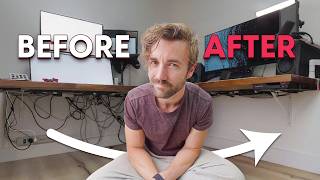
The final setup is praised as the 'world's greatest easiest and highest quality work from home setup,' with a before-and-after comparison showing dramatic improvement.
The video successfully demonstrates a high-quality, user-friendly work-from-home setup that even a non-tech-savvy person can operate, emphasizing simplicity and professional results.
What is the main webcam used in the setup?
Insta360 Link 2C
00:49
What is the price of the Insta360 Link 2C?
$150
00:49
What lighting equipment is used?
Elgato Key Light Mark 2
02:26
What is the purpose of the teleprompter?
To allow the user to read scripts while looking at the camera.
06:12
What microphone is used?
Deity V-Mic D4
09:36
Why is a single USB hub used?
To simplify the setup and reduce potential issues for a non-tech-savvy user.
10:34
What resolution options does the Insta360 Link 2C support?
4K30 and 1080p60
05:01
Insta360 Link 2C as Centerpiece
Highlights the key product and its value proposition for professional-quality webcams.
00:49Out-of-the-Box Quality
Demonstrates the webcam's plug-and-play excellence, a key selling point.
04:21Single Point of Failure
Emphasizes the importance of simplicity for non-tech users, a practical principle.
10:34World's Greatest Setup
Confident claim that encapsulates the video's success, though subjective.
12:10[00:02] balance of looking like you're in a professional studio but also the Simplicity of being able to set it up with the Press of a single button so my parents just moved here to Utah about 30 minutes away from us and if you have any
[00:15] kids you know how exciting it is to have grandparents nearby but I have been tasked with setting up the tech in their home and this video is probably going to be video one of three starting with the work from home setup today next we're
[00:28] doing a theater downstairs and last smart home stuff around the home but today we are setting up my dad's Zoom call desk and he is not a tech guy so this has got to be
[00:49] cuz if not it's a 35-minute trip back home but the main centerpiece that we're building everything around is the insta 360 link 2C specifically the brand new 360 link 2C specifically the brand new white one this is $150 webcam that looks
[01:01] phenomenal sometimes up to mirrorless quality depending on how much effort you sponsor of today's video but let's set up the camera first so that way you guys can see the beginning and the end of how this looks when we're starting and when
[01:14] webcam where' the laptop go the ghost got it yeah uh oh every house comes with a ghost oh we left it in the kitchen all right your favorite kitchen all right your favorite laptop don't don't talk to me about it
[01:29] let's see what this setup would look like if I let my dad set it up and that like if I let my dad set it up and that means just the laptop webcam that's our better than that we're good and we're going to do a lot better than
[01:44] point here this is what it would look like and sound like if my dad did a zoom call all by himself luckily he doesn't have to do that because this is pretty rough oh man we might actually have to close that window even with the nice
[01:59] stuff we'll see we'll see that'll be a good test I believe I that'll be a good the very first decision we had to make was which way the desk faces and I wanted to utilize all this natural light here originally the desk was facing this
[02:13] way directly towards the windows but that would put some real flat lighting I figur if we can kind of get this diagonal shot here he'll get some depth on his face from the side lighting and it would look really good but just in
[02:26] it would look really good but just in case he has to shoot a call at night we got this light for him this is the Elgato key light Mark 2 like I can't I can't clamp anything to the desk so I have to use these stands and honestly
[02:41] difficult slid is going to be farther from them him than I would have liked man I just noticed how long this thing is agato makes an arm that's supposed to clamp onto stuff and this isn't it I don't have one yet
[02:57] Elgato so we're using a a reg regular desk clamp to mount the camera and I didn't realize how long it was should still work should be
[03:09] fine see if we were using a fat boy camera like the one you're using this camera like the one you're using this wouldn't this wouldn't fly wouldn't this wouldn't fly [Music]
[03:50] way up here do we just take advantage of this extendo arm and have this thing this extendo arm and have this thing right over his computer I think we do
[04:03] extendo arms yeah I think we make this a happy little mistake oh look at that he's going to love
[04:21] the laptop webcam and now here is what we're working with now with the insta 360 link 2C that is actually tell you about this webcam because they are the sponsor of this
[04:35] image one of my favorite things about this webcam is how good it looks directly out of the box just plug and play this is auto exposure so you can bright side of my face and the super dark side of my face this is autofocus
[04:48] the white balance just because there was so much red in my room it was making me look a little pink but very minor this is basically how the camera looks Plugged In which is just wild but the main reason I've become a big fan of
[05:01] this webcam since it came out a couple months ago is just how high quality the quality image whether you're shooting 4K 30 like we are right now or 10860 I mean Clarity we're getting in this shot and we don't even have HDR turned on yet
[05:16] I might actually leave that on I think that looks better another thing I really autof frame and make sure you're always in the center even though there's no motorized parts to it it's got a high enough quality sensor that it can zoom
[05:29] in and crop around and Center you so you can use gestures to turn that on or off the center of the frame and you're in focus and the insta 360 link software look if you want to adjust some things like I did with the white balance
[05:43] really good out of the box you won't need to do much to it so this camera is it's designed for educators live streamers content creators professionals that's the reason we used it in this video cuz if you want the ease of a
[05:59] the quality of something close to a mirrorless camera and you want it at the price of $150 well that's that's what you're going to get out of the insta 360 up they're doing a spring sale discount
[06:12] right now bringing it down $19 so down to about 130 bucks I'll put a link to it we got to do is get this teleprompter working this is one of the requests that my dad had when checking out my zoom call setup he saw the teleprompter and
[06:25] then I could talk directly to the people with the camera behind my screen and he said want that so that's what we're doing I do have one extra and I'm giving it to him lucky man ready for
[06:47] right behind the screen this is the ultimate Zoom call device by the way Elgato prompter I can't do Zoom calls without it anymore one of the issues I'm having here is the light from this side is way
[07:01] Rembrant I thought we'd get more direct on the face and so this side is so shadowed but I need this light to be here for the clamp so I'm wondering if we make some slight adjustments and we have when he's
[07:15] on Zoom calls kill two birds with one stone kind of shift him this way have his Zoom calls be like this oh that's already so much better on the lighting can we move this camera here real quick [Music]
[07:31] now we don't oh that is way better I think we might be able to find a way between the two we could even do this this is the art I was talking about before put it more like this and he can talk to the
[07:46] getting the window behind him anymore with that super Overexposed thing he's getting his setup and a garbage can apparently but he's getting a nicer on his face look how much better that looks oh let's split the difference here
[08:02] bring it in a little bit more now that is a zoom call setup now we got to get if we were to grab the microphone that the computer's picking up it probably doesn't sound very good making a single cable solution is is the only way the
[08:17] only way this is going to work for him so I found this USB hub it was like 40 bucks and it does a couple things it was cheap it's got eight different ports and it's got power delivery for the computer so it should do pretty much everything I
[08:40] ultra simple ultra high quality microphone solution here the one weird thing about this USB hub is that even with DC power in it can't power the laptop you have to add another power supply like a laptop charger USB charger
[08:54] in order for the power to go into the laptop so like this charges the the peripheral is plugged in and then the USB power charges the computer which I that's fine but it's kind of annoying that I have to plug it in twice oh well
[09:10] there got some power this is the moment of truth let's plug into the laptop and of truth let's plug into the laptop and see if it works I got to ask my mom his see if it works I got to ask my mom his password should I get that on camera
[09:24] [Music] Mom all right test recording for the microphone this is the laptop microphone that's what you'd be hearing if he was just jumping into a regular Zoom call this is what it sounds like with a new
[09:36] deity microphone so how are we feeling about this good bad I got to take a listen you you tell me in the comments though cuz you can hear it I I haven't Pinnacle piece of gear added to this was the webcam switching from a built-in
[09:51] webcam on the laptop to an insta 360 link 2C that's making his Zoom calls going to be on a zoom call with whether it's the adjustment from the camera being neck height to being eye height or just the better image quality in general
[10:05] better dynamic range that's going to make him pop when he jumps into any Zoom call being that my dad's not a super techy guy condensing everything down to a single point makes the most sense so physically just about everything mounts
[10:19] to the tripod over here and for the USB cables everything is going into a single USB hub made by anchor that should keep this super clean and also super simple for him to set up and so far everything's working great having one
[10:34] point of failure is always stressful for like the computer side of things but having multiple points of failure is stressful knowing my last time we were here setting this all up I set up a little bit more of a
[10:48] simple cuz it's what I use but it was built into the back I had two problems with that one is it added just a ton of extra stuff and C to his desk so it kind of made a mess of the whole Space here
[11:02] but two it's going to leave too many variables it's going to leave too many potential complications I'm worried that he's going to plug it in and now all the audio from his call is going to be routed out of the headphone jack of the
[11:14] why he can't hear anyone and he's going to call me stressed out and frustrated that nobody's making any sound those those will be his words so switching to a USB shotgun microphone like the dity was it vmic D2 nope vmic D4 that ended
[11:31] in the USB Powers it and sends the microphone signal directly into the system but it has no interface for the audio to come out so when plugging it in there's no risk of audio being routed to
[11:43] the microphone like a lot of other USB mics that have a headphone jack I put a think it's been discontinued and I can't find it anywhere if I find another one put a link to it in the description down below but no promises on that this is
[11:57] kind thing that they don't make anymore and it's the perfect work from home and it's the perfect work from home mic hate to see it look I don't want to get ahead of myself here but I'm under the impression that we have created the
[12:10] world's greatest easiest and highest quality work from home setup in situations like this especially like especially when it comes to Boomers no offense Boomer watching this and I feel the same way but simpler the better
[12:27] a good sounding easy mic an easy to set up good-looking webcam a teleprompter everything going into a single cable I'm going to I think we Pat ourselves on the back here let's top
[12:41] after of what this looked like when we started and what this looks and sounds like now all right welcome everybody to my zoom call this is where I show you guys what my forehead looks like and then also what my window looks like cuz
[12:54] that's all you can see welcome everyone to my zoom call how do I look how do I sound just is this I got to ask the question is this better it just you know I know the answer but I got to ask you anyway
[13:07] watching guys if you have any questions leave them in the comments down below if you don't just leave an emoji for engagement hit the like button while you're down there subscribe if you haven't already and as always happy
[13:19] working from home is that what we're doing I don't know I'm going to be a super villain to turn around though [Music]
[13:33] [Music] n
⚡ Saved you 0h 13m reading this? Transcribe any YouTube video for free — no signup needed.