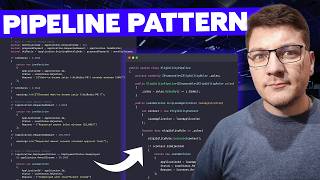

500 Lines of If-Else? Fix It!
45sHigh relatability for developers stuck in messy codebases, offering a compelling promise of a better way.
▶ Play Clip"The title promises a refactoring of a 500-line method, and the video delivers exactly that with a clear, step-by-step demonstration."
This video demonstrates how to refactor a large, unwieldy method full of if-else statements into a maintainable pipeline pattern. The presenter shows a typical loan eligibility service with multiple business rules and then walks through extracting each rule into its own class, introducing an eligibility context and a pipeline to execute the rules in order. The result is a more flexible, testable, and extensible design.
A typical enterprise application has a large method with many if-else statements and business rules added by different developers. It's hard to navigate, understand second-order effects, and test.
A new class called EligibilityContext is created to hold the loan application, warnings, and rejection status/reason. It provides methods like Reject() and Warn() to simplify rule implementation.
An interface IEligibilityRule is defined with an Order property (for execution order) and an Evaluate method that takes the EligibilityContext.
Each business rule (age, minimum income, debt-to-income, loan amount, employment) is moved into its own class implementing IEligibilityRule. This allows testing each rule in isolation and distinguishing between warnings and rejections.
A new class EligibilityPipeline is created to hold the rules, sort them by Order, and execute them sequentially. It creates an EligibilityContext, iterates over the rules, and returns a LoanDecision.
Each rule is registered as a transient service, and the pipeline is also registered. The pipeline receives the rules via IEnumerable and sorts them internally.
To add a new rule (e.g., sanctioned country), you simply implement IEligibilityRule, set its Order, and register it in DI. No changes to the pipeline are needed.
The pipeline pattern improves testability, extensibility, and adheres to the open-closed principle. The trade-off is increased complexity with more classes to manage.
The pipeline pattern offers a clean way to encapsulate complex business rules, making them easier to test, extend, and maintain. While it adds some complexity, the benefits of isolation and flexibility outweigh the drawbacks for growing rule sets.
What is the main problem with a 500-line method full of if-else statements?
It's hard to navigate, understand second-order effects, and test.
00:02
What is the purpose of the EligibilityContext class?
It holds the loan application, warnings, and rejection status/reason, and provides methods like Reject() and Warn().
01:25
What two members does the IEligibilityRule interface define?
An Order property (int) and an Evaluate method that takes an EligibilityContext.
02:56
Why use increments of 10 for the Order property?
It allows easy insertion of new rules between existing ones without renumbering.
03:53
How does the EligibilityPipeline execute the rules?
It sorts the rules by Order and iterates over them, calling Evaluate(context) on each.
06:19
What happens if the context.IsRejected is true during pipeline execution?
The pipeline returns a rejected LoanDecision immediately, short-circuiting further rule evaluation.
06:46
How do you add a new rule to the pipeline?
Implement IEligibilityRule, set its Order, and register it in dependency injection.
09:20
What design principle does the pipeline pattern respect?
The open-closed principle: closed for modification, open for extension.
11:11
Introducing the Eligibility Context
This is the core abstraction that simplifies rule implementation and centralizes state.
01:25Extracting Rules into Separate Classes
This is the key refactoring step that improves testability and maintainability.
03:26Adding a New Rule with Minimal Effort
Demonstrates the extensibility benefit of the pipeline pattern.
09:20Respecting the Open-Closed Principle
Shows how the design aligns with SOLID principles, a key consideration for software architecture.
11:11[00:02] a new business rule. It's 500 lines of code, a bunch of if-else statements, and many rules added by different developers. Eventually, you find the right spot to implement your business logic, you write the code, and you pray
[00:16] that you didn't break anything in the process. But, it doesn't have to be like this. There's a better way using the pipeline pattern, and in this video, I'm going to show you how. Here's a loan eligibility service that implements a
[00:29] couple of business rules, where in the end, we decide if we want to approve this loan or reject it with a specific reason, where it could be any of the business rules inside of this class. Code like this is very typical in many
[00:44] enterprise applications. I've seen similar examples across the many projects that I've worked on, and it's always a set of rules chained as a bunch of if-else statements in a large method that keeps continually growing. It's
[00:58] very hard to find your way around it. There are a bunch of comments explaining why which rule is there, and it's really difficult to know the second-order effects of introducing a new rule. You can't be sure if you're impacting an
[01:11] existing rule that somebody else coded. And moreover, testing a class like this is very complicated because you need to do a lot of setting up to make sure that you are respecting the existing rules while trying to test your own. Now,
[01:25] there's a better way to implement all of this using the pipeline pattern, and let me show you how we could get started. I'll introduce a new class inside of our project, which I will call the eligibility context. Now, we need to add
[01:39] a couple of properties here, with the core one being the loan application that we are examining. And let's say that we can only initialize this once when we create the eligibility context. But, we also want to keep track of any warnings
[01:57] that we might run into as we process the loan application. And in the end, we may consider to outright reject the application. So, we'll have an is rejected field, and then in that case, it might be useful to store the
[02:12] rejection reason. So, let me add a property for that. To make it easier to work with this type, I'm going to add two methods. One is going to be the reject method, where we're going to specify the reason. We're going to set
[02:26] is rejected to true, and we're going to pass in the specific reason. And the other method is going to be warn, where we can add a warning, and all we do is just append this to our warnings list. I'll actually rename this to reason just
[02:41] to be consistent with our first method. Now, another thing we need is an interface to represent the individual rules that we have currently in the loan eligibility service. So, I'll create an interface, and let's call it an
[02:56] Here, I'm going to define two properties. An order is just a number that's going to allow us to execute these rules in a specific order, and it also lets us reorganize them at any time by just changing the order value. We're
[03:11] also going to have an evaluate method, where we pass in the eligibility context, and I will actually move the IEligibilityRule into its own file. So, with these two types in place, we can start pulling out the individual rules
[03:26] from the loan eligibility service into separate types. So, I'll create a new folder called rules, and then let's go ahead and add a new class. I'll call this the age rule because this is our first check, and all we have to do is
[03:41] implement the IEligibilityRule interface, add the missing members, and then we're going to implement the respective values. So, I'm going to give this an order of 10, and I'll use increments of 10 for the different rules
[03:53] as this gives me an easy way to introduce new rules in the future between existing rules. I would have up to nine rules to add in each direction, which is probably going to be plenty. And then, we take the code from the loan
[04:05] eligibility service, and I'll just drop it into the evaluate method, and we'll figure out how to refactor this to make it compile. So, the application can be accessed through the eligibility context. So, I'll just replace any
[04:18] reference to application with context. loan application. Instead of calling warnings.add, we're going to say context.warn. And in case of a hard rejection, we're going to take the reason, and we want to
[04:31] say context.reject. Drop in the reason here, and we have to make sure to short-circuit the execution because there is no reason to continue. So, now I have to do this for the remaining rules inside of the code base,
[04:44] our refactoring faster. But, let's quickly review them starting from the minimum income rule, which is the next one in the pipeline. And here, we reject any application where the annual income is under 20,000. Then, we have the
[04:58] debt-to-income rule, which could either reject the application or issue a warning. Then, we've got the loan amount rule, where we reject any application below a certain minimum or warn when this is above a maximum threshold. And
[05:11] lastly, there's the employment rule that also applies a few additional checks. So, we effectively moved every business rule from the loan eligibility service into its own type, and this comes with a few advantages. We now gain the benefit
[05:25] of being able to test each rule in isolation. I no longer need to set up the required context for all of this to execute successfully before being able to test rule number four or rule number five or any new rule that I want to
[05:40] approach also makes it easier to distinguish between warnings and rejections. And another big benefit that we get with this approach is that we can easily introduce new rules in the future. Now, we've got our eligibility
[05:53] rules, but we need some way to execute them. So, for this, I'll add a new eligibility pipeline. And what we're going to need here is a field to store the eligibility rules that we have
[06:05] inside of our application. Let's say we initialize these through the constructor. Now, it's important that we sort them according to the order value for each rule. And then, we just need a method that will return a loan decision.
[06:19] I'll call this method run, and it gets a loan application. We can now create an loan application. We can now create an instance of our eligibility context, where we can set the loan application. And then, we need to iterate over our
[06:34] rule.evaluate. We pass in our context that we keep alive throughout the pipeline. And if at any point the context is rejected, we
[06:46] can return a new loan decision. And in case of a failure, here's what we did in the eligibility service. We would set the application ID, the status, and the rejection reason. So, we'll do the same inside of our pipeline. So, here I have
[07:00] the loan application. The loan status will be rejected, and then the reason is going to come from our context. So, we'll say context.rejectionReason. I'll also add a fallback in case the rejection reason is null. And then, if
[07:13] you recall, inside of the loan eligibility service, we had two ways to make a decision. Based on the number of warnings, if there were none of them, we number of warnings is less than or equal to two, we would approve it with some
[07:28] conditions assuming it wasn't rejected beforehand. So, let me drop this code here, and we have to update this code to use our eligibility context, where I can say context.warningsCount. And then here, I'll just use the loan
[07:41] application, and the reasons are going to come from our eligibility context. executes what was previously inside of the loan eligibility service, but in a much more flexible way that allows us to easily add new rules in the future. We
[07:57] have to wire this up with dependency injection, and it's going to look something like this. We add each rule as a transient service, and we also add our eligibility pipeline as a service. So, now when we resolve the pipeline from
[08:11] dependency injection, it's going to receive the existing rules through an IEnumerable containing the individual services. It'll populate the internal when we run the pipeline. In essence, this is a very similar setup to the
[08:24] strategy pattern video that I released recently with the difference that the strategy pattern picks one strategy to execute, and that strategy is responsible for the entire processing. With a pipeline, you may go through the
[08:38] entire pipeline and keep processing the same object with the option to terminate reach the end of the pipeline. And this is actually very similar to the chain of difference that I would highlight is that with a chain of responsibility, you
[08:53] manually set the next handler in the chain. And in this implementation, we are setting the next handler using an order field. So, in a way, this is more flexible. I'll drop in the code below to execute our new pipeline, and then let
[09:07] me execute both examples. And if everything works correctly, we should see the same output as in the first example. Let me do a quick scan, and I think it checks out with our first version using the loan eligibility
[09:20] service, and our second version using the eligibility pipeline. Now, let's say we need to add a new rule to our system. For example, we aren't allowed to accept countries. So, we're going to introduce a sanctioned country rule, and all we
[09:35] have to do is implement the IEligibilityRule interface. We get to decide when we want to run this, and let's say it runs as the first rule in the chain. So, I'll use zero for the order. We would have some list of
[09:49] sanctioned countries. Let's say it's a hash set. And then, we can just say if sanctioned countries contains the country from our loan application, we're going to just reject this with some rejection reason. How do we add this to
[10:02] our pipeline? All we have to do is register this as a new service. So, this is now part of dependency injection. When we run the pipeline, this will be application that we have here, the country code is coming from a sanctioned
[10:16] country. So, when I execute this, you will see in the output that application number five is rejected and the reason is because application from sanctioned countries are not accepted. And this is how you can implement a pipeline pattern
[10:29] in your code for encapsulating chains of complex business rules. Some will also consider this a chain of responsibility pattern and I don't think it perfectly fits the bill, but either way it's an improvement on the old loan eligibility
[10:43] service with the drawbacks of a bit more complexity as we now have more moving parts to manage. We also have more classes to manage, but these classes are now tighter in scope. They are easier to evolve in the future because they only
[10:57] have one reason to change. We can easily test them in isolation and we can also test the pipeline if we want to. And also our eligibility pipeline respects the open-close principle. It's closed for modification, but it's open for
[11:11] extension because at any point in time we can add or remove rules without changing anything about our eligibility pipeline. If you want to see how this recommend taking a look at this video
[11:24] next. If you enjoyed this video, consider gently tapping the like button. We don't want to be too aggressive here. Thanks a lot for watching and until next Thanks a lot for watching and until next time stay awesome.



⚡ Saved you 0h 11m reading this? Transcribe any YouTube video for free — no signup needed.