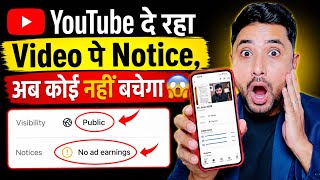

YouTube's New Notice System: Demonetization Alert!
45sThe creator reveals a major YouTube update that is affecting many creators, sparking curiosity and concern about demonetization.
▶ Play Clip"The title promises a big update and delivers a clear explanation of YouTube's notice system, though it's padded with some repetitive explanations."
This video explains YouTube's new video status notification system, which informs creators about monetization and visibility issues on their content. The creator walks through the different notice types, their meanings, and how to interpret them to avoid demonetization or video blocking.
YouTube is now sending notices to creators about demonetization, video deletion, or channel bans. The video shows an example notice stating 'no ad earning' on a video with significant views.
When a notice appears, the video stops earning from ads. Since ad revenue is the primary income for most creators, this can significantly affect earnings.
Videos deemed not advertiser-friendly are ineligible for ads. Even original content can be flagged if it doesn't meet YouTube's advertiser-friendly content guidelines.
YouTube has updated how creators check video status. Previously, it showed copyright strikes or community guideline strikes; now it also indicates whether the video will earn money.
Videos can have one of four statuses: no notice, potential limitation, partial limitation, or complete limitation. Each status indicates different levels of restriction.
A red symbol indicates complete limitation: the video is blocked, not recommended, and won't reach new audiences. It's effectively dead.
A yellow symbol indicates partial limitation, such as limited ad earning or age restrictions (e.g., not shown to viewers under 18).
A grey symbol is an information notice that doesn't immediately limit the video but warns of inappropriate content. If not fixed, it may lead to future limitations.
If shopping is disabled on a video, it's often due to copyright-protected content (e.g., music). This prevents product tagging in the video.
If a video shows 'no notice', it's healthy: it's reaching viewers and earning according to settings. No action is needed.
Understanding YouTube's notice system is crucial for creators to maintain monetization and visibility. By recognizing the different statuses and their implications, creators can take corrective action to avoid severe limitations.
What does a red symbol on a YouTube video status indicate?
Complete limitation: the video is blocked, not recommended, and won't reach new audiences.
03:55
What does a yellow symbol on a YouTube video status indicate?
Partial limitation, such as limited ad earning or age restrictions (e.g., not shown to under-18 viewers).
04:28
What does a grey symbol on a YouTube video status indicate?
An information notice that doesn't immediately limit the video but warns of inappropriate content; if not fixed, it may lead to future limitations.
04:55
What are the four possible video statuses on YouTube?
No notice, potential limitation, partial limitation, and complete limitation.
03:29
What does 'no notice' mean for a YouTube video?
The video is healthy: it's reaching viewers and earning according to settings.
07:30
Why might shopping be disabled on a YouTube video?
Due to copyright-protected content (e.g., music), which prevents product tagging in the video.
05:47
YouTube's New Notice System
Explains a major update that affects all creators' monetization and visibility.
Advertiser-Friendly Guidelines
Clarifies that even original content can be flagged, which is a common misconception.
01:11Red Symbol Meaning
Provides a clear, actionable definition of the most severe video status.
03:55Grey Symbol Warning
Highlights the importance of proactive content correction to avoid future penalties.
04:55[00:00] बहुत बड़ा बेट आया है Youtube पर Youtube अब हर चोटे बड़े Creators को Notice देख रहा है और इस Notice में किसी के Channel को Demonetize कर दे रहा है किसी की Video को Demonetize कर दे रहा है किसी की Video को Delete कर दे रहा है
[00:13] और किसी की अर्मिंग को बंग कर दे रहा है यहाँ पर आप देख सकते हो यह notice है कि आखिर इस notice से कैसे बचा जा सकता है और इस notice का मतलब कहीं इस चीज को समझ जाएगे अभी देखिए मेरे इस video पे notice आया हुआ है और जिसमें साफ तोर पे लिखा गया है no ad earning
[00:28] यानि की अभी तक ये मेरी वीडियो अभी देख सकते हो कि छांगेजार views पे गया हुए है और छांगेजार views shots पे आप देख सकते हो कि लगबाग लगबाग एक dollar बना हुआ है इसकी बाद आप देख सकते हो कि यहाँ पर लिखा गया है no ad earning. जैसा इस पर मैं click करता हूँ इस पर लिखा गया है this video is not earning from ads.
[00:44] यानि कि अब ये वीडियो ad से कमाई नहीं करेगी. और आपको पता ही है YouTube पे ad से ही कमाई होती है. और आप भी YouTube पे videos बना कर के अगर पैसा कमाना चाहते है तो ad से ही पैसा मिलता लेकिन अगर आपकी वीडियो के notice notice आ गया तो आपकी बहुत सारी
[00:59] चीज़ियें बंद हो सकती है जहाँ देखिए का मैं सारी चीज़ियें आपको समझा दे रहा हूँ देखिए क्या क्या लिखा गया यहाँ पर इस वीडियो is is ineligible for ads. ये वीडियो अब योग ये नहीं है ads के लिए ineligible हो गई है
[01:11] advertiser do not show ads on this type of content advertiser तो है जो ads लगाते हैं वीडियो पे वो अब इस तरह की वीडियो पे ads नहीं लगाएंगे as per the advertiser friendly content guideline यानि कि ये मेरी जो वीडियो है YouTube के advertiser
[01:26] advertiser friendly नहीं लग रही है जबकि ये मेरा content ये जो मेरी video है ये मेरी खुद की video है original video है और मैंने इसे बनाया हुआ लेकिन फिर भी YouTube को ये original advertiser friendly नहीं लगी है और भी कई सारे मेरी videos पर आप
[01:39] यह इस तरह का notice आया हुआ है जिसमें किसी में stopping disabled हो गया है जिसमें आप देखते हो किसी किसी video के कुछ भी नहीं है तो आखिर यह है क्या और इसे कैसे बचा जा सकता है अगर आपकी वीडियो पे आया हुआ है तो यह
[01:51] तो ये क्या है? आखिर ये क्या है? कई मैं आपको इसे तरीके से बताता हूँ तो सबसे पहले देखिए यहाँ पर जैसे ही आप content पर click करोगे YouTube major update a new way to check the status of your video copyright strike copyright claim check
[02:11] कि आपकी वीडियो पे copyright strike है कि आप कोई community guidelines strike नहीं आपने किया हुआ है तो पता चल जाता था लेकिन अब क्या है ये सब चीजे होने के बाद भी अब एक और चीज़ चेक होगा कि आपके वीडियो पे earning होगी या नहीं होगी
[02:24] यानि कि monetize आपकी वीडियो होगी कि नहीं होगी तो यहाँ पर जैसे learn more पे click करोगे तो यह बताया जिया है कि the most important information is single place यानि कि सारी भी information है वो एक single place में यहाँ पर
[02:36] white text दो में दे दी गई है next पर आप click करोगे तो यहाँ पर 3 symbol है इन symbol का मतलब क्या होता है यह आखिर किस तरह से work करेगा आपके चैनल पर आगे दिये इस वीडियो में आपको बताऊंगा next पे click करवे तो यहाँ पर कुछ और भी icons दिये गए हैं इन सबका मतलब भी है आपको मैं अभी बताऊंगा
[02:51] close मैंने click किया अब यहाँ पर आप देखोगे मैं अपनी एक video open किया हुआ हूँ so आप मेरी long video के आप देखोगे यहाँ पर notice में लिखा गया है कुछ भी problem नहीं है यहाँ पर देखिए notice में कोई problem नहीं है यहाँ पर लेकिन यह क्या रिखा कि no notice
[03:03] यानि कि मेरी वीडियो के no कोई भी notice नहीं आगा हुआ है और यह क्या रिखा कि this video is reaching viewers and earning according to your settings यानि कि यह वीडियो है मतलब ये वीडियो वारल होने के लिए सही है ये वीडियो नए audience के पास में जाएगी कोई दिक्कत वाली बात नहीं
[03:17] लेकिन ये समझना जरूरी है कि अगर आपके वीडियो पे notice आ गया तो उसको कैसे हटाते हैं तो चलिए मैं आपको इसे तरीके समझा दे रहा हूँ तो यहाँ पर देखिए इस तरह से जब आप अपने वीडियो को अपलोड करोगे
[03:29] तो आपकी वीडियो जब अपलोड होती ही रहेगी तो देखिए यहाँ पर आपकी वीडियो का status दिखाई देगा दिखाई देगा चार status आपको दिखाई देंगे पहला है taking दूसरा है potential limitation अब potential limitation क्या है वोजन में बताऊंगा
[03:41] दूसरा है partial limitation और चौसा है complete limitations तो ये limitations है क्या अखिर potential limitations क्या है तो यहाँ पर जैसे मैं थोड़ा सा नीचे आता हूँ, scroll करता हूँ इसको. तो यहाँ पर लिखा गया, अगर आपकी video पर red
[03:55] वाला आ गया, यानी की red आ गया, तो इसका मतलब है की indicate of complete limitation stretch as video being blocked or ineligible art video red symbol video red mark YouTube complete blocked
[04:14] ना ही वो वीडियो नए audience के पास में जाएगी ना ही वो वीडियो recommend होगी नाहीं वो वीडियो सर्क नहीं आईगी यानि की टोटली करीके से ब्लॉक्ड कर दिया गया वो वीडियो आगे नहीं बढ़ेगी इसके बाद में अगर आपकी वीडियो पे येलो तरह येलो कलर का
[04:28] symbol आ जाता है तो इसका मतलब क्या है indicate of partial limitals like limited ad earning or age restrictions अगर आपकी video पे yellow तरह का आ जाता है yellow color का symbol आ जाता है तो उसमें हो सकता है कि उस पे age restrictions लग
[04:42] जाए यानी कि अठारह साल से कम बच्चों को ना दिखे या फिर उस पे ad भी बंद हो सकते हैं, दोनों case हो सकता है, और अगर आपकी video के grey color का notification आ गया, grey color का symbol आ गया, तो यहाँ पर आपका यह indicate करता है
[04:55] कि an information notice that does not currently result in immediate limitations है, अगर grey color का आ गया है, तो YouTube कह रहा है कि आपकी video में कुछ इस तरह की चीजे पाई गई है जो inappropriate है सही नहीं है आगे इसको आप सुधार कर लीजिए अगर आप सुधार
[05:11] नहीं करते हो तो इस पे action लिया जाएगा और आपकी वीडियो को brown कर दिया जाएगा limit कर दी जाएगी एड्स अर्मिंग बंद कर दीजिएगी और भी कई सारी चीजें यहाँ पर यह सारी चीजें लिखा दिये इसमें एक चीजें और लिखा दिया है कि इफ यू सी अ नोटिस अगर आप एक नोटिस देखते हो सिंपली हाउवेवर इट्स द नोटिस कॉलम तो सी द रूट कॉल्
[05:47] अगर आप पैसा कमाना चाहते हो अच्छे तरीके से तो एक बढ़िया तरीके है shopping से यानि कि product timing करके कमा सकते हो तो अगर यहाँ पर shopping disabled हो गया अब क्यों हुआ है जैसे मैं इस पर click करूँगा तो आप देखोगे तो यहाँ पर copyright protected content was found in this video
[06:01] यानि कि ये इस वीडियो में copyright product जो है वो copyright protected हुआ है copyright view details click this copyright claim does not affect your video visibility video copyright claim case video visibility
[06:23] आपकी video पर views आएंगे लेकिन visibility, earnings and features due to how our source short monetization policy works तो यहाँ पर simple से डिटेल पर click करो तो आपको पता चल जाए कि आपकी video में क्यों आया हुआ है
[06:37] और इसको आप यहाँ से remove कर सकते हैं अगर आपके video में यहाँ पर shopping disabled दिखा है इसका मतलब simple से आप समझ लीजिये कि आप जब अपनी video को music लगाएंगे तो उसमें product नहीं लगा सकते
[06:51] simple सी बात है अगर इस video में आप music लगाते हो copyrighted है तो आप उस video में अपना product tagging नहीं कर सकते तो यह कुछ इस तरह से रहा notice का मतलब है तो यहाँ से आपको पता चल जाएगा
[07:04] आपकी video में क्या दिक्कत है क्या नहीं दिक्कत है जिस वीडियो में जिक्कत रहेगा उस वीडियो का जो है monetization disabled कर दिया जाएगा उस वीडियो पे limitations लगा दी जाएगी audience के पास में नहीं जाएगा अब ये काफी सारे लोगों के पास में आया हुआ था
[07:17] अब काफी सारे लोग इस चीज़ से परेशान थे कि वीडियो में ये notice क्या है? काफी viewers मुझसे comment करते पूछ रहे थे कि sir ये तो समझ में नहीं आ रहा है ये notice की चीज क्या आ रहा है? तो देखिए सबसे बड़ी बात है कि यहाँ पर जैसे माली जी ने अपना वीडियो open कोई करता हूँ तो यहाँ पर
[07:30] notice लिखा गया है तो जब आपकी video पे लिखा रहा है no notice यहाँ पर notice तो दिखाई देगा यह feature से एक इक्स्ट ऑप्शन यहाँ पर आय गया है लेकिन यहाँ पर आप देखो जब कुछ भी नहीं रहे तो आपको तो pencil लेने वाली बात नहीं गवडाने वाली बात नहीं है आपकी video पूरे तरीके से
[07:45] okay है यानि कि कोई विक्कत नहीं है और जब no notice रहे तो इसका मतलब यहाँ पर देखिए साफ लिखा गया है this video is reaching viewers यानि कि यह video viewers के पास पहुच रही है and earning according to your settings और आपके settings के
[07:58] यानि कि YCT प्रोग्राम के हिसाब से आपकी वीडियो पे आर्मिंग हो रही है तो ये कुछ इस तरह से राइन वोटिक्स का मतलब है यहाँ पर आप समझ लिखिए और अगर वीडियो अच्छी लगी तो वीडियो को लाइक कीजिए कॉमेंट कीजिए चैनल को सब्सक्राइब करके लाइक उनको क्लिक कीजिए और भी दोस्तों के पास में यह वाली वीडियो गएगी है
[08:13] ताकि उनको देखकर के लिए यह सारी सिजेग प्लीयर हो जाए
⚡ Saved you 0h 08m reading this? Transcribe any YouTube video for free — no signup needed.