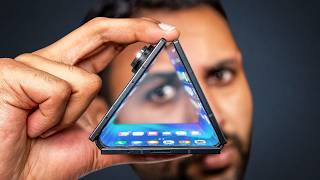

Samsung TriFold Unboxing: Massive Box & Charger
43sUnboxing a revolutionary tri-fold phone with a unique package sparks curiosity and excitement.
▶ Play Clip"Delivers an unboxing and comprehensive review beyond what the title suggests—worth watching for the in-depth analysis."
The Samsung Galaxy Z Trifold is a triple-folding phone that opens to a 10-inch tablet display, blending the portability of a phone with the screen real estate of a tablet. Despite its bulk and weight, the device offers impressive multitasking capabilities and a polished software experience. However, it carries compromises like a soft inner screen and a high price tag.
The box includes a SIM ejector, USB-C to C cable, a case with a lip covering the hinge, and a 45W charger.
The trifold weighs 309g, almost 50% heavier than current foldables, and is too thick to pass as a normal phone when folded.
At 3.9mm at its slimmest, it's the thinnest Samsung phone. The build feels solid with snappy magnets and no wobble.
Two sets of hinges result in prominent creases on the display, visible when any light hits the screen.
The fiberglass back is a fingerprint magnet, and the inner screen protector is so soft that leaning it against a vase caused deep gouges.
Powered by Snapdragon 8 Elite with 16GB RAM and 512GB storage. Cameras match the Z Fold 7: 200MP main, 10MP tele, 12MP ultrawide.
5600mAh battery split across three cells, 45W wired and 15W wireless charging. IP48 water resistance same as Z Fold 7.
The 10-inch 16:11 display reformats apps with more content visible, e.g., in Samsung Health and YouTube, with larger video and smaller black bars.
The phone can run Dex mode directly on its own display, offering a desktop-like interface with resizable windows and multiple desktops.
Huawei's version folds like an S, offering use of two or three panels, while Samsung's only fully opens. Samsung prioritizes protecting the inner display.
Three apps can run simultaneously with intuitive layouts. App trios can be saved and launched with a single tap showing the layout.
Considered the definitive Samsung foldable, but expensive: around $2,400 in Korea, estimated $3,000 in the US.
The Samsung Galaxy Z Trifold successfully merges a phone and tablet into one device with a polished experience, though its high price and delicate build limit its appeal to early adopters and tech enthusiasts.
What is the weight of the Samsung Galaxy Z Trifold?
309 grams
01:05
How many batteries does the Trifold use?
Three separate batteries
05:17
What is the peak brightness of the inner display?
1600 nits
12:46
What chip does the Trifold use?
Snapdragon 8 Elite
04:24
What is the estimated US price of the Trifold?
Around $3,000
13:25
What IP rating does the Trifold have?
IP48
05:45
Display Creases
Highlights a major visual drawback of having two hinges on the foldable display.
02:27Fragile Screen
Illustrates the durability trade-off for thinness, a key concern for potential buyers.
03:0910-Inch Display Optimization
Demonstrates how the large screen enables a true tablet-like experience with app reformatting.
06:12On-Device Dex
Transforms the phone into a portable desktop, a unique productivity feature for foldables.
08:02Premium Pricing
Clarifies the steep cost, which is 50% more than the Z Fold 7, positioning it as a luxury item.
13:12[00:02] Trifold. A phone that folds out not once but twice to reveal a 10in [music] tablet display on the inside. And I've ended up wanting one, a lot more than I with all of that screen. So, the Trifold ships in a pretty massive box by today's
[00:15] standards. Samsung did this with their very first Galaxy Fold 2. I guess it's adopters. The first thing inside is this insert, which has three things. a SIM ejector up here, a USBC to C cable, and then a case, which, as you can tell, is
[00:29] up a lot of the phone, but I think it's pretty well designed with this extra lip that [music] acts a bit like the spine of a book covering up the hinge when the trifold itself. And interestingly, underneath that, a 45W charger, too. Not
[00:45] including the charger on every other phone for eco reasons, but I'm happy to assumption that people just have these 45 watt bricks lying around.
[01:05] looks like from the front. It's actually identical to the existing Galaxy Zfold 7. Same 6.5 in cover display, the same sized screen bezels, but then you look around the device and it's a chunker. The thing weighs in at 309 g. So side by
[01:18] side with current foldables, the trifold is almost 50% heavier. And just the sheer thickness from having this entire extra layer means that this absolutely cannot pass as a normal phone when it's folded up. And then to open it, you kind
[01:30] fold. You reach around, but then instead of grabbing one layer, you grab two and you pull them out, followed by a second unfolding to get you to complete tablet that movement starts to feel very intuitive. Helped in part by how the
[01:44] try and fold it in a way that you're not meant to. And also by how if you look section is actually a tiny bit longer than the others? Well, that protrusion around to grab those top two layers to unfold it, they feel separated from the
[02:00] that, you'll notice the middle panel then pops up ever so slightly because which makes [music] that one easier to lift as opposed to you having to dig your claws underneath it. These are clever touches, and it actually makes
[02:13] this whole maneuver less fiddly than you might be expecting. And considering how thin the phone ends up, 3.9 mm at its slimmest point, making this the thinnest Samsung phone by quite a margin, I'm super impressed by how solid everything
[02:27] feels. It's got nice snappy magnets, zero wobble, and the whole thing does But at the same time, there are absolutely some niggles here. There's creases now on the display. Yes, they are multiplying because there's two sets
[02:41] of hinges now. And I would say each one of these creases is fairly prominent. Like the moment any kind of light casts on your screen, you will be reminded of that the phone's incredible weight combined with the typical Samsung camera
[02:55] narrow width of the phone all put together makes this practically unusable on a flat surface with every tap eliciting a resounding thunk from your table. When unfolded, it's a little better, but still not great. The only
[03:09] thing that mostly fixes it is the case, which may well explain why they [music] that I find difficult about this trifold though is just the absolute insane task that it is to look after the thing. The phone is finished with a fiberglass
[03:24] strengthtoe ratio decision that you don't want thick Gorilla Glass across shave off every micrometer. But the issue is with its viny type texture. It's [music] a bit sticky and pretty shiny, which means that every one of the
[03:41] six faces of this trifold device is consistently picking up fingerprints. So, it is borderline impossible to be holding this and unfolding this in a way something up. And while the fingerprints can be fixed with a wipe or seven,
[03:55] fix any damage to your screen. I don't anticipate the cover display will be an Glass ceramic, too. But this inner screen, or at least the screen protector replace without giving the phone back to Samsung, is so soft that I managed to
[04:11] get deep gouges on mine just by leaning it against a vase. Plus, now remember with a trifold, you've got more room than ever for random pocket particles to end up between your screens. So, the maintenance is a real consideration. And
[04:24] anything particularly special going on here. Like, the chip is the Snapdragon 8 Elite, which is still very powerful. And of course, gaming on this inner display [music] is a spectacular experience. But notably, this is not the absolute latest
[04:38] Elite Gen 5 chip that some phones have already started shipping with. So, this is lagging behind from day one. 16 GB of RAM, which is the same as the topsp spec version of the ZFold 7, but cool to see it come as standard on the Trifold with
[04:51] 512 gigs of fast storage. The cameras are pretty much onetoone copied directly from the ZFold 7, which is to say great main 200 megapixel camera, but then a fairly mid experience when it comes to the 10 megapixel three time zoom camera
[05:05] and the 12 megapixel ultrawide. You do have the extra foldable benefits of being able to let whoever you're capturing see themselves and then being able to see yourself while shooting selfies with your main rear cameras and
[05:17] you capture new ones. But as far as I can find, there is no distinct camera benefit from this being a trifold versus the normal biffolds. Tell you what does put a smile on my face. The battery has had some love. Compared to the 4,400 mAh
[05:31] capacity on the ZFold 7, this trifold gets 5,600, which because the thing's so thin, has had to be achieved with three separate batteries, one per slice. And it charges faster than other foldables. with 45watt wire charging, which is the
[05:45] same as Samsung's top-end S25 Ultra, and then 15 watt wireless charging while retaining the same IP48 water and dust resistance as the Galaxy Zfold 7, which less than what you would get on a bar
[05:58] down to, the only reason that I think this is still overall a really compelling phone is the 10-in 16x11 aspect ratio display that you get on the inside and what Samsung have enabled you to do with it. And I'd split this into
[06:12] three categories. First is the pretty obvious quantity of information. The screen apps on this, it is very immediately clear that this is not just a stretched version of the typical foldable experience. The apps actually
[06:26] files app, you can now go into a folder and then into a subfolder while still keeping every part of the file directory on screen at once. The gallery's got a navigation bar, but still while giving you tons of extra room to see your
[06:41] comparison is Samsung Health. Have a look at just how much more content fits on the screen of the Trifold versus the ZFold 7, and therefore how much less YouTube. Can you see how it's not just bigger, but it's completely reformatted
[06:56] suggested videos and [music] flick through a lot more comments in one go without needing to interrupt or shrink the video that you're also trying to solely focus on the content, then that content gets even bigger than the
[07:10] increased size of the phone would suggest. Because the trifold opens out square, then as long as it is widescreen content, which let's be honest, it getting like a 50% bigger overall picture with [music] still noticeable,
[07:24] but much smaller black bars on the top and bottom. And it's a nice extra to orientations. You know, the normal fold, it doesn't really matter which way you hold it. It's a square. Whereas the trifold, like a typical tablet, lets you
[07:37] rotate into portrait orientation, [music] which is just how I like my doom instead of a biffold phone where you feel like you're almost straddling two different types of form factor and your apps often feel like a clumsy halfway
[07:50] house [music] between them. What I love about this trifold is that you can move between two very clear distinct classes of app. The pure smartphone layout of an app when it's folded and then the pure uncompromised tablet layout of an app
[08:02] Samsung has had plenty of time to optimize that side of the equation because they've been making tablets with 10-in displays very similar to this one feature then of this extra-large display is that the trifold is the first time on
[08:17] a phone where you cannot just use Samsung Dex, but it kind of is Samsung Dex. So, Samsung phones have had Dex for ages. You flick down, you select the connect your phone up to. You can even wirelessly connect to a monitor these
[08:32] days and that will basically cast this desktop style interface to use on that computer and then a mouse and keyboard as your way to interface [music] with it. But now the phone is big enough that it can also just be the monitor. So
[08:46] flick down from the control panel, click Dex here, and you're just in it. It won't look immediately different, but it is a very different way to use Android. For example, when you open apps in Dex mode now, they will default to this
[08:58] around by dragging the tops and [music] resize them by dragging the corners. It also means that you can have multiple permanent desktops. So, let's say I'm minute. I can keep that [music] game in memory while I temporarily flick over to
[09:13] and the new app that I'm looking to download from the Play Store on my like using a laptop in that generally any of the more intense applications using them or playing them. But for the
[09:26] pretty close, especially when you connect up to a mouse and a keyboard and you use the fancy kickstand case to prop the whole thing up. The fact that this setup folds up to fit inside your pocket is super impressive to me and I would
[09:39] gimmicky. Let's be very clear though, this is not the first triple folding phone. You've probably seen Huawei already take a stab at this form factor last year. And I do actually think that phone did some things better. Like
[09:52] instead of the Samsung, which folds out like a U, the Huawei folded out like a part of the screen, you could use two parts of the screen, or you could use all three. Whereas the Samsung is a little bit more rigid. It only lets you
[10:04] the completely unfolded inner screen. And also, Huawei managed to achieve all three of these form factors with just one folding display. Whereas Samsung's cover screen is a completely separate additional component to its folding
[10:17] display, which will be what's making this trifold the heavier of the two I said, "Why did you make yours like this even though it's less space efficient?" And they said it's so that when the phone is folded up, no part of
[10:29] the soft inner display is being exposed to the elements, which I suppose seeing just how soft that inner display is feels somewhat justified. But then Dex just like with other phones, you can also still use it to connect up to a
[10:43] monitor. It's just that when you do it on this trifold, the trifold itself can become an extension to that monitor. So, even if you just have your phone and your laptop, you can have a dual monitor display on the go, which you have been
[10:56] just think it's sick that you can now do it with a phone that will almost definitely be with you. That said, I probably won't be doing a whole lot of dexing just because the way this phone handles multitasking, even without it,
[11:09] is really intuitive. So, let's say we load up the Netflix app on this side and then a browser on this side for some casual shopping while we watch. Let's search for friends cuz I'm in the middle of my fourth watch through right now and
[11:22] oh, it's not there. So now we drag Surf SharkVPN, our sponsor, to the far right, and that becomes the third app running in parallel, which [music] makes us feel phones glued to each other. So now we can use that to change what country
[11:36] Netflix thinks we're in from South Korea to the UK. And if we now go back to Netflix, then like magic, friends just reappears and we can resume the binge. button here to quickly swap the position of the apps. So you're not bound by the
[11:51] though there is tons going on at once, every animation that I tested was also change the layout, flicking between the more uniform three apps in portrait view. And then what I'm going to call the one big, two small view. I guess
[12:06] mostly on one app, but you just want to keep an eye on a couple of other things, WhatsApp [music] chat you're expecting a quick update from. But my favorite part of this is how you can then save any of these three apps as a trio. Meaning you
[12:21] can launch them as a trio by tapping this one icon and how that icon shows you not just which apps they are, but also in what layout they're going to open in. So if your trio is set to open the apps, each in the portrait view,
[12:33] then you will see each of the logos small and side by side like that in the surf shark to always open as the main window, then can you see how its logo is displaying bigger than the other two? And if you go to surfshark.com/boss,
[12:46] you can get Surf Shark for less than $2 a month with four extra months for free. The only downside that I could find with this superersized display is brightness. The Trifold inner display has a peak of 1,600 nits, which compares to 2600 on
[12:59] occasionally, but the day-to-day difference won't be nearly as much as that number makes it sound. So, honestly, I don't think the Trifold is this experimental quirky phone option. I actually think that this phone has
[13:12] immediately become the definitive Samsung foldable. You will have to definitely have to pay for the privilege. I don't have the final dollar price yet, but the Korean price converts to around $2,400,
[13:25] which when you consider that that is 50% more expensive than the Korean price of the ZFold 7. I would guess we're looking at closer to $3,000 when it launches soon in the US. It's fine. Just think of it like a grander slice. But because
[13:38] Samsung has spent so long making normal foldables and so long making tablets, this fusion of the two products doesn't feel like the first gen experiment that already polished and it is already taking full advantage of the extra
[13:52] taking full advantage of the extra space.

⚡ Saved you 0h 13m reading this? Transcribe any YouTube video for free — no signup needed.