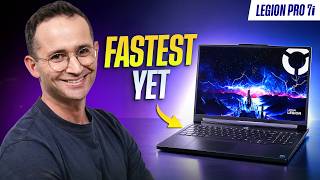

Fastest Gaming Laptop Ever Tested
45sImmediately claims a record-breaking performance, sparking curiosity and debate among tech enthusiasts.
▶ Play Clip"Title accurately reflects the content; the laptop is indeed the fastest tested, though the review is thorough and not overly sensational."
The Lenovo Legion Pro 7i (2026) is the fastest gaming laptop tested by the channel, beating even the larger Legion 9i. It features an updated Arrow Lake HX Plus CPU, but otherwise retains the same design, OLED display, and thermal management. The review covers gaming performance, productivity, battery life, pros and cons, and concludes that last year's model may be a better value.
The Legion Pro 7i is the fastest laptop the channel has ever tested, beating Lenovo's own 18-inch Legion 9i. Only the CPU is updated; other aspects remain unchanged.
In Time Spy, the Legion Pro 7i is the fastest laptop, beating the Legion 9i. CPU scores are 8% higher than last year's model.
In Still Walled Light, it destroys Apple's MacBook Pro 16 with M5 Max. In Port Royal (ray tracing), it tops the charts again.
Cyberpunk on ultra: 145 fps average, 1% lows above 90. Forza Horizon 6 maxed: 127 fps average, 1% lows 90. Marvel Rivals high: 140 fps average, 1% lows above 100.
Sam, a resident pro gamer, tested Marvel Rivals on low settings with DLSS performance: average 170 fps, 1% lows 130. Counter-Strike 2 maxed: 330 fps average, 1% lows 175.
Heat is barely noticeable during gaming; WASD keys and palm rest stay cool. Heat is directed out the back. Fan noise is loud but better than competitors.
Using balance mode reduces fan noise significantly but also reduces performance.
In Puget's Premiere Pro, the Legion outperforms other gaming laptops but loses to MacBook Pro 16 with M5 Max. In DaVinci Resolve, it beats the MacBook. In Blender, similar performance among top laptops.
In Geekbench, it's the best Windows laptop tested, beating last year's Legion and the Alienware Area 51 with the same chip by 8%. Apple's M5 Max still leads in raw CPU performance.
The MacBook Pro 16 draws far less power for similar performance, highlighting the efficiency of ARM-based CPUs. The Legion consumes more power than competitors, contributing to its performance.
Battery life improved to 5.5 hours (from 5) in office tasks with discrete GPU disabled. Performance tasks while unplugged are heavily throttled.
Color-accurate OLED display with 240Hz refresh rate. Keyboard has great key travel and per-key RGB. Lid logo and vents light up, customizable via software.
Ubuntu 26.04: most hardware works, but microphone is crackly. Fedora 44: webcam crashes when recording. Bazzite may be better.
Chassis feels less premium than Razer Blade 16 or Zephyrus G16; lid flex. Dark material shows fingerprints; white color chipped.
Thick and unwieldy; front edge not curved like Alienware. Webcam quality is poor, especially in low light.
Ports are far down, cables get in the way. No SD card reader or Thunderbolt 5. Only one USB-C is Thunderbolt 4 and not full-function; can't charge via that port.
The Legion Pro 7i offers desktop-like performance (near RTX 5070 Ti). If last year's model is $300+ cheaper, get that. For GPU, 5080 is the sweet spot; 5070 Ti has more competition.
The Lenovo Legion Pro 7i (2026) is the fastest gaming laptop tested, with excellent gaming performance and thermals, but it's essentially last year's model with a new CPU. If you can find the previous version for significantly less, it's the better buy.
What is the fastest laptop the channel has ever tested?
The Lenovo Legion Pro 7i (2026).
00:01
What is the average FPS in Cyberpunk on ultra settings?
145 fps average, 1% lows above 90.
03:13
How much does the CPU score improve over last year's model?
8% improvement.
02:47
What is the battery life of the Legion Pro 7i?
5.5 hours in office tasks with discrete GPU disabled.
07:41
Which GPU does the reviewer recommend for the Legion Pro 7i?
The RTX 5080.
12:53
What is the refresh rate of the Legion Pro 7i's display?
240 Hz.
08:20
What is the main downside of the laptop's ports?
No SD card reader or Thunderbolt 5, and only one USB-C is Thunderbolt 4 but not full-function.
11:44
How does the Legion Pro 7i compare to the MacBook Pro 16 in power efficiency?
The MacBook draws far less power for similar performance.
07:01
Fastest laptop tested
Sets the context for the entire review and establishes the laptop's top-tier status.
00:01Cyberpunk performance
Provides concrete numbers that demonstrate the laptop's gaming capability.
03:13Excellent thermal management
Highlights a key advantage over competitors, improving user comfort during gaming.
04:21Power efficiency comparison
Shows the efficiency gap between ARM and x86 CPUs, a significant industry trend.
07:01Value recommendation
Provides practical buying advice, suggesting last year's model for better value.
12:10[00:01] important gaming laptops. It's the new Legion Pro 7i for 2026. Now, I value watch this entire video to find out what's going on here. Instead, I'm going to tell you right now. The Legion Pro 7i is the fastest laptop we have ever
[00:17] tested. It beats out Lenovo's own 18-in Legion 9i, at least the one from last year. But, other than this laptop's slightly updated CPU, nothing else has really changed. That means it still does a great job of keeping heat well away
[00:31] from where your hands are. It also still has that vibrant, fast refresh rate OLED display, and it still has one of Lenovo's signature, really comfortable to see Lenovo at least address some of
[00:43] this laptop's downsides. It is a thicker gaming laptop that houses a powerful edge so it doesn't bite into your wrist, that would have been really nice to see. of the laptop so cables don't get in your way also would have been
[00:57] appreciated. And there are a couple of other factors. At the end of the day though, if you want the most powerful gaming laptop, well, this one is it. But, I must say, if you can find last year's for $300 or more cheaper, just
[01:10] get that one, guys. It's pretty much the same thing. With that said, make sure you do check out our website bestlaptop.deals. You gaming laptops with each of their pros and cons. We also track prices right
[01:24] across retailers so you know if a laptop's price is really a good deal. With that said, let's get into the video. But first, a quick word from today's video sponsor, Ugreen. They've just launched their high-end MaxiDock
[01:37] Thunderbolt 5 docking station, and it has 17 ports. You got tons of USB-C ports, USB-A ports, 2.5 gig ethernet, a fast full-size and microSD card reader, DisplayPort. But, the crown jewel is of course the two Thunderbolt 5 ports.
[01:52] Thunderbolt 5 gives you super fast transfer speeds up to 120 gigabits per second. Resolution-wise, it can support a single 8K external display at 60 hertz or dual 6K displays at 60 hertz. And you can do all this while charging your
[02:05] laptop at 140 watts, which is the same as the MacBook Pro 16's charger will give you. And something that is rare about this dock is that it includes a storage slot. So, you can drop in an NVMe PCIe Gen 4 drive right here and
[02:19] store your files. I've been, of course, using this dock for the past month or so and guys, it's been awesome. Link down below if you'd like to check it out. As going to start with the gaming benchmarks. Firstly, Time Spy. Here, the
[02:32] Legion Pro 7i is the fastest laptop, as I already said. It beats out the 18-inch Legion 9i. Unfortunately, we didn't have last year's Legion Pro 7i with a 5090 in to compare this one to. However, when you look at the CPU scores in isolation,
[02:47] this year's model beats last year's by 8%. So, we would expect a tiny improvement in gaming. In Still Walled Light, which runs natively on all hardware, we can compare this laptop to Apple's highest-end MacBook Pro 16, the
[02:59] one with the M5 Max chip. The Pro 7i destroys it. In Port Royal, which is a ray tracing benchmark, the Legion Pro 7i is at the top once again. I think we're starting to see a pattern here, guys. Now, let's see what kind of frames that
[03:13] you can expect while gaming. In Cyberpunk on ultra, we got an average of 145 frames per second and 1% lows above 90. That's without any frame generation on. In Forza Horizon 6, on maxed out settings with no DLSS of any kind, we
[03:28] got 127 frames on average with 1% lows of 90. Now, in Marvel Rivals on high settings, we got 140 frames per second, that's on average, and 1% lows above 100. This should clearly provide you with a very
[03:40] smooth gaming experience in all your ranked games. We actually recently had Sam join the team as a resident professional gamer. He was Challenger really wanted to make our gaming laptop reviews more in-depth. He mentioned that
[03:54] competitive gamers are likely to turn down the settings to maximize frames. So, he tried Marvel Rivals on low settings with DLSS set to performance. This boosted the average frame rate to 170 and 1% lows to 130.
[04:07] Now, in Counter-Strike 2, another e-sports title, when we fully maxed out our settings, we got 330 frames per second on average and 1% lows of 175. So, definitely good enough to make use of this laptop's 240 Hz display. So, how
[04:21] does it feel to actually game on? Well, I was surprised to find that during Cyberpunk and Forza 6, both fully maxed out, the heat was barely noticeable. Lenovo just does an excellent job of directing the heat towards the center
[04:34] you just aren't likely to feel it where your hands are, at least not during gaming. You can see in our heat cap that the WASD keys and the palm rest, they are completely cool to the touch, which is a big difference from the Alienware
[04:46] that I reviewed a couple of weeks ago. It gets hot around the WASD case. Now, is directed out the back of the laptop, it on your mouse hand, at least if you hold your mouse towards the back of the
[04:59] laptop. Fan noise was loud, but better than competing laptops, and I personally much. You won't be bothered by it if you're wearing headphones, of course. If you are though, you can game on the laptop's balance mode. You get a huge
[05:12] drop in fan noise, but be warned there is also a corresponding drop in performance. Now, some people like us here use powerful gaming laptops for seen them mentioned in the credits of our videos. Colin uses the Strix SCAR 16
[05:26] and Tony uses the Alienware 18, at least in the office. He uses the Legion 9i at have at least two of these huge, right? Anyway, in Puget's Premiere Pro test,
[05:39] the Legion just solidly outperforms every other gaming laptop. But, the MacBook Pro 16 with a highest-end Max chip, it takes the win. Interestingly, the Legion from last year with a 5080 actually outperforms some
[05:51] laptops that have 5090s in them. Now, when testing DaVinci Resolve, the Legion does beat that MacBook. That being said, all these powerful laptops, 120,000. So, the difference between them, it's a
[06:04] bit of a rounding error. In Blender, it's kind of a similar story. The Pro 7i much of a difference between all these powerful laptops. Now, let's take a look at this CPU's performance in isolation. Just so you can see how this new Arrow
[06:19] Lake HX Plus chip performs. In Geekbench, the Legion Pro 7i is the best performing Windows laptop we've ever tested. It beats out last year's Legion Looking at the Alienware Area 51, another laptop with the same chip, the
[06:33] 290HX Plus, what a name by the way. Anyway, this new Legion beats it by 8%. If you are looking for the fastest processor in a laptop though, Apple's M5 In Cinebench, which tests the laptops when they're maxed out, the Mac and the
[06:48] Legion remain at the top, but the results are now closer. However, guys, raw performance, it's only part of the picture. Let's look at power draw. Here is where the Mac just really shine, completely destroying this new Intel CPU
[07:01] in raw power efficiency. The MacBook Pro 16 drew far less power to perform around the same. This is a really good case for arm-based CPUs in gaming laptops. Obviously, we'll see how this plays out when the RTX back laptops arrive, should
[07:15] be around the end of the year. Anyway, back on this laptop, this year's year's, but on average drew the same amount of power. Both of these Legions consume more power than all the laptops we are comparing
[07:27] them to, which is probably a big reason why this laptop performs so well. So, given this laptop's huge power draw, what's battery life like? Well, this new one, it does last longer than last year's, 5 and 1/2 hours up from 5. This
[07:41] is when we were performing office tasks on repeat with a discrete GPU disabled. You can get better battery life if you buy a Panther Lake laptop like ASUS's new Zephyrus G16. It certainly won't perform as well, but it will last longer
[07:54] when unplugged. Unfortunately, if you do want to do performance tasks while you're unplugged, this laptop it is throttled quite a bit. As for the rest believe it's unchanged this year. So, rather than repeat everything that I've
[08:07] year's model, I'm going to link that one down below and I'm just going to summarize. Let's start with the pros. The Legion's color accurate OLED display, it just makes any game look visually striking. Paired with its fast
[08:20] 240 Hz refresh rate, it makes for a great gaming experience, especially for competitive titles where you will want the lowest input latency possible. The keyboard is another plus. Great key travel and a satisfying click. Typical
[08:33] Lenovo affair here. And yes, there is per-key RGB. This isn't the only RGB though. The logo on the lid does light up, the vents light up, and there is a change, you know, which colors it is in Lenovo software. So, you can get that
[08:46] awesome looking gaming experience with plenty of RGB, or you can turn off those lights for a more subtle look. Lastly, good news in the internals. The memory, accessible and replaceable. To test Linux, we first disabled the
[09:00] dedicated GPU because it tends to not function unless you fully install Linux and install those drivers. We then booted up Ubuntu 26.04. Screen brightness controls, keyboard backlight, Wi-Fi, Bluetooth, webcam, and speakers,
[09:12] they worked. But the microphone sounded really terrible and crackly. Linux. >> We then tried to boot up Fedora 44. keyboard backlight, Wi-Fi, Bluetooth, and speakers, they worked too. The
[09:27] webcam appeared to work, but when we tried to record on it, it would crash. Big thanks to all our Patreon supporters and YouTube members. Your generosity is enabling us to spend more time testing Linux and as that number grows, we look
[09:40] switching to Bazzite. All right, let's switch gears and talk about this laptop's cons. The chassis just doesn't feel as premium as you'd expect at this price point. Sure, its keyboard deck feels solid, but there is some lid flex
[09:53] and when you compare it to say a Razer Blade 16 or a Zephyrus G16, you can just tell that this is a step down in build quality. Speaking of the Blade, this laptop's dark material, it also shows fingerprints. There is a light color
[10:06] that won't be an issue, but be aware that white color, at least on our Legion 7i, it did chip. As expected for a powerful gaming laptop, this Legion Pro 7i, it is quite thick and unwieldy. So, if you do plan
[10:19] to move it around a lot, that Zephyrus G16 or the Blade 16 I just mentioned, they're looking mighty good. On its heft, it is a thicker laptop. Sam all, but I personally find that to be an issue. I really want to see Lenovo just
[10:34] curve its front edge like what Alienware does on their more expensive laptops. One other thing that you'll notice when comparing to the Alienware screen is how glossy the Legion's panel is. The Alienware's anti-glare coating on their
[10:46] OLED display, it's noticeably more effective. Now, even though the keyboard is a pro overall, there is a lot of light bleed around the keys. This can make it just harder to find which key is which in a darker environment. Also,
[10:58] disappointing, not a strong suit of THIS LAPTOP. LAPTOP. >> [music]
[11:18] LIKE ON THE Legion Pro 7i using our excellent studio lights. It's really not a strong point of this laptop and at its price point, it should be better. Also, Windows Hello facial recognition and no fingerprint reader. There is, however, a
[11:32] physical privacy shutter on the side of the laptop. If I'm using dim house lights, not the studio lights, as you can see, it looks really bad. Finally, the trackpad isn't haptic and also the ports. They are far down the laptop,
[11:44] cables can get in your way, and there isn't an SD card reader or Thunderbolt 5, which is pretty disappointing at this price point. Even worse, is only one of those two USB-C ports is Thunderbolt 4, and that one is not full function. When
[11:57] filming our Ugreen sponsor spot, we actually discovered you can't charge the Pro 7i from the Thunderbolt 4 port, only the regular USB-C port. Now, this isn't a major issue, but it does mean you can't get that clean single cable
[12:10] solution if you want Thunderbolt speeds. All right, let's wrap. The Legion Pro 7i can get in a gaming laptop. It actually creeps up to a desktop 5070 Ti. It also just gives you a more comfortable gaming experience than many other laptops with
[12:25] this kind of performance. As I've already said, noticeably less heat you its keyboard, very satisfying to use, plus you have that vibrant OLED display. But since the only thing that's really changed this year is its CPU, if you can
[12:39] of hundred dollars less, guys, just get that one. When it comes to which GPU to get in the Legion Pro 7i, we feel the 5080 makes the most sense. A 5080 can be fed enough power in this chassis to max out. It
[12:53] than a 5090, and most modern, even triple-A titles are going to be very playable at high settings on a 5080. Now, when it comes to the 5070 Ti some more choices when it comes to game settings, at least in modern triple-A
[13:07] titles. Plus, there is a lot more competition for the 5070 Ti variant. I'd recommend taking a really good look at Asus's Strix G16. Over at bestlaptop.deals, we've regularly seen it on sale for around $1,600,
[13:21] and that laptop feeds its 5070 Ti the full 140 watts. You'll also find all the gaming laptops we recommend over on our website, too, as well as each of their pros and cons. If you prefer to just click below this video, I'll list them
[13:34] there, too. Well, that's all I got. Like and subscribe. Until next time, go do something awesome with your day, and I will catch you later.




⚡ Saved you 0h 13m reading this? Transcribe any YouTube video for free — no signup needed.