
Apple's Budget Laptop: A Joke or Genius?
45sThe humorous and sarcastic tone about Apple releasing a budget laptop creates immediate curiosity and engagement.
▶ Play Clip"The title promises the truth about the MacBook Neo, and the video delivers a thorough teardown and honest assessment."
In this teardown video, JerryRigEverything disassembles Apple's new budget laptop, the MacBook Neo, revealing that it is essentially a smartphone with a laptop form factor. The device uses an A18 Pro chip identical to the iPhone 16 Pro Max, has a highly repairable design with a user-swappable battery, and features 95% recycled lithium and 100% recycled cobalt. The video highlights the laptop's performance for basic tasks and its potential to compete with Chromebooks in education.
Apple released a budget laptop called the MacBook Neo, which looks excellent on paper. The color is described as 'famished flamingo.'
The MacBook Neo uses an A18 Pro chip, the same processor found in the iPhone 16 Pro Max, making it essentially a smartphone with a laptop keyboard, screen, and battery.
The back panel is removed by unscrewing eight pentalobe screws with different shoulder lengths. The panel has hooks that allow it to slide off.
Inside, there are antennas (Bluetooth 6, Wi-Fi 6), a long thin motherboard, a massive battery, a clicky trackpad, and dual stereo loudspeakers. No heatsink or fan is present.
The battery is easily removable with screws, no pull tabs. It can be swapped in 5-10 minutes. The battery is 36.5 Wh with 95% recycled lithium and 100% recycled cobalt.
The trackpad has a metal bracket for rigidity and resonates at C-sharp. The speakers are side-firing spatial audio stereo speakers, glued shut.
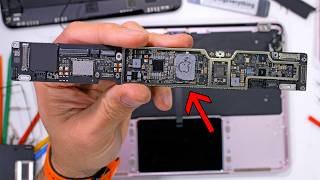
The motherboard is removed, revealing the A18 Pro chip. The chip's logo is installed upside down, which the host finds amusing.
The iPhone 16 Pro Max motherboard is smaller and stacked. Both have the same A18 Pro chip, but the iPhone chip lacks an Apple logo.
One USB-C port is USB 3.0, the other USB 2.0. Both can charge. The keyboard has a metallic sticker to keep out dust.
Apple uses a metal-forming process with 90% recycled aluminum instead of machining, reducing costs. Minor milling is still needed around the trackpad.
The MacBook Neo is positioned as an easy-to-repair device for email, web browsing, and typing, targeting the education market to compete with Chromebooks.
The MacBook Neo is a repairable, budget-friendly laptop that leverages smartphone technology to deliver solid performance for basic tasks. Its design and pricing make it a strong contender in the education sector, potentially challenging Chromebook dominance.
What processor does the MacBook Neo use?
The A18 Pro chip, the same as the iPhone 16 Pro Max.
00:58
How many pentalobe screws are on the back panel of the MacBook Neo?
Eight.
01:10
What is the battery capacity of the MacBook Neo?
36.5 Watt-hours.
03:03
What percentage of recycled lithium and cobalt does the MacBook Neo battery use?
95% recycled lithium and 100% recycled cobalt.
03:03
How long does it take to swap the MacBook Neo battery?
About 5 to 10 minutes.
02:36
What type of USB ports does the MacBook Neo have?
One USB 3.0 and one USB 2.0, both USB-C.
06:42
What metal-forming process does Apple use to reduce costs on the MacBook Neo?
A metal-forming process with 90% recycled aluminum that requires minimal milling.
07:08
What is the target market for the MacBook Neo?
Education, to compete with Chromebooks.
07:54
Smartphone Chip in Laptop
Reveals that the MacBook Neo uses the same A18 Pro chip as the iPhone 16 Pro Max, blurring the line between phone and laptop.
00:58Easily Swappable Battery
The battery can be replaced in 5-10 minutes with just a screwdriver, a rare repairability feature for Apple.
02:36Recycled Materials
Battery uses 95% recycled lithium and 100% recycled cobalt, highlighting Apple's environmental efforts.
03:03Cost Reduction via Metal-Forming
Apple uses a metal-forming process with recycled aluminum to reduce manufacturing costs, enabling the $500 price point.
07:08Education Market Strategy
The MacBook Neo is positioned to compete with Chromebooks in schools, potentially expanding Apple's ecosystem.
07:54[00:00] Today is the day that pigs learn to fly. Apple released a budget laptop that appears to be rather excellent on paper. This is the blush MacBook Neo. It kind of looks like the color of Santa's socks after he does the laundry, or maybe it's a glass of
[00:15] milk that's had a strawberry dipped in it. Or how about an embarrassed marshmallow? Oh, I got it. It's the color of a flamingo that's lacking sufficient shrimp in its diet. That's it.
[00:30] From now on, we'll call it "famished flamingo." You would think that for being only 500 bucks, Apple would want to make their logo a bit bigger to help offset the lost revenue with increased advertising, but we'll get into the nitty-gritty later. Inside the box,
[00:45] we have a new 20-watt charger and a USB-C cable. And you might be like, "Hey, Jerry, why would they include a smartphone charger inside a laptop box?" And that's a fantastic question. See, it turns out that this MacBook Neo is,
[00:58] in fact, a smartphone with a laptop keyboard, laptop screen, and a laptop battery. The Neo is using an A18 Pro chip, which is the exact same processor that we find in the iPhone
[01:10] 16 Pro Max that just happens to be sitting on my desk up in the corner. And here, let's prove it. If we flip over the Famished Flamingo MacBook Neo and grab my screwdriver, we can start removing all the pentalobe screws on the back panel. There are eight of them. And it's
[01:26] important to keep them all organized since each of the screws has a different shoulder lengths, the back panel and pull it off to the side. It has cool little hooks embedded
[01:39] into the metal that allow it to slide up and off, but then can get pressed straight back down again when we go to reassemble it later—assuming it survives that long. And there we go. We have the antennas up top, like the Bluetooth 6 and Wi-Fi 6. Then the long,
[01:53] thin motherboard, a massive battery here in the center, and the lower clicky trackpad and dual stereo loudspeakers near the bottom. You'll notice that the MacBook Neo has the same shape of motherboard that we find inside of the M4 iPad. But of course,
[02:06] instead of the M4 computer chip running a laptop operating system, we have an iPhone chip running the entire laptop. And we'll compare the two a bit closer in a second. But it is wild to see that there is no heatsink or heat pipes to help cool off anything in here.
[02:21] Not even a fan, which I'm not a huge fan of. I guess we'll turn it off before we go too much farther. I'll remove two more pentalobe screws near the battery, unplug it like a little Lego, and then take out a whopping 18 more screws. I'll unplug the two stereo loudspeaker wires
[02:36] so the entire battery can come free. This might be the fastest Apple laptop battery removal of all time. Theres no pull tabs, just screws. And I'd bet that anyone who knows how to work a screwdriver could swap out this battery in about 5 or 10 minutes,
[02:50] which is actually wild—especially if you know what Apple used to be giving us inside their laptops, like this monstrosity of a battery inside the MacBook Pro. What the heck? It feels like Apple is turning over a new leaf this year, especially since
[03:03] the Neo's battery is made with 95% recycled lithium and 100% recycled cobalt—all 36.5 Watt of it. That's a pretty big deal. Apple’s taken a page out of Framework's playbook,
[03:15] and I'm totally fine with that. We'll get back to the processor in just a second, but first, continuing on with our teardown, we'll remove the clicky trackpad next. It's really interesting here that Apple has added a very substantial metal bracket to the back
[03:28] side of the trackpad. Humans naturally think that heavier items should be more expensive. And while this bracket does double as rigid support for the back side of the clicky trackpad,
[03:41] I'm sure Apple didn't go out of their way to reduce the weight all that much either. And for those curious, it does resonate around a C-sharp. Lifting the trackpad out of the laptop, we can see it has two parallel plates that provide the spring-back force to level the
[03:55] trackpad out after it's been compressed. And the physical clicky button on the back is what presses up against the thick metal plate we took out a few seconds ago. The dual loudspeakers come out next. These are big old blocks of side-firing spatial
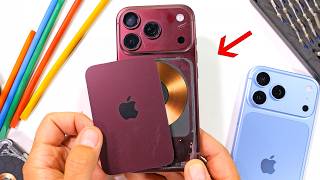
[04:08] audio stereo speakers, and they are glued shut pretty well. I thought we would need to get all catastrophic with them, but then I remembered we have magnet paper and teardown skins. And these MacBook Neo magnets are really as small as they look. Basically
[04:21] the same size as an earpiece from the Samsung Galaxy S26 Ultra or even the iPhone 16 Pro Max, which we'll get to more in a second. There are smartphone parts all over the place in here. With both speakers out, we can remove the color-matched headphone jack. Also pink,
[04:37] but with plausible deniability. To remove the antenna board, we have five more screws, including the wire attachment points on the motherboard. And then we can work on the motherboard herself. There are two display ribbon cable connectors. These
[04:50] have metal locking latches that flip up so the connector can slip out. Then the motherboard has five screws of its own, plus the two USB-C ports using a single screwed-in Lego-style connector on the right-hand side. Three more ZIF connectors with little plastic latches are
[05:05] in the center. And I assume these are for the power button, trackpad, and keyboard. Finally, the motherboard is released. This, my friends, is the entire brains of the MacBook Neo. It's the smartphone running the whole computer. And I don't say that condescendingly at all.
[05:19] According to the benchmarks, this laptop can hold its own for all the basics and work great for the vast majority of the human population, except for—oh no, what is this? What have they done?
[05:31] I can't believe Apple installed the processor logo upside down. Inconceivable. Even from the keyboard side of your Neo resting on your lap, the Apple stem on the A18 Pro will be pointing towards you,
[05:44] not away from you. I bet they thought nobody would notice, but here we are noticing. Speaking of noticing, let's grab the motherboard out of the iPhone 16 Pro Max. You can already tell that the iPhone motherboard is quite a bit smaller than what we see inside the MacBook Neo,
[05:59] but it should still have the same processing chip. A phone board can't be spread out like a laptop or an iPad board can. There's less real estate, so it has to be folded over and stacked on top of itself. If I take my razor knife,
[06:13] I can pop open the two halves. And then we can see, indeed, that the Neo and the iPhone 16 Pro Max have the same chip. The chip in the iPhone doesn't have an Apple logo on it, though, which is surprising. Apple normally tries to slap that logo everywhere it can, but it does
[06:28] still look super cool, though, so thumbs up for getting to see both chips side by side. There are a few things left inside the laptop that we need to check out, like the four screws holding in the dual USB-C ports. The one closer to the back side of the laptop is USB 3.0,
[06:42] and the one closer to the user is USB 2.0, but both can be used to charge up the battery. Then we have the large metallic sticker over the back side of the Magic Keyboard, and this helps keep any gunk or dust from getting inside of the MacBook components.
[06:56] the laptop is completely disassembled. Not bad for 500 bucks. Rather amazing, actually. Apple says one of the ways they managed to decrease costs is by using a
[07:08] metal-forming process instead of a machining process. They take 90% recycled aluminum and mold out the inner and upper housings in such a precise way that hardly anything needs to be milled down after the fact to reach that final tolerance. You can see some minor
[07:23] milling around the trackpad cutout, but reducing machine times helps reduce cost by quite a bit. machine markings everywhere. And if Apple had to machine every MacBook Neo frame this extensively,
[07:38] well, let's just say it wouldn't be 500 bucks anymore. And I'm glad Apple found I put it back together. But there's only one way to find out for sure. I think Apple's really onto something here. An easy-to-repair, dedicated email, web browsing,
[07:54] and typing machine is going to sell super well, especially in the education space. When I was a kid in school, our whole computer lab was made up of the translucent Apple desktop computers. share from the Chromebooks, which currently dominate the school space. Chromebooks also
[08:12] sometimes have mobile processors inside, like the Qualcomms. You might be like, they're probably just trying to trap kids into their ecosystem at a younger age.
[08:25] But hey, it looks like everything is working. Speaking of which, though, if Apple isn't going to make the logo any bigger, we'll just have to make the Apple logo better, 1984 style. My channel sponsor, dbrand, has a new series of skins that perfectly hide the scratches I
[08:40] made earlier. Apple actually used a super colorful logo in 1984 to bring awareness to their recently introduced color displays. And now all MacBooks can look ultra-friendly on retro midnight, silver,
[08:53] classic, and space black. Each 1984 skin is perfectly matched to their modern MacBook counterpart. Steve Jobs wanted the colorful logo to be more friendly. As everyone knows, Apples always last longer with a skin. Get some protection for your computer today with
[09:09] the link in the description. And thanks a ton for watching. I'll see you around.

⚡ Saved you 0h 09m reading this? Transcribe any YouTube video for free — no signup needed.