
This 49-Inch Monitor Is as Wide as My Wingspan
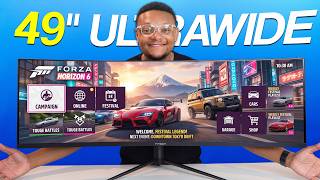
56sThe sheer size of a 49-inch ultrawide monitor, compared to a 6'4" person's wingspan, is an instantly eye-catching visual hook.
▶ Play Clip"Delivers exactly what the title promises — an honest, hands-on test of a genuinely ultra-wide monitor with clear verdict."
This video is a hands-on review of the INNOCN 49C1R, a 49-inch curved ultra-wide gaming monitor. The reviewer unboxes the display, details its specs and ports, and tests it across three use cases: PlayStation 5 compatibility, PC gaming, and gameplay capture. The verdict: it offers immersive visuals for PC gamers, but has notable limitations with consoles and capture hardware.
The reviewer explains this is the first ultra-wide curved monitor he's ever tested, setting up an INNOCN 49C1R sent by the company.
The box contains the monitor stand, screws, power cable, USB-C cable, and a DisplayPort cable. The monitor weighs 9.9 kg.
The 49-inch display features a VA panel, 5120x1440 resolution, 120Hz refresh rate, adaptive-sync, 6ms response time, and DisplayHDR 400 with 400 nits brightness.
Ports include DisplayPort 1.4, HDMI 2.1, USB-C with 65W power delivery, USB-A, USB-B, RJ45 Ethernet, and 3.5mm audio. Built-in speakers are also present.
The stand offers 4 inches height adjustment, 15° tilt back, 5° tilt down, 15° swivel, and compatibility with 100x100mm VESA mounts.
Connecting the PS5 directly results in a stretched, squished image. The PS5 does not support ultra-wide, so the fix is setting aspect ratio to auto, producing black bars.
Enabling PBP (picture-by-picture) in 1x1 mode splits the screen between the PS5 (HDMI) and a mini PC (DisplayPort), allowing multitasking on one display.
On PC, the monitor excels with full 5120x1440 at 120Hz, vibrant colors, and an immersive field of view. However, the 6ms response time adds noticeable latency in fast-paced shooters.
The Elgato 4K X and AVerMedia Live Gamer Ultra 2.1 support up to 3440x1440, not the monitor's native resolution, resulting in cropped output in OBS Studio.
The Elgato 4K Pro is the only capture card capable of passing 5120x1440, but it's an internal card requiring a dual PC setup. Alternative: use OBS display capture.
The monitor is best suited for PC gamers playing immersive, non-competitive titles like Forza, not esports or console users who won't get full ultra-wide support.
The INNOCN 49C1R is a great choice for PC gamers who prioritize immersion over competitive speed, but it's not ideal for PS5 players or streamers who need full-resolution capture without a powerful dual-PC setup.
What are the screen size and resolution of the INNOCN 49C1R?
49 inches with a resolution of 5120x1440.
01:21
What is the refresh rate and response time of the INNOCN 49C1R?
120Hz refresh rate and 6ms response time.
01:35
Which panel type does the INNOCN 49C1R use?
VA (Vertical Alignment) panel.
01:21
What HDR certification and brightness level does the monitor support?
DisplayHDR 400 with brightness up to 400 nits.
01:35
List the video inputs available on the INNOCN 49C1R.
DisplayPort 1.4, HDMI 2.1, and USB-C with 65W power delivery.
01:50
Does the PlayStation 5 support ultra-wide resolution on this monitor?
No, it produces a stretched image; setting aspect ratio to auto gives a standard 16:9 picture with black bars.
03:29
What feature allows two devices to be displayed side-by-side on the INNOCN 49C1R?
Picture-by-picture (PBP) mode, which splits the screen evenly between two sources.
04:10
What is the maximum ultra-wide resolution supported by the Elgato 4K X and AVerMedia Live Gamer Ultra 2.1?
3440x1440, which is lower than the monitor's native 5120x1440.
06:19
Which capture card is the only one capable of passing the monitor's full 5120x1440 resolution?
The Elgato 4K Pro, an internal card that requires a dual PC setup.
07:16
Which type of gamer is the INNOCN 49C1R best suited for, according to the reviewer?
PC gamers who play immersive, non-competitive titles like Forza, rather than competitive esports players.
07:58
PS5 Doesn't Support Ultra-Wide
Confirms that consoles won't take advantage of the full screen, an important factor for potential buyers.
03:116ms Response Time Causes Latency
Highlights a real trade-off for competitive gamers despite the immersive resolution.
05:35Capture Cards Can't Keep Up
Reveals a practical limitation for streamers/recorders: only an internal dual-PC card supports the full resolution.
07:16Best for Immersive, Not Competitive, Games
Gives a clear buyer's recommendation based on real-world testing, not just specs.
07:58[00:01] to test over the years, there's been one type of monitor that I've never ever used until today. In this box, our friends at Innocn decided to ship me an
[00:13] friends at Innocn decided to ship me an ultra-wide display for gaming. And this monitor just isn't ultra-wide, but it's also curved. Man, this is a lot of box to open. Let's put it on its side. It's a little bit safer.
[00:27] All right, so a couple things that we have here. First off, this is the stand that the monitor will go on. This also goes onto the back of stand. In the bag, you get some screws, got
[00:41] In the bag, you get some screws, got your power cable, USB-C cable, and then a DisplayPort cable as well. Let's get this bad boy open. Here it is. Let's get it up. I read on the spec chart that it weighs 9.9 kg, so
[00:55] it definitely has, ooh, some weight to it. also came with a couple screws, that way it can be secured to the base of the
[01:08] It's a secret trick. It's how you screw. Got to use your It's how you screw. Got to use your mouth.
[01:21] Let's see, is it secure? Wow, this is a 49-in display, which is almost as wide as my wingspan, and I'm damn near a 6'4" dude. It has a VA panel damn near a 6'4" dude. It has a VA panel type, the resolution is 5120 by 1440p,
[01:35] the refresh rate of this display maxes out at 120 Hz, has adaptive-sync technology, and the response time is at 6 ms. Additionally, the monitor has DisplayHDR 400, which carries HDR with brightness levels up to 400 nits. Here's
[01:50] a look at what you can expect from that. Under the back panel of this display is where your ports will be. You have the Display Port 1.4, an HDMI 2.1 port, Display Port 1.4, an HDMI 2.1 port, USB-C with 65 W power delivery, a USB-A
[02:04] USB-C with 65 W power delivery, a USB-A port, USB-B, an RJ45 Ethernet connection port, and a 3.5 mm audio port. But, if you don't want to listen to your audio through the port or on your computer, this monitor has its own set of speakers
[02:17] that you can play audio out loud on. Take a listen. Take a listen. >> [music]
[02:30] monitor, you can get about 4 in of height adjustment. It can tilt back 15° or down 5, and it swivels 15° on the supplied stand. If you want to mount this display, it is compatible with 100 by 100 mm VESA mounts, which will give
[02:45] you a bit more flexibility. So, now for this video, I want to take this monitor through a few use cases to see how worth it it might be for any of you guys watching to pick this thing up. So, number one, I want to see how good
[02:57] ultra-wide support is on the PlayStation 5. Number two is if I'm playing a game, how well can I capture the gameplay that I'm playing? And number three is just the overall usability on a PC and the games that you can play on it. All
[03:11] fully familiarize myself with this monitor, let me walk you through the through these tests. First, starting off with the PlayStation 5 doing a direct monitor, upon attempting this connection, this is what I saw. A fully
[03:29] stretched-out, squished-in image. Just not what I was going for. The PlayStation 5, it does not have support for ultra-wide monitors. So, this was honestly to be expected. To fix the display output issue, I can just go
[03:44] to my picture settings, go down to aspect ratio, and instead of it being set to wide screen, just keep it at auto. That'll give me the standard resolution look that you would typically expect out of a regular monitor. But now
[03:57] we have these black bars on the side of the screen, which doesn't give you the most out of the display, which then I guess you would say that this first test was a flop. But was it? If we navigate to our settings and go to the
[04:10] picture-in-picture tab, within here I enabled BPB 2 win 1 by 1, and when doing this, it evenly split the screen between two sources. One of course being the PlayStation 5 going over that HDMI connection, but the other side of that
[04:25] screen was a mini PC that I connected over the display port. With this setup, I was essentially able to multitask between the PlayStation 5 and the mini PC. I could put up whatever I wanted on the mini PC while having a game running
[04:38] on the PlayStation 5 and essentially multitask between the two of them at the same time on the same screen. Now, there is the normal picture-in-picture option, but I didn't like this one as much as it stretched out the PlayStation 5 screen
[04:52] the monitor settings to control the aspect ratio of the secondary screen. But yeah, the PlayStation 5 can work but just only in 16 by 9. You're not going to get the full ultra-wide resolution.
[05:04] PlayStation 6 at this point to get that capability in some games. Now, moving this monitor over to my gaming PC, we finally got our chance to see what it can do utilizing the entire screen real estate while gaming. And I have to say,
[05:19] guys, this looked exceptional. The colors popped. I could see so much more of the game that I'm typically not used to seeing. I got to play in full 5120 by to seeing. I got to play in full 5120 by 1440p resolution at 120 Hz using the
[05:35] that I did experience that I do want to mention is when it came to playing fast-paced games or shooters, I could definitely feel a bit of latency with that almost 6 millisecond response time. It's not very fast, especially when you
[05:52] compare it to monitors that are less than 1 millisecond. Would I be getting bodied here regardless? I mean, probably. But still, my chances would have been better if we were playing on a monitor that was 1 millisecond or less.
[06:04] So, with the experience on PC going so well, I next wanted to interject a capture card into the mix to see if it would be possible to easily record our gameplay while being able to watch it in full-screen resolution. Well, come to
[06:19] find out this didn't work as well as I thought it would. So, at this point, guys, I've tried to do everything that I could with the Elgato 4K X and the AVerMedia Live Gamer Ultra 2.1 capture card. They're supposed to support 3440
[06:34] card. They're supposed to support 3440 by 1440p resolution for an ultra-wide display. I have manually set that within my Windows settings within here. And with the Elgato 4K X connected, this is the screen that I'm getting right now.
[06:48] This is it. All right. Now, with the Live Gamer Ultra 2.1 connected, this is the screen results that I got. But obviously, you see it is so cropped in. You're not getting the full width of the screen. But luckily, it at least works
[07:02] within OBS Studio here. But like, I don't want to play this just using a part of the full monitor. This is what your experience should be like. >> What's so then how did you guys get it to work now?
[07:16] >> I took the capture card off. Maybe we needed to try a monitor that natively supported 3440 by 1440p. This is not that monitor. The only capture card on the market capable of passing the resolution of this ultra-wide display is
[07:30] the Elgato 4K Pro, which is an internal card that would require a dual PC setup to run effectively. Now, even though this ultra-wide display requires more resources to run, this doesn't mean you can't capture gameplay on this setup at
[07:44] all. You can always use the display capture source within OBS, which works perfectly fine. Just don't expect to be able to record at full resolution without some performance trade-off or a more powerful machine. The best person
[07:58] though for this monitor is someone that's a PC user or PC gamer that isn't playing competitive titles, but are playing games that provide an immersive experience. One such as the Forza that I
[08:11] where speed and quickness are not so critical. I think if you're that person, you're going to love this display and have an amazing experience using it. I a little bit more. But there's everything you need to know about the
[08:25] Innocn 49-in ultra-wide monitor. If you guys are looking to pick it up, there's links in the description below. Currently, it is starting out at around There could be some sales going on if you want to get it a bit cheaper, so
[08:38] much for staying to the very end of the video. If you enjoyed it, make sure you to the channel if you are new around here and I will catch you guys in the next one. Peace.
⚡ Saved you 0h 08m reading this? Transcribe any YouTube video for free — no signup needed.