
AI Summary
Aurelius shares a practical affiliate marketing system that earned him over $5,000 from a single YouTube Short and a companion long-form video. He breaks down the tools, the exact video strategy, and the four-step process for replicating the results.
Chapters
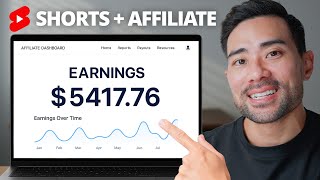
Aurelius shares his simple affiliate marketing system used to monetize his YouTube channel. One YouTube short and one long-form video earned roughly $5,500 in commissions.
Paid commissions totaled $2,405, with unpaid commissions bringing the total to $5,417.
A YouTube short received 337,000 views while the long-form version received only 21,000 views, generating recurring commissions from just these two videos.
AutoShorts is an AI tool that creates faceless videos for YouTube Shorts, TikTok and Instagram. Customers pay $19 per month for full access.
The short surpassed 300,000 views but only picked up after 180 days, showing that YouTube's algorithm can take time and results are not a get-rich-quick scheme.
The YouTube short directed viewers to the long-form video, and the URL was embedded directly into the video content.
The link was mentioned in the video itself, posted in a comment, and pinned to the top of the comment section.
On YouTube Shorts, links in descriptions and comments are not clickable, so the URL must be shortened with a service like Rebrandly and placed as text on the video.
The shortened link received 26,000 clicks, and Rebrandly provides detailed statistics on time and geography of clicks.
AutoShorts' affiliate program pays 30% recurring commission, meaning one referral earns payments for the life of the customer.
The short was about 45 seconds long, starting with a 'secret AI tool' hook, then explaining what the tool is, what it does, and ending with a call to action.
Using vidIQ's keyword research, he targets low-competition terms like 'AI tool' and 'short videos' to rank in YouTube search.
76% of the short's traffic came from YouTube search, with 'free AI video generator' as the top search term.
Uploading the short via the YouTube mobile app allows creators to choose a thumbnail from video frames, which the web version doesn't support.
Captions are added using Descript to automatically transcribe and style captions, since most viewers watch without sound. YouTube's built-in captions are a free alternative.
1) Find an affiliate program in your niche; 2) Create a YouTube short with a hook, explanation and call to action; 3) Add a shortened text URL to the video; 4) Optimize for search with keyword research.
Creating a longer version can attract long-form viewers and open more opportunities, though it was not the main driver of commissions.
The core lesson is that a well-structured YouTube Short promoting a product with recurring commissions can be a powerful income stream. Success requires patience, consistent content, and simple search optimization.
Mentioned in this Video
Tutorial Checklist
Study Flashcards (11)
How much did Aurelius earn in total from the two videos?
easy
Click to reveal answer
How much did Aurelius earn in total from the two videos?
Roughly $5,500, with a total of $5,417 in paid and unpaid commissions.
00:16
What product did he promote?
easy
Click to reveal answer
What product did he promote?
AutoShorts, an AI tool for creating faceless short videos.
01:00
What is AutoShorts' affiliate commission rate?
easy
Click to reveal answer
What is AutoShorts' affiliate commission rate?
30% recurring commission.
05:08
Why is recurring commission important?
medium
Click to reveal answer
Why is recurring commission important?
You refer the customer once and get paid for the life of that customer.
05:23
How many views did the YouTube short get?
easy
Click to reveal answer
How many views did the YouTube short get?
337,000 views.
00:45
Why must affiliate links on YouTube Shorts be shortened?
medium
Click to reveal answer
Why must affiliate links on YouTube Shorts be shortened?
Because links in descriptions and comments are not clickable, so a short URL can be displayed as text on the video.
03:37
How many clicks did the Rebrandly link receive?
easy
Click to reveal answer
How many clicks did the Rebrandly link receive?
26,000 clicks.
04:34
What percentage of the short's traffic came from YouTube search?
medium
Click to reveal answer
What percentage of the short's traffic came from YouTube search?
76%.
10:04
Which tool did he use for keyword research?
easy
Click to reveal answer
Which tool did he use for keyword research?
vidIQ.
08:11
What is the recommended method to choose a thumbnail for YouTube Shorts?
medium
Click to reveal answer
What is the recommended method to choose a thumbnail for YouTube Shorts?
Upload the short from the mobile app, which lets you select a thumbnail from video frames.
10:20
What tool did he use to add captions to his shorts?
easy
Click to reveal answer
What tool did he use to add captions to his shorts?
Descript.
11:14
💡 Key Takeaways
Two videos, recurring income
Proves that a single short plus a long-form companion can create a meaningful affiliate income stream.
00:30Shorts links aren't clickable
Highlights a critical platform limitation and the workaround of placing a shortened text URL on the video.
03:37Recurring commission advantage
Explains why choosing programs that pay recurring commissions is a game changer for affiliate marketers.
05:08Keyword research drives search traffic
Shows how using vidIQ to target low-competition keywords led to 76% of traffic coming from YouTube search.
08:11Repeatable monetization system
Distills the whole strategy into four simple steps that any creator can replicate.
12:08Full Transcript
[00:00] Hi, it's Aurelius. In this video, I'm going to share with you my simple but powerful affiliate marketing system that I've been using to monetize my YouTube channel. So I talked about this product on one YouTube short and one long form video and it's earned me roughly $5,500.
[00:16] So you can see that I've gotten paid 2,405 in commissions. And then this is the current balance and unpaid commissions, which totals together $5,417. And here are the only two
[00:30] videos I posted on my YouTube channel that's earned me the amount that you saw. So the first is the YouTube short, which is perhaps responsible for most of the traffic. And the second is a long form version. The stats for these two videos, first of all, with the shorts, I've
[00:45] gotten 337,000 views while the long form has only received about 21,000 views. And those two videos alone has gained me this amount of commissions and it is on a recurring basis.
[01:00] So To back up a bit, let me give you a bit of context on the product that I actually promoted and how you can see how this whole system works and implement it to your YouTube channel and start monetizing your brand. All right, so about a year ago, I stumbled upon this tool called
[01:16] AutoShorts. It was pretty much a game changer in the space of AI. And as you know, AI does go and... evolve really quickly. With AutoShorts, you're able to create these faceless videos
[01:28] and then post them as shorts on YouTube shorts, TikTok and Instagram. And this is really a game changer. If you don't want to put your face on camera, just to give you a bit of an idea of what it actually does, you can see some of these videos or generated by AI. It picks
[01:44] up the graphics and the videos, voiceover, captions, all that for you. And a customer pays $19 per month to get full access to its tools. And then there are other plans as well. So I thought let's just share this tool because that's one of the things I like to do on this channel.
[02:00] go in source, I research any tools that I think will be valuable to you and then share them as videos. So once again, we're in the stats of the YouTube shorts that I created. And
[02:12] it's got it. Yes. Over 300,000 views for the most part, you can see that it didn't really pick up. This is 180 days. And then that's when it kind of picked up. So I would say this is not a kind of get rich quick scheme. Sometimes when you're posting YouTube videos, it does
[02:29] take some time for the algorithm to actually pick it up. This doesn't generally say that yes, all YouTube shorts do get picked up later on, or even earlier. on it just really depends what the audience is searching for. could be a seasonal thing as well. Many, many factors,
[02:44] but for some reason this was just picked up in 180 days. Even if you take a look at the past 48 hours, it's gotten over 7,000 views. So this is huge, right? And what I did specifically
[02:57] with this YouTube short, you'll see on my YouTube short, I link it to the long form video, which then ends up going here. So if they're watching on mobile, of course it will. look different. That's one thing I did that was responsible for the commissions I made. But one of the
[03:13] things I believe made a huge difference is that I actually embedded the URL on the video. So let me show you on the actual short. I'll play the exact part where I'm telling them where
[03:25] to go. Head to this link here. That's the first time I mentioned it. And secondly, I also mentioned it in one of the comments you'll see here. And I've also pinned it. So it's always at the
[03:37] top. The downside of shorts is if you want to put a link in the description of your YouTube short, or even in the comments area, they're not clickable. So what you want to make sure
[03:49] you do is make your URL short. I use a link. shortening service called rebrandly. And this is rebrandly. You can click on the link in description box below. That'll take you there for convenience.
[04:01] And then once you've created an account, what you want to do is click on new link. Because I've gotten upgraded rebrandly account, I can link it up to a branded domain that looks like it's actually branded to my brand. So realest.link and then you can enter the destination URL.
[04:18] This is of course your affiliate link. You want to make sure you track and get paid for any referrals. Of course you don't need a paid account. You can just use the rebrand the URL and that will look like rebrand.ly and then forward slash anything you want. So it could be. the product
[04:34] name and that will be the link that you actually put as texts on your YouTube short. And then with your rebranding account, you can track how many clicks you've gotten in this case, 26,000 clicks for this particular link, which is a huge amount. Furthermore, you can click
[04:50] and then it'll show the stats on, you know, the time that. people click on most and the geographical location and much more. But anyway, with AutoShorts in particular, their affiliate program pays 30 % recurring. You can see here, our affiliate program offers a 30 % recurring
[05:08] commission. This is great because one of the things with affiliate marketing is some programs only pay you one time for that referral and then that's it. And then you have to constantly find new customers while programs like AutoShorts provides recurring commissions. So you only
[05:23] need to refer that customer once and then get paid for the life of that customer. So my tip here is to go and seek an affiliate program based on your niche, of course, and see if there's a recurring element to it. really is a bonus and an icing on the cake. If you
[05:39] are just going to promote a product and they do have an affiliate program, that is just good enough. In terms of actually creating the YouTube short, it can be something less than a minute. And you can see with my video in particular, it's about 45 seconds. And all
[05:55] I really did was I implemented a hook at the start and saying this secret AI tool. And then I went on to talk about what it actually is and what it can do. And I'll play a few glimpses of the YouTube short here. The tool is called AutoShorts. It allows you to create faceless
[06:11] videos on autopilot, like these ones here. All you need to do is create a new series and then choose the type of content you want simply into. You get the gist of it. So I explain what the tool is and what it can do and also how to go about doing it. So you continue explaining
[06:27] further and then add a call to action at the end of the video. In this case, I simply asked for a like and follow, but in actual fact, I could have just repeated what the URL is to get started creating their shorts. Now, whether you want to create a longer form version,
[06:43] That's really up to you, but I don't think this contributed much to the actual commissions that I made. think what really made the difference was the short since it's got over 300,000 views.
[06:56] But if you are wanting to reach the longer form viewers, then why not create a longer form version and provide a tutorial or how to on actually using. So it really is that simple
[07:08] to get started. Of course, no results are guaranteed and not all of my shorts gonna any commissions or sales at all. And if you are wanting to implement this, I'd say just create content on a consistent
[07:20] basis. And the more kind of videos you have out there, the more opportunities you'll have. The icing on the cake once your YouTube channel is of course monetized and you become a YouTube partner is the ad revenue. Shorts does not pay much. So $41 is really chump change. And if
[07:37] you will solely relying on ad revenue, then you need to reconsider because there's other ways as you saw in this video on monetizing your YouTube channel. However, of course, long form videos do garner you much more in terms of ad revenue with just 21,000 views. I've
[07:54] gotten $445 in ad revenue. Some other things that I usually do with YouTube shorts like this is some keyword research. I think it goes a long way when doing it, especially with YouTube shorts. There's a lot more longer form videos than YouTube shorts at the moment. And YouTube
[08:11] is currently pushing more YouTube shorts. And as you know, a lot of people are on their mobile devices and they're more than likely flicking through YouTube shorts as opposed to longer form videos. with keyword research in particular, I use a tool called vidIQ. Link will be in
[08:27] description box below for a dollar trial for the first 30 days. If you go to keyword research, there's a little box here. Once you've installed vidIQ and search up something like AI tool, and then it'll tell you the number of times it gets searched per month and also the competition,
[08:42] like how competitive is this keyword or key phrase. And you can sort it by your low. And then you can see which ones to target as opposed to ones that are very high in competition.
[08:54] So if AI tool is rather competitive, then you can find an alternate by looking for something like best AI tools. And then we can go search this term and then you can see it gets quite
[09:06] a lot of searches. However, competition is medium. This will give you some suggestions and matching keywords, if you want to filter it that way too. We can see AI tools for graphic design, AI for research paper planning. So you can really dial in and put in these exact keywords
[09:24] into your YouTube title. So let's say AI tools for writing and that is low competition. doesn't get searched a ton, but If you do want to target that you can do so and then add it into your
[09:36] title. But of course you want to naturally put this on your title. In this scenario, I'm actually targeting multiple keywords, AI tool and short videos. And this all kind of blends in together and it tells the algorithm that this is what the video is about. And if I go
[09:52] to analytics, you'll see under reach YouTube search terms that people have entered. which was responsible for the views. Free AI video generator is the top there, but you can see
[10:04] the proportion of the total traffic is 76%, which is quite big. And you'll see here overall, I'm getting most of my traffic from YouTube search, which means that people are finding my video. based on simply searching or typing what they wanna search for on YouTube. That's
[10:20] why keyword research does go a long way by using a tool like vidIQ. Next, when it comes to uploading your YouTube short, my preference personally is to use my mobile phone and then I upload
[10:33] the YouTube short that way. And then with this, I can choose the thumbnail based on. one of the frames of my video with the actual web-based version. can't really do this, but once you're
[10:45] back on your laptop or on the web, you can make those adjustments like the title and the description. But with the thumbnail in particular, I believe you can't really do this. So you can see right
[11:00] here. Usually there's an area, but you can see you can change the thumbnail on the YouTube mobile app. So it's weird that it works that way, at least at this time. But the best thing to do at the moment is just to upload it from your mobile device. And one thing I forgot
[11:14] to mention is that I add captions to my YouTube shorts. Most people on their devices, whether they're let's say on the train or they're at home, they may not have sound on, which is
[11:26] always a good idea to put captions. The way I've added captions is by simply using a tool called Descript. Descript is a great way to add captions automatically. You can see it's
[11:38] transcribed the video. This is a different YouTube short, but you can see how it works with the timeline here and the different words of what I'm saying. So it does all this. automatically for you. can see captions here and add your own captions based on the style that you like.
[11:54] By no means do you have to sign up to any of the tools that I've mentioned so far because they are paid tools. You could very well simply use YouTube's built-in captions. It won't look like this though. It will be pretty plain and simple. All right, to sum up everything in
[12:08] a nutshell, the first thing you want to do is to look for an affiliate program based on your niche, based on the topics that you talk about. Of course, a product that you believe in. one that you've maybe researched and used yourself or just find interesting or valuable, kind
[12:24] of like what I've done with AutoShorts and then sign up for their affiliate program. The bonus, like I said, is if they do have a recurring element to it, that's great. Otherwise, no worries, just look for an affiliate program or at least compensate you for the referrals
[12:38] that you bring in. Secondly, you want to create your YouTube short. And as you saw in my case study, doesn't need to be long, less than one minute is fine. Use a hook, tell them what it is, what it can do, how to do it or how to use it. And then use a call to action at the
[12:54] end. In addition, I think it personally helps by putting the actual text URL on the video so that they can visually see it. And then you can use a link shortening service like Ray Brownlee to make your URL short. And so that you're not saying the actual referral or affiliate
[13:11] link of that actual program, which can or tends to be really long. Thirdly, you can accompany your YouTube short with a longer form version to garner longer form viewers. And this is
[13:23] optional. However, if you are going to create a YouTube short, you might as well create a longer form video, opening doors to... you know, other viewers and longer form viewers as said. And with all that said, make sure you optimize your videos for search so that it
[13:36] has the highest potential for getting ranked for the particular keywords you're targeting. And that my friends is a little behind the scenes and just one way I'm monetizing my YouTube channel. And so can you, if you have any questions about this or have any questions about affiliate
[13:51] marketing in general, let me know in the comments. the meantime, thanks so much for watching and I'll see you in the next one.