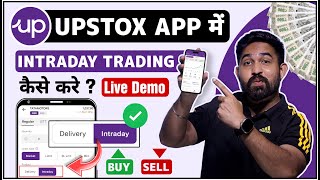

What is Intraday Trading?
60sClear, concise explanation of intraday vs delivery trading, a fundamental concept for beginners.
▶ Play Clip"The title promises a tutorial on intraday trading in Upstox, and the video delivers exactly that with clear steps and explanations, though it could be shorter."
This video is a step-by-step tutorial on how to perform intraday trading using the Upstox mobile application. The presenter demonstrates the entire process, from searching for a stock and understanding key metrics to placing buy and sell orders, while explaining important concepts like delivery versus intraday, leverage, and square-off.
The video aims to teach viewers how to buy and sell shares intraday using the Upstox app, with a step-by-step process.
To start, open the Upstox app and use the search option to find the company whose shares you want to trade intraday. The presenter uses 's bank' as an example but clarifies it's not a recommendation.
Two options appear: NSE (National Stock Exchange) and BSE (Bombay Stock Exchange). You can choose either exchange to trade.
After selecting an exchange, a summary shows buying/selling quantities, today's open price, and yesterday's close. You can view candlestick charts and adjust the time frame (professional traders often use 5-minute candles).
If you decide to buy, click the 'Buy' option. An interface shows the company name, current market price, and options for 'Delivery' or 'Intraday'.
Delivery means holding shares long-term (years). Intraday means holding shares from market open (9:15 AM) until 3:30 PM, with mandatory selling before the close.
Intraday trading offers 5x leverage. For example, if a share costs ₹100, you can buy 5 shares with ₹1000 (5x). The example shows a share priced at ₹24.9, where you get 5 shares for the same amount.
You can choose 'Market' to buy at the current price or 'Limit' to set a specific price (e.g., ₹23). The order executes when the price reaches your limit.
After selecting intraday and order type, swipe to buy. The order is placed and confirmed. The portfolio shows the purchased quantity (e.g., 5 shares).
Shares must be sold before 3:30 PM. If not, the broker automatically squares off the position at 3:20 PM and charges a fee. To sell, click on the position and select 'Square Off'.
Enter the quantity to sell, choose 'Market' or 'Limit' (e.g., ₹26), and swipe to sell. The order is placed and confirmed.
After selling, the portfolio shows overall profit/loss. The example shows a small profit of ₹0.05, but the goal is to demonstrate the process.
The video successfully demonstrates the complete intraday trading process in the Upstox app, from buying to selling, while highlighting key concepts like leverage and square-off. It emphasizes that intraday trading requires selling before market close to avoid automatic liquidation.
What does NSE stand for?
National Stock Exchange
00:57
What is the difference between delivery and intraday trading?
Delivery means holding shares long-term (years), while intraday means holding shares from market open until 3:30 PM, with mandatory selling before close.
02:05
What is the leverage offered in intraday trading in Upstox?
5x leverage
03:12
What happens if you forget to sell your intraday shares before 3:30 PM?
The broker automatically squares off the position at 3:20 PM and charges a fee.
04:53
What are the two order types mentioned for buying/selling?
Market (current price) and Limit (specific price).
03:56
Delivery vs. Intraday
Clarifies the fundamental difference between long-term holding and same-day trading, which is crucial for beginners.
02:055x Leverage Explained
Explains how leverage works in intraday trading, allowing traders to control larger positions with less capital.
03:12Automatic Square-Off
Highlights the risk of intraday trading: if you don't sell, the broker does it for you, potentially at a loss.
04:53[00:00] नमस्कार दोस्तों दोस्तों आज के वीडियो में मैं आपको शिखाऊंगा कि ऑप्सकॉक एप्लीकेशन में किस तरीके से इंटरडेडिंग क्रेडिंग किया जाता है कैसे किसी भी कंपनी के सेयर को इंटरडेडिंग करीब और बेच सकते
[00:13] यह step by step process में आज आपको पूरा समझाऊंगा तो चले बिना time गवाए चलते हैं हमारे mobile screen के और तो friends मैं आ गए हूँ मेरे mobile की screen पे अपना open कर लिया है अपना off stock application तो अगर आप off stock application में
[00:26] intraday trading करना चाहते हैं तो सबसे वह ले आपको उस कंपणी को यहां पर मर्क करना है जिस कंपनी के डाश को आप इंटरवेयर में खरीदना चाहते हैं तो यहां पर तहत वाले ऑप्शन पर आपको चले जाना है और यहां पर आपको उस कंपनी के नेम को हफ्त करना
[00:40] जिसको आप इंट्राडे में खरीदना चाहते हैं तो यहाँ पर मैं सर्ट करूंगा यस बेंक ओके तो मैं आपको बिल्कुल भी रिकमेंट नहीं करूंगा कि आप भी यही सहर खरीदिए यह एक ट्यूटोरियल वीडियो है तो आप अपना मन पसंद सहर खरीद
[00:52] या फिर वह खरीद सकते हैं जिसका आपने खोज किया है किसी ने आपको रिकमेंट किया है तो यहाँ पर मैं जैसे ही यह बैंक लिखूंगा तो मुझे यहाँ पर जो है दो ऑप्शन दिखेंगे एनेसी और दीजिए तो मैं आपको बता दूं एनेसी का मतलब
[01:04] तो NSE का मतलब है National Stock Exchange और BSE का मतलब है Bombay Stock Exchange तो आप किसी में भी जो है यहाँ पर खरीच सकते है तो मैं NSE वाले पर क्लिक करूँगा यहाँ पर आपके सामने कुछ इस तरीके से interface खुल जाएगा यहाँ पर इस share का जो है पूरा summary खुल जाएगा
[01:19] कि यहां पर कितनी quantity में लोग इसको जो रहे कितने quantity में लोग इसको sell कर रहे हैं आज जब market open हुआ था तब इसका price इतना था कल कितने पर close हुआ था यह सब आपको यहां पर दिखाएगा तो आपको जो है इसके पूरे fundamental check कर देना है
[01:52] नहीं मुझे इस company के share को खरीदना चाहिए इसका fundamental काफी अच्छा है ओके तो यहाँ से आपको जो है buy वाले option पे click करना है अब जैसे ही buy वाले option पे click करेंगे आपके सामने कुछ इस तरह के इसे
[02:04] interface खुल जाएगा यहाँ पे company का name लिखा है अभी इसका current market price कितना है वो यहाँ पे लिखा है okay यहाँ पे लिखा है delivery और intraday तो दोस्तो delivery का मतलब क्या है तो अगर आप किसी company के share को जो है अपने portfolio में long term के लिए hold
[02:19] hold करके रखना चाहते है चाहे तो एक साल दो साल तीन साल चार साल पांच साल जितना मरजी चाहे उसने तक आप अगर उसको अपने portfolio में रखना चाहते है तो उसे आप delivery में खरीच सकते है और अगर आप intraday में खरीचते है उसका
[02:35] मतलब है कि बई शुबह जो है नौ बचके 15 मिनित को जब market open होता है तब से लेके 3 बचके 30 मिनित तक ही आप किसी company के share को जो है यहाँ पर अपने position में hold करके रख सकते हैं. Okay? So,
[02:47] asset trading को हम कहेंगे intraday. यानि कि अगर हम किसी company के share को आज खरीचते हैं, तो उसे तीन बचके तीस minute के पहले बेचना है. अगर हम बेचना भूल भी गए, तो आपकी जो application है, आपका जो broker है, वो
[02:59] तो ऑटमेटिकली जो है उस पेर के तेर को जो है चैल कर देगा और आपके पास जो उसका कुछ ना कुछ चार्ज ले लेगा तो उसे हम कहेंगे इंट्रा trading. Okay? तो यहाँ पे आपको quantity डालना है कि आप कितना quantity जी जो है खरीदना चाहते है और मैं आपको बता दू के
[03:13] भाई intraday trading में जो है आपको यहाँ पे जो है इस बहुत अच्छा benefit मिलता है आपको जो है five leverage मिलता है. Five leverage का मतलब है अगर किसी company का share hundred 20
[03:34] रुपया यह चैनल ज्यानतार रुपया है. 5. लिए जाएंगे इंट्राडे में और अगर वही से आप बिलीवरी में खरीदेंगे तो एक ही सेर मिलेगा स्वाबिस पॉइंट अठारा रुपए में समझ रहे हैं तो दोस्तों यहां पर आपको इंट्राडे में बस यही बेनेफिक्ट अच्छा मिलता है यहां पर
[03:51] यहां ञेवैं के रुपये मैं जो है अगर धोड़े देलिता हुआ तो यहां पर लैकिन चीज रुपये मिल रहा है कह रहा है तो एवं पॉलिस पॉलिस पहले जैसे उसको घ्र जैसे उसको अगर मेक्सद प्राइस और यह अगर इनको समय करने दड़तें सिलिए यहां पर
[04:07] और अगर मैं जो है limit लगाकर, यानि कि मुझे लगता है कि भाई 24.99 रुपए है, 23 रुपए का होगा, तब मैं इसको खरीदूंगा, तो भाई limit पर जाके जो है मैं यहाँ पे case डाल दूँगा, जब यह 23 रुमे का होगा तब हमारा order execute होगा
[04:21] लेकिन मैं इसको market value पर कर दिना चाहता हूँ तो यहाँ पर market select करके उंग्राडे select करके जो यहाँ पर swipe to buy से click करूँगा जैसे ही मैं यहाँ पर swipe करूँगा तो हमारा जो order है वो यहाँ पर आ जाएगा
[04:33] यह आप देख सकते हैं हमारा order जो है यहाँ पे complete भी हो चुका है ओके तो अब हम जो है यहाँ पे portfolio में जाएंगे तो यहाँ पे दिखाएगा कि हमने आज जो है इसके कितने share खरीदे ओके 5 पांटे की खरीदी और हम यहाँ पे profit में है या loss में है
[04:47] लोगों तो यहां पर दिखाईगा यह आप तक यह रिकुल सते है रिकलटा इस तरीके से किसी भी कंपनी का रिकलाइव सेंटमिक आप पर सेक्षा है तो अब बात कर दो कि किसी कंपनी के सेंटमिक रहने के बाद की तरीके से
[05:00] बेचे जैसे कि मैंने आपको होता है तीन चीज के पहले आपको जो है इस कंपनी के शेयर को बेचना पड़ेगा अगर आप application charge click click application
[05:19] option आ रहा है square of का. So, दोस्तो हम जैसे ही square of पे click करेंगे जो आपके सामने को इस तरीके से interface कुलेगा. आपको यहाँ पे quantity डाल देना है. आप कितने share को जो है sell करना चाहते है. अगर आप market value पे sell करना
[05:31] चाहते है तो यहाँ पे आपको market डाल देना है उसके बाद यहां से स्वाइट करना है तो डायरेक्ट यह आपका जो ऑर्डर है वह यहां पर सेल पर लग जाएगा उसके बाद अगर आप लिमिट लगाना चाहते हैं तो लिमिट पर जाकर जो आपको यहां पर डालना है कि अभी जो है 24.22 रुपए चल रहा है तो अगर
[05:44] यहाँ पर आपको यह लगता है कि चब्बी तुपमें निजाएगा 26 जाकर यहां पर आपको invest तुम सब कर दिना है यहां पर आपको ऑर्डर लग जाएगा पर अगर आपको यह लगता है कि वह यह जो है। यहां पर 24 रुपय है और यह माइनस में जाएगा
[05:57] कि दिश्डर चैंक पास यानी कि टेल में तक जरूर यानपे लास्क जरूर याना है उससे तो अब कुछ नहीं जरूराके दावे रूप हटे के ने लेकिन हम यहां हमारे पमेज में पेट्सकर मार्के पैस पति लक्कुमा लुटे तो
[06:10] यहां पर आप देख सकते हैं हमारा जो सेल ऑर्डर है वह भी यहां पर जो है वह हो चुका है तो दोस्तों अब हम पॉर्टफॉलिय में जाएंगे तो यहां पर आप देख सकते हैं ओवर और प्रॉफिट एंड लॉस यहां पर दिखाएगा यानि कि आज कितना profit and loss हुआ थे यहाँ पे आप देख सकते है plus में जो है यहाँ पे दिखा रहा है 0.05 तो दोस्तों बहुत ही
[06:26] कम है लेकिन कोई बात नहीं है हमारा मकसद सिर्फ इतना था कि आपको पता चले कि किस तरीके से off stock में जो है ऐड टेक किया जाता है किस तरीके से इंटरनेट कैलिंग में जो है स्थिर को बाय अंसिल करना है हम इस
[06:39] तरे तक अपने बहुत अच्छा वीडियो पत्त कर आए होगा आप लोगों को यह भी समझ आ गया होगा कि और सक्कमेंट इस तरीके से इंट्रानेट ड्रेड़िंग किया जाता है तो मिलते हैं नाइस वीडियो में
[06:54] सबकली टेक चेयर बाइ जई निन जै भारत
⚡ Saved you 0h 06m reading this? Transcribe any YouTube video for free — no signup needed.