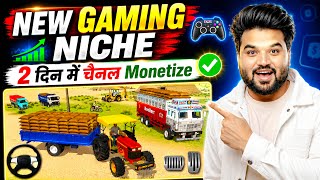

Earn ₹85,000/month with Gaming Channel?
45sConcrete income claims and high earnings potential hook viewers looking for passive income.
▶ Play Clip"The title promises a guide to creating a US gaming channel, and the video delivers a solid, actionable tutorial, though it is padded with repetitive gameplay footage."
This video presents a step-by-step guide to creating a faceless, voiceless gaming YouTube channel, specifically focusing on the Indian Vehicle Simulator 3D game. The creator demonstrates how to select a profitable niche, use AI tools like ChatGPT and Flow AI to generate viral thumbnails, and edit gameplay videos using the VN app. The video also highlights the potential earnings from such channels, citing examples of channels that have gained significant views and revenue within a few months.
The creator shows a channel with 3000 to 1996000 views and discusses earnings from a video, mentioning 3500 hours of watch time, 2008 subscribers, and $65 earned. He estimates a channel with 40-500 views daily could earn around $30 per day, translating to roughly ₹85,000 per month.
A channel created on June 10th, just over two months old, is already monetized. It has 2045 subscribers and videos with views ranging from 2000 to 108000, demonstrating rapid growth and monetization potential.
The recommended game is Indian Vehicle Simulator 3D, available on both Play Store and App Store. The creator advises using Hindi as the discussion language and placing videos under the 'People and Blog' category to reach a wider audience.
The creator suggests reusing the same video title if it is performing well, as it consistently attracts views. For different vehicles, like a dumper instead of a JCB, simply rearrange the keywords in the title.
To create a viral thumbnail, take a screenshot of the game, upload it to ChatGPT, and prompt it to 'give me the master print of this thumbnail'. ChatGPT will provide a detailed description or 'master copy' to guide the creation of a new, high-quality thumbnail.
Use Google's Flow AI website to generate thumbnails. Sign up, create a new project, select the 16:9 size and x4 option. Paste the 'master print' from ChatGPT, upload the original screenshot, and generate four different thumbnail options.
After generating thumbnails, select the best one and download it in 2K or 4K quality. The creator notes that the generated thumbnails are highly realistic and completely different from the original screenshot.
The game has three modes: Open World, Farming Mode, and Tochan World. The creator demonstrates playing Farming Mode, which involves driving a tractor and ploughing fields. The process is simple and requires recording a lot of gameplay.
The editing process is done using the VN app, available on the Play Store. The process involves cutting out ads, rotating the video, changing the frame size to 21:9, and increasing the vibrance to make colors pop.
Once the game is edited and ads are removed, the video is ready to export. The creator notes that no memes were added in this example but offers to provide them via a Telegram link in the video description.
This trend is currently very popular and offers a great opportunity to create a YouTube channel without showing your face or using your voice. The creator encourages viewers to learn the game and start their own channel, as the content is simple to produce.
The video provides a complete, step-by-step blueprint for creating a faceless gaming channel, from game selection and channel setup to thumbnail creation and video editing. It emphasizes the potential for high earnings and rapid monetization, making it an attractive opportunity for aspiring creators.
What is the name of the game recommended for creating a faceless gaming channel?
Indian Vehicle Simulator 3D
01:21
What YouTube category is recommended for these gaming videos?
People and Blog
03:51
What is the estimated monthly earning in rupees for a channel getting 40-50 views daily?
Approximately ₹85,000 per month
00:28
What prompt should be given to ChatGPT to get a 'master print' for a thumbnail?
'Give me the master print of this thumbnail'
05:22
What aspect ratio and number of results should be selected in Flow AI for thumbnail generation?
16:9 size and x4 results
06:40
What are the three modes available in the Indian Vehicle Simulator 3D game?
Open World, Farming Mode, and Tochan World
09:50
What is the recommended frame size for the final video in the VN app?
21:9
14:08
How long is the ad that must be watched before playing the game?
15 seconds
10:04
What is the estimated monthly earning in rupees for a channel earning $30 daily?
Approximately ₹85,000
00:28
What is the name of the Google website used for generating thumbnails?
Flow AI
06:03
[00:01] and I showed you this channel and showed you its views 3000 1996000 and here I am talking about the latest video 26000 31000 43000 and if I want to show you the earning of such views in a here I will open one of my videos but this is going to have around 1 lakh
[00:15] I have got 3500 hours of watch time here, after that I have got 2008 subscribers from this video and here you will be able to see that I have got $65 from this video and as this brother is getting 40 to 500 views regularly here. Let's
[00:28] assume that here he is earning $30 daily. So let's do 30 * 30. And friends, if we convert this to 95, then here you will see that he is earning approximately ₹85,000 per month here. Isn't it ? I have found another channel here. You will be
[00:41] able to see that friends, there are 2045 i.e. 450 subscribers here. Ok? And friends, the biggest thing is that this channel has been monetized here. And when this channel was created. Friends, this channel was also created here on 10th June and today is
[00:56] 15th August, that is, 16th August, so if you see now, it means this channel has been around two and a quarter months and friends, if I talk about views, then you will be able to see here that there are views right now, this is yesterday's video, it has simple 2000 views here, but
[01:08] video of 4 days ago has 10,000 views, after this, friends, if I come down, then you will see that the video of 8 days ago has 37000 views, you will see that the video of 10 days ago has 58000 views and friends, you will see that the video of 12 days ago has 108000 views, that means the
[01:21] friends, I will show you here. Here you will be able to see which also told this in the previous video. And friends, let me tell you first of all here. This is Indian Vehicle Simulator 3D game which friends, you will get on both Play Store and App Store.
[01:35] Now friends, the biggest thing comes which is a common question for everyone and friends, the normally common question below this video is that brothers say that brother, what should be the discussion language? So friends, you can
[01:49] keep Hindi there. Rest friends, the most important thing is about the category, in which category will you put these videos, so friends, whatever this is telling you is I will open each video and show you which video is
[02:03] put in which category and friends, the most important thing here you will be able to see is the viral thumbnail, how to make this viral thumbnail, friends, I will also tell you this in this I told you in the previous video also, but in this video again I will tell you in
[02:16] what way you can design these viral thumbnails here and a brother had commented to me that brother, what is the scene of the title? So now you will see here friends, this same title is used here because friends, the
[02:28] same title is getting views again and again. Ok? So friends, if If you are doing a little different work, like instead of JCB you have a dumper, then you can simply move the keywords a little forward or backward here. Otherwise you
[02:41] can keep the title same here. So now let me first show you in the video in which category this video is placed. And friends, let me show you here. Right now monetized. Let me show you first here. You will be able to see that
[02:53] I check the monetization status here. So you will be able to see that this channel is monetized. Isn't it see that it has been two and a quarter months now. And friends, ₹184 is being made here. If you convert it into Indian currency, you will see that the
[03:08] payment here is around ₹18,000. Ok? So, paying ₹18,000 per month within 2 months is Because friends, if we keep uploading videos here, then Ok? Now friends, let us see here in which category this video
[03:23] is placed. Ok? So you will be able to see this here, I have opened this channel here. Ok? Here I simply open this video in a new tab. Now you will be Here I mute its sound. Ok? Now friends, here I
[03:37] open its resources. Ok? Here you will be able to see that I have opened the resources of this video. It is something like this, right now here I will Ok? You will be able to see here that as I searched the category, you will see that
[03:51] this video is placed here under the category People and Blog. Ok? And friends, the one who is telling you absolutely wrong because friends, this video which is posted in People and Vogue because friends, this brother has probably posted it in People and Vogue so that
[04:04] people of every age here or friends, every person can see the play zone of this game here, they can have fun or enjoyment here, right, you will be able to see it, right now here I will simply open another video and show it to you, I will
[04:17] remove its resources, simply open any other video from below here like here I open the one with 108000 views and show it to you here. I simply go into its resources. Ok? And here I will simply
[04:29] search the category and show it to you. You will be able to see here in which category it this is also embedded inside People and Vogue. Ok? So keep in mind that the category of your channel that you want to
[04:42] keep is People and Vogue here. Ok? Now friends, here I will show you how to make a viral thumbnail in this way. You can see here how the viral thumbnail looks. So friends, let us learn how to make this viral thumbnail here.
[04:54] friends? First of all, you will be able to see this scene here. Ok? So first of all, Here I take a screenshot. I have taken a screenshot of this here. In this way you have to take a screenshot of the thumbnail.
[05:09] ? Chat GPT has to be opened. Okay friends? Friends, if Chat GPT is get it in Play Store. You can download Chat GPT from there. Now friends, you have to open Chat GPT here and friends, you have to upload that photo here.
[05:22] this photo, I have uploaded it here. me the master print of this thumbnail. Ok? You just have to say this much and your work will be done here. Here I have written give me the master print of this thumbnail
[05:35] and here I hit enter. Like here I hit enter. You can see here that it has way it has given us the master copy here. Ok? Now friends, we are
[05:49] not going to copy this thumbnail here. Same will create a thumbnail like this. Will will make it even better than this. Create high quality thumbnails. Ok? So you can see that it has given print here below. Let me copy this over here. You have to
[06:03] Or you can also copy it by selecting it here in this way. You can copy it here as you like. Ok? After copying, Ok? And friends, here you have to search Flow AI, you will be able to see here that this is
[06:16] also Google's website, which will come at number one. Simply you have to click on it and you will see that it will open here in this manner. Ok? sign up with your email ID. Then here you will
[06:28] Simply you have to click on New Project. Like friends, here you will click on New Project. You will be able to see something like this type of interface here. Ok? Simply you don't have to do anything here. Here
[06:40] me zoom in a little bit here. Simply you will be able to see. Here you have to click on 16 no size. You have to select it here. And here you have to select x * 4. here we need four results simultaneously. Ok? And friends, it is written here
[06:55] what do you want? Simply you have to paste your print here. You will be able to see that I have pasted it here and by clicking on the plus icon here, clicking on the plus icon, you have to click on Upload Media and upload the
[07:08] screenshot that you had just taken here. You will see screenshot has been uploaded here. Now here I click on Add to Prompt. photo has also reached us here in this manner. Now let me hit enter here.
[07:22] So here you can see that it has it is going to generate four thumbnails for us. Ok? All four thumbnails will be of different quality. Whatever you like, you can simply keep it.
[07:36] ? Let me show you now. Let them be generated here. And friends, here you will be able to see that it has generated all four photos here. And you will be able to see how the photos were generated. Isn't it? You will see that the screenshot of the photo that I had given was
[07:49] something like this. Isn't it? If you look at this photo, you will see that he has And friends, this thumbnail is something like this, you will see this thumbnail here, in a way a completely different thumbnail has been made here. If you look at this one, it has also become
[08:02] zoom in a little bit here. You can see here how realistic the thumbnail looks. I will open this one and show it to you. You will be able to see it, right? That means the entire thumbnail has been changed here. In a way, there is not even 1% coffee here. You will be able to
[08:15] see this thumbnail, right? And friends, how was this thumbnail blades are visible here. But friends, JCB or not, this is the real thumbnail in this manner. And friends, you will be able to see how high
[08:28] realistic the thumbnails that we have generated are here. Awesome thumbnails generated here. Ok? you have to do is you will be able to see it here friends. I simply like this and click on download image and download it in 4K. So I do 2K.
[08:43] thumbnail will be saved in our gallery in 2K quality. Ok? So here I have solved two of your problems. Here I have friends, which channel should be put in which category and friends,
[08:58] I am going to tell you this here now. Isn't it? Meaning, all the other games related to this which are here you can see a PDF. I have put everyone's names here. And friends, the second thing is how you have to play the game and record it.
[09:11] I will teach you this thing also here in this video. So simply friends, let's go to the mobile screen. So here I am on the mobile show you the game, normally the game which I was telling you about, its name is
[09:24] Indian Vehicle Simulator 3D, friends, all the videos that that brother has uploaded of this game, you will be able to see them here, you will find all the characters etc. here, they are I will tell you that you have to download it and friends, here
[09:36] I open it directly and friends, there was another game in which videos of many different games were stored, friends, what I do here is by creating a PDF file normally and
[09:50] open something like this. Simply you have to click on play. Three modes are available inside it. Open World, Farming Mode, Tochan World. Isn't it? Simply And first of all here is what you have to do? Here you will have to watch the ad for
[10:04] 15 seconds. So simply here I watch a 15 second ad. The add And friends, here you will see that I click on farming mode. Our game has been loaded here. You will be able to see it like this and now I will
[10:17] will see that a game has already arrived here. You will be able to see something like this that a tell you about the editing part, friends, let me clear one thing here. The I had recorded it on 10th August and today is 23rd August. The video is being
[10:31] I have uploaded three-four videos related to gaming. And friends, the same comment was coming in all those videos. The correct. But here you leave the editing process. The explained here. I have been out for the last three-four days, so I am uploading this content today. But
[10:45] friends, how is the gaming video related to this edited? How are added? On this, I have made a proper video here which is 18 video in this one, then many brothers will miss the editing process
[10:59] after watching this video and seeing the thumbnail. Isn't it? So I am going to upload that video properly tomorrow. So the video of the full editing process will come tomorrow. I am going to upload the full editing video tomorrow. And some of its you know it is fine. An arrow is visible on the side here. If you scroll down,
[11:14] click on this, it will stop here. Ok? You will be able to see it now. click in this way, you will be able to see it. Now you will not be able to play it here like PUBG. You will be able to see how and where this guy wants to take you. There
[11:29] is a house etc. here. You will be able to see it here. As I am gaming here. Something like this, right? near the tractor. I will make him sit on the tractor. Ok? What are you doing here right now? It is simply Ok? You will be able to see it here and here I will start it.
[11:43] Now you will be able to see in this manner, here. Right now ploughing is going on here, in our place ploughing is called hakai. turn it around. Ok? I'll pick it up here. Here it depends on you.
[12:00] How high do you want to raise it, how low do you want to raise it. Ok? It depends on you. You can see it in this way. Now let me take you here for the second time. So you have to play it in this manner. You will be able to see your game here.
[12:12] You have to record a lot of the gameplay here in this way. Isn't it ? It is a simple process. You don't have to do much. You will be able to see it here. Isn't it ? So here it is as I told you. What do I simply do here? Let me
[12:25] close it here. Ok ? And friends, here I will here let's try its second mode. I click on the touch mode. And friends, you will be able to see that both the tractors are stuck here in this manner. You will be
[12:38] able to see in this way who wins here, you can see it here normally as I show you here. You can see that both the ? What is inside it depends on you friends. Which
[12:51] which one do you not want to win? Ok? It depends on you. You will see that as soon as we left, the other tractor is pulling it here. friends, let me tell you one thing here. Inside this you will see that
[13:05] many customization options are available here. You can make modifications here. You get a lot of settings etc. inside it. This is it friends, when you play this game Ok? Only then friends, you will understand all the things here. Isn't it? And friends,
[13:18] if you do not understand some things then there are many options here. Many players teach on YouTube. Everything about how to play this game is Ok? So friends, you
[13:30] can normally learn it there also. Ok? So in this way you get many options friends, here I will show you what you have to edit inside editing. So simply you do not have to do anything in this, friends, whatever ads etc. come here, we will
[13:42] I'm going to open the VN for editing. You will also find this inside the Play Store. Ok? Here I click on Continue. And now we have recorded the game normally. And now we have recorded the game normally.
[13:56] from here, right? What do you do? As I show you here. Here I opened the game in this manner, I will make a cut here. I will delete the next part. Ok? And by clicking on this, first of all
[14:08] I rotate it from the bottom here. You will see that I have rotated it here in this manner. Isn't it ? Here I also change the frame size. Here I take the Simply 21 Snow size. Or I can take this size here.
[14:21] Ok? And inside this, let me fix this game here. You can see it here now. I have fixed it here in this manner. You will be able to see this here. Ok? I'm showing you right now. Simply do nothing.
[14:33] What is the first thing to do here? You will be able to see here that this ad will come in front of us, simply cut it here. And here as far as the ad is completed, simply let this ad be completed here. You will be able to see that in this way, Simple Ad
[14:45] is complete with us here. I will close this. Ok? Here you can see that I have closed it. After this friends the game has been loaded. And here you will be able to see the game that you just played. Simply Game is here. Isn't it?
[14:57] etc. seems a little less. So simply click on the filter here. And friends, you have to come vibrance needs to be increased a little here. So colors etc. will be added inside it. You can see it in this way. You will be able to see it here. I simply did this here. Now the
[15:11] ads etc. that were coming in between. Here you simply have to close that also. As I show you here. I'll cut here. There were ads and so on. Let You will be able to see here whatever I am showing you live. So here you
[15:26] can see that we started this second game here and this one is also here. In this way you don't have to do much. I was teaching you this, let me cut it. I remove the back part. So you will be able to see that our game is completely
[15:38] You don't have to do anything right now. If you want to export, click here. And you can export it in whatever print you want. Rest, if you want to post memes etc. then you can do so. It depends on you. Ok? That brother did
[15:50] not invest so much of it. So this is directly your video ready here. Ok? I have told you everything here. here you must have understood the video well. And friends, here I have not
[16:05] added memes etc. inside the video. Friends, if you want to add that here too, then I will provide all these things to you normally on Telegram I will give you the Telegram link directly inside the description of the video. Ok?
[16:17] So friends, this trend is going on a lot right now and as I told you, in just one and a quarter months, you will be is a very good opportunity. Friends, if you learn to play this game, even
[16:30] if you do not know how to play it, there are many users, many players here. You can learn there and you can also create your own YouTube channel because friends, here there is no face, no voice, you just have to do your work. You just have to
[16:44] add the meme and your content is ready here. So friends, in this way you hope you guys liked the video. If you like the video, please See you guys in the next video. Bye-bye for now. Vande Mataram
[16:58] Bye-bye for now. Vande Mataram friends.
⚡ Saved you 0h 16m reading this? Transcribe any YouTube video for free — no signup needed.