Why Use App Insights for OpenTelemetry?
45sDirectly addresses a common pain point for developers deploying to Azure with OpenTelemetry, offering a clear solution that sparks curiosity.
▶ Play Clip"Title promises a practical tip and delivers exactly that—concise and on-point."
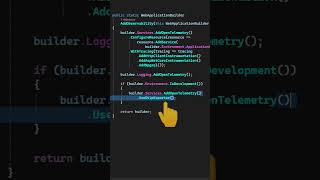
The video explains how to configure OpenTelemetry to export telemetry data to Azure Application Insights. It highlights using local tools like Seq or Aspire dashboard for development and the Azure Monitor exporter for production, requiring only the connection string.
OpenTelemetry users deploying to Azure should use Application Insights as the exporter for metrics, traces, and logs.
In development, configure the OpenTelemetry exporter to use Seq or the Aspire dashboard locally.
For non-development environments, use the Azure Monitor exporter and provide the Application Insights connection string.
What Azure service is recommended as the exporter for OpenTelemetry?
Application Insights
What tools can be used locally for development?
Seq or the Aspire dashboard
00:14
What is required to use the Azure Monitor exporter?
The Application Insights connection string
00:14
Use Application Insights as Exporter
Provides a clear, actionable recommendation for Azure users.
Environment-Specific Configuration
Shows how to switch between local and cloud telemetry backends seamlessly.
00:14[00:00] If you are using OpenTelemetry and you want to deploy your application to Azure, you should consider using Application Insights as the exporter for your application's metrics, traces, and logs. In development, you can configure the OpenTelemetry exporter,
[00:14] and you could use Seek or the Aspire dashboard locally, and if you're not in development, then you can use the Azure Monitor exporter, and all you have to do is to provide the Application Insights connection string,


⚡ Saved you time reading this? Transcribe any YouTube video for free — no signup needed.