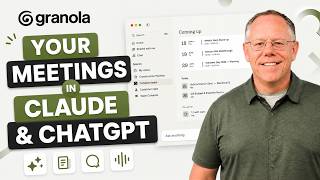

Turn Meetings into AI Gold with MCP
45sShows a concrete, impressive use case for AI in business, appealing to productivity enthusiasts.
▶ Play Clip"Delivers on the promise of showing MCP workflows with Granola, though some parts feel like a product demo."
This video demonstrates how to integrate meeting transcripts from Granola into AI workflows using MCP (Model Context Protocol). The host shows how to connect Granola to Claude, ChatGPT, and other AI tools to generate proposals, create simulations, and manage projects, highlighting the power of a unified knowledge base.
Granola transcribes and organizes meetings from Zoom, Google Meet, Microsoft Teams, and more, with built-in AI for analysis.
MCP allows different AI tools to communicate and share information, enabling workflows like generating proposals from meeting notes.
Users can chat with Granola to get insights across all meetings or specific ones, and even drag additional sources for analysis.
Enable the Granola connector in Claude by going to Customize > Connectors, searching for Granola, adding it, and signing in. Control access permissions.
Claude can pull meeting notes from Granola and combine them with attached documents to generate a proposal with price estimates, saving time.
MCP is universal, so Granola can connect to Claude, ChatGPT, GPT, or any other MCP-supporting AI system.
Set up multiple MCP connectors (Google Drive, Gmail, Calendar, Microsoft 365, Slack, monday.com, Asana) to create a comprehensive AI assistant knowledge base.
Claude can find a meeting in Granola, check related documents, and format a spreadsheet with action items, adding it to Google Drive.
Cowork is an agentic assistant that plans and executes multi-step projects, using all MCP connectors to generate proposals, risk assessments, emails, and calendar events.
Granola becomes a database of business information, available as a knowledge source in Claude, Cowork, ChatGPT, and other AI systems.
By leveraging MCP connectors, Granola transforms meeting notes into a powerful knowledge base that enhances AI workflows across multiple platforms, saving time and improving productivity.
What is MCP?
MCP (Model Context Protocol) is a framework that lets different AI tools communicate and pass information between them.
00:14
Which meeting apps does Granola support?
Zoom, Google Meet, Microsoft Teams, and more.
How do you enable the Granola connector in Claude?
Go to Customize > Connectors, search for Granola, add it, and sign in.
01:20
What can you do with Granola's built-in AI chat?
Ask for insights across all meetings or a specific meeting, and drag additional sources for analysis.
00:44
What is Claude Cowork?
An agentic assistant that works with you to plan and execute projects with multiple tasks and outputs.
05:09
Name three connectors you can set up with Claude besides Granola.
Google Drive, Gmail, Google Calendar, Microsoft 365, Slack, monday.com, or Asana.
03:24
MCP Enables AI Interoperability
Explains the core concept of MCP, which is essential for understanding the video's workflow.
00:14Easy Connector Setup
Shows a simple, practical way to integrate Granola with Claude, making the workflow accessible.
01:20MCP is Universal
Highlights that MCP works across multiple AI platforms, increasing the value of the setup.
02:55Building a Comprehensive Knowledge Base
Emphasizes the strategy of connecting multiple data sources to create a powerful AI assistant.
03:12Cowork Automates Complex Projects
Demonstrates how agentic AI can handle multi-step tasks, saving significant time.
05:09[00:00] Granola is the app that can transcribe any meeting. So we're talking about Zoom meetings, Google Meet, Microsoft Teams, anything. Then it can organize your meetings and can even analyze them using its own built-in AI.
[00:14] But today, we're partnering with Granola to see how you can bring your meeting transcripts into much more interesting AI workflows using MCP. MCP is the framework that lets different AI tools communicate and pass information between them.
[00:29] So you can use information from your meetings to do things like generating proposals or creating detailed simulations in Tools-Rite Cloud or ChatGPT. Now, since I started using Granola, I've actually been really impressed with what you can do with their own built-in AI.
[00:44] There's a chat field where you can ask for insights across all of your meetings. Or you could open an individual meeting and use the chat field there to get insights about that specific meeting.
[00:56] This was an introductory meeting with a potential new client. I can drag additional sources into that chat field, then ask Granola to do something like give me an estimate of the material costs
[01:08] based on what we discussed in the meeting. And this is a powerful way to analyze your meetings very quickly. But if you want to leverage your meetings in AI tools like Cloud or ChatGPT,
[01:20] all you have to do is enable the Granola connector. Let's set it up in Cloud. You can just go to Customize, then to Connectors, browse and search for Granola, add the Granola connector, and sign in.
[01:35] And once the connector is set up, you can control the access permissions. So you can decide whether certain tools are always allowed or if it will ask for your permission each time. And now in a new chat I want to get Claude to help me make a proposal for this new client that I just met with So I drag in some proposals that I written up for other clients recently
[01:56] and I'll also bring in a spreadsheet with my material costs. And I'll ask Claude to refer to that meeting and generate a new proposal that's consistent with the other documents that I attached. And I'll tell it to include price estimates based on material costs from that spreadsheet.
[02:12] Now, we can actually see as Claude invokes the Granola connector. And I didn't have to explicitly tell it to do that. That connector is available, and Claude understands that it should check Granola for information about my meetings.
[02:25] And generating full documents that I can download and work with is something that Claude does very well. So here's that document. And it's a great starting point for this proposal. Claude did the research, pulling in information from my Granola meeting notes.
[02:40] It created the document and set up the formatting, saving me a lot of time. And this is a Word document that I can download and keep working on. Cloud is also a great platform for creating simulations, for role-playing scenarios to find problems,
[02:55] or, of course, bringing insights from a meeting into coding or app design projects. But MCP is a universal standard, so you can connect to Granola from Cloud, ChatGPT, GPT, or any other LLM or AI system that supports MCP. There's a link in the description with more
[03:12] information. Now think about what an AI assistant does for you. Ideally, the best assistant would know everything about what's on your calendar, your documents, your messages with your teammates,
[03:24] and your meetings. So you will probably want to set up several MCP connectors at once. Remember that library of connectors? You can connect Claude or CatGPT to your Google Drive Gmail and Google Calendar Or if you use Microsoft 365 you can connect that That links your documents email and calendar to Claude knowledge base Do you message your teammates using Teams Well
[03:49] that's included in the Microsoft 365 connector. Or what about Slack? There's a connector for that. You can connect to your project management apps like monday.com or Asana. And when it comes to
[04:01] meetings, Granola is the app that organizes all of my meetings from Zoom, Teams, Google Meet, whatever. So Granola is a core part of a foundation of knowledge that I've built in Cloud using MCP
[04:14] Connectors. With that foundation in place, I can tell Cloud to do something like add a sheet to my Google Drive to organize all of my action items from the volunteer recruitment meeting. Cloud will
[04:26] find that meeting in my Granola account. I'll also tell it to include notes and insights as well as a column where I can make task assignments, and I'll tell it to refer to documents from previous events
[04:38] to decide on those task assignments. I can see that Claude has invoked the Granola connector and found the meeting that I was thinking of. It checks my Google Docs and Microsoft 365 for related documents, and after it finds that information, it formats it into a spreadsheet
[04:54] and adds that sheet to my Google Drive. So now when I go to my Google Drive, that new sheet is already there, and it has all the information I asked Cloud to find from that meeting. So these connectors build my knowledge base for the Cloud chat.
[05:09] And when I have more complex projects, I might go to a work agent like Cloud Cowork. If you don't already know Cowork, it's an agentic assistant that can work with you to plan and execute a project with multiple tasks and multiple outputs.
[05:23] And it works with all of those MCP connectors that we've seen. So looking back at that project that I was evaluating for a new client I can ask CoWork to review my introduction meeting with that client and I could upload documents for it to reference or since those documents are already on my Google Drive I can ask it to find those documents
[05:45] I'll ask it to generate a new proposal based on what was decided in the meeting, as well as a risk assessment document. I'll tell it to reference my material sheet for cost information, to identify the department heads I'll need to contract, and to make a schedule and add key dates to my calendar.
[06:02] Then draft introductory email messages for each department head. Multi-step projects like this take time to plan and complete, so I'll skip forward in time. And let's see what we got.
[06:14] There's the proposal document and the risk assessment that Co-Work generated. I can open either of those in Word or save them to my Google Drive. If I go to my Gmail, to my draft folder, I can see draft emails for each department head.
[06:28] And on my Google Calendar, Cowork has added appointments for the milestones that we discussed in the meeting. I see one this month and a few more in September. In fact, everything that Cloud generated here is based on insights from my Granola meetings
[06:43] and the additional documents that I referenced. Since Granola transcribes and organizes all of my meetings, no matter which meeting app I use, it's become this incredible database of information about my business that's now available as a knowledge source inside of my daily AI assistant.
[07:01] So when I'm working in Cloud or orchestrating large projects in Cloud Cowork, or working in ChatGPT or any other AI system that works with MVP, all of my meeting insights from Granola are there, ready to be used.
[07:16] If you're ready to start working with granola, you can use the code Stratford when you sign up to get your first month free.


⚡ Saved you 0h 07m reading this? Transcribe any YouTube video for free — no signup needed.