
E-Ink Dashboard: Weeks of Battery!
45sShowcases a visually unique e-ink smart home dashboard that lasts weeks on a charge, appealing to tech enthusiasts seeking energy-efficient gadgets.
▶ Play Clip"Delivers a solid list of 15 devices with genuine hands-on experience, though the '2026' label is speculative and some items are niche."
The video showcases 15 smart home devices that the creator genuinely recommends for 2026, ranging from e-ink dashboards and smart buttons to air quality sensors and a chess robot. The creator emphasizes practicality, family-friendliness, and value, sharing personal experiences and setup tips for each product.
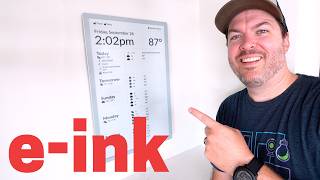
The Terminal OG is a small, inexpensive e-ink dashboard that displays a custom Home Assistant dashboard. It takes a snapshot of the dashboard, applies style changes, and sends it to the screen. It lasts weeks or months on a single charge, making it easy to place anywhere.
The Third Reality garage door opener is a robot button that presses the physical garage door remote, bypassing Security+ 2.0 restrictions. It works with Matter, uses rechargeable batteries, and can be set up in under 3 minutes.
A battery tester that reads AA, AAA, and coin cell batteries. It shows voltage on a display, and if the battery is dead, nothing shows. It's more convenient than a multimeter and can test coin cells, which many testers cannot.
An add-on plug that shows nerdy stats like power consumption and has a button on the display. It's inexpensive and useful for checking if a cord is charging a device.
A button that works with almost all Echo devices, with four buttons each supporting short and long presses, allowing up to eight different actions. This has been a long-awaited feature for Amazon smart home users.
IKEA buttons are inexpensive ($6) and work with Matter and Thread. They use rechargeable AAA batteries and have a magnet for mounting. There's also a $10 version with a scroll wheel, but the scroll wheel reliability was poor.
A Z-Wave scene controller with a main on/off switch (up to 3 amps) and four programmable buttons. It has an LED light that can be customized. The creator bought six more after liking it, and it's family-friendly.
A bright, pocketable flashlight with a wide field of view, spotlight, laser pointer, and black light. It's useful for attic work and makes scorpions glow in Arizona. It's not cheap but very bright.
A $30 air quality sensor that monitors temperature, humidity, PM2.5, and CO2. It has a minimal design with a clock. Downsides: settings reset when unplugged, and sensors are less accurate than expensive models.
A robot vacuum under $500 for Prime Day with self-cleaning dock and anti-tangle side brush. High suction power handles leaves and pet hair. Sponsored segment.
A robot vacuum with a roller mop that has a scraper and a shield that covers the roller on carpet. It can mop up messes without smearing, a first for the creator.
A wet and dry stick cleaner that vacuums and mops, with steam or hot water options. It's used for quick cleanups and deep cleans, and self-cleans in the dock.
A smart lock with ultra-wideband that auto-unlocks as you approach. It works with Matter over Thread, has a fingerprint reader, and a rechargeable battery. The creator wishes it came with two batteries for swapping.
A star projector that turns the ceiling into a starry sky. The creator's daughter likes it because it's not too bright or dim and helps her not be scared of the dark.
A floor lamp that solves poor lighting in a room. It can be super bright, do warm/cool whites, and multiple colors. It can be turned on/off by waving a hand.
A powered screwdriver that the creator uses daily. It comes with magnetic bits, a right-angle adapter, and a charging case. It's powerful enough to drill screws and has a lock for manual use.
A millimeter wave sensor with RGB light, light sensor, and VOC air quality sensor. It's responsive and accurate for presence detection, works with Zigbee, and acts as a repeater. Firmware updates fix issues.
A smaller Zigbee mmWave sensor, better for indoor use due to its size. The creator recommends the R3 for garages and the FP1E for living spaces.
A stud finder with lights that show exactly where studs are, extremely accurate. Useful for mounting or avoiding studs when cutting drywall.
An inexpensive camera probe with a light and joystick to move the camera. It helps with cutting holes and running cables, saving time and frustration.
A chess robot that sets up the board and moves pieces. It has a camera that reads the board locally. The creator's daughter beat him, and they now team up against the robot. It's fun and creates memories.
A 4K solar-powered camera with 24/7 recording via snapshots between events. It records normally on motion, then shows a time-lapse of the 24/7 recording. The solar panel can be adjusted but not backwards. Not Home Assistant compatible.
A pocketable multi-tool with knife, package opener, screwdrivers, and scissors. Blades lock and open one-handed. Tools are swappable. The creator carries it daily and considers it perfect.
The video provides a curated list of smart home devices that offer practical value, from budget-friendly buttons to advanced sensors and tools. The creator emphasizes family-friendliness, ease of use, and real-world testing, making it a useful guide for smart home enthusiasts.
Terminal OG
tool
Third Reality Garage Door Opener
tool
Battery Tester
tool
Power Monitoring Plug
tool
Amazon Echo Smart Button
tool
IKEA Smart Button
tool
Zooz Zen32
tool
Arkfeld Pro Flashlight
tool
IKEA Air Quality Sensor
tool
Roborock S Pro
tool
Roborock Curve Two Flow
tool
Roborock F-25 Ultra
tool
Aqara U400
tool
Govee Star Projector
tool
Govee Floor Lamp
tool
Fanttik S2 Pro
tool
Third Reality R3
tool
Aqara FP1E
tool
Stud Finder Sapphire 9000
tool
Camera Probe
tool
Chess Robot
tool
TP-Link Tapo Solar Camera
tool
Multi-tool
tool
What is the Terminal OG?
An e-ink smart home dashboard that displays a custom Home Assistant dashboard and lasts weeks on a charge.
00:02
How does the Third Reality garage door opener work?
It is a robot button that physically presses the garage door remote, bypassing Security+ 2.0 restrictions.
01:12
What battery types can the battery tester read?
AA, AAA, and coin cell batteries.
02:10
How many actions can the Amazon Echo smart button perform?
Up to eight actions (four buttons, each with short and long press).
03:02
What is the price of the IKEA smart button?
$6.
03:16
What protocol does the Zooz Zen32 use?
Z-Wave.
03:56
What sensors does the IKEA air quality sensor monitor?
Temperature, humidity, PM2.5, and CO2.
05:39
What is the price of the IKEA air quality sensor?
$30.
05:39
What is the main feature of the Aqara U400 smart lock?
Ultra-wideband auto-unlock when approaching the door.
08:05
What is the maximum amperage for the Zooz Zen32 switch?
3 amps.
03:56
What does the TP-Link Tapo camera do to achieve 24/7 recording?
It takes snapshots between events, creating a time-lapse of the 24/7 recording.
14:37
Bypassing Evil Corp
Shows a clever workaround for proprietary garage door restrictions, a common pain point.
01:12Family-Friendly Scene Controller
Demonstrates that even a 3-year-old can use smart home controls, emphasizing usability.
03:56Budget Air Quality Monitoring
Highlights a low-cost solution for CO2 monitoring, making air quality accessible.
05:39Magic Auto-Unlock
Ultra-wideband technology provides a seamless, magical user experience.
08:05Chess Robot Creates Memories
Shows how smart devices can foster family bonding and learning.
13:32[00:02] smartome tech to show you today. Not only that, but I'll share my favorite tech that helps me add the smart home tech in my house. It's like techception. We're going two levels deep here. And I weeded out lots of junk to only show you
[00:14] what's worth it. Starting with this e- in smart home dashboard. Remember when I toured Joel's house and he had those incredible e-aper dashboards? I wanted one so bad. Well, this is similar. is just smaller, less expensive, and easy
[00:29] to set up. Okay, maybe not that similar then. I'm using the Terminal OG, and it's very interesting how it works. I have a custom smarthome dashboard I made in Home Assistant, so it can display anything I want like my home weather
[00:43] station, door lock, battery, and calendar. How it works is the terminal app I added in Home Assistant takes a snapshot image of that dashboard where it also makes some style changes to look good on an e- in display. Then it sends
[00:57] screen. Since it uses such little battery, this can last for weeks or months without needing to recharge, so it's super easy to place anywhere in the house. If you ever wanted an e-ink smart home dashboard, this is a good option. I
[01:12] love this next smart home device because it sticks it to the man and because it made my garage door smart in less than 3 minutes. You see, Evil Corp created Security Plus 3.0, 0 which blocks all of us from being able to add our own ways
[01:26] to control the garage door. Classic evil corp. But what they didn't expect was the third reality garage door opener. This is so basic that it's actually genius. It's a robot button that presses the garage door remote. Take that. Just
[01:43] know if it's open or closed. And I'm using rechargeable batteries in it. Then put an extra garage door remote in this device. Clamp it in place with the button presser lined up and you're good to go. Plus, it works with matter, so
[01:56] it's compatible with most systems. Okay, if a sensor goes offline, it could be the battery, or maybe you just need to reconnect the sensor. How do you tell? quickly tell you the battery level for normal AA and AAA batteries that use 1.5
[02:10] volts, rechargeable ones that use 1.2 volts, and coin cells that use 3 volts. volt number written on them, so you don't need to memorize that. And if the battery is dead, nothing will show on the display since the device uses the
[02:24] battery being tested for the display. Isn't this so cool? And there are other battery testers out there, but many don't read coin cell. Plus, it's way more convenient to carry around than a multimemeter. I also really like this
[02:36] gadget if you want to see if a cord is charging a smart home device or not. This add-on gives you all the nerdy stats you want, and there's a button on displays. These are both super inexpensive, so if you don't already
[02:49] good idea to add them. All right, next are some different smart buttons. You know, sometimes you just need a physical button for family members to control the smart lights. Well, if you just use Amazon for your smart home, then there
[03:02] is finally a button that will work with almost all Echo devices. Seriously, people have been wanting this for years. It technically has four buttons on it and each one can do a short or a long press. So you could run eight different
[03:16] device. >> This is button number one, long press. >> Now if you use matter and have a thread border router, the buttons from IKEA are so inexpensive. Six bucks for this. What? It can use
[03:30] rechargeable AAA batteries and has a magnet on the back so you can stick it to the included metal plate or anything metal like the fridge. IKEA even has a button with a scroll wheel that's $10. The scroll wheel can change the
[03:42] button can turn the lights on and off if you want to, and it can control three different groups this way. I don't think this one is that easy to use, and reliability with the scroll wheel wasn't great for me, but I really like the
[03:56] button that's $6. Hard to beat that price. Now, if you're like me and you're trying to completely avoid batteries if possible, then you got to see this Zeus Zen32. It's my new favorite. I recently showed it in my last video and I liked
[04:08] showed it in my last video and I liked it so much I bought not one, not two, but six more. There's a main onoff switch. That's the top button. And there's also a dimmer version, too. But I'm using the onoff for the fans in my
[04:20] house. It says it can be used with fans up to 3 amps. And most ceiling fans use fine for me. Then the buttons on the bottom can be programmed to control other smart devices in the room. I can also set the color and brightness of the
[04:34] LED light on the button to help me know what it controls. My 3-year-old knows what all the buttons do, so yeah, it's definitely familyfriendly. It does need a Z-Wave hub, so heads up on that. But I plan on adding these to almost all the
[04:47] rooms in our house. That way, there's always some physical buttons to control everything. Over the last few weeks, I've been in our attic running cable for my new smart home. Lighting in the attic is basically non-existent, and I've seen
[05:00] been using these Ark Pro and Arc Pro about these is how bright they are for their size. They easily fit in my pocket and are light enough to clip on my hat,
[05:12] which I did all the time when I needed two hands up in the attic. And there are wide field of view or more of a spotlight, a laser pointer, and a black light. This is a must in Arizona because it makes the scorpions glow. That's
[05:27] right. If I'm not avoiding ghosts in the attic, then it's scorpions in the backyard. Ah, they aren't super cheap, but look how bright it gets when I double click the button. This is incredible for this tiny little
[05:39] flashlight. Okay, I've been a huge fan of air quality sensors for the last few years, but they're either really pricey or missing some crucial sensors like CO2 monitoring. Well, this new one from IKEA is only 30 bucks and it monitors
[05:51] temperature, humidity, 2.5 particulate matter and CO2. Nice. I like the minimal design and it's perfect for a desk or nightstand since it has a clock and you
[06:03] get too high. So, where do they cut corners to make it this cheap? Well, if it's unplugged, then the settings and time are reset, which is annoying. The sensors are also not going to be as pinpoint accurate as the more expensive
[06:17] air quality sensors, but for the price, it's acceptable and it works with with my smartome. I know it might not be for everyone, but I like it. Next up is sponsoring this video. I recently started using the Kreo S Pro out here in
[06:32] the shop, and right now it's under $500 for Prime Day, but it still has a lot of the features you see on the flagship models, like the newer self-cleaning dock and the anti-tangle side brush, which is a mustave if you live with pets
[06:46] or other hairy animals. >> Hey, leaves always blow in here, but the high suction power gets those and everything else on the ground, keeping willing to spend a little more for a robot focused on mopping, then check out
[06:59] the Curve Two Flow. It has a roller mop with really smart design like a scraper that gets rid of gunk and a shield that automatically covers the roller when it switches to carpet. This is the first robot vacuum I've tried that can mop up
[07:11] whatever my kids throw at it without just smearing it on the floor. Pretty sweet. Okay, but if you want spinning mops and a roller mop, then let me throw one more option at you. The F-25 Ultra. This would pair great with the S Pro. I
[07:26] never really understood why I would want to stick mop when I could just have a robot vacuum do the work for me. But then I got this one and we use it all the time. Like if we just need to clean up a mess really fast before Annie gets
[07:38] to it. Stop drinking the bubbles, you crazy dog. This is a wet and dry cleaner, so it vacuums and mops. And you can have it steam or use hot water to help remove the stains. After it does a deep clean, we put it here and it cleans
[07:51] check out Robbo Rock's Prime Day sales this week in the links below. And thanks channel. I know this next device has been out for a few months now, but I wasn't able to cover it because of our move. It's the Accara U400 smart door
[08:05] lock with ultra wideband. This technology is incredible. Having the door automatically unlock by just walking up to it feels like magic. And it doesn't open if the door is locked and I walk behind it. Seriously, it's
[08:19] mind-boggling. You do need a compatible phone with ultra wideband, which a lot the last few years have it, and hopefully more Android phones soon. Even if someone has a compatible phone and another person in the family doesn't,
[08:33] it's still a good lock since the fingerprint reader works very well. It has a rechargeable battery, but I wish it came with two so I could swap them out instead of hanging a power bank on the handle to recharge it like they
[08:45] recommend. What? The U400 uses matter over thread and overall is a super solid smart lock. Speaking of matter, most of GOI's lights work with matter now and my kids are obsessed with what's in their room. First, this star projector turns
[09:01] the ceiling into a beautiful, mesmerizing outer space star experience. themes, and the stars are like these little lasers. I asked my daughter why she likes it, and this is what she said. I like the lights because they're not
[09:15] too bright or too dim, and they help me not be scared of the dark. >> Definitely beats putting up these glow-in-the-dark stars. They rip tons of paint off the ceiling when I took them down in our old house. Terrible. Go also
[09:28] oldest daughter's room. The lighting in this room before adding this lamp was this room before adding this lamp was absolutely atrocious. But this lamp has solved that problem. It can get super bright, do warm and cool whites, plus a
[09:41] ton more. I like the shape of it and I like that you can change the color so you can do multiple colors at once. And I like that you can turn it on and off easily by just waving your hand. >> I'm glad my kids love these lights.
[09:53] They're easy to set up and since they work with matter, my smart home can make sure they don't get left on all the time. A win all around. Every once in a while, I try something out with average expectations and then I'm blown away.
[10:07] That's an understatement how I feel about this powered screwdriver. I'm obsessed. This is the Fantic S2 Pro and I've probably used it every day for the last few months with moving and taking things down and setting things up. I use
[10:21] this for pretty much everything. It comes in a compact case that holds all the magnetic bits. The P2 is finally wearing down from using it so much, but I have some good replacements I'll link down below. The case also has a cutout
[10:34] to charge a screwdriver, and it even has a right angle adapter included. I can level on the light bar, and it's powerful enough to drill screws in the wall. Not only that, but it locks so I can use it to manually tighten or loosen
[10:47] a screw. I used to carry a normal drill and screwdriver, but those are collecting dust since I just use this for everything. Now, anytime I need to thermostat, or whatever, I'll be using this. Over the last few years, different
[11:02] millimeter wave sensors have been released that all have their own unique specialties, including this one, which I think is perfect for the garage. It's the Third Reality R3. It's a millimeter wave sensor that also has a big RGB
[11:15] light on top, a light sensor, and a VOCC air quality sensor on board. Say you want your garage lights to turn on quickly when someone walks in. This millimeter wave sensor is very responsive and accurate, so it can keep
[11:28] area. I have two here in the shop and I can make it so the ceiling lights turn on and off depending on where I am. Pretty cool. There are some bad reviews firmware and it should fix all the problems people had. The big RGB light
[11:43] can be used for automations like if the air quality is bad or if the security system automatically arms while you're in the garage late at night so you don't go back in. There are tons of use cases. It also uses Ziggby, so it's very
[11:57] reliable and acts as a Ziggby repeater for all the nearby Ziggby devices. I'll admit the R3 is bulky, especially when compared with something like the Accara FP1E, which is also a Ziggb millimeter wave sensor for about the same price.
[12:10] So, personally, I would use the FP1E in the house because it can blend in better, and the bigger R3 in the garage for the extra sensors and RGB light. Put it on a workbench, plug in a USBC cable, and you're good to go. There are some
[12:24] smart home projects that can be easy or difficult depending on the tools that you have. Like look at my old stud finder. It never works. >> Yeah, that was bad. For real though, a stud finder is really helpful for some
[12:37] smart home projects. Say you need to mount something to a stud or avoid the stud completely if you're cutting a hole in the drywall. I've used both a basic stud finder and even a stud buddy that has strong magnets to show you the
[12:49] screws in the studs, but both of those don't even come close to this. The stud finder Sapphire 9000. The lights show you exactly where the studs are, and it's extremely accurate. Look at this. It's nuts. And another useful tool is
[13:05] this camera probe. If you ever need to cut a hole or running cables, this makes the job way easier. It isn't that expensive and has saved me so many times. There's a light at the end and a joystick to physically move the camera
[13:18] how many times I've tried to use the camera on my phone to see into tight places and it never really works. Now I don't need to do that anymore. I just think it's crazy that useful tools like these can be bought on Amazon. They make
[13:32] projects so much easier. Robots, they're taking over. You got vacuums and chess playing robots. Yeah, that's right. This all started because my daughter wanted to beat me in chess. Well, let's just say things weren't pretty after every
[13:46] time we played. Hey, I don't take it easy because they're a kid. They got to earn that win. Well, eventually all that practicing paid off and she did beat me. So, now I'm scared to play her. Instead, we've decided to team up against the
[13:59] robot, which is so much fun. The chess robot will set up the board. So, that's nice. I don't have to do it. And it's kind of wild to watch it move pieces and I like that it doesn't take up a ton of counter space. It wasn't very
[14:13] accurate at reading the board at first, but I just added a little extra overhead light, and now it's really accurate. There's a camera that can only see the chessboard, and everything is processed locally. I know I could just play chess
[14:25] on my iPad or something, but it's so much more fun to play with physical pieces and creating memories. It's a little pricey, but if your kids like chess, it could be worth it. When I was at CES, one of the things I was most
[14:37] curious to try out was the TPLink Topo camera. I know, not the most flashy thing at CES, but I had a good reason. It was because of one feature, 24/7 recording on a solar powered camera. Normally, you only get event recording
[14:52] on solar powered cameras, but TPLink was genius, and they figured out how to take snapshots in between events to essentially get 247 recording. The will take an image, and you can increase
[15:06] it, but it will affect battery life. TPLink implemented this really well because when the camera detects motion, a person, an animal, or a vehicle, it will record normally, which is 4K and pretty clear. Then, when the event
[15:18] recording is over, it looks like a time-lapse of the 24/7 recording that starts automatically playing. A 24 shows in the corner when this is happening, and it's super helpful to see what's happening in between events. The solar
[15:31] panel on top of the camera can be slightly adjusted, but I wish it could point backwards, like the camera is facing north. It would be nice to Unfortunately, I couldn't add it to Home Assistant, but if you're looking for an
[15:44] easy to install 4K solar powered camera that kind of does 24/7 recordings, it's a pretty good option. All right. So, I like to add a bonus item at the end of these types of videos, which is usually a multi-tool, but I don't know if I'll
[15:58] ever be able to do that after this video because I might have found the perfect able to top it. Here are my requirements. Small, pocketable with clip, has a knife, package opener, Phillips and flathead screwdrivers, and
[16:13] good scissors. The blades need a lock, and I need to be able to open it one-handed. Well, this checks all the boxes and more. I can swap out any tool for another. What? I carry this multi-tool all day, every day, and use
[16:27] it for everything. Pry tool to open up a sensor. Yes. Scissors for when I'm terminating Ethernet, of course. And there's a safety lock that shows if it's unlocked or not. Like I said, it's perfect. I'm a little sad because I like
[16:42] I'll ever need to buy another. It's seriously that amazing. Okay, that's it. something good for your smart home. And everything will be linked down in the everything will be linked down in the description. Thanks for watching.
[17:02] lose? >> Oh. Um, oh, I got an idea.



⚡ Saved you 0h 17m reading this? Transcribe any YouTube video for free — no signup needed.