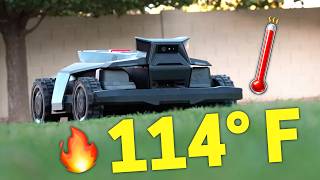

I'm Never Mowing My Lawn Again!
45sThe hook promises a life-changing solution to a common chore, sparking curiosity and engagement.
▶ Play Clip"Delivers on the promise of never mowing again, with real-world testing and honest pros/cons."
The video reviews the Segway Navimow X430 robot lawn mower in a real-world Arizona backyard, covering setup, mapping, performance, obstacle detection, and automation features. The creator shares both positive surprises and minor frustrations, concluding that it effectively eliminates manual mowing.
The creator lives in Arizona, has never used a robot mower before, and has questions about handling obstacles, extreme heat, and whether it truly eliminates mowing.
Rob from The Hookup recommended the Navimow X430 as the best robot lawn mower he tested, prompting the creator to request one from Segway for sponsorship.
Unboxing is straightforward but heavy. Includes charging dock, accessories, and an RTK antenna. Network RTK is recommended for most users and is free for life.
Dock needs clear line of sight to the sky. X430 is IP66 rated (dust/waterproof). Placed next to a detached shop; wheels handle curbs easily.
Initial app setup was confusing, but updating firmware fixed issues. Mapping can be done automatically or manually via remote control.
Manual mapping is fun but imprecise; every movement is recorded, leading to squiggly lines. Map shows ground image for accurate borders.
Drawing lines on the map is challenging. No-go zones exist but are often unnecessary due to good navigation with RTK and camera.
App requires manual mowing first because the robot is designed for frequent light cuts. It still worked well on long grass but edges needed trimming.
The X430 is almost silent and cuts grass extremely evenly, resembling fake turf. Uses two spinning discs with razor blades.
Height adjustable from 0.75 to 4 inches via app or on-robot screen. Creator chose 1.75 inches for Bermuda grass.
Front wheels turn 90 degrees for sharp turns without dragging, reducing grass damage compared to omni wheels.
Mowed 8,300 sq ft in under two hours, finishing with 27% battery. For larger yards, it auto-charges and resumes.
Camera detects up to 200 objects. It avoided the dog Annie and stopped quickly when she ran in front. Small toys may be chewed, but larger obstacles are avoided.
Camera detects tree roots and mows around them. All-wheel drive and dual suspension handle holes and 40° slopes easily.
Night mowing is off by default but can be enabled. Headlights automatically turn on; it mows in near darkness without issues.
Mowed the entire yard in 110°F heat without issues, unlike typical robot vacuums that need finetuning.
After initial mapping, the X430 requires no interaction. It's completely autonomous, which the creator finds almost sad.
Schedules can be set in the app, but copying/pasting schedules between days is not possible, which is frustrating.
Creating zones and channels works, but if the gate is closed, the robot won't notify when stuck. Moate automated gate is an optional solution.
Includes geofence alarm and rain sensor that pauses mowing. Smart home integration with Google/Amazon; Home Assistant integration is in alpha.
The creator enjoys perfectly cut grass daily, saving time and avoiding heat. Still needs occasional edging but overall is a high-quality flagship option.
The Segway Navimow X430 delivers on its promise of hands-off lawn care, handling obstacles, heat, and multi-zone yards with minimal intervention. Despite minor app quirks, it's a worthwhile investment for those with medium to large lawns.
What is the IP rating of the Segway Navimow X430?
IP66 (dust and waterproof)
01:38
How many objects can the X430 detect with its onboard cameras?
Up to 200 objects
06:54
What is the maximum slope the X430 can handle?
40 degrees
08:19
What is the cutting height range of the X430?
0.75 to 4 inches
05:18
Why does the robot require manual mowing before first use?
It is designed to mow frequently, taking off only small amounts of grass daily, so long grass must be cut first.
04:07
What is the battery percentage left after mowing 8,300 sq ft?
27%
06:12
What is the name of the automated gate that can be purchased separately?
Moate
10:49
What is the default setting for night mowing?
Off
08:34
Almost Silent Operation
The mower is nearly silent, a major selling point for residential use.
04:34Zero-Turn Maneuvering
Front wheels turn 90 degrees, allowing sharp turns without damaging grass.
05:45Extreme Heat Tolerance
Mows in 110°F without issues, proving durability in harsh climates.
09:01Hands-Off Operation
After initial setup, the mower requires no human intervention, a key convenience.
09:30Lifestyle Improvement
The creator saves hours weekly and enjoys a perfectly maintained lawn, highlighting the product's value.
11:58[00:02] in Arizona, is terrible. I've been wanting a robot lawn mower ever since we moved in. But I've never used one before because we had fake grass in our last house. So, I had a million questions. Will I have to baby it around things
[00:14] like kids toys, tree roots, and big holes in the ground? Can it handle extreme heat? And of course, the main question, will I really not have to mow my lawn ever again? We have a pretty goodiz lawn for our backyard. And Rob
[00:27] from the Hookup said the Navim Mo X430 was the best robot lawn mower he tested. "Yeah, I want that one. But just because it's the best on paper, how well is it I'm going to throw at it?" I reached out to Segue about using their Navimo X430
[00:44] to you and sponsor the video." So, thanks to Segue for supporting the channel, and I'm still going to show you my real experience using it, the good and the bad, starting with the setup. Unboxing it was pretty straightforward
[00:56] together. Just watch your back lifting it up. It's heavy. Also included in the box is the charging dock, some accessories, and a local RTK antenna. I was a little confused about the RTK antenna, like, do I need to set this up?
[01:11] Well, for most people, no. Segue recommends using the network RTK and cellular data if it's available. You know, like the signal from the sky. And don't worry, it's not an extra fee. It's free for life. So, of course, I'm going
[01:25] set up. Next, I had to decide where to put the charging dock. When I initially envisioned where the robot lawnmower would charge up, I pictured it under the patio. Well, the charging dock is supposed to be in a clear line of sight
[01:38] with the sky, you know, for a clear signal. And the X430 is IP66 rated, so it's dust and waterproof. That way, it can be out in the elements. But you can get a little garage to protect it. Cute, but I don't need that. I didn't want it
[01:51] anything or creating a trip hazard for our kids. So, I ended up putting it here next to my detached shop. I was worried it wouldn't be able to climb up the curb to charge, but clearly I underestimated it since the wheels have no problem.
[02:06] It's basically a small speed bump for it. In the box are these big screws that anchor down the charging dock so it doesn't move while docking or undocking and they work great. Now I was excited to have it map out the yard and have it
[02:18] start mowing, but the Navio app was being super confusing and I couldn't get it fully set up. Then I updated the firmware on the robot and everything started working fine. So if you're setting it up, don't panic. Just update
[02:31] the firmware. To map out my backyard, I could let it do it automatically or drive the robot around myself. I think it's fun to remote control robots. So, of course, I went with manual. I drove around the perimeter of the yard. And
[02:43] was done. If you're like me and don't drive it around perfectly the first time, you can always do it again later or fix a spot in the map by drawing a line. Now, drawing on the map sounds easy, but it's very challenging. Every
[02:58] little movement to adjust a point is recorded, so I always ended up with tons of squiggly lines. I do like how the map shows an image of the ground so I could make the border accurate between the grass and the curb or whatever. It's
[03:10] Maybe it's something Segue could update in the future. Of course, there are other options in the map that can be added like no go zones, but the X430 does an extremely good job navigating with a combination of the network RTK
[03:24] and onboard camera. So, I actually didn't need any of that, which I'll show you in a second. I was so excited to have a robot mow my lawn for me. I grew up here in Arizona and I mowed my parents lawn for years as a teenager. I
[03:39] can't tell you how many times I wished it was automated when it was over 110° outside like it is right now. So, I went to start the robot lawn mower and the app told me I'm supposed to manually cut the grass first. What? After all that?
[03:54] Are you kidding me? Well, I still had the robot lawn mower go around a little bit just to make sure at least it works. It did great even with the grass being pretty long. As you can see, the edge of the lawn still needs to be trimmed just
[04:07] like using a normal lawn mower. So, I edged the grass and manually mowed it. I bagged up a lot of cut grass, and that's why I have to manually mow it first. The robot lawn mower is designed to mow frequently, like every day, and only
[04:20] takes off the small amount of grass that grew from the previous day. That way there aren't any big grass clippings left on the ground and it kind of just disappears. Pretty amazing. Now I can finally send the X430 to mow the lawn.
[04:34] And there were two really big things that surprised me. One was how quiet it is. I had heard people say it was quiet, but this is almost silent. It was shocking. The other big surprise was how evenly it cuts the grass. The
[04:50] grass almost looks like the fake turf grass in my previous house for looking so perfect. Well, besides some of the dead dirt patches. We'll pretend those don't exist. But it was night and day different from my big lawn mower for how
[05:03] evenly the grass was cut. The X430 uses two discs with small spinning razor And it comes with replacement blades that you can swap out. It handled thick grass no problem and chomp through sticks, so it's plenty strong. I can
[05:18] adjust the mowing height in the app or even on the robot since there's a screen with some physical buttons. The range is 75 in up to 4 in. And I went with 1.75 in because I like the grass pretty short. I have Bermuda grass and I think
[05:33] zone can be cut at a different length, so it's very flexible for what you want. that sets apart the X430 from the other robot lawnmowers is the front wheels.
[05:45] They can basically turn 90 degrees for what Segue calls zeroturn maneuvering. So sharp turns around corners of my backyard are no problem. And since the wheels actually turn, they're not being dragged across the grass like omni
[05:58] wheels, allowing the X430 to do less damage to the grass when turning. Sweet. I was curious if this robot lawn mower could mow all our grass in just one charge. So I had it mow everything in the back and front, and the battery was
[06:12] at 27% when it finished. I'm happy it can do it all in one go, which it did in just under two hours. Not bad. Our actual lawn is about 8,300 square f feet, so much less than a full acre. And the way it can mow a full acre is when
[06:25] it runs out of battery, the robot automatically charges back up and then mowed. Just something to be aware of if you have a really large yard. Okay, so this is great and all, but what happens when the X430 faces off with my family?
[06:39] Especially my dog Annie. Look at her. She's putting her face in that sand castle toy and running around completely blind. She has to know that that's a bad decision. She's not going to do that again. Wait. Oh no. She's doing it again
[06:54] and almost runs into a tree. She is absolutely crazy and loves to chew our kids toys and leave them on the lawn. Segue says the X430 can detect up to 200 objects with its onboard cameras. Well, that little sand rake is a goner.
[07:10] Clearly Annie and the X430 have a similar taste for chewing on stuff. To ground, and I'll keep those things off the yard, but the bigger stuff is easily avoided, especially people and pets. Look how close Annie got to running in
[07:25] front of it. Let's rewind that. Pure lunatic. But hey, the robot stopped right away and would have not have hit her because it stopped so fast. The object detection works so well, it was actually difficult for me to film the
[07:39] to it and it would keep a safe distance away. That's why I'm not too worried about our 3-year-old walking up to look at the little black car that she calls it. Oh man. I was also worried about big tree roots sticking up and if it was
[07:54] just going to rip them to shreds, but the camera always detected the roots and carefully mowed around them. It's impressive that it can just figure this out on its own and I didn't have to mark anything on the map. There's also big
[08:06] holes in the ground thanks to Annie and tons of bunnies that come into our yard. Well, the X430 is all-wheel drive and dual suspension, so this is just a walk in the park for it. We don't have big slopes in our yard, but it can handle
[08:19] steep 40° slopes no problem. What about stone pathways? I was worried that the big stones would be treated as obstacles. Nope, it was just fine. There's a setting to have it mow at night or not. And by default, night
[08:34] mowing is turned off. And right when the sun is setting, it will finish for the day. So, I turned on night mowing and had it keep going. There are two headlights that automatically turn on and it had no issues mowing in nearly
[08:46] complete darkness. It finished and docked the same as if it was bright out. But what about the biggest hurdle? The Arizona heat. It's about 110 and scorching outside. Well, I sent that poor robot lawnmower out in the middle
[09:01] of the day while I sat in the air conditioning. It mowed and mowed and didn't break a sweat, finishing the entire yard in extreme heat without any issues. This was all shocking to me. I'm used to robot vacuums needing some extra
[09:16] finetuning so they don't get stuck or go where they're not supposed to go. But this wasn't the case with the X430. It's completely handsoff. Sure, I had to first mapping because it was popping up on the curb a little bit, but after
[09:30] that, no interaction for me. It's like it doesn't need me. It's kind of sad. environments, but what about automating the X430 to run every day without me
[09:42] lifting a finger? In the Nav'iMo app, I can set a schedule to mow all the zones or a specific one at a certain time and day of the week. The most frustrating thing is that I can't copy and paste the schedule from one day to the other. It
[09:56] that I've used that doesn't have this feature. Like if I wanted to mow every day at the same time, but I changed my mind and wanted to mow an hour earlier, mind and wanted to mow an hour earlier, I have to edit each day. Come on. I was
[10:09] curious how it was going to mow the front and the back. In the app, you can add a new zone and I just remote controlled it over to the front grass and it created a channel for me. basically a path the robot can go to and
[10:22] from a zone. So to mow the front, I had to open up the gate and let it out. But here's the kicker. When the X430 is done with the front lawn zone, it heads back on that channel to mow the back. Well, if the gate is closed, it won't notify
[10:35] me that it finished the front zone or that it's stuck waiting to get back. I just have to keep an eye on it in the app, which is not ideal. The other option is Moate. And no, it's not a controversial thing like water gate or
[10:49] deflate gate. Moate is an automated gate that can be purchased separately which can let the robot go to the front and back all by itself. It'll even wait till your pet is not around so it can't escape. Pretty cool. There are also some
[11:01] anti- theft features. You can set an alarm if it goes outside a geoence or if notification. This might be controversial, but I would like an option where if someone was trying to steal it, it would turn on the blaze to
[11:15] one's going to want to try to seal it with that and lose some fingers. I doubt little rain sensor that can automatically stop mowing if it's raining. Then it will start mowing again after a certain time you set. As for
[11:30] smart home compatibility, it works with Google and Amazon. There is a hacks integration for home assistant, but it's in alpha. So, I'm probably going to wait because right now I'm pretty happy with it just mowing the lawn every day at the
[11:43] same time. And it has been such a relief not having to mow out in the heat. The weather station in our backyard said it felt like 116° outside. And watching the X430 m the grass from the nice inside air conditioning felt pretty good. I'm
[11:58] beating the system. Sure, I still have to edge the grass every once in a while, but that doesn't take long. And it's crazy to look out in our backyard and see perfectly cut grass every day. I enjoy our grass way more now that it's
[12:11] always the perfect length and never overgrown. No more blocking out a few hours a week to mow the lawn. Now I can spend that time with my family or doing other things. So overall, the X430 is a super high quality flagship option. And
[12:24] now that it's set up, it doesn't require any effort for me. If you have a larger great lawn mower. I'll have links to everything down in the description, and thanks for watching. >> Hey, I thought you were going to walk
[12:38] >> I'm walking the dog right now. >> Wo! Hey, that's really smart.


⚡ Saved you 0h 12m reading this? Transcribe any YouTube video for free — no signup needed.