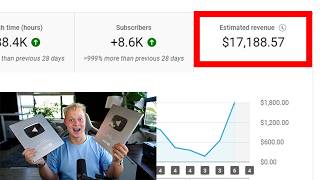

Faceless Channel Made $10K in First Month
44sThe impressive income claim in the first month hooks viewers interested in making money online.
▶ Play Clip"The title promises a full breakdown of a $17,188 month, but the video actually shows a $10,000 month and spends significant time on self-promotion and tool demonstrations."
This video provides a step-by-step breakdown of how a faceless YouTube channel earned $10,000 in its first month by leveraging AI tools like ChatGPT, Claude, and Jenni AI Pro. The creator, Stefan, demonstrates how to replicate the channel's success by identifying a profitable niche, generating video ideas, writing scripts, creating voiceovers, and designing thumbnails using AI.
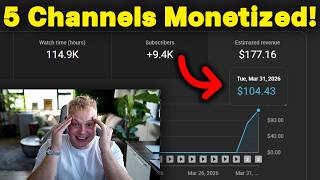
A faceless channel started 1 month ago, with the first video getting 82,000 views and the most popular video reaching 430,000 views. The channel earned roughly $10,000 in its first month.
The channel received 1.7 million views in the first 30 days with a $5.40 RPM, resulting in almost $10,000 in earnings.
Stefan claims to have made $42,000 with two videos, scaled a channel from zero to $48,000 in 30 days, and helped students earn $31,000, $24,000, and $12,000 in single months.
The videos are made with VidRush, a tool for creating faceless videos, but Stefan prefers traditional YouTube automation methods to avoid inauthentic content issues.
The channel posts about forgotten American weapons. Stefan suggests replicating this content style for other countries like the UK or Germany to find new opportunities.
The videos are relatively easy to create, mainly using footage and still images, making them accessible for beginners.
Stefan uses a mix of ChatGPT and Claude to generate video ideas. He provides a prompt to Claude, along with screenshots of the channel's popular videos, to get new topic suggestions.
Claude generates a title: '25 outlawed pocket weapons every Civil War soldier sewed into his coat lining.' This becomes the chosen topic for the demonstration.
Stefan uses Claude to write a script by providing a prompt, a reference transcript from a competitor video (obtained via YouTube transcript to transcript.com), and the chosen topic.
The script is 4,000 words long, and Stefan is satisfied with the quality, noting that Claude can write the entire script in one go.
Stefan recommends using Jenni AI Pro for voiceovers, especially for beginners, as it is cheaper than 11 Labs. He demonstrates copying the entire script and pasting it into Jenni AI Pro to generate the voiceover.
Jenni AI Pro offers a million credits for $22, making it significantly cheaper than 11 Labs, which costs around $330 for similar usage.
Stefan advises hiring a video editor, possibly on Upwork, but notes his own Upwork account was banned. He suggests finding editors through personal brand or coaching programs.
Stefan uses ChatGPT for thumbnail design, providing a prompt to generate a thumbnail in the style of the competitor channel. He notes that AI-generated thumbnails are improving and can be used effectively.
After creating the video, upload it to YouTube and continue the process. Stefan recommends targeting a different country than the US to find a less saturated market.
The video demonstrates a complete workflow for creating a faceless AI-powered YouTube channel, from ideation to publishing, using tools like ChatGPT, Claude, and Jenni AI Pro. The key takeaway is that replicating a successful niche in a different market can yield significant revenue with relatively low effort.
How much did the faceless channel earn in its first month?
Roughly $10,000.
00:01
What is the RPM of the channel?
$5.40 RPM.
00:29
What tool is used to create the videos on the channel?
VidRush.
01:23
What strategy does Stefan suggest for finding a new niche?
Take a successful US niche and replicate it for a different country like the UK or Germany.
02:20
What is the example video title generated by Claude?
25 outlawed pocket weapons every Civil War soldier sewed into his coat lining.
06:17
What website does Stefan use to get transcripts of competitor videos?
YouTube transcript to transcript.com.
07:09
How many words was the script generated by Claude?
4,000 words.
11:32
Which tool does Stefan recommend for voiceovers for beginners?
Jenni AI Pro.
11:46
What is the cost of a million credits on Jenni AI Pro?
$22.
13:34
What does Stefan suggest for finding a video editor?
Hire a video editor on Upwork or through a personal brand.
13:48
What tool does Stefan use for thumbnail design?
ChatGPT.
14:29
Revenue Breakdown
Provides concrete numbers on views and RPM, showing the potential earnings of a faceless channel.
00:29Niche Replication Strategy
Offers a practical method for finding new opportunities by adapting successful content to different markets.
02:20AI Script Generation
Demonstrates a repeatable workflow for using AI to write scripts, saving significant time.
06:31Cost Comparison of Voiceover Tools
Highlights the cost difference between Jenni AI Pro and 11 Labs, helping beginners choose a budget-friendly option.
13:34AI Thumbnail Design
Shows how AI can be used to create thumbnails, reducing the need for graphic design skills.
14:29[00:01] right here has started just 1 month ago. The first video got like 82,000 views as we can see here and the most popular video has now 430,000 views. But that's not the best of it. This channel made roughly $10,000 in the first month of
[00:16] starting and in this video I'll show you guys exactly how you can replicate their guys exactly how you can replicate their success with ChatGPT and Claude and some kind of other AI tools. You will see everything in this video. So this
[00:29] channel has gotten 1.7 million views in the last 30 on the first 30 days with a the last 30 on the first 30 days with a $5.40 RPM. That's almost $10,000 in the first month of starting this channel. All right? Now for the people who don't
[00:43] know who I am, I'm Stefan, 23 years old, currently making around about 30 to 40,000 dollars a month and constantly starting new channels. That's also how I find these niches constantly because I'm doing niche research to start new
[00:55] channels. All right? Um I've made $42,000 with two videos as we can see right here. Then I've scaled up a channel from zero to $48,000 in just 30 days and I've helped hundreds of other people do the exact same thing.
[01:09] For example here Martin's with help to scale to $31,000 in one single month. Then here this student here $24,000 in one single month. Here $12,000 in one you're interested in getting the exact same results, check out the first link
[01:23] you to build your faceless YouTube channel. Go ahead and book your call and we will build it together. Now first thing, I can see that these videos are made with VidRush. You guys do not have to tell me that the videos are made with
[01:38] VidRush. All right? Every or most of you guys, like if you have been in the YouTube automation space, there is a tool called VidRush. All right? This is a tool that can basically create videos exactly like this. Now I would I
[01:52] personally don't use VidRush. All right? I still run my channels the traditional way of doing YouTube automation because I just think it's the safest way of the reason why none of our students have been hit
[02:06] with inauthentic content, right? Because we run channels the traditional way, all of the way. Now, the first thing we're going to do is we're first going to look at this channel and kind of figure out what exactly they're doing. So, they are
[02:20] posting videos about here forgotten American weapons. Now, what we can do is we can take this exact same kind of content style or content idea and just move it to something else, for example, UK or whatever kind of kind of
[02:35] We're just going to replicate exactly this and you can you can that you can then go ahead and do this in any kind of uh for any kind of other country you let's have a look at the videos. We can firstly see the videos are quite long.
[02:51] kind of figure out like, "Hey, how difficult are these videos to create?" I difficult to create. It's like mainly, you know, footage and then, you know, images and stuff like that. Here just as an example, still images. So, not too
[03:08] too difficult to create, all right? All right. So, first thing we need is some video ideas, all right? For that, we actually go ahead and I have these community which I'll put's link in the video description. Inside there, I'll
[03:21] link all of the prompts for you. So, we're actually going to use a mix of ChatGPT and Claude today, which is going to be interesting. So, firstly, we're going to post our prompt inside here. So, pretend you are a YouTube guru and
[03:34] faceless channel expert. Write me a prompt to copy this style of videos. I want the perfect ideation model. Write me video ideas based off the outlines that performed well on their channel. Target clickbait and CTR. Write me the
[03:48] Now, I just have to change this. I usually always use ChatGPT, but I just want to show you that I can do this with any kind of AI. All right, I've been testing Claude more and more. I like it. All right. So, firstly, we're going to
[04:03] make a screenshot of all of these videos and paste it inside there because we we need to give Claude or any kind of AI the most popular video topics for the AI to then give us or write us a prompt to you know, give us
[04:21] new video ideas based on the ones that have gone pre-viral already on the to work with that. So, let's see what they are doing. As I've said, if I would
[04:33] go into this niche, I would not go ahead and do it for America again. I would do it for different kind of country, like for example, the UK, Germany. All of for any country and that's like the easiest thing you can do is take
[04:48] something that is working in for the uh US market, take that and move it to a different market. Easiest thing you can do. All right. Easiest way to find a new this to to load and then I'll get you guys back.
[05:02] All right, here it's going. So, here is it's going me it's giving me like the whole uh prompt here now that I'm going to give back to it. As I've said, this is the first time I'm actually doing this with Claude. Normally, I do these
[05:15] kind of things with ChatGPT, but I want to test out Claude. I want to make it um as as how do you say it? As authentic as possible. Guys, I'm also testing out some new things. All right. So, let's see. Here's the prompt. What is it
[05:30] saying? I noticed your message cuts off mid-prompt. Okay. So, it is Let me whoop whoop whoop. Let me just go back. First time I'm doing this. guys back. All right, it seems to be correct now.
[05:45] So, what we are going to do now is we're going to copy this and then I am going to paste this inside here. Boom. Now, it should Damn, it still didn't give the whole prompt, I think. Not completely sure. I think that man,
[06:00] >> [clears throat] >> All right, now we have our titles here looks pretty good. Like I said, first time using Claude for this. Looks pretty good. Uh it really looks good. So, here 25 outlawed pocket weapons every Civil
[06:17] 25 outlawed pocket weapons every Civil War soldier sewed into his coat lining. So, this is super cool. We're going to take the first video topic um and just roll with that. So, the next thing we need is a script, all right? For that,
[06:31] Claude. Like I said, for this video I'm going to test Claude. Now, the prompt is very simple. Um here's a faceless YouTube automation niche I want to copy. Pretend you are a professional script writing genius and guru. These are the
[06:44] best performing videos so we can replicate replicate their success and virality. Using the script I'm going to provide you as a reference, write me a prompt to give Here, let me just put here to give Claude to write me a script
[06:57] for this topic and so on. So, now we're going to go ahead and we are going to going to go ahead and we are going to paste Let's actually open a new chat, all right? We're going to open a new chat, paste this inside here. Then now
[07:09] we need a like a transcript of for example this video. So, I'm just going video link. Copy and then we are going to YouTube transcript YouTube to transcript.com. I always use this website. For me it works
[07:24] to just going to go ahead, copy the transcript, boom, go to um here Claude again, paste it inside here and we're going to send it off. So, now again, it's going to write us a a prompt that we can give
[07:39] Claude to then write us the script, okay? Going be very, very uh interesting to see what it's going to do. So, I'm already going to open Google Docs for us so we have that ready and can just copy and paste our script inside here, all
[07:53] right? So, let me know if you want me to do more of these kind of videos testing out new things and, you know, just kind of showing how I do it and I like to make the videos raw like I do with this video here because then you can see
[08:06] that, you know, I also am testing out new things. I also am you know, struggling sometimes with AI. It's completely normal. But yeah, I'll get you guys back once this has um loaded and it's done. Um don't want to
[08:19] stretch this too long. So, here's actually writing us the prompt, but I'll get you guys back in a second. All right, it's done. It looks pretty good to be very honest. It even states like, "Hey, how many words it should write."
[08:31] Everything. On ChatGPT, I usually have to do that myself. So, what I'm going to do is I'm I'm going to copy all of this now, okay? Your task. Da da da. And then, all right. So, I'm just going to copy all of
[08:46] this, go down, copy everything, boom, until here. And then, okay, now it's not sure why it's Okay, should be okay. Then I'm also it's Okay, should be okay. Then I'm also just going to copy the uh transcript of
[08:59] that video and we are just going to paste it inside here. Now it has the prompt and the transcript. Has both things. So, we're just going to send it off and see what it does. Like, I'm actually pretty excited to see what it
[09:11] does. But this is how quickly you can actually write scripts with AI. I mean, I'm now 9 minutes into the video, spoke about some other things, and, you know, we already have a brand new video topic which looks pretty promising. And then,
[09:24] going to have a We're going to have our script very soon. So, let's wait for that. All right, so it now starts writing the script a little bit different to how ChatGPT writes it, but it looks good. As far as I know, like
[09:37] the cool thing with Claude is that it can completely write the whole script for you. The only thing with Claude that I realized is, you know, okay, I had the Max plan already, but you quite need a bigger plan to write a bunch of scripts
[09:50] with Claude, but as far as I know and heard from, you know, a bunch of, you know, my students as well, because everyone is always testing new things, kind of figuring out new kind of, you know, ways to to make
[10:04] everything better. And that's why it's so cool to be in a group of people that all going to the same direction. That's exactly why I do the coaching and why I do all of these things, you know, to be in a in a environment where, you know,
[10:17] everyone is testing out new things. Everyone is sharing their wins. Everyone that just pushes everyone in the group to crazy milestones, right? So, if you're, you know, interested in working close with me, joining that group, then
[10:31] let me know. Um click the first link in the video description. Book a call with me. Get surrounded by the right people. Um have the right strategy, and let's scale up your channel, and then I'll get you back once this is done and dusted.
[10:46] actually pretty surprised and quite happy because I could read through it already a little bit, but it seems to be very, very good actually. So, in autumn of 1862, a pri- uh private in the Okay.
[11:01] can pause the video and read through all of that. But I can just click here on copy and then paste it inside here. Boom. Why is it not pasting? Let me see. Okay. Now we have our whole script here from number 25 to number one. Super,
[11:16] super cool. Let me just check how many words this is. Um boom. Word count. Always want to see and see how accurate it is actually with that one. Um let me see. No, this word counter is not good. Word counter. Boom.
[11:32] And let's click on that, paste it inside here. All right, 4,000 words. Amazing, amazing, amazing. All right, so now we have our script. It looks very, very good. The next thing we actually want to do is we want to generate the
[11:46] generate with Jenni AI Pro, or we can also use 11 Labs, all right? If you're just starting out, I would highly recommend you to use Jenni AI Pro because it's just going to be way cheaper. So, what you can do is
[12:01] you go to your competitor channel, you take a listen at the voice over, and is. >> Kentucky walked home from the night >> So, here we can now hear it is a older voice, all right? What we do then is we
[12:13] actually click on there, all right? If we If we're using Jenni AI Pro, we can click on on here to choose a voice, and then here we can now go to filters, and then just click male, and it's a older older male, and then apply filters, and
[12:27] here we can now hear, like we can take a listen to the voice overs. So, let's >> Conservatives cherish the act >> Not the best one. Let's take a listen to grow in >> It's okay. That one was actually not too
[12:40] listen to this one. >> Every song has a backstory. >> Perfect. I would say this one is even perfect. What you do then is, and that's a cool thing with Jenni AI Pro, link it in the video description as well. You
[12:53] can literally copy the whole script, and you can just go ahead and paste it whole script, right? So, you don't have to go and do part, part, part. Copy the whole script, click on create voice, and it's going to create the voice over for
[13:07] create only this small part. Don't want to waste too many credits. One thing to waste too many credits. One thing about Jenni AI Pro though is that it it all right? So, let's take a listen here.
[13:20] Okay, I actually didn't change the voice, so I'll leave that for now. But, a million credits is only $22. So, it's like $40 to get 2 million credits, which on 11 Labs is like $330. So, Genny Pro
[13:34] way cheaper than 11 Labs, all right? Then, the next thing we need to do is we actually need to put the video together. Now, for that, I would always highly recommend you to hire a video editor, all right? A video editor
[13:48] you can you can hire a video editor on Upwork, okay? Now, super easy. My Upwork account got banned because I was, you know, sent my number on there and reported me. So, I can't use Upwork at the moment. That's why I'm only hiring
[14:03] through my YouTube personal brand the whole time. Works amazing. Found some super awesome editors through my YouTube personal brand. And the cool one-on-one with me, you actually get direct access to our editors. So, we
[14:16] have to go through the whole hiring process and all of these things. We make your life easy, all right? Then, next up we need to go ahead and we need to create a thumbnail, all right? Now, for
[14:29] the thumbnail design, we I would use ChatGPT now because with image generation. It's always just getting better. pretend you are a professional YouTube thumbnail designer. Write me a prompt to
[14:44] copy this exact style of thumbnails. For the video topic, then we're just going to give it the video topic here. Boom. Like that. We're just going to paste it Then, we are going to go ahead and just get
[14:57] again. again. Boom. All right. Then, okay. Boom. Let me paste Okay, I didn't paste the first
[15:10] again. All right. I just want the thumbnails and then it's now going to give us a prompt to one. Now, for the channel name, for the logo,
[15:25] for all of these things, you can use ChatGPT as well. All right? Super easy. Super easy. And it's getting really good at creating logos, channel names, um yeah, thumbnails as well. Let's see how it does this one.
[15:38] how it does this one. All right. Boom. Let's copy this prompt. paste it inside there and see what it does. Like, sometimes AI does a amazing job. And the cool thing is, with AI, you
[15:50] anymore. You can use AI to create your thumbnails. All right? Not the most difficult thing. So, let's wait for this to to continue. All right. So, the thumbnail creation is done and
[16:02] it actually looks good. Like, it it could look a bit more realistic, but otherwise this thumbnail looks extremely good. All right? For Imagine, like, this is the first try that we tried to do this thumbnail. And if you guys go back
[16:16] a little bit, like, to my videos maybe in December, you will see how like, how I was still struggling to create the thumbnails with ChatGPT. Now, it's way better. It's getting really, really good. So, yeah. What you do now is you
[16:29] get the video, you upload the video to YouTube, and you just continue that. You I've explained so many times in my videos. And, you know, you look if the I would recommend for you is I would actually do this for a completely
[16:44] So, I wouldn't do American. I'd do UK, Germany, any kind of these countries. And, you know, there you have your first channel. So, yeah. Put it to work. Like, know, get your channel up and running. And if you need any help with that, then
[17:00] description. Let's scale your channel from $200 to $400 a day, or even here to $4,000 a month, or here eight to $8,000, or even to $18,000 a month. So, check out the first link in the video
[17:13] with that being said, I'll see you guys in the next video.
⚡ Saved you 0h 17m reading this? Transcribe any YouTube video for free — no signup needed.