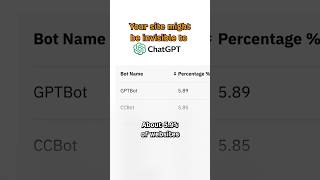

5.9% of Sites Block ChatGPT by Accident
30sShocking statistic about millions of websites unintentionally harming their own AI search visibility grabs attention.
▶ Play Clip"Delivers exactly what the title promises—a quick, actionable tip with a clear call to action."
This video reveals that approximately 5.9% of websites are unintentionally blocking AI search bots like ChatGPT and Claude. Many sites inherit restrictive robots.txt rules from templates or platforms like Cloudflare, making them invisible to AI-powered search. The video provides a quick tip to check and fix this issue.
About 5.9% of websites are inadvertently blocking ChatGPT and other AI search bots due to inherited robots.txt rules from templates or platforms like Cloudflare.
Go to yourdomain.com/robots.txt and look for GPTbot, ClaudeBot, Google-Extended, or OAI-SearchBot. If any have a 'disallow' directive, your site is blocking that AI platform.
Blocking AI bots means those platforms likely won't read or recommend your content, reducing your visibility in AI search results.
Checking your robots.txt file is a simple but crucial step to ensure your website is accessible to AI search engines, preventing accidental loss of referral traffic.
What percentage of websites are accidentally blocking ChatGPT?
About 5.9%
Which AI bots should you check for in robots.txt?
GPTbot, ClaudeBot, Google-Extended, and OAI-SearchBot.
What is the consequence of blocking AI bots?
Those AI platforms likely won't read or recommend your content.
What action should you take if you see 'Disallow' for an AI bot?
Remove or modify the directive to allow crawling.
Accidental Blocking Stat
Reveals a significant percentage of websites are unintentionally invisible to AI search.
Actionable Check
Provides a simple, immediate step any website owner can take.
Impact on Visibility
Highlights the concrete consequence of blocking AI bots.
About 5.9% of websites are accidentally blocking ChatGPT from crawling them. That's millions of sites invisible to AI search, and it's probably not on purpose. A lot of sites inherit robots.txt rules [music] from templates. Like, if you're on Cloudflare, they have a feature that's now on by default that tells AI bots to stay away from your content. So, here's a quick tip to check if you're blocking ChatGPT and other AI search bots. Go to yourdomain.com/robots.txt. Look for
GPT bot, Claude bot, Google extended, or OAI search bot. If you see disallow next to any of those, you're asking that AI platform not to read your site, which means it probably won't recommend that page.
⚡ Saved you time reading this? Transcribe any YouTube video for free — no signup needed.