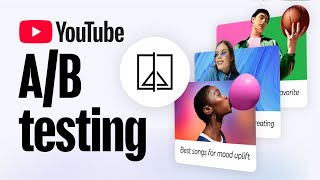

How to A/B Test Titles & Thumbnails
50sDirectly addresses a common creator pain point with a clear how-to, making it highly actionable and shareable.
▶ Play Clip"The title perfectly matches the content, which is a straightforward tutorial on YouTube's A/B testing feature."
YouTube's A/B testing feature allows eligible creators to test up to three video titles and/or thumbnails to determine which combination generates the most watch time. The feature is available on YouTube Studio for public, long-form videos and provides statistical results to help optimize video performance.
YouTube's A/B testing lets creators choose up to 3 titles and/or thumbnails to test with viewers to pick the winner.
Eligible creators can use the feature via YouTube Studio desktop when publishing a new video or on an existing video's Video Details page.
Creators can choose between Title only, Thumbnail only, or Title and Thumbnail combination tests.
Up to three titles (under 100 characters each) or three thumbnail images can be tested. For combinations, three title-thumbnail pairs can be tested.
A/B testing is only for public, long-form videos. The test starts once the video is published.
YouTube shows the options evenly across the audience and selects a winner based on which generates the most watch time share.
Creators can check the test status on the Video Details page under 'View test report', showing time left and performance.
Results may take a few hours to a couple of weeks, depending on how similar the options are and the video's traffic.
If statistically significant, a 'Winner' label appears and YouTube automatically updates the video. If 'Performed Same', the first option is selected.
Creators can always manually select the title and thumbnail, or run a new test (which deletes the old experiment).
Titles and thumbnails must follow Community Guidelines. They should work together and help viewers understand the video content.
Start with a limited selection of older videos, then test recent videos for meaningful insights. Test thumbnail variations with different layouts and elements.
Use balanced images with a focal point, high contrast, minimal text, and consider depth of field and blank space.
YouTube's A/B testing feature helps creators optimize titles and thumbnails by providing data-driven insights. By testing variations, creators can improve click-through rates and overall video performance.
How many titles can you test in a single A/B test?
Up to three titles.
0:35
What is the character limit for titles in A/B testing?
Under 100 characters.
0:35
What metric does YouTube use to determine the winning thumbnail?
The one that generates the most watch time share.
1:08
What does the 'Performed Same' label indicate?
All test options had similar watch time performance.
2:06
Can you run a new A/B test after a test is complete?
Yes, but it will delete the old experiment.
2:24
What types of videos are NOT eligible for A/B testing?
Videos designated as made for kids, for mature audiences, or live videos.
2:41
Test Mechanism
Explains how YouTube evenly distributes test options and selects a winner based on watch time share.
1:02Performed Same Result
Clarifies that if no clear winner, the first option is selected, giving creators control.
2:06Purpose of Titles and Thumbnails
Emphasizes that they help viewers understand the video, not just get clicks.
2:47Thumbnail Design Tips
Provides actionable advice on balance, contrast, text, and depth of field.
3:34[00:00] Not sure which title or thumbnail to use?
[00:02] Try “A/B testing,” a feature that lets you
[00:08] thumbnails to test with viewers to help
[00:12] Eligible creators can use the “A/B testing”
[00:17] when publishing a new video, or with an
[00:22] click the icon under the ‘Title’ section
[00:26] choose if you want to run a Title
[00:31] or a Title and Thumbnail test.
[00:35] to three different titles to test.
[00:39] For thumbnail only, you can upload three
[00:44] prefer. For title and thumbnail, you can add
[00:50] After you’ve added your titles, thumbnails or
[00:55] only available for Public, long form videos, and
[01:01] Here’s how the test works:
[01:02] YouTube will show your chosen titles and/or
[01:08] and will select a winning thumbnail based on
[01:13] You can check the status of your test at
[01:17] page and clicking “View test report”
[01:22] You’ll see how much time is left for the
[01:26] also choose to stop the test and manually
[01:30] If you let the test run, the results
[01:35] of weeks to be finalized.
[01:37] the results is affected by factors like:
[01:43] are (the more they differ, the
[01:46] And your video traffic (the more
[01:49] the faster your test will finish)
[01:52] the test report will show the results
[01:57] you’ll see a “Winner” label. YouTube will
[02:01] thumbnail to this winner when the test is done.
[02:06] This result indicates that all test options had
[02:11] clear winner, or if the options “Performed
[02:15] will be selected and shown to your audience.
[02:20] up to you – you can always manually select
[02:24] You can also choose to run a new test, but
[02:29] Now let’s walk through some things
[02:33] using the “A/B testing” feature:
[02:36] our Community Guidelines, and the tool will
[02:41] made for kids, for mature audiences, or live.
[02:47] an important purpose beyond getting viewers to
[02:52] video is about so that they don't waste
[02:56] Remember that your title and thumbnail should
[03:01] testing title and thumbnail combinations
[03:05] viewers understand what your video is about.
[03:10] a limited selection of older videos for
[03:15] recent videos you think will provide the most
[03:19] We also recommend testing thumbnail
[03:23] layout compositions and changes to thumbnail
[03:28] object placement) to learn which resonates most
[03:34] Ensure your images are balanced, with a focal
[03:39] Utilize high contrast, allowing
[03:43] the background in both light and dark mode.
[03:49] impactful, while too much text can be
[03:53] And finally when it comes to depth of field, keep
[03:58] We hope the A/B testing feature will help you
[04:03] and thumbnails, and help your overall video
[04:07] check out the links below. Thanks for watching!
⚡ Saved you 0h 04m reading this? Transcribe any YouTube video for free — no signup needed.