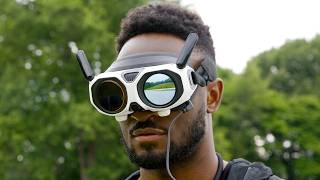

This Drone Has NO Gimbal!
45sThe opening visual of an unconventional drone and the claim 'no gimbal' immediately challenges viewer expectations, sparking curiosity.
▶ Play Clip"The title accurately reflects the content: the drone is indeed a new take on drones, emphasizing fun and 360 capture."
The Anti-Gravity A1 is a unique drone that integrates a 360-degree camera system, allowing users to focus on creative flying rather than precise framing during flight. Post-capture, users can reframe footage to hide the drone itself. It emphasizes fun and accessibility, offering features like automated subject tracking and an immersive FPV experience.
The A1 looks different from typical drones; it's not just a tool for aerial footage but also a fun experience.
Two lenses (top and bottom) capture 360 video, eliminating the need to control a single camera while flying.
With goggles and a joystick, users can start flying immediately; framing is done later in post-production.
Includes Sky Genie (auto orbit), deep track (follow subject), and invisible drone stitching via Insta360 X5 sensors.
8K 360 video at 30fps, 249g weight (regulatory compliant), obstacle avoidance, auto return to home, replaceable lenses.
Standard 24-minute battery (with 39-minute extended option); battery anxiety reduced due to post-shot framing.
20GB internal storage; goggles have 90° FOV, per-eye resolution 2560x2560, pass-through, and exterior screen for others.
Single joystick instead of two sticks; intuitive for flying without camera moves; includes picture-in-picture for forward view.
First-time users can become confident within an hour; Andrew from the studio showed rapid improvement from first to last shot.
Record a flight path and let others experience it live via goggles; recommended to have them sit down on first try.
Stitching may cause a slight smudge on the horizon; goggles may look unusual in public; extra top strap would improve comfort.
Working on goggles with ring remote and gesture controls.
The Anti-Gravity A1 redefines drone flying by prioritizing fun and creativity, making it accessible to beginners while offering powerful features for content creators.
What is unique about the anti-gravity A1’s camera setup?
It has two lenses (top and bottom) that capture 360 video, eliminating the need to control a single camera while flying.
01:03
What resolution and frame rate does the A1 record 360 video at?
8K at 30 fps.
03:08
What is the weight of the A1 and why is that number important?
249 grams, which is the regulatory limit for drones in many regions without additional restrictions.
03:20
How does the A1 hide itself in footage?
Through stitching—the two lenses' images are combined to make the drone and propellers invisible.
02:04
What is SkyPath and how does it work?
A feature that records a flight path; another person can then wear goggles and experience that path live in 360.
07:15
What is the field of view of the goggles?
90 degrees.
05:13
Fun factor emphasized
The video asserts that the drone is not just a tool but a fun experience, which differentiates it from typical drones.
00:37Invisible drone stitching
Technical capability that removes the drone from footage, a key selling point for clean shots.
02:17Quick learning curve
Demonstrates that even beginners can become proficient within an hour, lowering the barrier to entry.
06:50[00:00] This video sponsored by Anti-Gravity.
[00:09] So, this here is called the Anti-Gravity
[00:11] A1. It is a drone, but it looks a bit
[00:14] different than what we've come to expect
[00:16] from drones. Now, I'll be the first to
[00:17] admit, while I've made two or three
[00:18] drone videos in the past, I'm not an
[00:19] expert. To me, drones are really, really
[00:22] good tools. And so, they're very
[00:24] expensive, but they're they're really
[00:25] useful for someone who has a specific
[00:27] type of shot, a type of footage that
[00:29] they're trying to get. But, this A1,
[00:31] this is a little different from any of
[00:32] the other popular drones that I've seen
[00:33] or tried, and it's the reason I want to
[00:35] showcase it, because after using it,
[00:37] it's not just a tool to get aerial
[00:39] footage, but it's also just
[00:41] fun. Like, it's just a straight-up like
[00:42] fun experience to just go out and fly
[00:44] it. So, this is a genuinely new,
[00:46] interesting take on something that was
[00:48] already pretty awesome. So, I was
[00:49] intrigued. Also, a reminder, they're
[00:51] sponsoring this video, so I'll be going
[00:52] over my experience and even some
[00:54] feedback for them by the end, too. So,
[00:56] A1 doesn't have a normal camera [snorts]
[00:59] gimbal, like you might expect from a
[01:00] drone. Instead, it has these two lenses,
[01:02] one at the top, one at the bottom. And
[01:04] that's because instead of having to
[01:05] control a singular camera while flying,
[01:07] the Anti-Gravity A1 is essentially a 360
[01:10] camera that's capturing all angles, all
[01:12] the time, that happens to be able to
[01:14] fly. We've had 360 cameras, stuff like
[01:17] this, uh for years. And the whole point
[01:19] of these is they're super versatile. So,
[01:21] they're always recording everything
[01:22] around them in 360 all the time, and all
[01:24] you have to do is just kind of get the
[01:25] camera into position, and then you don't
[01:27] have to worry about framing, you just
[01:28] kind of do your thing, live that
[01:30] experience, and then later you can go
[01:32] back and frame it exactly how you want.
[01:34] So, when these started getting really
[01:35] good, that's when people started getting
[01:37] really tricky with them, doing stuff
[01:39] like spinning them around on a string,
[01:41] or throwing them, or putting them up on
[01:43] these huge selfie sticks. So, now the
[01:45] big unlock is
[01:47] it can fly. So, because of all that, you
[01:49] can now just grab this A1, grab these
[01:51] goggles, and this joystick, which I'll
[01:53] talk about in a minute, and just start
[01:54] flying. And as long as the subject you
[01:56] want to capture is generally nearby, you
[01:58] just worry about getting creative with
[02:00] the flying, and then you can do all the
[02:02] framing in post when you get home. And
[02:03] then just like the 360 cameras have that
[02:05] like invisible selfie stick feature,
[02:07] these sensors and lenses are actually
[02:09] the same as the Insta360 X5. So, through
[02:11] stitching, it makes the drone itself and
[02:14] the propellers completely invisible in
[02:16] your final footage. And then they've got
[02:17] a bunch of other great features like Sky
[02:19] Genie that can automatically orbit a
[02:21] subject that you select in your goggles.
[02:23] And my favorite, Deep Track, since I
[02:25] think really drones and car shoots go
[02:27] hand in hand. Basically, you can fly in
[02:29] a straight line, and then all you have
[02:30] to do is try and match the speed of the
[02:32] car as best you can, and Deep Track will
[02:35] pick up the car and frame your subject
[02:37] without having to do any keyframing.
[02:39] And then since it's a 360 camera,
[02:40] there's also some more creative ways to
[02:42] use the video you're capturing that work
[02:44] better on social media platforms like
[02:45] these floating orb shots. Would you find
[02:48] a ton of use for this? No, probably not,
[02:50] but it's still a cool idea to see some
[02:52] weird perspectives like this. So, as a
[02:54] tool for a video creator, it already
[02:56] feels like a game-changer that you don't
[02:57] have to get the exact shot perfect in
[02:59] the moment. You can just focus on
[03:00] getting creative with the positioning.
[03:02] That is pretty sweet. Uh the orb of
[03:05] recording 360 is 8K at 30 FPS, the
[03:09] correct frame rate.
[03:10] And so, you can't take like a 8K
[03:12] screenshot, but you can get pretty
[03:13] creative and have a good amount of
[03:15] flexibility with where you want to frame
[03:16] stuff up. The A1 is 249 g, which if
[03:19] you've been into drones long enough
[03:21] before, you've heard that number, and
[03:22] that's exactly where it has to be to be
[03:24] regulatory compliant almost everywhere.
[03:26] And it has obstacle avoidance, it has
[03:28] navigation assistance, auto landing
[03:30] gear, payload detection, and auto return
[03:33] to home, which I've used quite a few
[03:34] times cuz you might get a little
[03:35] overconfident in how far away you can
[03:37] fly. The lenses are replaceable, so if
[03:39] you do get in an accident, that's much
[03:41] easier to fix than a whole gimbal. Uh
[03:43] and there's also anti-gravity care, so
[03:44] it'll cover things like flyaways or
[03:46] water damage or anything else like that.
[03:48] Now, the weak spot for almost all drones
[03:50] in my opinion has been battery. You
[03:52] know, you you get up there, you try to
[03:53] frame out and get like the perfect shot
[03:56] and then 15 minutes later you're landing
[03:57] it cuz you didn't quite get it, but
[03:59] you're going to get it on the next
[04:00] battery. The A1 comes with a 24-minute
[04:03] battery standard, uh which is about par
[04:05] for the course.
[04:07] But, that's on top of the fact that you
[04:08] don't feel as much pressure to nail the
[04:10] exact right camera shot in the air cuz
[04:14] you're framing it after the fact. So,
[04:15] the battery anxiety definitely feels
[04:17] like it's less. But, if you're still
[04:18] worried, it also has a 39-minute
[04:21] extended version. Oh, and there's 20
[04:22] gigs of internal storage, too. So, the
[04:24] SD card slot is easily accessible, but
[04:26] if you ever forget a card, you're still
[04:27] covered. I am definitely in the camp
[04:29] that every camera should have internal
[04:31] storage. But, anyway, back to the main
[04:32] point,
[04:34] it's just fun. This is the original
[04:35] reason why I was so into this drone,
[04:37] which is because the fun factor is so
[04:38] high. You could even honestly just go
[04:40] out and fly it around for fun, not even
[04:43] trying to get any specific shot, just
[04:45] having fun with it. You get a feed
[04:46] straight from the A1 to these FPV
[04:48] goggles that you wear. And then, it's
[04:50] not like a normal FPV drone where you're
[04:51] always only looking forward as you fly.
[04:54] With the Omnilink transmission, you can
[04:56] fly in one direction, but freely move
[04:58] your head around and look around
[05:00] wherever you want to experience
[05:01] everything around you. It's kind of like
[05:03] you're a bird flying through the park
[05:05] and looking around, or like a mini jet
[05:08] or something. It's just incredibly
[05:10] immersive.
[05:11] The goggles have a 90-degree field of
[05:12] view, which is the widest in any flying
[05:14] FPV goggles, 2560 by 2560 per eye,
[05:17] one-tap defogging, and a pass-through
[05:20] feature just in case someone comes up to
[05:22] you while you're flying. But, what's
[05:23] really neat, and I haven't seen this
[05:24] before, is it has this customizable
[05:26] exterior screen so that others can see
[05:29] what you're looking at on the outside of
[05:30] the goggles. So, if you're with someone,
[05:32] they can kind of get a sense of what
[05:33] you're seeing while you're flying. I
[05:35] also like that you can use it as a
[05:36] status screen for firmware updates, too.
[05:38] And by the way, you've probably noticed
[05:39] I'm not using a typical two-stick
[05:42] controller.
[05:43] This is a joystick. And this is another
[05:45] one of those things that at first I was
[05:46] a little skeptical of cuz there's a
[05:48] reason everyone uses those two sticks.
[05:50] It's just the muscle memory is baked in
[05:51] already. I already know exactly how to
[05:53] get that smooth sliding parallax shot
[05:56] we've all seen.
[05:57] But the joystick makes sense for this
[05:59] drone because again, you don't have to
[06:01] do the camera moves as you're flying.
[06:03] You're just positioning the camera in
[06:05] space. So it feels closer to just flying
[06:07] a plane and getting into the spot you
[06:09] want and then you're moving your head
[06:10] around freely to look around. So I'm in
[06:13] on this joystick. There's an icon on the
[06:15] screen that shows where the front of the
[06:17] drone is pointing and then all you do is
[06:19] just press the trigger and you're flying
[06:20] in that direction. And if you look away
[06:22] from the flight path, you get this
[06:23] little picture-in-picture window so you
[06:25] can still see what's in front of the
[06:27] drone. So it ends up feeling super
[06:28] intuitive. Uh I gave this to Andrew at
[06:30] the studio for a day. This is his first
[06:32] shot he took with the A1 in normal
[06:34] flight mode at like 10:00 in the
[06:36] morning. And so then here's the last
[06:37] shot he got by early afternoon the same
[06:39] day using sport mode and the FPV
[06:41] controls which let you turn your wrist
[06:43] for tighter turns. And it's way more
[06:46] dynamic. It's pretty fire. I really now
[06:48] think anyone who's never used anything
[06:49] like this can pick this up and learn the
[06:51] controls and be super confident like I
[06:53] was within like an hour. I was like I
[06:56] have a screenshot here of my first time
[06:58] trying FPV mode ever and look how quick
[07:01] I tried some stuff.
[07:14] No prob. No worries.
[07:16] Uh so what about someone who's not as
[07:18] technically savvy but still wants to
[07:20] have some fun with a drone like this?
[07:22] Then it has those extra features. So one
[07:24] called SkyPath I think is really cool.
[07:26] So basically I fly a path that I think
[07:28] is really neat and record it. And then I
[07:31] give someone else the goggles, they put
[07:33] the goggles on and the drone will fly
[07:35] the same path in real time and then they
[07:37] can look around with the goggles in 360
[07:39] and experience it live which is I think
[07:42] really fun. They don't need any
[07:43] experience to see that. And it's pretty
[07:44] trippy, just floating around. I will say
[07:46] pro tip, the first time you have someone
[07:47] try this, uh have them do it sitting
[07:49] down. Just because they're going to look
[07:52] down and they're going to see themselves
[07:53] hundreds of feet off the ground and just
[07:56] just to be safe. Now, look, I know this
[07:57] is a sponsored video, but I also asked
[07:59] them if I could throw in a couple small
[08:00] things I noticed because I think people
[08:02] are going to be thinking about buying
[08:03] this after watching this video, and it's
[08:05] not perfect. So, first off, the
[08:06] stitching to hide the drone is
[08:08] impressive. But to the trained eye,
[08:09] there is this ever so slight smudge on
[08:11] the horizon of your footage. And that's
[08:13] basically where it's stitching together
[08:15] the two lenses. And for the most part,
[08:17] you don't really ever notice it, but
[08:18] there is a chance it can get in your
[08:19] shot if you're doing a lot of recording
[08:21] of things like right on the horizon
[08:22] line. So, that's something to keep in
[08:23] mind. And then number two, if you're if
[08:24] you're if you're going to shoot in a
[08:26] public area,
[08:28] because you have the goggles on and the
[08:29] screen is lighting up, just be ready to
[08:31] explain that to people. Because they can
[08:33] look kind of crazy. I was told they're
[08:36] also in the process of working on some
[08:38] goggle-less flights with a ring remote
[08:40] and gesture controls, which sounds
[08:42] pretty awesome. I haven't seen that in
[08:43] action yet, but I appreciate that
[08:44] they're still trying to find more ways
[08:45] to let people get creative with this
[08:47] drone. But speaking of these goggles, I
[08:48] do wish they had an extra strap like up
[08:50] at the top. It's kind of similar to any
[08:52] other like heavy thing. There's
[08:53] obviously displays up here. So, if you
[08:56] have an extra strap at the top, it
[08:57] distributes the weight more evenly, it's
[08:59] more comfortable, would let you fly for
[09:01] multiple batteries without getting
[09:03] uncomfortable. But other than that,
[09:04] yeah, I've had a really good time just
[09:06] messing with having fun with the
[09:08] Anti-Gravity A1. This is not a review,
[09:10] but I'm sure there will be a bunch of
[09:12] other really good video reviews around
[09:13] the same time this drops, so I'll link
[09:15] those below when I see them.
[09:17] Um this is one of the most interesting
[09:18] hardware products I've seen in a while.
[09:20] Anti-Gravity's biggest sale of the year
[09:22] is here, so you can save up to 25% off
[09:25] Anti-Gravity A1, which saves you like
[09:27] $480,
[09:29] and you can save up to 20% off
[09:30] accessories as well during Amazon Prime
[09:32] Day. And the first 25 people who use my
[09:34] link will get a free flight battery and
[09:37] double lens replacement kit with
[09:38] purchase of the A1.
[09:40] So, there it is. Thank you guys for
[09:42] watching.
[09:43] Catch you guys in the next one.
[09:44] Peace.
[09:46] Also, if you want to see how we shot
[09:47] that intro with the robot, here's the
[09:49] drone's perspective.
⚡ Saved you 0h 10m reading this? Transcribe any YouTube video for free — no signup needed.