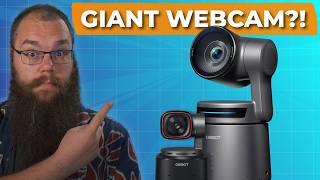

I Was Blown Away by This $500 Webcam
42sThe shocking price and bold claim of being blown away create curiosity and debate about whether a webcam can be worth $500.
▶ Play Clip"The title promises perfection, but the video delivers a balanced review with clear caveats about price and app usability."
The OBSBOT Tail Air is a high-end 4K PTZ webcam designed for streamers and content creators. It features AI-powered tracking, low-light optimization, and wireless streaming capabilities. This review highlights its strengths and weaknesses, including its $500 price tag.
The camera has a high-quality 4K lens with an f1.8 aperture, which allows more light in for better low-light performance.
The software automatically adjusts settings to maintain optimal image quality, even in changing lighting conditions.
The camera has PTZ (pan, tilt, zoom) capabilities with two gimbal motors, allowing for flexible positioning.
It supports NDI wireless streaming with virtually no latency, allowing for cable-free studio setups.
AI tracking is highly reliable, maintaining focus even with rapid movement or changes in position.
Hand gestures can control tracking, zoom, and other functions, adding convenience.
The built-in battery provides 7 hours of standby and 2.5 hours of continuous recording.
The camera can record directly to an SD card, useful for later editing.
The app is not user-friendly, with hidden features and cumbersome PTZ controls.
At $500, the camera is expensive and may not be suitable as a first webcam.
What resolution does the OBSBOT Tail Air support?
4K
00:57
What is the aperture of the OBSBOT Tail Air's lens?
f1.8
00:57
How long is the OBSBOT Tail Air's standby battery life?
7 hours
05:46
How long can the OBSBOT Tail Air record continuously on battery?
2.5 hours
05:46
What wireless streaming technology does the OBSBOT Tail Air use?
NDI
03:03
What is the price of the OBSBOT Tail Air?
$500
07:48
High-quality 4K lens with f1.8 aperture
This spec is key to the camera's superior low-light performance, a major selling point.
00:57NDI wireless streaming with low latency
This feature allows for flexible camera placement without cables, a significant advantage for studio setups.
03:03AI tracking is robust and reliable
The camera's ability to maintain tracking despite rapid movement is a standout feature, enhancing usability.
03:48Built-in battery for portability
The 7-hour standby and 2.5-hour recording capability make it suitable for outdoor or on-the-go use.
05:46High price point is a barrier
At $500, the camera is a significant investment, making it less accessible for beginners.
07:48[00:02] Last year, we took a look at the AI powered Opspot Tiny 2 Light, but this this is different. This chunk is the Opspot Tail Air, and it blew me away. This right here was shot with the Opspot Tail Air, and throughout the video, we
[00:16] will be switching up between this one and my usual mirrorless camera setup. Do for the nearly $1,500 price difference? But before we get started, I need to let you know that this video is sponsored by Opspot. As
[00:31] much as I try to remain unbiased, no sponsored review can be. So, if you like what you see, then make sure to check out some other reviews as well. And if you want to pick up an Opspot Tail Air, you can find a link in the description
[00:44] below. That is an affiliate link. So, if you use that, you are helping the channel. Thank you. And thank you for sponsoring this video. The first thing I noticed when I plugged this webcam in was the image quality. I do not think
[00:57] I've seen a webcam with such a great quality before, but that should not come as a surprise. This thing has a highquality 4K camera lens and a nearly highquality 4K camera lens and a nearly unbeatable f1.8 aperture. A low aperture
[01:11] like this means that the lens can allow a lot of light in which in turn produces better images, especially in low light condition like you know streaming spaces. You may have seen this on other webcams. You are getting ready for your
[01:24] stream, turn on your lights and your camera, and it looks like there is something hiding in the dark spots on your screen. You think to yourself, "Am am I haunted?" for just a moment before zooming in and realizes it's just a
[01:38] bunch of pixels that are not doing what they should. Not with this camera. I've tried and unless I really underlight or overlight my studio, there is no way that I can cause the distortion to show up. And this is straight out of the box.
[01:54] I didn't change any of the features or settings on the cameras despite them allowing for a very fine grain control, which is great for when you are in a space that hardly ever changes. The software on this thing is phenomenal at
[02:08] detecting changes and immediately switching the settings to go straight back to optimal. This is also a PTZ camera, which means that there are two tiny gimbal motors inside, which allow you to point, tilt, and zoom your camera
[02:22] in any way that you want, which is just this is the direction cameras would go if you asked me 5 years ago, but here we are. because I can change the direction
[02:34] and how the camera reacts. I think I'm going to take this one and mount it right overhead. So, I have an incredible overhead shot. The second one I am not so sure about. I don't know if I like this as an off angle. So, I have the
[02:47] a long rant and switch between the cameras or if I want to mount it in the back at the top. So, we get more of a studio cam vibe, which these cameras are amazing for, by the way, because you don't need a cable to run all across
[03:03] your room. The Opspot Tail Air has a USB connection and an HDMI connection, of course. But if you want to use it as a studio camera, you can just stream your video wirelessly from the camera to your phone or PC using the built-in NDI
[03:18] features. And it is virtually latency free, too. Just look at that. a quick wave and it instantly shows up in the app, which is insane. Most wireless cameras, even those much higher priced than this one, deliver at least half a
[03:33] second of delay, but I can't see a delay at all. And that is not all the PTZ part of the Opspot Tail Air is good for. One of the most powerful features of this device is the AI tracking, which we see in almost any of Opspot products, but
[03:48] this one takes it up a notch. I tried to get this camera to lose me, which with successful with this far. Turns out having a beard is like having glasses as Superman to AI. The moment you have one, they don't recognize you as a person
[04:04] anymore. But not with this one. This device, there was really nothing I could do to make it lose me. It doesn't matter if I moved slowly, quickly, if I ducked and weave, or randomly whip back, the result stays the same. The tail air
[04:19] stays tracked on me no matter what. And the nice thing is that no matter if you're on one side of the room or all the way across it, you can use hand gestures to get it to do whatever you want. Hold your hand up and it will
[04:32] start tracking you. Hold it up again and it stops. Hold up an L sign and you can zoom in or back out. And with the okay sign, you can tell it to start and stop hand gestures, then you can get one of these
[04:51] don't drop it. The remote is a really nice addition because it allows you to control up to three hotspot tails at the same time manually allowing you to change the PTZ or allow them to snap to one of the three preset positions. So,
[05:05] if you have a whiteboard, a guitar corner, or just a whole load of math books, maybe you can show off your books by aiming your PTZ camera at them and holding your P1, P2, or P3 button for 3 seconds to set that as a fixed position.
[05:20] And if you've done the same with your standard position, you can just flick the camera back right to you. Oh, and for you pet streamers out there, their AI tracking software can also be set to automatically track your pet. It won't
[05:34] help our little mut because she refuses to lay down in one spot for more than 10 minutes. But you might be able to use it to show off your cute fur babies a little more from time to time. And no, this camera is not just for gaming
[05:46] streamers. It also has a built-in battery which allows you to have it on standby for 7 hours and record non-stop for 2 and 1/2 hours before it needs a recharge. Here, let me show you. The nice thing about this camera is as well
[05:59] that you can use it outside easily because it's not too heavy and the software to detect your environmental light and stuff is really, really good. Again, I've done nothing with it. No settings changed. I just took it outside
[06:12] and we are having a bit of a walk. And because of the AI face tracking features, you don't even need to hold it pointed towards your face because it can just track it, which honestly is going to help with framing and arm strain. And
[06:25] if you really want to, then you can even use the built-in SD card slot so you can record your streams directly to the device for later editing. I'm actually going to bring this to TwitchCon EU where I will be streaming the experience
[06:38] using the HubSpot Tail Air. So, if you want to see that or join any of my live streams, then check me out on Twitch. I'm live every Tuesday and Friday from 5 to 11:00 p.m. Central European time. and I code my widgets live, answer
[06:53] questions, and play dubious games. I'm live right now when this video goes out, so come hang out. You can also use the app to stream directly to Twitch. All log into Twitch and with one button
[07:06] press, you are live. But there is a downside. There always is. Well, maybe there are two downsides. The first one is that the app is not very userfriendly. You need to use it to connect your camera and only when it has
[07:19] connected to your phone can you turn on the UVC setting which allows it to directly be plugged into your PC using USB. Features are hidden and controlling the camera especially the PTZ stuff is not as easy as you would want for
[07:32] software that was specifically designed for such a device. But the main problem, the main gripe that I have with this camera is the price. This is one of the most expensive webcams that I have ever seen, coming in at
[07:48] $500. And I realize that that is not for everyone. $500 is a big price tag. But the device is jam-packed with features and the video quality is amazing. But that does mean I would not suggest it as your first webcam. Maybe I wouldn't even
[08:04] recommend it as your first PTZ webcam. I think the Opspot Tiny2 Light is then a much better choice. And if you want to see what that can do with less than half the size of the Opsbot Tail Air, then check out the video right here.




⚡ Saved you 0h 08m reading this? Transcribe any YouTube video for free — no signup needed.