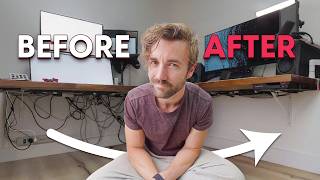

$200 Webcam vs $2000 Camera: Can You Tell?
45sThe blind comparison between a budget webcam and a high-end camera creates curiosity and challenges viewer assumptions.
▶ Play Clip"Title promises an incredible webcam and the video delivers with side-by-side proof, though it's a sponsored review with inherent bias."
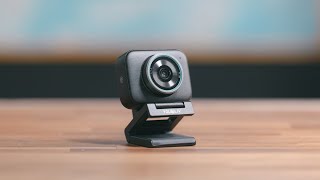
The video is a sponsored review of the YoloCam S3, a $200 webcam that the creator claims can rival expensive camera setups for desk-based content creation. The host demonstrates its image quality through side-by-side comparisons with a $2,000 Lumix camera, highlighting its large sensor, optical-like sharpness, and software features. The video concludes that for streaming or desk shooting, a high-end camera may no longer be necessary.
The creator introduces the YoloCam S3, a $200 webcam, as a viable alternative to expensive cameras, capture cards, and dummy batteries for YouTube videos and streaming.
The entire video is shot on the YoloCam S3, and a split-screen comparison shows it side-by-side with a Lumix camera. The creator reveals the right side is the YoloCam, demonstrating comparable image quality.
The webcam's blurry background (shallow depth of field) is achieved through a large sensor (1/1.3 inch) and wide aperture, which also allows more light, improving low-light performance.
In a low-light test with no front lights, the YoloCam maintains color and detail, avoiding the mushy look typical of webcams in dark conditions.
The webcam is built with premium materials and features strong magnets on the bottom and side for flexible mounting and rotation.
The YoloCam software offers controls for frame rate (24-60fps), sharpness, and presets that mimic Sony or Canon color profiles. The creator preferred the Sony preset in his lighting.
The software includes a vignetting control that brightens dark corners. The creator prefers it off for a more natural tone, but notes it can enhance subject-background separation.
The 4x digital zoom retains sharpness, looking almost like optical zoom, which is unusual for webcams.
The AI parameter feature tests different exposures and white balance options, and no longer requires signing in with an account, making it more accessible.
The creator shows side-by-side comparisons with other webcams, letting viewers judge without his bias, and concludes that for desk use, a $200 webcam can replace a costly camera setup.
The YoloCam S3 delivers impressive image quality that rivals expensive cameras for desk-based content creation, making it a compelling choice for streamers and YouTubers. Its large sensor, software features, and affordable price point signal a shift in what creators need for high-quality video.
What is the price of the YoloCam S3?
$200
00:04
What sensor size does the YoloCam S3 have?
1/1.3 inch
02:20
What feature allows the YoloCam S3 to achieve a blurry background?
Large sensor and wide aperture
02:06
What is the maximum frame rate supported by the YoloCam S3?
60 frames per second
04:17
What does the AI parameter feature do?
It tests different exposures and white balance options to help users choose a look.
06:02
What is the zoom capability of the YoloCam S3?
4x digital zoom
05:33
Blind test reveals webcam quality
Demonstrates that a $200 webcam can visually match a $2,000 camera, challenging assumptions about expensive gear.
00:32Large sensor for depth of field
Explains the technical reason behind the webcam's professional-looking blur, a key selling point.
02:06Digital zoom rivals optical
Highlights an unexpected capability that enhances the webcam's versatility for creators.
05:33Webcams can replace cameras for desk use
The creator's conclusion suggests a paradigm shift for budget-conscious creators.
06:53[00:04] year that if you don't want to get a fancy expensive camera, a fancy expensive lens, a capture card, and a dummy battery, you don't have to anymore. You can just get a $200 webcam,
[00:17] your YouTube videos, whatever you're shooting, will look really good. And if that sounds ridiculous to you, well, let me just show you. This box is empty right now because I've been shooting this entire video on the Yolo Cam S3, a
[00:32] $200 webcam. How many of you noticed? How many of you thought this was a fancy camera? Cuz this is not my normal high-end camera I shoot with. Uh, let's have even a little bit of more fun. Let's go to split screen here. Okay, one
[00:45] of these is a $200 Yellow Cam S3, and one of these is a $2,000 Lumix camera a couple seconds. I'm going to tell you which one's which. a keen eye if you know what you're looking for. But they both have good
[01:01] blurry background. I mean, look at the blur on this little light right up here colors. They both have good dynamic range. But the answer is right here. The one on your left is my Lumix camera. The one on the right is my Yolo [music] Cam
[01:15] one on the right is my Yolo [music] Cam S3. This webcam is so good. And I hate saying things like that. Kind of superlative, over-the-top positive comments like this webcam is so good. in a sponsored video because this is a
[01:27] sponsored video. It's sponsored by Yolo Cam, which is why the rest of the video I'm just going to let the camera do the talking. Uh, I'm going to talk about the talking points that are important and then I'm going to let you look at the
[01:39] footage and decide for yourself. At the end, I will do kind of a side by side of webcams just so you can see for yourself. And I'm going to keep my voice opinions, because again, this is a sponsored video and that wouldn't be a
[01:52] fair side by side. But let's talk about some of the things that make this webcam look so good. The the actual hardware changes because there are some. The one thing you'll notice first is how much blurry background there is. I've never
[02:06] webcam. The way you get blurry background like this on any camera is [music] by having a larger sensor and a wider aperture lens. Meaning that little kind of iris of the webcam opens up larger. And this webcam has the largest
[02:20] sensor I've seen. And a lot of these videos, they share the sensor size, which is one over 1.3 inches. And that's that doesn't mean ones are. So, I've made this graphic here that show the sensor sizes of a
[02:33] bunch of comparable webcams. And I've put them into decimal form so you can You can see how much larger this is than your typical webcam. Although, this does of a lot of webcams coming out this
[02:46] of the webcam statement at the large sensor, which allows for great shallow depth of field, that blurry background, and it also lets extra light land on it. This makes it especially
[02:58] show you. And I'm going to go back to that split screen here so you can see them side by side. This is what it looks like without any lights on. I have no lights in front of me right now, only lights behind me. And
[03:11] you can see lots of times when a webcam loses lights, it loses a lot of detail and color, and it kind of gets mushy in the dark areas. You can see I'm not well lit. Like, this isn't a good-looking shot, but the colors maintain the
[03:24] quality maintains itself. And a big part of that is due to the large sensor. is because it's so sharp, but it doesn't look like digital sharpness. Like, you like optical sharpness. Like, it looks like it's got a sharp lens on it. And
[03:37] blurry background, that's when you get that extra pop, that that kind of distance separation between you and the background, which is what makes a shot look so dynamic sometimes. It's also built incredibly well. The whole thing
[03:50] material. The mounting magnets on the bottom and the side are insanely strong. you some of the features of this webcam and their software. So, this is Yolo with the webcam, and it's basically just some simple controls with a couple
[04:04] really cool presets. So, for example, you can switch between vertical and magnetic on both the bottom and the side, so you can rotate it however you need. The magnets are very strong, by the way. You can change your frame rate
[04:17] for anywhere from 24 to 60 frames per second. You got your sharpness, need here. But you have these presets where you can make it look more like a Sony or more like a Canon
[04:36] thought the Sony one looked the best in my lighting and in my situation. They control, which has been on, I believe, the whole time in this video. But near get kind of darker spots. It's called vignetting. And if I turn this off, you
[04:50] can see that's what the image actually looks like. But if I turn it on, it brightens those back up and it makes it look a lot more natural. Personally, I'm kind of a fan of keeping it off. I think you get a slightly different tone in the
[05:03] background than myself. and you kind of darken the background while keeping the more separation between me and the room behind me. Also, maybe it's because the room's a huge war zone right now. I decided to do construction yesterday,
[05:16] little bit. Depending on your room, you kind of get two pretty solid lighting exposure and white balance, which I just left on auto. This is how it looked zoom control here, and this is kind of nuts. I can do a four time zoom and
[05:33] watch how sharp it still is when we zoom all the way in. I've never seen a digital zoom look this much like an optical zoom. Just for fun, let's put a side by side and I'm going to zoom in this shot at 4x digital zoom.
[05:49] So, you can see how much better the zoom is in this software than in regular works. I don't know if there's like some algorithmic sharpening going on, but it's it's very good. And then there's this thing called AI parameter. And a
[06:02] couple months ago, you had to sign in with an account to use AI on foreign totally brush over it, but they got rid of that. You don't have to anymore. You does. It's going to test out different exposures. And you can pick the exposure
[06:15] to test out different white balancing and color options, and you [music] can exposure options. The one on the right looks a little bit too bright. I think then it's going to give me different color options here. And then once you
[06:28] pick both the exposure and the color option, I think I like the middle one the white balance have switched to manual based on the composition that you picked in the earlier ones. Kind of a cool way of checking out different looks
[06:41] without actually having to know how to do it yourself. But I like this new age of webcam we're entering. I'm going to put side by sides between this and comparable webcams on the screen right now just so you can get a clear idea of
[06:53] this webcam versus the competition without my bias injected in. So, I'm not want you to watch these. But I feel like the Yolo Live S3 is the first time I felt confident enough in a webcam where I feel like unless you need to use fancy
[07:06] artsy lenses or you take a camera outside to shoot stuff. If you're live streaming or shooting your YouTube videos at your desk, I don't think you need to spend thousands on a camera setup anymore. You can just plug in a
[07:18] webcam that's $200 and get a really high quality image. And I think this is the seeing professional streamers who want a high quality image pick a webcam. And for that. Let me know in the comments down below if you agree with me and your
[07:31] thoughts on this webcam. And if you are interested in the webcam, I'll put a I think I've said it before, but this webcam is $1.99. webcam is $1.99. And as always, happy streaming.
⚡ Saved you 0h 07m reading this? Transcribe any YouTube video for free — no signup needed.