
The $1000 Webcam Challenge
45sOpens with a high-stakes, money-related hook that immediately grabs attention and sets up a comparison viewers care about.
▶ Play Clip"The title promises a comparison of budget 4K webcams, and the video delivers exactly that with blind tests, software analysis, and pricing—no fluff or misleading claims."
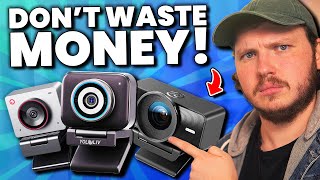
The video compares three budget 4K webcams—Elgato FaceCam 4K, OBSBot Meet 2 4K, and YoloCam S3—through blind video samples, software analysis, and pricing. The creator aims to help viewers make an informed decision by testing image quality, features, and value for money.
The creator sets up a blind test with identical lighting and settings, asking viewers to pick their favorite video quality from the three webcams.
The YoloCam S3 has a color corrector tool that allows precise adjustments, while the OBSBot offers face tracking and gesture control. The Elgato lacks these features but has a cleaner interface.
The Elgato FaceCam 4K had noticeable noise, making it the least preferred. The YoloCam had punchy colors, and the OBSBot had a softer, less sharp image.
The OBSBot Meet 2 4K is the cheapest at $130, while the YoloCam S3 and Elgato FaceCam 4K are both $200, making the OBSBot the best budget option.
Price Comparison
Reveals the actual costs, showing the OBSBot as the budget option at $130, while the other two are $200.
11:16YoloCam Color Corrector
Demonstrates a unique software feature that allows precise color adjustments, beneficial for content creators.
09:44Blind Test Results
Highlights the Elgato's noise issue, which significantly impacted its performance in the comparison.
10:25Vertical Video Support
Notes that the YoloCam and OBSBot offer vertical orientation, a key feature for social media creators.
09:15[00:00] Picking the right 4K webcam is a big decision, not just for the quality of your content, but also for your wallet. I should probably stop juggling these with $1,000. And to get even more confusing, every single one of these promises mirrorless camera quality on a budget.
[00:14] It's overwhelming and scary to spend money on something that might not be worth it. So have no fear, because today we are finding out which of the big three truly takes home the award for Best 4K Webcam on a Budget!
[00:27] But I don't want you to trust my word. I want you to feel confident in your decisions. The first thing we are doing are blind video samples. The challenge for you is to pick which of these three cameras you like the look of best.
[00:39] Is it the Elgato FaceCam 4K? Is it the OBS Neat 2 4K? Or is it the YoloCam S3 4K? I've set all of my lights to be the exact same brightness and temperature for all of the tests. I've matched the white balance to the webcams.
[00:52] I've set the webcams to their lowest f-stop and then exposed them at the lowest ISO they can go to. No effects, no filters, just the base webcam. Stick around to the end of the video for that reveal and comment your favorite below, because whichever gets the most comments, I am going to be giving away.
[01:05] More at the end of the video on how to enter that. This blind test is incredibly important to me for authenticity. In fact, this entire video will only show footage of these three cameras side by side, so you can decide which one you like for yourself.
[01:17] And I will disclose right now, the YoloCam S3 was sent in for this video, and they have given me a 5% discount code for you guys, which is in the description. With that done, let's talk about why I picked these three 4K webcams, because in order for
[01:29] me to recommend a webcam, it has to meet an insane amount of criteria. I am incredibly picky. Backed up, a webcam has to be a minimum f1.8. This number refers to the aperture, essentially the ring inside the lens that opens and closes to let light in. Making this simple,
[01:44] lower the number, more light is let in, and more blur on your background. As you can see on my mirrorless, it's very blurry because it's on f1.8. Obviously, this is incredibly beneficial for darker rooms or creators with budget lighting as you need less intense lights to properly
[01:58] expose your image. If you have a webcam with a higher number f-stop by default, you'll likely need to digitally increase the webcam's brightness with ISO or GAN and when you do that, you create digital noise which is disgusting and ruins the image.
[02:13] Looking at you Elgato. You can see this really clearly in all the footage I've been showing on screen while explaining this. The YoloCam S3 and OBS Bot Me 2 are both f1.8, so they perform far better in low light and require lower ISO, so cleaner images.
[02:27] And then the Facecam 4K, which is f4, yeah, it's not as great. 1.8 and 4 don't seem like a drastic difference, but it actually adds up quite a lot. To see low light performance best, if I turn all my key lighting off and raise the ISO on all two cameras till they're roughly exposed,
[02:45] Well the Elgato goes all the way up to 7500 ISO the OBSBot goes up to 4200 ISO and the YoloCam actually does 2500 which is performing better than the OBSBot despite having the same f Zipping into 400 as well I incredibly impressed with the digital noise All three
[03:03] images should be unusable. This isn't how webcams are meant to be used after all, we're supposed to have lighting. But both the OBSbot and the YoloCam could totally be usable at a stretch, with the YoloCam being a bit better at hiding the digital noise than the OBSbot. While of course, again,
[03:19] the Elgato, well, just look at it. In terms of S-COP and licenseivity, if I had to rank them, I would say the YoloCam and the OBSCOT are incredibly close, but it does feel like the YoloCam slightly takes the lead, even just from a technical aspect, because it did require a
[03:34] low ISO, and you can see less digital noise in the background. Of course, again, having an S4 aperture with such dreadful noise performance, Elgato is out of the run in here. I will say, Elgato does recommend using their noise reduction software, which leads me into the second most
[03:48] important factor I look for. Sharpness, clarity, crispy crispy footage. You're buying a 4k camera, you want it to look 4k. All three of these cameras are sharp, incredibly so, but when you add the
[04:01] noise reduction to the Elgato, it becomes wet, mushy, smeared crap. It has no sharpness whatsoever. You can see it on screen happening right now. So immediately they're out of the running again.
[04:13] I will say, and I can't technically be certain of this, but based on the way the digital noise behave on the YoloCam and OBSBot, I think both have noise reduction built into the camera as default, but it is done far better and doesn't destroy the clarity of the image.
[04:26] Staying on sharpness, looking at the YoloCam and the OBSBot when we are at our max field of vision at full wide angle, it's incredibly close. Both are beautifully sharp cameras, but when we zoom in to 400% and look at the skin around my eyes and my pupil, I don't
[04:42] think anyone will deny the YoloCam S3 comes out ahead. Now, this isn't a yes or no, good or bad situation between these two, because some people prefer a slightly softer image to start with, and they want to do their own digital sharpening in post if needed.
[04:56] However, others prefer just a plug-and-play, it's going to look sharp, it's going to look beautiful. Before we move on to color accuracy, I want to also point out blur or depth of field, and also autofocus. The Facecam 4K has no depth of field and has no autofocus,
[05:10] because, again, it is F4 on a 22mm lens, so it flattens the shot out, And then it also has fixed focus, so there's no auto-focus. It's just going to focus where it is, out of the running again. What's crazy is this is one of the most purchased webcams right now.
[05:25] Like, how? I'll admit the OBS bot doesn't really have much depth either, because even on an f1.8, if the lens is 20 to 30mm wide, it's usually going to all be in focus. Except when you compare this to the YoloCam,
[05:39] and let's say zoom all the way into that squirtle in my background, shockingly, that squirtle is slightly blurred on the YoloCam. Seriously compare these two side by side and there is actually depth on the YoloCam despite it being a 28mm equivalent lens Likely because it using a sensor that costs 5 times the OBSBot sensor and nearly 4 times the cost of the FacePan sensor
[06:00] Being really upfront here, I am actually quite biased. I love my OBSBot Neek 2 4K. I did an entire video recommending it just a few weeks ago. The core specs aren't too different, but somehow in performance, the YoloCam S3 is coming out ahead nearly every single time. But what about
[06:15] color accuracy. Well, my lighting is all set to 4700 Kelvin and all three webcams are set to match that roughly. Being blunt, the Elgato should win here. If we line up all of our images, the Elgato is most accurate to what my office looks like. The
[06:29] problem is my office isn't full of incisional noise, so it's out of the running. Me personally, I don't like it when a camera heavily colors my image for me. I want a clean, accurate base that I can work with to add my own colors to later.
[06:41] Here is where the YoloCam kinda suffers in my opinion. The image is very saturated by default, it's quite contrasted by default, and don't get me wrong, it's not bad, it's actually quite beautiful,
[06:53] but similar to how sharp it is, some people will prefer, say the OBS one, which is less contrasted, less saturated, so they can add their own later. If you can't see the difference in contrast and saturation from the images on screen side by side,
[07:06] well a good representation is setting both cameras to all factory defaults, and then changing their white balance to be 10,000 each. You can see the YOLO Cam is far more saturated orange than the OBS Bot Me 2.
[07:18] That said, I will say the OBS Bot Me 2 is less accurate in terms of white balance and skin tone. I found that to get my skin tone correct on the OBS Bot 2, I actually had to nudge the white balance more towards 5,000, but the YOLO Cam had a perfect match of 4,700 Kelvin, pretty much bang on.
[07:34] Personally, as someone with experience in color correcting, I prefer the OBS spot saturation and contrast because I can punch that up later, but I think a beginner would prefer the YOLO cam S3's look. Speaking of being a beginner, I will say if I was on a budget and only had one key light
[07:47] that I could place off to the side of me, which you can see an example on screen right now, the heavy saturation and contrast of the YOLO cam does make my face more obscure in the shadows compared to the softer drop off of the OBS spot. Just an important example to show.
[07:59] Now we have that giveaway coming up, the blind test will be revealed as well, and I want show you guys the cost of each camera but first let's talk about software. Straight out of the gate any webcam software needs fully unlocked manual exposure, manual white balance control
[08:13] and all three of these webcams do give you that. Looking at the YoloCam and OBS spot software you can see ISO, shutter speed, FPS, white balance, tint, you name it it's all there. But where are the differences? Well I really like on the YoloCam how I can move my focus point to a different spot
[08:29] and it will continuously refocus to that area. Meaning I can essentially manually focus from myself to the background and back. That said, all three softwares allow you to control your zoom digitally, but the YoloCam, from what I can see,
[08:41] doesn't allow you to then reframe after zooming. Whereas the Elgato and OBSbot once you zoomed in you can drag a little square around and change the shot And while this isn here right now i have been told by the yolo cam team they are working on this and it coming in a future update very soon in the same category of not needed but cool the obs bot also has the
[09:01] digital face tracking so when i move around it follows me and it has gesture control zooming as well neither yalgato or the yolo cam have this but it is a bit of a gimmick feature that most would it use. That said, both the YoloCam and the OBSBot also allow for a quick switch
[09:15] vertical frame so you can turn the camera on its side and the software switches you to a vertical shot which of course is better for TikTok, Shorts, mobile or just taking up less room horizontally on the side for a face-to-face streaming or gaming. If I had to rank these I would say all three
[09:29] softwares are pretty much identical all fairly easy to use but I do think the Elgato was the clumsiest to set up with the OBSBot and YoloCam being very quick, easy and most beginner friendly. You get what does have more bells and whistles that not everyone would need or want.
[09:44] And speaking of bells and whistles, something that's quite cool though was the YoloCam color corrector. Essentially, it takes a frame of your shot you're using, and then you use the eyedropper to select a color value, and then you can shift that value to different colors, or what you'd likely do is shift it to a different brightness.
[09:59] So for example, I select my red tones of my face, and then slightly raise the brightness, which makes my face stand out more. This is a really cool tool and there is a more in-depth special version as well, but I think most of you would probably stick to the simple version I just showed.
[10:12] Alright, right now it looks like the winner isn't totally clear. I will say the YoloCam seems like it's ahead with the OBS bot close behind and the Elgato so far at the back of the room we can barely see it because it's all covered in noise.
[10:25] Let's reveal the blind test and then explain the giveaway and finally reveal the prices for these. It should be absolutely no surprise after seeing this whole video that the blind A was the facecam 4K. The noise gives it away.
[10:37] Once you've seen that noise, it's impossible not to notice. Up next, blind B. The saturation, the contrast, the sharpness, the depth, and no surprises again, Yellowcam S3. Which leaves us with the blind C, being the OBSBot Meet 2 4K.
[10:50] It's slightly less punchy of an image, a little less sharp, not as much depth, but still a beautiful image. So were you right? Which did you prefer? Did you comment below? If you did, then I'm going to count up which camera wins and randomly DM someone to send that webcam
[11:03] or the one they preferred to them. And with all that info done, I can now reveal the price and let you decide if these are truly budget 4K webcams. After all, I asked you guys to vote, and you told me that budget is either cheaper than the majority
[11:16] but still competitive quality, or roughly 100 USD. So coming in at the cheapest of the three options, the OBSBot Meet 2 4K, which sits at 130 USD, followed closely behind by the YoloCam S3 and the FaceCam 4K,
[11:31] which are actually tied at 200 US in each. Let me know in the comments if the price reveal changes which you prefer and what you think overall about these cameras. I won't tell you my favorite because it's not my job to tell you what to buy but instead just make you more informed before you make a purchase.
[11:45] That said, don't buy the Elgato. See you next week.
⚡ Saved you 0h 11m reading this? Transcribe any YouTube video for free — no signup needed.