
This Webcam Has a Secret Mic Feature
60sThe revelation of a webcam that syncs with a lav mic to solve streamer audio issues is an innovative hook that tech enthusiasts will want to share.
▶ Play Clip"Delivers on the promise of webcam improvements with concrete examples, though some sections feel like sponsored filler."
The video reviews the OBSBOT Tiny 3 webcam, highlighting its innovative audio solutions, improved camera sensor, and dynamic range. It introduces the OBSBOT Vox SE lav mic that connects directly to the webcam, solving the problem of wireless audio for streamers who move around. The review compares the Tiny 3 to its predecessor and other webcams, emphasizing the significance of dynamic range for image depth.
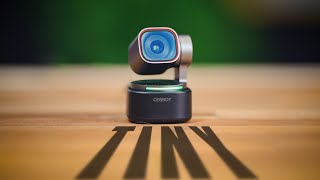
The video introduces the OBSBOT Tiny 3, a new webcam in the Tiny series, emphasizing its compact size compared to the Tiny 2.
Instead of just upgrading image quality, OBSBOT tackled webcam audio, releasing the OBSBOT Vox SE lav mic that connects directly to the webcam.
PTZ cameras allow movement, but streamers often face audio challenges. The Vox SE provides a simple solution: a tiny lav mic that connects to the webcam, eliminating the need for separate receivers and battery management.
The Vox SE has a button that toggles camera tracking, and it charges via a magnetic dock. It supports up to two mics connected to the Tiny 3 or Tiny 3 Light.
The Tiny 3 has a microphone in the base that tracks the subject, offering five audio modes: smart omni, directional, dual, figure-8, and pure audio.
The Tiny 3 features a larger 1/1.3-inch sensor, improving low-light performance and providing a shallower depth of field compared to the Tiny 2.
The most significant upgrade is increased dynamic range, which allows the camera to retain details in shadows and highlights, giving the face more depth and a more three-dimensional look.
The reviewer emphasizes that shadows give an image depth, and the Tiny 3's improved dynamic range ensures good shadows without washing out colors.
The video includes side-by-side comparisons with other webcams, concluding that the Tiny 3 is a great upgrade and expressing excitement for 2026 webcams.
The OBSBOT Tiny 3 is a significant upgrade in webcam technology, particularly in audio and dynamic range, making it a compelling choice for streamers seeking high-quality video and flexible audio solutions.
What is the OBSBOT Vox SE?
A tiny lav mic that directly connects to the OBSBOT Tiny 3 webcam, solving wireless audio for streamers.
00:45
How many audio modes does the Tiny 3's built-in microphone offer?
Five: smart omni, directional, dual, figure-8, and pure audio.
02:39
What is the sensor size of the OBSBOT Tiny 3?
1/1.3-inch sensor.
04:42
What is the main benefit of increased dynamic range in webcams?
It allows the camera to retain details in shadows and highlights, giving the subject more depth and a three-dimensional look.
05:11
What is the price of the OBSBOT Tiny 3?
$3.49 (likely $349).
02:27
Audio Innovation
OBSBOT chose to tackle webcam audio, a common pain point for streamers, with a simple solution.
00:16Dynamic Range Upgrade
Increased dynamic range is highlighted as the most significant improvement, enhancing image depth.
05:11Shadows Give Depth
The principle that shadows are essential for image depth is a valuable photography tip.
06:21[00:04] It's the latest webcam in their Tiny series. And if you want to see how tiny this really is. Like this is it next to the Tiny 2. It is really living up to so small. But they did something really
[00:16] interesting with this that solves a unique issue with streamers that hasn't really been solved, at least not in a way this simple before. And I'm really that 2026 is the year of the webcam because there are some very exciting
[00:29] just upgrading the image quality and the sensor size and all the normal things you do when you iterate on a webcam, they decided to tackle webcam audio. And they did so in a really cool way where they have also released the Obspot Vox
[00:45] they have also released the Obspot Vox SE. It's this tiny little lav mic that directly connects to the webcam. Because here's the thing, PTZ cameras are really around the room, move around is a really
[00:58] live stream to keep it dynamic. But the problem is most streamers have a want to stand up and move around, you're stuck with two options. You can either shout really loud so this microphone can hear you or you're forced to grab
[01:12] something like the Road Wireless Pro, which is a great lav, but it's not You got to have a receiver that would be plugged into the PC and it's running on battery power so you have to take it off and charge it every time and if it dies,
[01:26] you know, just so many potential problems. And also, it's like $400. This charging dock, and it comes with some magnets. Let's just throw those on real quick. I can either just throw the magnet on the inside of my shirt or it
[01:40] have this on me the entire stream. And then if I want to stand up and move around, I switch the audio source to this guy. And also, it's got a button on the side. And if I press it, it turns on the tracking on the camera,
[01:57] which is really cool. If I press it again, the tracking turns off. again, the tracking turns off. Let's press it again. Tracking turns on.
[02:12] far the simplest solution I've seen to free audio around your space. And then when you're done, you just slap it back in the little charger and you're good. I gave me and I didn't see a price for the Vox SE. So, I will I'm sure I'll have it
[02:27] right here in the corner. But, you can connect up to two of these lav mics to either the new Tiny 3, which is $3.49, or the other new webcam they're releasing, which is the Tiny 3 Light, which is $1.99. But that's only one of
[02:39] They've also added, I don't know if you can see it, there's a little microphone in the back of this here where they've the base of the webcam so that as the webcam tracks you, the microphones
[02:53] essentially also track you and they give you five different audio settings. Let right now so you can hear the difference between them. And keep in mind, we are switching from a very high-end Sennheiser shotgun mic to a webcam mic.
[03:06] So, while you may hear a downgrade in quality, it is still a heavy upgrade opinion, it's one of the first times webcam quality has actually sounded useful. This first one's called smart omni mode. And omniirectional means you
[03:19] have stuff on the side of the webcam or behind the webcam, you can hear it just as clearly there as you can in front. This next one is called directional processing done, and that's because it does a really great job in cutting out
[03:32] the directional mode sounds the most processed out of all of them. Dual where you hear in front of the webcam and behind the webcam but not on the favorites out of the five. Even though I don't really care to hear what's behind
[03:45] the webcam, it just seems to have the most natural sound out of all of them. in a studio, you'll actually set a microphone to figure 8 mode. It just for some reason gives some nice clarity to the person talking into it. This is
[03:58] called pure audio mode. And this is the mode with no processing at all. meaning you're going to hear the fans of my PC really turn on here when I do that. It's for most streamers who have large PCs with fans, but it is there in case that
[04:12] audio mode, which gives you like a stereo signal. So maybe if you're doing mic, this might be the way you want to go. So some really cool and useful audio improvements. not only actually having useful microphones inside the webcam
[04:27] itself, but then the inclusion of this uh this lav mic, which is honestly, I out of all this, but they did also upgrade the camera itself. And that's this side by side right now with the Tiny 2. So, the previous version of this
[04:42] webcam. Now, the Tiny 3, which is the webcam on the left here, has that larger that we've talked about with some other webcams, that 1 over 1.3 in sensor, gives you much better low light performance, and also gives you slightly
[04:58] more shallow depth of field, which you can see if you look at the little the little face on this uh mouse pad right over here, you can see it's much blurrier on the left side. Maybe not much blurriier, but it's marginally
[05:11] blurriier on the left side. But the most significant upgrade in my opinion here, the thing I'm most excited about about 2026 webcams, including the Tiny 3 here, is if you look at my face, if you look at my face on the right, if you don't
[05:23] what to look for, you might feel like my face on the right just looks flatter than my face on the left. My face on the left just looks like it pops off the screen a little bit more. And there's a reason for that. That is
[05:39] due to increased dynamic range, meaning the camera's ability to see details in the low light areas and in the highlight areas. If you look at the shadows, especially in the areas like next to my nose, under my eye over here, you can
[05:53] kind of see that this whole side of my face is almost the same level of brightness versus the shadows on the Tiny Three on the left side look a little bit darker. But even though they look darker, they still retain the same
[06:07] colors and the same quality. They don't get washed out or muddied up at all. And that's what makes the face look like it's deeper is because there's more never use a ring light, by the way. Shadows are what give an image depth.
[06:21] Don't be afraid of shadows. But most importantly, you need good shadows. And the Tiny 3 with its improved dynamic range. It's larger sensor just really gives your face and the subject that depth that you need that dynamic range
[06:35] are some quick sideby-side shots with the Tiny 3 and some other webcams in a share my opinion during this section just because this video is sponsored, yourself some of the differences in clarity and background blur and color
[06:47] and image quality. But all in all, great upgrade to the Tiny Series. I'm excited webcams. Leave a comment down below if you have any thoughts. Leave them for me. Leave them for other people to read so you can get uh a variety of opinions
[06:59] these in the description down below if you're interested. And as always, happy you're interested. And as always, happy streaming.
⚡ Saved you 0h 07m reading this? Transcribe any YouTube video for free — no signup needed.