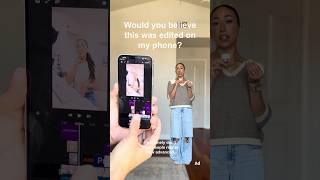

Edit Your Phone Videos Like a Pro
30sRelatable pain point of creators filming on the go and the solution of mobile editing.
▶ Play Clip"Delivers on the title with a genuine, concise walkthrough of phone-based editing."
This video demonstrates how to edit an entire short-form video directly on a smartphone using Premiere Mobile, covering importing and trimming clips, cleaning audio, and adding dynamic visual layers to keep viewers engaged.
Creators film content everywhere and often need to transfer to desktop; advanced mobile editing removes that need.
The entire video was edited on a phone by importing clips, organizing, and trimming for faster pacing.
Audio is cleaned directly in the app because bad audio can hurt content performance.
Add captions, transitions, sound effects, or B-roll at least every 3 seconds to keep the video dynamic.
The workflow suits Reels, TikToks, and YouTube Shorts, and Premiere Mobile's creative mode enables on-the-go editing; comment 'Premiere' for the link.
What app was used to edit the entire video on a phone?
Premiere Mobile
00:55
Why should you clean up audio in your editing app?
Because bad audio can make even good content not perform well.
00:27
How often should something new appear in a short-form video to keep it dynamic?
At least every 3 seconds.
00:41
What are examples of elements to layer every 3 seconds?
Captions, transitions, sound effects, and B-roll.
00:41
Which platforms is this editing workflow specifically creator-friendly for?
Reels, TikToks, and YouTube Shorts.
00:55
What action does the creator suggest to get the Premiere Mobile link?
Comment 'Premiere'.
00:55
Mobile editing is now viable
Advanced phone editors let creators skip the desktop transfer step entirely.
00:01Pacing through trimming
Trimming clips speeds up short-form pacing and makes content feel more intentional.
00:13Audio quality matters
Bad audio can tank performance of even good content, so clean it in-app.
00:27Engagement layers
Adding a new visual/audio element every 3 seconds keeps short-form videos dynamic.
00:41[00:01] how advanced mobile editing has gotten. As creators, we're filming content everywhere. Coffee shops, between meetings, while traveling, in the middle of busy work days. And sometimes having to transfer everything over to a desktop
[00:13] down. So, I made this entire video on my you how you can, too. First, I'll import all of my clips and organize everything through and trim everything down so the pacing feels faster and more intentional
[00:27] for short-form. I always clean up the audio directly in app, too, because bad audio can make even good content not perform well. Next, I'll layer something to happen at least every 3 seconds, like captions, transitions, sound effects, or
[00:41] even B-roll. And this makes the video feel even more dynamic. The workflow just feels creator-friendly, especially for Reels, TikToks, and YouTube Shorts. already in creative mode instead of having to wait until I'm back at my
[00:55] directly on your phone, too, definitely try Premiere Mobile. You can comment try Premiere Mobile. You can comment Premiere and I'll send you the link.
⚡ Saved you 0h 01m reading this? Transcribe any YouTube video for free — no signup needed.