ChatGPT's New Pets Feature is Just Visual
45sThe novelty of OpenAI adding pets that don't change functionality is quirky and will spark curiosity and debate.
▶ Play Clip"The title promises a new feature and delivers exactly that, though it's a minor cosmetic addition rather than a major update."
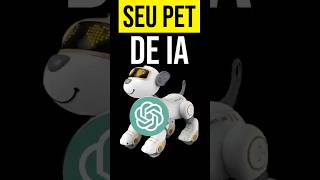
OpenAI has introduced a new feature called 'Pets' in ChatGPT, which are small visual mascots that accompany users while they work. These pets serve as visual indicators of task status, showing whether a task is running, completed, blocked, or waiting for user input. The feature is purely cosmetic and does not alter ChatGPT's functionality or intelligence.
OpenAI has added a 'Pets' feature to ChatGPT, which are small characters that accompany the user's work and provide a visual indicator of what is happening.
The pets do not add any functionality to ChatGPT; they are just mascots that show the status of the work, such as running, completed, blocked, or waiting for user decision.
Users can choose from various pet models like Codex, Fireball, Roots, and Rock. The difference between them is only visual and personality; all perform the same function.
Pets accompany tasks and indicate if something is running, completed, blocked, or waiting for user input to continue. This allows users to do other things while ChatGPT works.
Previously, users received notifications when tasks were completed. The pets make this more fun and interactive, as they visually show the status.
Users can click and hold to drag the pet to reposition it if it's in the way, and can adjust the size of the pet.
The Pets feature is a fun, visual addition to ChatGPT that enhances user experience by providing a playful way to monitor task progress, though it does not affect the underlying AI capabilities.
What is the primary purpose of the Pets feature in ChatGPT?
To provide a visual indicator of task status (running, completed, blocked, waiting) while users work.
Does the Pets feature change ChatGPT's functionality?
No, it is purely cosmetic and does not affect the AI's intelligence or capabilities.
00:14
What are the available pet models mentioned?
Codex, Fireball, Roots, and Rock.
00:45
How do pets differ from each other?
Only in visual appearance and personality; all perform the same function.
00:58
What was the previous method of task completion notification?
ChatGPT would send a notification when the task was completed.
01:35
How can users reposition the pet?
By clicking and holding the pet to drag it to a new position.
01:50
New Pets feature
Introduces a novel visual element to ChatGPT that enhances user engagement.
Purely cosmetic
Clarifies that the feature does not impact AI performance, setting accurate expectations.
00:14Task status indication
Explains how pets help users multitask by showing task progress visually.
01:10Comparison with notifications
Highlights the shift from passive notifications to active visual feedback.
01:35[00:03] что, честно говоря, показалось мне довольно Особенность OpenAI. Они маленькие. персонажи, которые сопровождают ваши работа и функция как индикатор Визуальное представление происходящего. Да, Вот и все. Он ничего не добавляет.
[00:16] Ещё одна функция в чате GPT. Нет Это меняет принцип работы чата GPT. Он там просто домашний питомец, талисман. Это показывает, как продвигается работа. происходит. Итак, вы отправляете задание. в чате GPT и открывает, например, Google,
[00:29] там появилась маленькая кукла Обновление. Я вам покажу. Затем, Я ещё вернусь сюда, в боковую панель, я Нажмите на мое имя ниже. настройки. Посмотрите, сколько у нас уже есть. Здесь тоже появляется гораздо больше подобных явлений.
[00:43] верно? В общем, вот и всё. Режим для питомцев. У нас есть несколько вариантов. Вот, например, в Кодексе мы находим это. Здесь, всего лишь с каплей воды, вы получите Здесь, всего лишь с каплей воды, вы получите Огненный шар, у него есть капоты, рок, короче говоря, у него есть
[00:57] Вот модели, которые мы видели на данный момент. Ты можешь Пока ты сам этого не создашь, хорошо? ТЕ Единственное различие между этими питомцами заключается в том, что... Внешний вид и личность. Все здесь уходят выполнять точно такую же функцию. Отслеживайте выполнение задач и указывайте, если чего-то не хватает.
[01:12] Процесс выполняется, завершен, заблокирован. или ожидая вашего решения Продолжайте выполнение следующих шагов. Затем Он действительно очень интересный человек. потому что ты можешь делать и другие вещи пока жду, когда заработает чат GPT,
[01:26] сложные задачи, такие как создание веб-сайта, инструмент или, наконец. Ранее существовала такая опция. уведомление, затем чат aptviava уведомление по завершении например, задача. Но, конечно же, с Наличие домашних животных делает жизнь намного веселее. Помещать
[01:40] Огненный шар. И очень важно, чтобы вы Выберите здесь опцию, чтобы разбудить вашего питомца. Итак, всем привет, мой питомец проснулся. Посмотрите, как это мило! Мне это показалось очень смешным, извините, я Мне это показалось забавным и интересным, хотя...
[01:55] Интеллектуальность чата GPT не имеет значения. Если вы Нажмите и удерживайте, чтобы перетащить. переместить его в другое положение, если это необходимо. занимающий какое-то пространство, которое представляет собой вас. getting in your way, right? Going down here, we can adjust the size of the




⚡ Saved you 0h 02m reading this? Transcribe any YouTube video for free — no signup needed.