
Stop People Stealing Your Videos NOW
44sHigh urgency and fear of content theft, common among creators, drives clicks.
▶ Play Clip"Delivers on the promise with a clear, actionable setting, but the urgency is slightly oversold."
This video explains a crucial YouTube setting that content creators should check to protect their videos from being stolen and republished by others. The host demonstrates how to navigate to the upload defaults in YouTube settings and emphasizes the importance of using the standard YouTube license instead of Creative Commons attribution, which allows others to legally reuse and monetize your content with just a credit.
Many people steal content and upload it to YouTube and other platforms without permission, and creators don't get a cut.
Go to Settings, then Upload Defaults, and ensure the license is set to Standard YouTube License.
If the license is set to Creative Commons Attribution, you are giving permission for others to reuse your content.
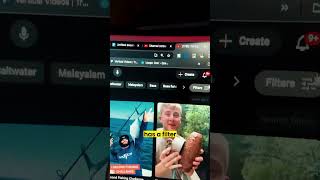
YouTube allows filtering by Creative Commons, making it easy for others to find and steal videos, then republish them with credit and monetize.
Ensure the setting is Standard YouTube License to have a fighting chance against content theft, which is happening at scale.
To protect your content on YouTube, always use the Standard YouTube License in your upload defaults, avoiding Creative Commons which permits others to legally reuse and monetize your work.
What is the recommended YouTube license setting to protect your content?
Standard YouTube License
00:27
What does Creative Commons Attribution allow others to do?
It allows others to reuse and monetize your content as long as they give credit.
00:27
Where do you change the license setting in YouTube?
Settings > Upload Defaults
00:14
Creative Commons is a risk
This is the core warning: using Creative Commons gives permission for others to reuse your content.
00:27Example of content theft
Concrete example of how Creative Commons enables theft in a specific niche.
00:40[00:01] in a world to where a lot of people are making off of stealing your content and uploading it to YouTube and other platforms without your permission and without you getting a cut. If you want to prevent that and give yourself a
[00:14] fighting against the people that are doing that, here's what you want to make YouTube channel. First, you want to go into the settings area down here in the Then, you want to go into upload defaults. From there, you want to make
[00:27] sure that your license is set to standard YouTube license. If your license is set to creative common attribution, you are literally giving And let me show you where that's a problem. Let's say you make fishing
[00:40] content. Well, YouTube has a filter option where you can come over here and filter, you can click on creative comments. all of these fishing videos here. By having that creative common attribution has made it possible for
[00:53] people to steal any of these videos and then as long as they give them credit, they can publish them as their own and make money from this content. If you sure that you have that setting set to standard YouTube license. And that's at
[01:07] a fighting chance on YouTube as this is happening more and more at scale. Follow happening more and more at scale. Follow for more tips like this.


⚡ Saved you 0h 01m reading this? Transcribe any YouTube video for free — no signup needed.