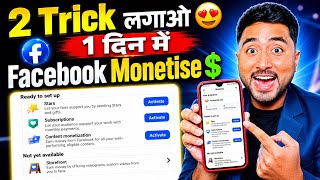

Facebook Monetization Secret Revealed!
48sPromises a hidden method to unlock monetization, tapping into the desire for quick financial gains.
▶ Play Clip"The title promises a monetization setup, but the video only shows how to complete basic weekly tasks, which is common knowledge for active pages."
This video presents a step-by-step method to unlock Facebook's content monetization tool by completing weekly tasks in the page's professional dashboard. The creator demonstrates how to fulfill specific requirements—such as posting public content, creating a reel, sharing stories, and replying to comments—within seven days to increase reach and eligibility for monetization.
The video claims to reveal a method to enable Facebook content monetization, showing an example of a monetized page with zero followers.
In the professional dashboard, click on 'Weekly Focus' to view tasks that need to be completed to improve monetization chances.
Select 'Reach More People' if you're not getting views; 'Maximize my earnings' is for already monetized pages; 'Get a Quick Start' is for new pages.
Within seven days, create three new public posts. The video demonstrates posting photos with captions like 'Good Morning' and 'Good Evening'.
Upload a reel (e.g., 13 seconds long) with a title and share it to complete this task.
Post seven stories within the week. The video shows posting a story with a song and sharing it.
Reply to at least six comments on your posts or reels to complete this task.
Post original content consistently, avoid copying, and use your camera to create videos. The video emphasizes working according to Facebook's guidelines.
By consistently completing the weekly tasks in the Facebook professional dashboard, you can increase your reach and engagement, which significantly boosts your chances of getting the content monetization tool enabled.
What is the first step to access the weekly tasks on a Facebook page?
Open the professional dashboard and click on 'Weekly Focus'.
01:07
Which option should you choose if you're not getting views on your Facebook page?
Reach More People
02:03
How many public posts must you create within seven days?
Three new public posts.
03:11
What is the task related to reels?
Create one new public reel.
05:14
How many stories do you need to post within the week?
Seven new stories.
06:07
How many comments must you reply to?
Six comments.
06:35
What is the recommended approach to content creation?
Post original content, avoid copying, and use your camera to make videos.
07:48
Choosing the Right Goal
Explains the difference between 'Reach More People' and 'Maximize my earnings', helping users select the appropriate path based on their page status.
02:03Weekly Task Breakdown
Provides a clear list of tasks (posts, reel, stories, comments) that must be completed within seven days, which is actionable for users.
03:11Consistency and Originality
Emphasizes the importance of consistent, original content creation, which is a key principle for growing a page and qualifying for monetization.
07:48[00:02] today I am telling you a method, if you follow it, then very soon your Facebook content monetization tool will be enabled and unlocked. You see here, there is a page which has been monetized, some method has been applied on it,
[00:16] I am going to tell you the same method and if you also do it in the same way, then your page will also be monetized in this way and you will also start earning money from Facebook, so first of all look carefully, I am going to tell you step by step in a good manner,
[00:29] look carefully, this is a page. Here you can see that there are zero followers. There is zero following. Three posts have been posted. Zero means it is a small page. Let me open its professional dashboard here. And after opening it, if you see here,
[00:42] content is being uploaded on it. Now I am going to teach you how to monetize this Facebook page. You will look carefully. You have been working on Facebook for a long time but
[00:54] means if you are not able to monetize and are very worried then I am going to solve your problem in a jiffy. But you have to do the work. I am telling you the method. If you work on the method, you will get it very soon. So first of all
[01:07] see what you have to do? Here you will see where it is written that means the name of the Facebook page is useless content, there you will see below it is written that your activity is 0%. You have to click on this. Now what is the first thing we have to do for content monetization tool on Facebook
[01:21] ? Come down here. If you too are Come down here. If you too are seeing it like this here 0701 06 Content Reels Comment is visible like this then you can tell me by commenting, if it is not visible then
[01:34] also I will tell you how it will look, below here you can see Media Quality Reactions, after this below here you can see Weekly Focus, so first of all you have to click on Weekly Focus, after clicking you will get an
[01:48] interface like this, this is very important, if you ignore this then Facebook will ignore you, Facebook will not give you the content monetization tool and here you should keep in mind how to work smartly
[02:03] content monetization tool will not be enabled for you, so simple what is written here, as soon as you click on Reach More People here, three here, three options will come in front of you, Reach More People, now
[02:16] what does Reach More People mean, tell yourself by commenting, what does Reach More People mean, tell me by commenting below here here What is the second option ? Maximize my earnings. This means
[02:31] not monetized. So what do we need it for? It will be needed when it gets monetized. And below here it is written Get a Quick Start on Facebook, which means we have just started a Facebook page. We have just started working on Facebook.
[02:43] So this is for those who are just starting their Facebook page and want to work. And after this, those people who are already posting videos, posting reels on Facebook and are not getting views, are
[02:56] not able to find the content monetization tool, are not getting reach, then they have to click on this Reach More People. written below? Update. And here below you will see one thing, Challenge Reset on Monday, that is, this challenge is given to you every week and how to complete it, so here we are
[03:11] After clicking on Update, now you will see that here it is written Task and here it is written Not Started. Now you have to complete this simple task n't you do this work within 7 days that is create three new public posts. This
[03:27] tell you more things. What is written here? Create three new public posts, that is, is written here? Create three new public posts, that is, three public posts have to be made. And Like I am showing you. Look here, click on the plus icon.
[03:41] what else is written here? Create a post. Click on this. After going to the gallery, post any one post. For example, suppose I posted this. Clicked on Next and wrote Good Morning here. Ok?
[03:54] here I clicked on Next. Now after clicking on Next, I posted it here. Now you will see that as soon as this is posted by me, look here, it will be posted right away. Now see, it has been posted and after posting, see,
[04:07] and after posting, see, 94% remaining means that we have posted one out of three. Now look at it this way, I am showing you this one after completing it. Suppose we have to pour it in the afternoon. After coming here,
[04:20] we have to post something like this. For example, suppose I have uploaded this photo. Wrote good afternoon here. Ok? After entering Good Afternoon, I clicked on Next here.
[04:32] After clicking on Next, I posted it here. Now you will see that Now look how this was posted. Now if you see, see this 88% means I have completed 12% here. 88% is still left. Now look again,
[04:48] I came here again and after coming here, I am posting one of my photos here again. Ok? Like this photo, this photo came. After this I wrote Good Evening here. Ok ? Evening. I did it and put it here. Then
[05:01] clicked on Next. After clicking on Next, I clicked on Post. Look, it has been posted. Can you see what it is now? posted. Can you see what it is now? 82% left. That means I have completed 18%.
[05:14] Now look at that, look at that here, it is completed. Completed Create three new public posts. Done. You are not able to do this. Now look what is written after this. Create one new public reel. What have you said now? I came here to cast a reel.
[05:27] said now? I came here to cast a reel. seconds or 20 seconds here. For example, let's say this is 13 seconds long. Now clicked on Next. Put some of your title here. Look here
[05:40] I put the title. Meaning, whatever the title of your video is. Here I clicked on Share Now. Now you see, as soon as the reels are uploaded, this task will be completed here also. So this is your first step. you have to do.
[05:53] You look carefully. Look at this video of mine, if you see the reels now, you will video of mine, if you see the reels now, you will see that 76% is left, which means I have completed 26%. Now look, look, there are three new public posts. One new public
[06:07] reel is done. Now what is written here ? Create seven new stories. So Click on it here. After clicking, you can post any of your stories like this. Look, I posted the story here. I played the song Vawana. After applying it,
[06:20] I clicked on this share. Just look, this will be posted. So see how easy it was and how many days do you have to do it in ? This has to be done within 7 days. Five and two have to be done within 7 days. Just look as soon as my story is up, see this
[06:35] 71% left. That means I completed 29% here in front of you. How many? Within seven days. Then reply to six comments. Now
[06:47] how will you do this? Whatever photos, videos or reels you upload, you have to reply to the comments made by people here. So you can see the weekly progress, completed it here and shown it to you. So this is how you have to do it every day and if you
[07:05] do it here for seven days, it will be completed. So the sooner you do this, Facebook will give you a new task. If you do it accordingly, your reach will increase, views will increase and after this, when the reach increases, you will get followers, engagement will increase and
[07:18] after this, the chances of content notation tool will increase a lot. Now what do you have to do here after this? Come down simply, you come. Look, let me refresh this once. See if it is completed or not? Whatever it was, was it completed
[07:31] or not? Now look, here it is said that four days remaining is four days. Today is Wednesday, that is, Monday, Tuesday and Wednesday, that is, three days have passed, four days are left. So see, I have completed this much here in just one day.
[07:48] After this, now look here, for the content monetization tool, you simply have to click on notify it. Even if you don't do it, it will still work. But you should screenshot. You have to post original content. You don't have to copy anywhere.
[08:02] You can turn on your camera here as per your convenience. After turning on the camera, after turning on the front camera, you have to make videos here in this way. After making videos, you have to upload them on YouTube and Facebook.
[08:16] But you don't have to break the consistency. But you should try because you have to When you want to earn money from Facebook, you will have to work continuously. You will have to work according to Facebook and you will have to work according to the way I am telling you.
[08:30] and you will have to work according to the way I am telling you. monetized. So you guys can also do it. There is no big mountain. You should understand the method. I will keep telling you many more methods. For that, subscribe to the channel and
[08:44] press the bell icon. I will make more important videos for you in the future so that you can monetize your Facebook page.

⚡ Saved you 0h 08m reading this? Transcribe any YouTube video for free — no signup needed.