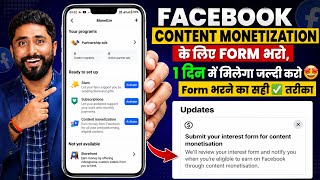

Facebook New Update: Get Content Monetization Tool Fast!
45sHigh-demand topic with a promising solution, tapping into creators' desire for quick monetization.
▶ Play Clip"The title promises a quick fix, but the video is a straightforward tutorial that delivers exactly what it says—no hype, just steps."
This video provides a step-by-step guide on how to apply for Facebook's Content Monetization tool through a new form. It explains where to find the form, how to fill it out correctly, and what information to provide to increase your chances of approval.
Facebook has released a new update that requires creators to submit an interest form to get the Content Monetization tool.
The form is called 'Submit your interest for content monetization' and is essential for accessing the tool.
Navigate to the Professional Dashboard and click on the Monetize section to find the update banner.
The first question asks for your creator type, with options like Digital Creator, Business, Artist, etc. Digital Creator is recommended for video creators.
You need to specify your preferred content format, such as Reels, photos, text posts, or stories.
Use the provided text: 'I am a content creator and I create original content on my Facebook page. I need the content monetization tool.'
You can link your YouTube channel by selecting YouTube and entering your username without the '@' symbol.
Enter your total follower count from your YouTube channel.
After submission, Facebook will notify you when you're eligible. You can update your interest form if needed.
What is the name of the form to apply for Facebook's Content Monetization tool?
Submit your interest for content monetization
00:28
Where do you find the Content Monetization application form on your Facebook page?
Professional Dashboard > Monetize section
00:56
What creator type is recommended for video creators in the form?
Digital Creator
03:44
What text should you write when asked why you want the Content Monetization tool?
I am a content creator and I create original content on my Facebook page. I need the content monetization tool.
05:00
How should you enter your YouTube username in the form?
Without the '@' symbol
06:49
What information about your YouTube channel is required in the form?
Your total follower count
07:16
Submit Interest Form
This is the key step to unlock the Content Monetization tool for eligible creators.
00:28Choose Digital Creator
Selecting the right creator type is crucial for the application to be processed correctly.
03:44Use Provided Text
Using the exact text provided in the video increases the chances of approval.
05:00Username Without @
A common mistake is including the '@' symbol, which can cause errors in the application.
06:49Eligibility Notification
Facebook will notify you when you're eligible, so patience is required after submission.
07:48[00:00] पेस्टबुक पेज अगर अभी तक आपका मोनोटाइज नहीं हुआ है तो यह वाला फॉर्म आपको भरना पड़ेगा इसके बाद आपको facebook page पर content monetization tool मिल जाएगा facebook का एक नया update आया हुआ है कि अगर अभी तक आपको content monetization tool नहीं मिला हुआ है तो इस form को अगर आप तरीके से
[00:14] submit करते हो तो content monetization tool बहुत ही जल्दी मिल जाएगा तो जिसका जिसका content monetization tool नहीं मिला हुआ है ये वाली वीडियो देखिए फॉर्म सही तरीके से भरना चाहिए गलत फॉर्म भर दोगे तो जो मिलने वाला रहेगा वो भी नहीं मिलेगा तो ध्यान से देखिए का यहाँ पर
[00:28] लिखा क्या है update आया हुआ है Facebook का और ये मिलेगा कहाँ पे अभी मैं आपको दिखा दे रहा हूँ लेकिन मैं सबसे पहले आपको बता दे रहा हूँ किसमें लिखा क्या जाए है submit your interest for content monetization submit your interest form for content monetization tool यानि कि अगर
[00:43] आपको content monetization tool चाहिए तो ये वाला आपको form भरना पड़ेगा otherwise आपको content monetization tool नहीं मिलेगा अब ये मिलेगा कहाँ पे तो मैं आपको back चला आता हूँ अभी आप देख सकते हो कि ये मेरा एक page है जिसको मैं अभी grow करने
[00:56] वाला हूँ जिसको monetize करने वाला हूँ और आपके सामनी ये मैं तो इसी तरफ से आपको भी करना है। तो सबसे पहले यहाँ पर देखो, Professional dashboard पे आप click करोगे, और click करने के बाद में यहाँ पर देखोगे, को आपके सामने यहां पर monotize में यहां पर आपको दिख जाएगा और यहां पर दिख जाएगा. अभी
[01:10] देखो बुझी सिटार का setup का यहाँ पर option मिल चुका है. ये देखिए. मिल चुका है. अभी content notification tool का नहीं मिला है. तो content कैसे लेना है? यहाँ पर monetize section पे आप click करोगे और ऊपर में ही आपको यहाँ पर update से आपको
[01:22] दिखाई देगा. ठीक है? इसको आप click करोगे और click करने के बाद में यहाँ पर इसमें कुछ आपको भरना है. क्या क्या भरना है वो चीजी मैं आपको दिखा दे रहा हूँ अब यहाँ पर देख सकते हो कि क्या लिखा गया है tell us about yourself इसका मतलब होता है क्या है कि आप अपने बारे में बचाओ
[01:36] अब यहाँ पर आपको अपना नाम पचा यह सब चीज मत लिख जाना है यहाँ पर लिखना क्या है वह चीज बता रहा हूँ लेकिन उसके पहले एक छोटा सा request है कि जिसको जिसको facebook page पर content induction पूर्च चाहिए वो चैनल को subscribe करके लिए like and subscribe कर लिए
[01:48] क्योंकि आगे monetization से related बहुत सारे चीजे update आपको एक्टिव और हाँ यूट्यूब चैनल पर मिलता रहेगा तो उसके लिए आप सब्सक्राइब करके रखोगे तभी तो आपको जानकारी मिलेगी चलिए तो यहाँ पर क्या लिखा गया है What type of creator are you?
[02:00] यहाँ पर पूछा है कि आप किस प्रकार के creator है creator click option confused artist author business chef coach comedian dancer design and fashion digital creator entrepreneur gamer musician personal blog photographer public figure scientist sportsman tech
[02:23] अगर आप, जैसे मालिजिए यहाँ पर मैं आपको दिखा दे रहा हूँ अगर आप जैसे कोई business से related videos बनाते हो तो यहाँ पर आप business चूठ करोगे आर्टिस्ट का क्या है, जैसे मालिजिए कोई artist है यह पर चीज़ करते हैं, वो आर्टिस्ट हो गए
[02:35] यह करें और थर्ड आफर का मतलब क्या जो कोई लिखते हैं जो इसकी फोरी लिखते हैं बुक्स लिखते हैं वह ऑफर हैं उस तरह के रिल्फ बनाएंगे यहां पर लिखेंगे फैस मतलब क्या होता है कि अगर आप किचन में किचन पुष्ण लेटेड चीजें
[02:49] यानि कि सेफ हो, मार्चलर सेफ हो, ठीक है उसके, कोच हो, अगर आपको एक किसी-किसी कोचिंग देते हो, जिसे ट्रेनर हो, तो यहाँ पर आप लिखो, कॉमेडियन, वीडियो बनाते हों अगर कॉमेडी वीडियो थी, यहाँ पर डांसर, सिंपल सा डांस, डिजाइन और फै
[03:19] पर्सनल ब्लॉग बनाते हो तो यहाँ पर personal ब्लॉग ब्लॉग वो वीडियो वाला ब्लॉग नहीं यह अलग ब्लॉग है ठीक है फोटोग्राफर हो फोटो सूटिंग करते हो यह सारी चीजें करते हो उसके public figure यानि हो आप जिसे उसके बारे में
[03:31] साइंसीफ्स्ट। आप और सारी चीजी में। मैंने आपके और मैं एक डिजिटल क्रियेटर में आपको बोलूंगा। डिजिजिटल चैनल पे आपको सेलेक्ट करना है।
[03:44] समझना आए हैं। यहां पर आप क्या करना है। digital creator अगर आप सिर्फ videos बनाते हो ऐसी videos बनाते है जिसे entertainment वाली videos बनाते हो तो आप digital creator पर click कर दीजिए आपके लिए सबसे ज्यादा best है तो यहाँ पर मैंने done पर click किया अब done पर click करने के बाद में यहाँ पर क्या पूछा है what what your
[04:01] perform what your preferred format of content production यानि कि आप किस तरह से content को आप बनाते हो, यानि कि Facebook पेज पर यानि कि Facebook प्रोफाइल पर आप किस तरह के content को आप
[04:14] content audience Reels rails photo upload text post story facebook page facebook profile
[04:45] content monetization tool क्यों चाहिए आप content monetization tool में interested क्यों हो तो simple से यहाँ पर आपको क्या करना है क्या लिखना है वो चीज़ी यहाँ पर मैं दिखा दे रहा हूँ तो यहाँ पर मैं सीधा सा paste कर दे रहा हूँ अब यही screenshot आप ले लेना नहीं तो मैं description में इसको
[05:00] दाल दूंगा. इसकी खॉट भी ले सकते हो. यहाँ पर क्या लिखना है? आपको यही चीजे लिखना है. अनुसर कुछ भी चीजे मत लिखना है. यहाँ पर लिखना है आपको. I am a content creator. मैं एक content creator हूँ. And I create original content on my Facebook page. और मैं अपने
[05:14] सब्सक्राइब करता हूं शायब नीचे आपने फेसबुक पेज पर कामवाई करना करते हूं टेंट म जरुरत है यहां पर अगर
[05:40] if your haves a facebook page, then it should be right and अगर आपका प्रोफाईल है तो तो याद को get all profile तुरक पर सारे मुस्खारिए संदरमी करना प्रणाठिती है अगर आपका प्रोफाईल होगा तो याद जहाँ पर Facebook page है वहाँ पर आपको Facebook प्रोफाईल कर देना
[05:52] simples इसना सारा हो गया यहाँ पर अपने अगर आपके पास में YouTube चैनल है तो यहाँ पर इसको आप इस पे टिक कीजिए इस बटन को टिक कीजिए
[06:04] टिक करने के बाद यहाँ पर आप लिखा गया है इस पे आप पेश करोगे तो आपके सामने आ गया TikTok, YouTube, Instagram और अदर जब मैं यहाँ पर तिक का टॉक्स यों अंधिया में तरह साम्परया में जाना नहीं जिससे मेरा यूट्यूब है तो अब यूट्यूब है ।
[06:17] तब हमारे उन्हें यदि जो जाता है कोई यह यूट्यूब सेलेक्ट कर सकते पर यार भी स्लेक्ट कर सकते हैं इसको आपको सेलेक्ट करना है यहाँ पर मैंने यूट्यूब सेलेक्ट किया YouTube application open YouTube application open
[06:37] जैसे ही मैं अपने channel को open करता हूँ और open करने के बाद में यहाँ पर आप देखुए तो जो active राहूर के निशीद जो add the rate handle है ना वही में username यहाँ पर आपको simple से आना है और यहाँ
[06:49] आपको लिखना है at the rate. here, as soon as you have fixed at the rate, the red colour is here, the symbol is coming. so, you don't have to put the at the rate here. after that, you have to write active , the way it is written there.
[07:02] active rahoot this way, you have to write the username. again you have to sit back from the side, I select , after selecting, the number of followers is asked, how many followers are there? How many followers are there on your YouTube channel?
[07:16] so, you have to simple type- in whitening studio . जाने के बाद में अपने total followers को देख लेना जैसे मेरे YouTube पर कितने subscribers हैं 10,28,171 तो यहाँ पर मैं आया और यहाँ पर लिखा मैं 10,28,171 यहाँ पर मैंने इस तरह से लिख दिया देखो लिख यहाँ पर मैंने सारे की ज़रूरत ली यहाँ पर एक बार आप चेक कर लेना कहीं गल
[07:48] if you are eligible. Facebook कह रहा है कि आपने service कर जिया thank you so much आपको notify कर दिया जाएगा जब आप इसके eligible होगी. अगर इसमें आपको कुछ change करना हुआ कुछ और change करना हुआ. आपको लगता है कि आर कुछ गलत हो गया मुझे change करना है. तो simple से आपको क्या करना
[08:03] content modification tool पे यहाँ पर आपको click करना है click करने के बाद अब देख सकते हो कि यहाँ पर submitted हो गया है और होने के बाद में अब नीचे देखोगे तो एक update interest form आया हुआ यानि कि आप इसको चैनल को update पर चुनेगे...
[08:17] और अब आप उपडेट करने के बारे में अपडेट कर दो अपडेट कर सकते हो नहीं कि आप इसको इसको लगाना नहीं... यहाँ से आप फिर से चेंज कर सकते हो ठीक है... इस तरह से आप कर दोगे
[08:29] आपको कॉंटेंट मोटाइसन खुलते हैं वो जल्दी मिल जाएगा तो वीडियो अगर आपको अच्छी लिखी वीडियो को लाइक कॉमेंट करना और सब्सक्राइब करके बिल आइकन को पेस करना तो तक ले जाएं बन जाएं
⚡ Saved you 0h 08m reading this? Transcribe any YouTube video for free — no signup needed.