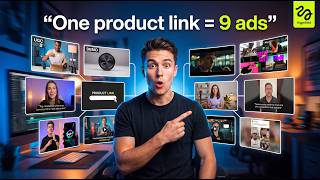

AI Creates Perfect Ads from One Link
45sShows a visually impressive AI-generated ad that looks professionally made, sparking curiosity and debate about AI replacing human creators.
▶ Play Clip"The title accurately promises ad generation from a product link without script or agency, and the video delivers exactly that with a step-by-step demo."
This video demonstrates how to use Higgsfield Marketing Studio, an AI-powered tool that generates complete ad campaigns from a single product link. The host shows how the platform creates multiple ad formats—such as UGC, product reviews, and cinematic spots—without requiring scripts, creators, or editing, producing polished results that rival professional production.
The host introduces a portable USB-charged blender as a personal morning routine item, demonstrating its ease of use.
The entire ad campaign was generated automatically using just one product link, with no script, creator, editor, or hook writing involved.
The AI-produced ad features natural pacing, polished shots, consistent characters, and professional product presentation, comparable to a real creative agency's work.
The platform can generate up to nine different ad formats—including UGC ads, product reviews, unboxings, tutorials, TV spots, and cinematic promos—from the same product input.
Higgsfield Marketing Studio, powered by Cedents 2.0, automates the entire ad workflow from a product link, eliminating the need for multiple creators, edits, reshoots, and high production costs.
Users click the link in the description to access Higgsfield, then navigate to Marketing Studio within the platform to start generating ads.
The dashboard offers multiple creative formats like UGC, product reviews, tutorials, cinematic ads, and unboxings, all built into the platform.
Users can paste a product link or upload an image; the AI automatically analyzes and imports product details, images, descriptions, and branding elements.
The avatar section provides pre-built avatars with different looks and styles, and users can also create custom avatars for brand personalization.
Users choose an ad style (e.g., TV spot) and can optionally describe the desired look, or simply hit generate to let AI create a complete ad without manual scripting.
The AI-generated ad features polished shots, intentional camera work, smooth pacing, professional product showcasing, clean transitions, and AI-generated background music that syncs with visuals.
Users can instantly generate multiple different ad styles from the same product, such as switching from TV spot to product review format.
A 15-second product review ad is generated automatically, featuring natural avatar delivery, body language, and reactions that feel authentic and unscripted.
The wildcard format gives AI more creative freedom, experimenting with editing style, transitions, pacing, and presentation for a more dynamic and cinematic result.
The wildcard ad feels cinematic with faster cuts, energetic pacing, and polished transitions, effectively communicating the product through visuals alone.
Higgsfield Marketing Studio enables users to generate multiple fully produced ad creatives from a single product link in minutes, without scripts, creators, or editing. Users are encouraged to try the link in the description.
Higgsfield Marketing Studio revolutionizes ad creation by allowing anyone to generate multiple professional ad formats from a single product link, eliminating the need for scripts, creators, or editing. This AI-powered tool produces high-quality, scroll-stopping ads that can be tested immediately, making it a game-changer for marketers.
What is the name of the AI tool demonstrated in the video?
Higgsfield Marketing Studio, powered by Cedents 2.0.
01:39
How many different ad formats can the tool generate?
Up to nine different ad formats.
01:10
What are the steps to create an ad using Higgsfield Marketing Studio?
1. Click link to access platform and open Marketing Studio. 2. Add product via link or image. 3. Choose an avatar. 4. Select ad format. 5. Generate.
02:08
What does the 'Wildcard' format do?
It gives the AI more creative freedom to experiment with editing style, transitions, pacing, and presentation.
07:41
What types of ad formats are available in the platform?
UGC ads, product reviews, unboxings, tutorials, TV spots, cinematic promos, and more.
01:10
Can users create custom avatars?
Yes, users can create custom avatars for more personalized branding.
03:42
What is the main advantage of using this tool according to the video?
It eliminates the need for scripts, creators, editors, and expensive production, allowing rapid generation of multiple ad formats from a single product link.
09:31
Ad from One Link
Demonstrates the core capability: generating a complete ad campaign automatically from a single product link without human intervention.
00:16Nine Ad Formats
Highlights the versatility of the tool, enabling users to produce multiple ad styles from the same input, which is crucial for A/B testing.
01:10AI-Generated Ad Quality
Shows that AI-generated ads can achieve professional polish, natural pacing, and coherent storytelling, challenging assumptions about AI content.
04:57Wildcard Creative Freedom
Illustrates how the tool can produce cinematic, dynamic ads with minimal input, expanding creative possibilities for marketers.
07:41Efficiency and Cost Savings
Summarizes the key value proposition: rapid ad creation without traditional production costs, making it accessible to small businesses and solo entrepreneurs.
09:31[00:02] >> Hi guys. So, this is my new morning obsession. It's a portable blender tiny and you literally just charge it with a USB. I just throw whatever you a little milk, and then you just press it. Oh my god, look at it go. It's so
[00:16] Bye. >> So, this ad was entirely created using just one product link. No script. No creator. No editor. creator. No editor. No hook writing. Just one link.
[00:31] it generated a complete ad campaign automatically. Different visuals, different scenes, different ad styles. And honestly, the results look way better than what most people expect from AI right now.
[00:45] The pacing feels natural. The shots actually look polished. The characters stay consistent. Even the product presentation feels professionally directed. It genuinely looks like something a real creative
[00:57] agency would produce. And what's even crazier is you're not limited to just one type of ad. You can generate up to nine different ad formats automatically. nine different ad formats automatically. UGC ads, product reviews, unboxings,
[01:10] UGC ads, product reviews, unboxings, tutorials, TV spots, cinematic promos, and more. All from the exact same product input. So, instead of spending days trying to come up with different hooks and creative angles manually, the
[01:23] AI does it for you, which is honestly insane for testing ads at scale. many creatives, you'd need multiple creators, multiple edits, reshoots, revisions, and thousands of dollars in production costs. But now, you paste in
[01:39] a product link, and AI handles the entire workflow. This is Higgsfield Marketing Studio, powered by Cedents 2.0. And in this video, I'm going to show you exactly how to go from a simple product link to fully generated
[01:54] scroll-stopping ads step by step. Let's get into it. So, first, click the link in the description below, and it'll take you directly to the Higgsfield platform. Once you're inside, you'll notice there are multiple AI tools available here.
[02:08] are multiple AI tools available here. Things like URL to video, C-Dance 2.0, Marketing Studio, and more. But, for this video, we're going to focus specifically on Marketing Studio, since that's where all the ad generation
[02:21] happens. So, go ahead and open that up. And this is the main dashboard you'll be working from. This is basically the control center where you can generate different types of ads for your product. Right away,
[02:33] you'll notice there are multiple creative formats available. UGC ads, product reviews, tutorial-style content, cinematic ads, tutorial-style content, cinematic ads, unboxings, and several others.
[02:46] Everything is built directly into the platform. Now, let's start creating the The first thing you want to do is click on add product. From here, you can either paste a product link or upload a product image
[02:59] image instead. For this example, I'm going to use this product right here to generate the ad. So, I'm going to copy the product link, right here. And once you do that, the AI
[03:14] automatically starts analyzing the product and pulling in all the details Product images, descriptions, branding elements, everything gets imported automatically, which saves a ton of setup time. So, I'm
[03:28] continue. Next, we have the avatar section. This is basically where you choose the person who's going to appear in the ad. If I open this up, you'll see there are a bunch of different avatars already
[03:42] available inside the platform. Different looks, different styles, different presentation vibes. And what's even cooler is you can also create your own custom avatar if you want something more personalized for your brand.
[03:55] But for this example, I'm just going to use this avatar right here. Next, let's move into the formats. Right here, you'll find all the different ad styles you'll find all the different ad styles you can generate. UGC, tutorials,
[04:07] unboxing, hyper motion, TV spots, and more. So for this example, I'm going to select TV spot. Now here's what's really powerful. You can actually describe exactly how you want your ad to look, and it will generate it based on your
[04:22] input. No setup. But what's even crazier is you can skip all of that. Just hit the generate button and it will create a complete ad for you using AI. No manual scripting, which saves a ton of time. So I'm going to hit generate
[04:38] of time. So I'm going to hit generate and let's see what the AI comes up with.
[04:57] than I expected. The overall quality looks super polished. The camera shots feel intentional. The pacing feels smooth, and the entire ad flows like something you'd actually see running on social media right now. Even the way the
[05:10] product is showcased feels professionally edited. The transitions are clean. The scenes connect naturally. Nothing feels random or stitched together. And what's even crazier is
[05:23] the background music was also generated by AI, and somehow it matches the visuals perfectly. The energy, the timing, the overall mood. Everything syncs together surprisingly well.
[05:35] Honestly, if someone showed me this without context, I probably wouldn't guess it was fully AI generated. It genuinely feels like a real ad made by a production team. Now here's where things get really
[05:48] interesting. Instead of creating just one ad format, you can instantly generate multiple completely different styles from the same product. So, I'm going to open this drop-down right here.
[06:00] And as you can see, there are several different ad formats available: UGC product reviews, tutorials, unboxings, TV spots, and more. For this next example, let's try the product review format. And this time,
[06:14] I'm going to increase the duration to 15 seconds before generating the ad again. >> I've been using Essence Lash Princess for that false lash vibe. The conac fiber verb brush grabs every lash for big volume and length. No
[06:30] clumps. Plus, it's cruelty-free and paraben-free. >> And there we go. Look at that. That entire ad was generated automatically in just a few clicks. And honestly, this is where things start getting kind of
[06:44] crazy. Because this genuinely feels like a real creator reviewing the product. The way the avatar talks, the body language, the reactions, even the delivery feels surprisingly natural. Nothing about it feels stiff or robotic
[07:00] before. It actually looks like the kind of product review content you'd normally scroll past on TikTok or Instagram. The pacing feels authentic. The expressions feel believable. And the product
[07:13] integration feels smooth throughout the video. Even the small details make a huge difference here. The pauses, the tone, the way the product is being demonstrated. It all comes together like an actual UGC style ad.
[07:28] Honestly, if someone showed this to you without telling you it was AI generated, there's a good chance you'd assume it was filmed by a real creator. And that's exactly why this tool is so powerful for marketers right now. Now, let's test one
[07:41] more style because this is where things get even more interesting. This time, I'm going to switch over to the wildcard format. And this mode is basically designed to give the AI more creative freedom with the ad generation. So,
[07:54] instead of following a more structured format like UGC or product review, it starts experimenting more with the editing style, transitions, pacing, and overall presentation. For the aspect ratio, I'm just going to
[08:07] leave everything on automatic and let the AI handle the setup itself. No manual adjustments, no complicated settings, just one click. So, let's settings, just one click. So, let's generate this and see what happens.
[08:38] good. The editing style feels completely different compared to the previous ads. This one feels much more cinematic and dynamic. The cuts are faster. The pacing feels more energetic, and the overall vibe instantly grabs attention.
[08:54] It honestly feels like something edited by a professional creative team. Even the way the scenes transition into each other feels intentional and polished. And once again, the AI-generated music
[09:06] matches surprisingly well with the visuals. The beat timing, the mood, the everything feels synced together naturally. What's really impressive is that even without heavy dialogue, the ad still
[09:19] communicates the product clearly. The visuals alone do a really good job of selling the product and keeping attention. Honestly, this already feels like a finished ad you could upload and start testing immediately. And the fact
[09:31] product input, that's actually insane. And yeah, that's Higgsfield Marketing Studio. From a single product link to multiple fully generated ad creatives in just minutes. Different formats, different styles,
[09:46] different creative angles. All without writing scripts, hiring creators, or spending hours editing videos manually. No production team. No complicated workflow.
[09:58] No back and forth revisions. You simply give the AI your product process for you. So, if you want to try this for yourself, check out the link in the description below. You can go from a
[10:12] simple product idea to a complete set of scroll-stopping ads in a single session. Definitely go test it out and see what you can create.

⚡ Saved you 0h 10m reading this? Transcribe any YouTube video for free — no signup needed.