
Why Most People Fail at Content Creation
43sRelatable struggle of content creators resonates with many, setting up the tension for the solution.
▶ Play Clip"Delivers on the promise of automating most content creation tasks, but requires 2-3 days of setup and some manual tweaking, so '90%' is aspirational."
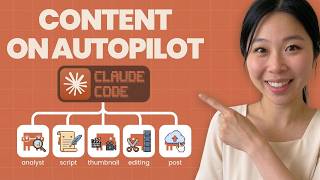
In this video, Sandy Lee demonstrates how to build an AI-powered content creation team using Claude Code to automate 90% of social media content. She outlines a multi-agent system that handles research, scripting, thumbnail design, video editing, and daily reporting, and shows a live build process leveraging APIs like YouTube Data, Google Sheets, and Descript.
Sandy wants to create a system where multiple AI agents work under her to handle content creation, including research, scripting, thumbnails, editing, and reporting. She uses Claude Code (not Co-work) for deeper API integration.
She explores marketing plugins like brand review and draft content but finds them too generic. She decides to build custom agents with more specific instructions tailored to her channel.
Sandy mentions canceling ChatGPT due to OpenAI's agreement with the government for military use, stating she personally disagrees and prefers Claude.
She uses Whisper Flow to speak her ideas instead of typing, finding it more efficient and accurate than Siri.
She asks Claude to find outlier videos (especially from creators under 50k subs) that are performing well, using a 48-hour view vs channel average formula.
After a few minutes of processing, Claude suggests seven agents: channel analyst, trend scout, script writer, thumbnail designer, video editor, daily reporter, and shorts repurposer (phase 2).
Outlier score = video views in 48 hours / channel's average 48-hour views × 100. Score >200 = strong outlier, >500 = viral. Prioritizes smaller creators.
Total cost estimate: Claude API ~$40, YouTube API free, Rapid API small fee, VPS optional. Compared to social media manager ($2-4k), video editor ($1.5k), researcher ($1-2k) per month.
After setting up the .md file, she types /init in Claude Code to generate a structured project plan including operations, tools, and agent specifications.
She enables YouTube Data API v3, Google Sheets API, Gmail API, Google Drive API through Google Cloud Console and creates a service account with editor role.
After 2-3 days of tweaking (30 min for outline, rest for personalization), she shows the final dashboard with brand colors (brown, dark green, beige). It displays outlier videos, content ideas, scripts, thumbnails, and has an email digest feature.
She uses Descript's Underlord AI to auto-edit footage: remove filler words, add intro/outro, and potentially auto-post to YouTube. Current setup requires manual layer addition.
Sandy successfully built a 7-agent AI content team using Claude Code for under $200/month, automating research, scripting, thumbnails, and editing. The system is customizable and delivers daily updates, saving significant time and cost versus a human team.
What is the outlier score formula for identifying viral videos?
Outlier score = (video views in 48 hours) / (channel's average 48-hour views) × 100. Score >200 = strong outlier, >500 = viral.
16:47
How many AI agents did Claude recommend for Sandy's content team?
Seven agents: channel analyst, trend scout, script writer, thumbnail designer, video editor, daily reporter, and shorts repurposer (phase 2).
13:42
Why did Sandy cancel ChatGPT?
She canceled ChatGPT because OpenAI agreed to allow the government to use their resources for war, which she personally disagrees with.
05:37
What tools does Sandy use for voice input and thumbnail generation?
She uses Whisper Flow for voice input and Nano Banana Pro for thumbnail generation.
06:02
What is the estimated monthly cost of the AI content team compared to a human team?
AI team costs under $200/month (Claude API ~$40, plus small fees) vs. human team costing $7,000-$8,000/month.
21:15
What is the purpose of the /init command in Claude Code?
It generates a structured project plan from the .md file, including operations, tools, and agent specifications.
23:52
Which APIs did Sandy enable in Google Cloud Console?
YouTube Data API v3, Google Sheets API, Gmail API, and Google Drive API.
27:03
Cost savings with AI team
Quantifies the massive cost reduction from $7-8k/month human team to under $200/month AI agents.
21:15Outlier score formula
Provides a concrete, implementable metric for identifying viral content from smaller creators.
16:47Dashboard customization
Demonstrates the iterative process of branding AI output to personal style, avoiding generic 'AI slop'.
29:13Ethical stance on AI usage
Highlights a personal choice to avoid a major AI provider due to ethical concerns, showing value-driven tool selection.
05:37[00:01] brand or grow your business? I talked to many different people and one of the struggles that they have often is creating content. [music] After working a long day, they finally come home, then they have to turn on the
[00:13] don't exactly know what to say, so they have to go back to YouTube, try to script it, but then they get [music] lost in watching videos because they find this funny video and they just give up. That happened to me multiple times.
[00:27] I started creating content since 2018 and I grew my channel across three different platform, YouTube, Instagram, and TikTok to 550k followers organically. However, here's the catch. I stopped creating content after a year
[00:44] of doing so and then I went back to it and then I stopped again. It's because I was so overwhelmed. I had to take care of my kids and also have full-time job. I'm not saying creating content is easy right now. However, what I'm going to do
[00:58] right now. However, what I'm going to do is I'm going to create using AI. I get a ton of help using AI. Even I got a skill of AI editing videos. And what I want to do in this video is I want something that's very specific that I pretty much
[01:13] want to create this content creation team and multiple different agents underneath me working. And I'll be feeding my idea to either Claude Co-work or Claude Code depending which one's better. So, I'm going to ask Claude what
[01:27] I should be using. And after that as a skill or plugin so that either three or five different AI agents can take care of my content. Obviously, my input is going to be there. You can't rely on AI 100%. I think human input always has to
[01:43] for companies, if you're running a business, AI can't replace human, but human can learn AI to advance its skills. That's my opinion. Or at least that's how I I it should be. So, you'll be seeing the live demo exactly how much
[01:59] time it will take me to build the system. And I haven't done this before, to take, to be honest. But, let's go straight into it. There is a Claude Colwork. What I'm going to do is I found out that the more I use Claude Colwork,
[02:15] the more I like Claude Colwork cuz it's such a easy user interface. But, I'm leaning towards more Claude Code because Claude Code has more capability of doing things. It can save your API key in .env file. Whenever it has a dot, that means
[02:30] it's a secret. Nobody knows it except for you. Anyways, it can save the API key, something that's very sensitive information, and it can actually go there and do the work for you. Whereas, Claude Colwork, yeah, it does the work
[02:43] but it can't go in depth. I don't know if that's because it's still in the beta mode, but still, I think they're still working on it. So, what I'm going to do content folder inside the Claude Colwork. But, I'm going to see if any of
[02:59] the plugin makes sense in terms of what I'm trying to create. So, let's look at the plugins for marketing and see what they have. Now, they have a lot of cool things. They have this brand review, review content against your brand voice,
[03:15] style and guide, and messaging pillars. Okay? That's kind of related to what I But, I want to be more specific. Instead of just a brand review, I want Claude popping up. Draft content. Let's see what's in here. Content type, blog post,
[03:32] social media post, especially specify LinkedIn, Twitter, Instagram, or Facebook. Email newsletter, landing page, topic or theme of your content, target audience, who is this content for, key message, two to four main
[03:47] points or takeaways to communicate, tone, authoritative, conversational, tone, authoritative, conversational, inspirational, technical, witty. Length. Okay, has a length over here. Brand voice. Content generator by type. Blog
[04:02] post. And what about social media post? It has hook in the first line, which I like that. Hook is very important. What about hashtag? Okay, has a hashtag suggestions. Call to action to engage prompt, emoji uses if it's appropriate,
[04:16] if it's the right setting to use it. If LinkedIn, professional framing. If Twitter or next, punchy. And if Instagram, visual first language and Instagram, visual first language and story driven. Okay, this is not too bad.
[04:29] But what I really want to do is let me go back to the chat and I'm going to go back to the chat and I'm going to talk about and explain exactly how I create content. Like my strategy of how I use this content. And after explaining
[04:43] that, the Claude will tell me exactly what to use between Claude code work or Claude code. And I can go back and forth, but I prefer just using one platform to be honest. So we'll see which one it will turn out to be that
[04:56] Claude recommends. Okay, now I'm ready. Whenever I do vibe coding, I like to wear something comfy. So I'm in my PJs. I'm the most creative when I'm in my PJs. So no judgment there. So what I like to do is I typically like to start
[05:10] asking Claude code, the chat mode over here. Instead of asking straight into Claude code, I like to talk to Claude just the chat version first to organize my thought. So about a couple months ago, I used ChatGPT to bounce different
[05:24] ideas because I thought ChatGPT is the best in terms of bouncing different ideas. And don't get me wrong, they're probably still really good, but just a couple weeks ago I canceled ChatGPT because recently there's a campaign
[05:37] saying "Cancel ChatGPT because OpenAI recently agreed that the government is allowed to use ChatGPT or any resources that they have to be used for this war
[05:49] that's happening around the world. And I personally do not support that. I very much disagree with that. I'm trying my best not to use that. So, let's go back to Claude. What I'm going to do is I'm going to use Whisper flow. So, instead
[06:02] of typing everything, I'm going to actually speak. Whisper flow is amazing. I can just speak. It understands me so much better than Siri right there. So, that's what I'm going to do. So, what I really want to do is I want to create a
[06:17] marketing team for my social media channel. My channel is youtube.com /sandyleeai. That's my channel. What I want you to do
[06:30] is I want you to study every single video that I had for my channel to video that I had for my channel to understand my voice and to understand what I'm trying to explain to people. Like pretty much analyze my channel. And
[06:45] after that, what I want the other AI agent to do is research like other people in my industry, what they are doing. You can call them competitor, you
[06:57] can call them friends. So, in this case, I'll just title them as influencer. I'll just title them as influencer. Study other influencers who's into AI Study other influencers who's into AI agency niche or AI news or AI business
[07:10] or like how to use AI wisely niche. Whatever that you can find, you I want you to just connect and study their channel. And I personally actually subscribe to most of those people, too. And I want you to find outlier videos
[07:26] for me because what I'm going to do is based on the topic that I get from YouTube, Instagram, and X, those three different platforms. VidIQ is doing really well at finding outlier video. If you can find something similar to what
[07:41] they are doing in terms of giving numbers of those outlay video, that's what I want. I don't exactly know what kind of data that they use, so that's something that you can do research about. But, if you can find that, that's
[07:53] great. In general, what I want to do is find a topic in X, find a topic in YouTube, and Instagram, and see what's trending. In any of the trending video,
[08:05] I want you to get the script of the first intro. So, first 30 seconds of the video, I want you to get the intro because I want to review those intro. I don't want you to copy and paste exactly the same as intro that they have because
[08:20] I'm not going to copy exactly same. But, I want you to get their formula and the format. That's the most important thing. So, after getting the format and formula of their intro and a title and thumbnail, I want you to put exactly
[08:34] what they have into Excel sheet, okay? So, I can review it and I can change it. But, also I want you to give me the recommendation of how I can change it based on my style of recording a video and my voice, my brand voice, Sandy's
[08:50] brand voice. So, here's the two sections that you will do. You'll just put exactly the same as what the creators are putting, but also you're going to write a script and create a thumbnail, and create a title based on the
[09:05] recommendation of my own style. So, you're mixing it and changing it. And I want you to do that on daily basis, okay? On every single day. If there's extra thing that you need to get like Epify, MCP for Epify, or N A N for the
[09:22] trying to decide whether I should be using Co-work or Cloud Coach for this. And I'm going to have a lot of API connected and connect with multiple different tools because, again, I'm creating this content
[09:38] team instead of just one. So, creating thumbnail is very important as well. So, I want you to create this one thumbnail department alone and make it as one skill specifically. And when you're creating a thumbnail, those outlier
[09:53] videos and especially hunt for or look for the smaller creators whose videos are popping up instead of this huge creator always popping up. That's the outlier video I want you to search. And all the agents will be working together
[10:07] by the way. As long as you search the thumbnail, you're going to reference the but I want you to change into my own style and put my picture in there. I'll give you a couple pictures that you can use. And use Nano Banana Pro, which I
[10:22] can give you the login information or whatever you need. I have open router API tool, so if you need that, I can also give you that as well. And for also give you that as well. And for title, it has to be short and concise,
[10:37] but also you have to match what other people are talking about. For intro, I want you to have a really strong hook where you can relate like I can relate to my ideal custom avatar know that I'm talking to them right away. And then
[10:54] we're going to talk about some huge opportunity that they're missing out if they don't learn this. And some sort of guarantee/satisfaction/the value that they're going to learn if they continue to watch this video. And
[11:08] during the intro I'll be showing like the quick less than 10 seconds of what this video is going to be about. And also the other AI agent I wish I have is
[11:21] also the other AI agent I wish I have is AI editing team. I have the script and I have the script's API key that I just barely got, so I'll be feeding you that. And as long as I give a very specific brand tool and brand color image and
[11:36] also style that I want you to edit. If I can just upload the video there, I want can just upload the video there, I want you to edit those and have me confirm, right, before I post on YouTube. But eventually what I'm going to do is I'm
[11:50] going to trust AI to do all the editing and after editing then you can actually upload from the script to YouTube. So that's what I'm going to do. And I'm going to focus on this long form channel
[12:02] instead of short form. Eventually I'll get into short form as well. So if you want to might as well just create the short form like another AI agent for short forms, you can. But my biggest thing right now is creating the long
[12:14] thing right now is creating the long form and that's my huge focus. So here's my idea. I gave you couple different assignments for AI agent. I want you to create just one team that has multiple different agents who has each of them
[12:27] have skills and eventually this will be the plugin that I'll be creating for my the plugin that I'll be creating for my social media content team. So tell me exactly what I need to do at this point step-by-step and that way I can make the
[12:43] whole system. And this has to be as easy as possible. And one thing that I want to add is whenever you're putting the information excel documentation, that's great. But if you can go above and beyond and send me a quick email with
[12:57] those update, that's also a really really good one that I would like to get. Tell me the breakdown of what I need, the different team and different AI agent in the set as well as the cost breakdown. Okay, now I'm done. I've
[13:13] talked to Claude like a lot just now and this was just my idea. One thing about building something with either Claude co-work or Claude code is you have to go back and forth a lot, right? Unless you're copying and paste somebody else's
[13:28] yours. Like a lot of projects in GitHub that you can get and then just copy and paste to your own skills. But I found out whenever I do that, that since that's not my idea, I tend to not get the results that I want. So I have to
[13:42] the results that I want. So I have to tweak it couple of times. So let's see tweak it couple of times. So let's see where it's at. Okay, it's finally done. It took about 3 minutes to get everything all sorted out, but we will
[13:55] see what's going on over here. Pretty fancy already. Let's download this to make this a little bit larger. So basically Claude recommended that I should have seven different AI agent. We'll see how that goes. The first agent
[14:09] is the channel analyst who study the channel and competitor who study my channel and my competitors and also build my brand voice little bit. And I will need YouTube data API and Claude API who can do this. And let's do the
[14:25] trend scout. So the trend scout is finding the outlier video on YouTube, X and Instagram on daily. I love that. I feel like X is a lot faster compared to YouTube and Instagram. Like every single news is over there. It's like a big hot
[14:41] AI news channel. So it finding outlier video on X will be really good. I also need YouTube data API for X and vidIQ style scoring. Perfect. And the next one is a script writer. Script writer who can write hook, intro, full script in
[14:58] Sandy's voice. Claude API. I personally always have been using Claude to write script because there's something about Claude and writing skills. It's so much there. So I like this. We're using Claude API and brand voice document.
[15:12] Perfect. Which means I can customize my own brand voice. That's great. And a script writer is right hook. Thumbnail designer is find reference thumbnails, generate Sandies version. We're using Nande Banana Pro API and Claude Vision.
[15:26] Video editor is auto edit footage to script brand colors and captions. We're script brand colors and captions. We're using Descript API and Claude API. Daily reporter, compile everything into Excel and send email digest. Google Sheets API
[15:40] and send email digest. Google Sheets API and Gmail API. And for shorts phase two, this repurpose the long form into shorts automatically. That sounds heavenly, right? I mean, there's a lot of SaaS like like Opus or even Descript, I think
[15:54] they do that. So, using a Descript API would be just fine because I'm already paying for it. So, let's go with the agent. So, this is explaining the specific agent breakdown what they will be doing. Let's see. The influencer
[16:07] be doing. Let's see. The influencer channel to monitor. Okay, these are all great people right here. And add any channels you subscribe to or Claude will put them in. Awesome, because I do have a lot more that I
[16:19] it because also a lot of them are pretty big. Like they're all big in AI industry. I want to find some smaller channel as well. Trend Scout YouTube and X. Okay, here's the formula that they were talking about. I want to look at
[16:34] this formula. Outlier score is the video view in 48 hours and channel average 48 hour views times 100. Score is higher than 200, that's a strong outlier.
[16:47] And scores more than 500 is a visual viral outlier. Agent flags these for you automatically. It specialize It specifically prioritizes smaller specifically prioritizes smaller creators under 50k sub. And with outlier
[17:03] scores, not just big names. Outlier top five outlier videos per day, each with title, thumbnail, screenshot link. Okay, this is great, especially that it has the video view versus channel's average within the 48 hours. but I want I don't
[17:19] know if I want just the 48th hours or like maybe a week. I don't know how VidIQ does, but pretty much I want to get the videos that are popping up like pretty good for the AI channel because everything just is happening so fast. I
[17:35] feel like if I'm a week behind, I'm very behind. So, this is good. I will just leave it. Agent 3 script writer, it's short punchy 6 to 10 words maximum. Hook and intro. If you're trying to build income with AI, but okay, sure. I can
[17:51] refine that as I go honestly, but let's go more viral tease. Output format. Agent 4 thumbnail designer. But video editor. Okay, well, hold on. So, after
[18:05] they put it, they're going to save it to Google Drive. Okay, that's pretty cool. And video editor, the script API remove filler words. Yes, that's what I want. Add captions to your brand font. I only want captions for the first intro
[18:19] though, so I'm going to add that. Add intro to outro bumpers match your established edit style. For a video editing, I want you to make couple changes. Removing filler word is perfect, but I also want you to use
[18:33] layer towards the beginning for intro. Intro has to be as much as animated as possible. You can also use B-roll that the script has. And or create B-roll
[18:45] using the script AI. And you can also cooperate and then work with Underlord, cooperate and then work with Underlord, which is AI of the script. And also I want you to add caption just towards the beginning for intro section, not
[18:58] throughout the whole video. And for the beginning intro, if you can add like a beginning intro, if you can add like a subtle music very quiet, not loud music cuz I want my voice to hear more than the music. That would be great. So,
[19:10] that's the intro. And also the gap between words has to be less than 0.5 seconds. Cloud Code versus Cloud Co-work, which one should I choose? All right, Cloud Code is actually seems like there's a check mark here, so it might
[19:24] be the better option right here. Let's see. It's best for developers, API integration, and unlimited, and it is API connection is limited. Based on my experience, Cloud Co-work is great, especially for those of you who's not
[19:37] get into like any technical stuff. This is a great platform or great tool to use. But, I found out Cloud Co-work is very limited when it comes to API key. It does exactly same thing as Cloud Code
[19:52] where AI agent is working for you as agentic workflow, but Cloud Co is more of a senior developer versus Cloud Co-work is more of a your AI assistant, right? Who's not a really a developer, but who learn maybe developing skills
[20:07] like 10 years ago, 5 years ago. That's just my theory behind it because every time when I'm trying to use Cloud Co-work and trying to save some important documentation, then they said, "Don't save it here. Maybe like it's
[20:19] better to use Cloud Code." And once you get to use Cloud Code, it's actually pretty easy to use it and continue to use it. I personally love Cloud Code. So, I'm glad they're suggesting Cloud Code for this, especially for seven
[20:33] agent. You definitely need Cloud Code. So, I'm going to save a couple API key in .env file. Whenever there's a dot, that's more of a secret, that's local, only I can see it. It's hidden, so I like that. Complete tools that we need.
[20:48] Cloud API, yes, I have it. Nano banana pearl, open router API, the script, Google accounts. I have all of those, so that's great. And it seems like they don't even need Appify. That's the one that I don't have, so this is good.
[21:03] that I don't have, so this is good. Step-by-step build plan, set up a create a Google Sheet, build channel analyst first, build trend scout, and cost breakdown. Let's see how much it cost. That's important. And finally,
[21:15] let's talk about how much it cost. Cost is important, right? Let's go over this. Claude API is per use, so about 40 bucks, okay? YouTube free for now. Rapid
[21:28] bucks, okay? YouTube free for now. Rapid API is not free. Appify is optional. VPS for self-hosting is also optional. So, it can be anywhere between $84 to $74.
[21:40] If they're doing exactly what I've asked them to do, this is nothing. Like, seriously nothing. Okay. Yeah, just like it says, compared to to the social media manager anywhere between 2 to 4K, video editor 5 to 1,500, and researcher for 1
[21:56] to 2K. Yeah. You can pretty much finish about 7 to 8,000 dollars of work with less than 200 bucks. Pretty powerful. Now, for solopreneurs like myself, a tool like this is very valuable because I'm just getting started. So, I need
[22:11] more help, and that's where AI comes in. Yeah, I'm not going to worry about the shorts just yet. Cuz I want to focus on the long term for now. But, what you need to give Claude code to start is very specific. I love this. You need to
[22:25] your YouTube channel, Banana API, and all that. And put all of this in Claude the MD file at the root of the project. This file becomes the brain every Okay. Perfect. So, this is the MD file. I'm going to
[22:40] open Claude code and get started. Cuz this is under content folder. So, this is perfect. So, the other thing that I can do is I can either save this into the folder that I just barely mentioned, or the one of the other ways, which is
[22:55] the way that I'm going to do right now, is I'm going to say save this into MD file. Save this into cloud MD file. And And I just copy and paste the whole thing that we just barely read together. All right. Now this is all done. It said
[23:12] the content or image has to be saved to the MD file. That's perfect. The image was cut off. That's weird cuz I just copy and paste the whole thing. Oh, that cut off. So somehow the copying and paste didn't work. So what I'm going
[23:26] to do is I'm going to have them find it from my download and then create a MD file. Got the full document and then it's replacing it. That's perfect. And sometimes that's what cloud code does. Cloud code just talks about how hey,
[23:39] however, I can't really read this file, but then like they work towards something and they're like just kidding. I found a way to read it. So that's the reason why I love cloud code. And after that was done, what I did is I just type
[23:52] /init. And what it does is typically if you don't have the MD file that they just pretty much go through every single thing on your folder and then create the MD file for you. In this case, I already had a MD file. So what it did is it
[24:08] created the plot directly situation, which is the another MD file that I gave them before. Planning, operations, tools, and and also tools and then saving tools way. They can also saving tool way. Existing content preserved for
[24:24] outlier analyzer editing. Yeah, like I said, I have a lot of things going on. That's the reason why I want to make sure I have the whole system. So it's more of a one place versus using it in multiple different ways. So I want you
[24:38] to look at the MD file that I just barely created for this project. And it suggested to have seven different AI agent to create my content social media content marketing team. So tell me exactly what I need to give you like
[24:54] step-by-step and just make it very simple as simple as possible. Then I want you to apply that so we can work on this right away. While I'm waiting, I cut my chocolate. Okay, Google Cloud API keys, you need one Google Cloud project
[25:08] with these three APIs enabled. Then give me the API key and OAuth 2.0 credentials JSON file. I'll walk you through creating these if you haven't. Your Google Sheet, and yeah, I need to create a Google Sheet. Competitor channel list,
[25:24] a Google Sheet. Competitor channel list, and also ICA, brand colors and fonts, Rapid API key, then open in a parallel. This is a lot, guys, but I can tell once I set this up, it's going to be my life is going to be so much easier, so I just
[25:39] how to do this, but I'm going to ask them to do step-by-step because I kind of forgot, and also I don't want to take too much time of researching this. Step-by-step. So I'm going to ask step-by-step guidance for the YouTube
[25:52] data and the Google Sheet, all the data analysis, all the key and the credential analysis, all the key and the credential information because I also prefer having Claude give me very specific instruction because like I tend to forget sometimes.
[26:07] So let's go over here, console.cloud.google. All right, I had to turn on that two-step thingy, and finally I'm here. Let's look at this. What did Claude want me to do? Select the projects. What is
[26:21] it? Sleigh Machine Social. I'm going to click right here where the project is, and go to new project, and my project name is as Claude suggested, Sleigh name is as Claude suggested, Sleigh Machine Social. I need to create new,
[26:36] And what else did Claude say? Then make sure the project is selected at the top, click hamburger menu, and then API Services Library. Let's see if that's selected. This is not selected, so I'm just going to select the Sleigh
[26:51] Machine Social. Go to hamburger menu right here. API keys and enable API and services. Go to the library that they suggested. And what I'm going to do is I'm going to
[27:03] search YouTube Data API V3 right here. Click enable. That's it. This is enabled. Let's go to the next one. Google Sheets API and Gmail
[27:15] API. I'm going to also enable Google Doc just in case. Enable and yeah. just in case. Enable and yeah. Enable and also Google Drive. And I think they said Gmail. I'm going to enable all of this. Yeah, these are all
[27:30] enabled. That's how we can check over here, right? So, I got Google Sheets, Google Doc, Drive, Gmail, and YouTube all taken care of right here. So, go back here. Step one is taken care of. Now, let's go to step two. Create a
[27:44] service account for Google Sheet. Still in credentials, okay. So, I'll go to credentials and create credentials. I click create credentials, service account, the Slee Content Bot right here. Create, continue. The role is the
[28:00] editor and click go to keys tab. And next, what I'm going to do is I'm going to add API key right here. All right, so now what we're going to do is go over now what we're going to do is go over here and then select keys and select add
[28:14] keys right here and create a new key. JSON file is perfect. Now, let's go to JSON file is perfect. Now, let's go to step three. Go to sheets.google.com.
[28:28] Google right here. This is the one that I'm going to use. Actually, Daily I'm going to use. Actually, Daily Outlier is the first one and Content Calendar is the second one. Brand Voice is the third one. Competitor Tracker is
[28:44] the fourth one. The thing is, I want exactly same as what the other people say instead of just changing to my own style. So, I probably do have to change this at some point, but I'm going to open this maybe anyone with the link,
[28:58] copy the link. Okay, this is what they want to do. They want us to add this machine whatever and then have it at a verse. So, we'll see if that will work. Okay, guys, after working on this for 5 to 6 hours, I'm finally done and I can
[29:13] show you what I got right now. It took about maybe 30 minutes to get the actual outline done and have the agent set up. But, what took me really long is the getting agent into the way that I really like. Personalization part,
[29:27] customization part, that's the reason why it took a little bit of time. But, like. So, this is the very first thing that I got from Cloud Code and I really this is just only for me. I just, you
[29:41] know, this is too AI slop color font. I didn't like it. So, I just gave my brand color and font and different images and this is what I got. I like this a lot better. I just like brown and dark green, white, beige color a little bit
[29:56] more. But, let me go over the dashboard. So, the dashboard what it has So, before need to explain what's going behind the dashboard. You know, what is the some of the resources that are using to create the dashboard. So, the very first thing
[30:10] that I asked Cloud Code to do is turning everything into my style, Sandy style. So, Cloud Code actually studied what my channel is about, how many subscribers I have, who's my ideal customer avatar, and what videos are performing well, why
[30:26] is it performing well. It did a little bit analysis of my own style. And also, it did a great job at getting the competitor analysis as well. Who are some of other creators talking about AI niche and how many subscribers they
[30:39] have, views, videos. And based on the competitor analysis that they have, they actually get the outlier videos based on the other YouTubers videos. So, if one
[30:52] of the video is popping up really well, then it shows a higher outlier video and it's recommending me to record a video and make a video based on that topic. And it updates every single day. At first, I put it under 48 hours. So,
[31:08] the 48 hours period, but that was just too short. So, I just increased that to 5 days. So, I'm just going to get all this different information every single day. This Google sheet, the Clockwork
[31:20] actually have access to edit it and that's the reason why they could update this on daily basis. And not only that, I actually get email from them as well. before I go over email, let's go over the dashboard. So, I love this this
[31:35] dashboard because it's a lot easier for me to look at it compared to the Excel with you. So, it's it's telling me specifically how many outlier video that I have from YouTube and X Twitter. I didn't have
[31:49] Instagram just yet because I just set that up, but I feel like YouTube and X is just fine from the get-go. And so, it's giving me specifically outlier video and title that they use. If I click it, it can go straight into his
[32:02] channel over here. If I click damn, it's Martel's over here. It can go straight in here. So, I can actually listen to it and read it as well. But something that I really like is I can just see what videos are popping up based on this
[32:15] outlier score that Clockwork has given. The next is content idea. So, it's for different subject. But what Clockwork actually did is it picked the best content idea based on the outlier
[32:29] best content idea based on the outlier video and my brand style. And in today's script section over here, I asked Clockwork to give me very specific intro. Like 30 seconds has to be all
[32:41] has all different steps that I give in Clocko code and it's giving me the very specific detail. But other than that, the intro, I want rest of it to be in shows that. But one of the cool things about this is you don't really have to
[32:57] of hard to see. But if you actually click the start recording button right here, then the start recording button will have all the transcript in the easier way for me to see. It's just like easier way for me to see in all the
[33:12] bullet points. So, this is more of a reference for me. I'm not sharing this with the viewers. However, what if I want to share this same idea to the viewers, but I don't want all the script to be there? That's when Clocko actually
[33:26] it here and there, but this is what I got. So, basically, if I were to record a video like this, I'll be sharing this specific site and I'll zoom in and explain exactly what this is talking
[33:40] about, which is the best part. Like even this took such a long time, but Clocko is doing everything just automatically for me. And the other thing is thumbnail. So, this specific video right here, his thumbnail is looking like
[33:54] this. 24/7 AI employee Shawn, he's actually one of my friend, but this is actually one of my friend, but this is what his video looks like. My video that Clocko made is kind of similar to what his. But if you don't really like the
[34:06] similar, you don't want to really copy exact same style, Clocko also gave a very different style as well and that you can customize. So, that's the thing that I asked Clocko to do is like have a reference, but I also you have to
[34:19] it's giving me three different things and again, I'm using Nano Banana Pro to generate this. And I have a competitor generate this. And I have a competitor over here and this is fantastic. So, I
[34:31] explained to you before, I'm actually getting this on daily basis via email. Every single morning I actually get emails at Sandy AI daily digest email. If I click full open full dashboard, it goes straight into this Google sheet so
[34:46] I can look at the daily outlier video or content calendar video. Or I can ask Claude code to open up the dashboard and it will have everything up to date. I'm filming this video like on Friday, March 13th and and everything's up to date
[35:01] over here. And the other thing that I wanted to show you is the editing team. Now, editing took me a little bit of time because the script's API is fairly new. It didn't really have some of the things that I wish that they had. But
[35:14] then something that the script actually has is it has an AI feature called Underlord. So, you can ask the Underlord to do different things. I don't know if you can see the little icon over here. This is the Underlord. So, what I asked
[35:27] Claude to do is, "Hey, maybe ask the write prompt to Underlord so the script's AI can edit the video for me." So, that's what I did. I didn't touch this video, but then this video already got edited. It removed all the filler
[35:41] word, all the words like repeat video that I don't really want and it starts straight from here, which is fantastic. And all I need to do is I need to add it more layers and that way the Underlord can use the exact layer for my intro and
[35:55] that will be just perfect. Like that will be just done deal. And I removed some of the gaps. So, my editing team is almost done as well and all I have to do is put the video into the script and Underlord used by Claude code will fix
[36:12] Underlord used by Claude code will fix it and after completing editing, it can actually automatically post to YouTube video for me as well, which is yes, it's going to save so much time. I'm so excited for this. I am so happy with the
[36:26] thing that I built. It took me a couple hours over several days, like I would say two to three days because, you know, I've been working on it here and there. I'm going to share everything to you on this Notion documentation. So, just
[36:38] click the link below and you can go there, sign up, and and make sure that you get that Notion documentation and use that as a a bone again, right? Just the frame of it. This is more of a foundation and I want you to alter it
[36:53] and change it to your own niche. If you're in different niche, marketing, real estate, or whatever niche you're in, I want you to change to your own style and also your own brand voice. Obviously, your brand is not going to be
[37:06] like dark green and beige. Maybe you are, it's fine. Just to use it, but I want you to have your own voice because personal brand, that's that's what's all about. Like everything's personalized. But because I built most of it, this is
[37:19] going to save so much time for you. But you're not going to get this done within then it's going to take a couple hours. So, just get ready. But good thing is I'm going to share everything with you. In the very next video, I'm going to
[37:31] share a couple different Claw Code tips that I've learned throughout the couple of months of using Claw Code. I wish I knew these information from the get-go when I first started it, but even Claw Code has developed so much since I
[37:44] everything with you so that you're not wasting your time and credit. That's a huge. So, you're not waiting for like a couple hours to get the Claw Code back. So, stay tuned. Make sure to subscribe so you can watch the next video.
⚡ Saved you 0h 38m reading this? Transcribe any YouTube video for free — no signup needed.