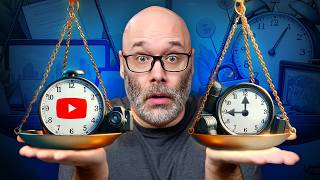

Balancing YouTube with a Full-Time Job
45sThis addresses a common pain point for many viewers, making it highly relatable and likely to drive engagement.
▶ Play Clip"Delivers practical scheduling advice, though some repetition and generic tips pad the runtime."
This video addresses the common challenge of balancing YouTube content creation with a full-time job or other life commitments. The creator shares practical strategies for scheduling content creation in two-week cycles, leveraging tools and templates to speed up editing, and prioritizing consistency over perfection. The goal is to help viewers publish content consistently without feeling overwhelmed.
Many YouTubers have full-time jobs and are limited on time, which makes consistent content creation challenging.
It's important to schedule dedicated time for content creation, just like any other priority, to ensure it gets done.
The creator learned from experience that forcing content that doesn't fit your lifestyle leads to burnout. Simplify content and focus on what you can sustain.
Using templates for editing (e.g., lower thirds, in-screen graphics) saves time. Simple content with good value beats flashy graphics that take too long.
Use tools like editing by text to automatically remove silence, speeding up the initial edit. Also, work on multiple videos at a time to batch tasks.
Work in two-week cycles to avoid always chasing one video. This allows time for planning, recording, editing, and publishing without stress.
Think about titles and thumbnails while still working on the video idea. This helps ensure the content is packaged well and can attract viewers.
AI script writers can provide a starting base for scripts, which you can then customize to make unique content, saving time on outlining.
The schedule doesn't have to start on Monday; adapt it to your life. If you're limited on time, do what you can and use overflow days (Friday-Sunday) to catch up.
If you work on more than one video at a time, you can record extra content in advance and edit on weekends, ensuring a video is ready for Friday.
Friday, Saturday, and Sunday are overflow days to catch up on any missed tasks. After that, it's time to relax and recharge.
Use small pockets of time (e.g., bathroom breaks, lunch) to answer comments and engage with your community, as it's important for growth.
The key to balancing YouTube with life is to create a realistic schedule, use tools to streamline production, and prioritize consistency over perfection. By working in two-week cycles and using overflow days, you can publish content regularly without sacrificing your personal life.
What is the recommended cycle for scheduling YouTube content creation?
Two-week cycles.
04:12
What editing technique can automatically remove silence from videos?
Editing by text.
03:32
What is the benefit of using templates in video editing?
Saves time by not having to recreate graphics and lower thirds each time.
02:51
What should you do if you have limited time for YouTube?
Do what you can and use overflow days (Friday-Sunday) to catch up.
06:10
Why is it important to plan titles and thumbnails early?
To ensure the content is packaged well and can attract viewers before you commit to making the video.
04:52
What is a suggested way to engage with your community when busy?
Use spare moments like bathroom breaks or lunch to answer comments.
09:09
Content Must Fit Your Lifestyle
Highlights the importance of sustainability over forcing content that leads to burnout.
02:11Leverage Editing Tools
Practical tip to speed up editing using text-based editing and silence removal.
03:32Two-Week Cycle
Provides a concrete scheduling framework to avoid last-minute stress.
04:12AI Script Writers
Introduces a modern tool to streamline scriptwriting, saving time.
05:16Overflow Days
Emphasizes the importance of built-in buffer time for unexpected delays.
08:42[00:00] that you either have a full-time job you're probably limited on time This is a really common problem when it comes to YouTube
[00:12] which kind of puts you in a pickle in some cases. exactly what it is that you can do schedule-wise at the pace that you choose to put it out.
[00:26] if this is your first time here, and learn how to use all of the tools so you don't miss any videos that can help you.
[00:39] that you need to keep in mind for the following part, which is a step-by-step schedule that you can follow
[00:51] at the pace that you want to put out content. that we have to say when we're having this conversation, that restarts every two weeks
[01:06] So let's talk about the obvious thing that we all know, and I'll just be that person today. That means YouTube, TikTok, Instagram,
[01:20] all the streaming services, things like that. from you being able to publish content. of watching entertainment videos on YouTube Shorts,
[01:33] that in some cases isn't as obvious is that you need to schedule your content-creation time. is gonna really highlight how important that is.
[01:46] you're gonna end up doing it. or if you have some other thing that you have to go to and then you make sure that you go to it.
[01:58] you're giving it a priority, that I'm getting ready to share with you. is we all have content that we enjoy making,
[02:11] just doesn't fit into your lifestyle. and I had to walk away and stay consistent over a long period of time.
[02:24] because I was trying to force in that content But it also taught me which is, if possible,
[02:37] or try to simplify the content what I'm saying is to focus on the things having a bunch of flashy graphics
[02:51] yes, they make everything look good and all of that, than a bunch of fancy graphics can. is to use templates when you're editing.
[03:06] like wooshes on a regular basis, If you have lower thirds that pop up If you have an in-screen graphic,
[03:18] on a regular basis in your videos, so that you don't have to waste those few seconds or minutes every second counts when you gotta wake up
[03:32] that you leverage the tools that are available. it has the option to edit by text to where it'll automatically remove silence
[03:46] to help you just get through that initial edit a lot faster. if possible, try to work on more than one video at a time. the video ideas and thumbnails and all of that,
[03:58] When you are outlining and scripting the videos, When you're recording the videos, so then you can save the time on setting up lights
[04:12] So let's talk about the schedule. I recommend that you work in two-week cycles. and you're always chasing that one video
[04:25] or whatever other day you publish, where you can get everything done that you need to get done. So in the event that there are some things
[04:37] without feeling stressed out about it. and thumbnail planning and research The reason it's important to make sure you're thinking about
[04:52] while you're still working on the video idea but if you can't package that up that are gonna be interacting with that content
[05:04] before you even had a chance that you can come up with a good idea for the title before you even commit to making the video.
[05:16] You can, without question, or if you wanna speed things up, that has an AI script writer
[05:29] and it will give you a starting base of your script. and then you can add to it or take things away and to make something completely unique out of it.
[05:44] if that's something that you're interested in. everything it was that you were gonna do for the video, Depending on how long your scripts are,
[05:57] and things like that, make sure that you reserve enough time on that Wednesday this doesn't all have to start on a Monday.
[06:10] So you do this based around wherever it is and where is a good ending point for you. Now, keep in mind, if you're on a limited time,
[06:22] Do what you can do. go in and start tightening things up. And then as you get faster at editing,
[06:36] with where everything's at in your editing software, and spending a little bit more time in the edits because you're getting more efficient at the thing.
[06:49] it's perfectly fine to overflow into Friday. that first video completed and uploaded on Friday We have a built in cushion for this,
[07:05] if it moves over into Saturday, But if you did work on more than one video at a time, Saturday, you start editing the next video.
[07:19] but if not, then you can let that overflow into Sunday Week number two, Monday. Get the video that you finished up on Saturday or Sunday
[07:33] and get that ready and scheduled to go out on Friday especially if you do and you already have an idea
[07:46] upload the video, add a description, add in-screens, cards, Because it doesn't take a lot of time to do,
[07:58] is a little bit crazy. instead of it being a longer day Okay, so now we have a video published on day five,
[08:11] on the following Friday. to record some extra content in the previous week, and start that process again of recording the content
[08:28] you've already got a video ready to roll on Friday. to plan and record that additional content, you would get that ready to publish
[08:42] Friday, Saturday, and Sunday are all overflow days. those days are the days that you can catch up on them. then it's time to chill out, relax,
[08:56] for getting it done that's gonna help you publish content more consistently, Now, in the middle of all of this stuff,
[09:09] You still need to interact with your community. so come here a little bit. when you're using the bathroom
[09:21] or taking a lunch break at work or school when it's just a few minutes here, a few minutes there, to answer comments and to engage with your community
[09:34] but you don't have a lot of time and you wanna do YouTube, So the first step is to make sure and just see how far you can get
[09:49] that as you're going through the process of doing all this, each part of this a lot faster as you get rolling. so you can get it done.
[10:02] but it's also gonna help you get better results is to build the skills around being a content creator. that tells you exactly what you need to focus on right now.
[10:15] I'll see you in the next video, thanks for watching.


⚡ Saved you 0h 10m reading this? Transcribe any YouTube video for free — no signup needed.