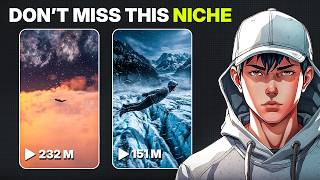

30M Views from AI Flying Humans?
45sHigh view count claim hooks curiosity about a new trend.
▶ Play Clip"Title accurately describes the tutorial; it delivers the easiest method as promised."
This video provides a step-by-step tutorial on creating cinematic AI-generated flying human videos using ChatGPT and Flow AI. The creator demonstrates how to generate scene ideas, create images, and animate them into realistic flying clips suitable for platforms like TikTok and Reels.
Creators are gaining hundreds of thousands of followers by posting cinematic AI clips, with one page getting over 30 million views on a single video.
Go to ChatGPT, search for 'flying human generator', open it, and start chat. The GPT provides scene ideas to choose from.
After selecting an idea, the GPT outputs an image prompt and a video prompt. Copy the image prompt for the next step.
In Flow AI, go to image generation, paste the prompt, select model 'Nano Banana 2', set aspect ratio to 9:16, and generate images.
Pick the best image, open image-to-video feature, paste the video prompt from GPT, set aspect ratio to 9:16, choose model 'VEO 3.1 fast', and generate.
The output features slow camera movement, cinematic drifting through clouds, and natural wind effects on clothes, resembling a movie trailer.
The entire process requires no camera, actors, or expensive setup—just AI. The niche is still early, offering growth opportunities for consistent creators.
This workflow enables anyone to create viral AI flying human videos without traditional filming. The niche is still early, so starting now and staying consistent can lead to rapid growth.
What two prompts does the ChatGPT flying human generator provide?
An image prompt and a video prompt.
00:30
Which model is used for image generation in Flow AI?
Nano Banana 2.
00:43
What aspect ratio is recommended for TikTok and Reels?
9:16.
00:43
Which model is used for the image-to-video feature?
VEO 3.1 fast.
01:10
What is the key advantage of this AI method over traditional filming?
No camera, actors, or expensive setup required.
01:48
Viral Potential
Highlights the massive reach (30M views) achievable with AI content.
00:01Cinematic Quality
Demonstrates that AI can produce movie-like visuals without traditional equipment.
01:26Early Niche Opportunity
Emphasizes that the niche is still early, offering first-mover advantage.
01:48[00:01] creators are gaining hundreds of thousands of followers just from posting these cinematic AI clips. One page even pulled over 30 million views on a single show you exactly how to create these flying human videos step-by-step, even
[00:17] if you've never made AI content before. First, head over to ChatGPT and search for flying human generator. Open it and hit start chat. The GPT will instantly and scene ideas to choose from. You can
[00:30] idea, or just type more for [music] fresh concepts. I'm going with number seven. Once the GPT finishes generating, it'll give you two things: an image prompt and a video prompt. Now, copy the image prompt and head over to Flow AI.
[00:43] Inside Flow AI, go to the image generation section and paste your prompt into the prompt box. For the model, choose Nano Banana 2. Then, set the aspect ratio to 9:16, [music] so it fits perfectly for TikTok, Reels,
[00:56] images you want and hit generate. And look at these results. These genuinely sci-fi movie. The lighting, the atmosphere, the realism, it's actually crazy how cinematic they [music] look. Once your images are ready, pick the one
[01:10] you like the most and open the image-to-video feature. Now, go back to the GPT and copy the video prompt. Paste it into Flow AI. Set the aspect ratio to 9:16. Also, choose how many outputs you want. For the model, I choose VEO 3.1
[01:26] fast. Then, hit generate. And this is where the magic happens. The slow camera movement, the cinematic drifting through the clouds, the wind reacting naturally to the clothes, it genuinely looks like a scene from a movie trailer.
[01:48] film anything. No camera, no actors, no expensive setup, just AI. And honestly, this niche still feels super early right now. Most people still have no idea how start now and stay consistent, [music] there's a huge chance to grow fast with
[02:04] this kind of content. That's the full workflow. All the tools and links are in the description below. And if you want more viral AI content ideas like this, make sure to subscribe to AI Vision so you don't miss the next video.



⚡ Saved you 0h 02m reading this? Transcribe any YouTube video for free — no signup needed.