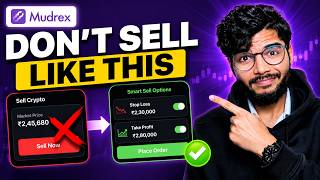

You're Selling Crypto Wrong!
40sDirectly challenges common practice, creating curiosity and urgency to learn the '10 times better' method.
▶ Play Clip"The title accurately describes the content, but the promise of '10 times better' is an exaggeration; it's a solid tutorial with some promotional fluff."
This video demonstrates a more efficient method for selling cryptocurrency on the Mudrex platform, focusing on using take-profit and stop-loss orders to automate trades and potentially avoid losses. The creator contrasts the common practice of immediate market selling with a smarter approach that allows users to set multiple conditional orders at different price points.
The video starts by suggesting that most users sell their crypto in Mudrex incorrectly by using the immediate 'sell' option, which executes at the current market price.
To manage investments, users should navigate to the 'Spot' section and click on the icon to view all their cryptocurrency holdings.
An example is given where selling ₹101 worth of Tether Gold immediately results in a loss because the selling price is lower than the average buying price (₹4,25,000 vs ₹4,80,000).
Instead of the 'sell' button, users should click on the three dots next to the asset to access advanced order options, which allow setting a desired selling price.
A take-profit order can be placed at a specific price, such as ₹4,30,000, to automatically sell a percentage (e.g., 25% or 50%) of the holdings when the price reaches that level.
Users can place multiple orders at different price points, allowing them to sell portions of their crypto at various levels to capture gains during a bullish run.
To protect against market crashes, users can set stop-loss orders to automatically sell a certain percentage (e.g., 75%) if the price falls by a specific percentage (e.g., 5%).
Additional orders can be placed, such as selling 100% if the price falls by 8%, giving users full control over their selling strategy.
The video concludes that using take-profit and stop-loss orders allows for smart selling on any cryptocurrency in Mudrex, avoiding the pitfalls of immediate market sells.
The video's main takeaway is to use conditional orders (take-profit and stop-loss) in Mudrex to automate selling at desired prices, which can help avoid selling at a loss and maximize profits. This approach is presented as a smarter alternative to the common practice of immediate market selling.
What is the common mistake when selling crypto in Mudrex?
Using the immediate 'sell' button, which sells at the current market price, potentially at a loss.
00:04
What is the alternative to the immediate sell button in Mudrex?
Using the three dots menu to place conditional orders (take-profit and stop-loss).
00:46
What is a take-profit order?
An order to sell a certain percentage of holdings when the price reaches a specified higher level.
01:11
What is a stop-loss order?
An order to sell a certain percentage of holdings if the price drops by a specified percentage.
02:36
How many conditional orders can you place in Mudrex?
Multiple orders, such as four, five, or six, at different price points.
01:53
Conditional Orders as a Better Strategy
Introduces a practical alternative to immediate selling, which can help avoid losses.
00:46Take-Profit Example
Provides a concrete example of setting a take-profit order, making the concept easy to understand.
01:11Stop-Loss for Risk Management
Highlights the importance of stop-loss orders to protect against market crashes.
02:22[00:04] If you are buying and selling in mdx then my assumption is that you are selling your crypto currency in mdx in the wrong way. my assumption is that you are selling your crypto currency in mdx in the wrong way. home interface, you will be going to the spot here. Here you will see this icon above.
[00:18] You must be clicking on it. Here you will be able to see all your investments in crypto currencies. Now for example, let's say this is Cathar Gold, I click on it and normally you click on sell and
[00:31] assume that I want to sell ₹101. Type the amount here and click on sell. I clicked on confirm and my crypto currency was sold here. Isn't it ? Most people would do the same. But there is a 10 times better
[00:46] way to sell cryptocurrency in mdrax. What you do is that instead of clicking on the cell here, you should click on the three dots here.
[00:59] Click on it and click on continue. Because what just happened? My ₹101 worth of Taithar Gold was sold immediately at the same price. See the current price is ₹4,8,000.
[01:11] My selling was done on this. But my average buying price is ₹4,25,000. That means I ended up selling at a loss here. Bought for more and sold for less. So I could place a selling order here. 4,25 as it is.
[01:27] 4,25 as it is. When I reach 4,300 Tether Gold, I can sell 25% or 50% of the Tether Gold I have. 5% on my desired price
[01:39] when it goes up Tether Gold then this is my selling here. How much? Of ₹162. I will click on Place Order. My order has been placed. But My order has been placed. But my selling didn't happen. Selling will happen only when
[01:53] I want to. That means selling will happen only when Cathar Gold reaches my desired price. Ok? So in this way I can place not just one but four, five or six multiple orders. Let's assume I have some crypto currency worth ₹10,000. Inside mdx,
[02:07] I can place an order to sell my crypto worth ₹2000 above the price of X. Crypto should be sold for ₹3000 and above the price. Isn't it? I kept selling different amounts at different price points. I can place my order in advance and sit
[02:22] peacefully so that whenever it rises and there is a bullish run in the market, my order gets automatically set here. Look, the order has been set. This is active. Ok? Is. Now this is take profit. But I can also place a stop loss here. The
[02:36] coin may also go down. There could also be a market crash. And I don't want also be a market crash. And I don't want what can I do here? If this falls by 5% then sell almost 75% of mine.
[02:52] Ok? If it does not fall below 5%, get my amount sold here. I can place my order here. And if I want, I can place more orders. Let's assume want, I can place more orders. Let's assume that if it falls by 8% here, then make
[03:05] me sell 100%. I will click on Place Order. Another order was placed. Now see, all these three orders are for selling only. But at different price points. I will be selling at one place. If it reaches ₹4,30,000
[03:21] then my sale will be done. Now if this much Tether Gold falls below the current price of Rs. 387000, then I will sell this much amount and if it falls further to Rs. 375000, that is, below that, then I will sell this much amount.
[03:37] Ok? This way I can place multiple orders and sell smartly on any cryptocurrency on the mdrax platform. So if you were not using this option of stop loss and take profit, then now
[03:51] I have explained everything to you in full detail. Otherwise, if you were not using mdx till now, then here is an offer for you. If you download mdrax from the link in my description or by scanning this barcode and
[04:05] scanning this barcode and deposit funds of ₹2000 or more in your new fresh account, then you will added to your mtrx fund wallet. This offer is for new users and will be applicable
[04:22] after depositing funds of ₹2000 and with that ₹2000 you can do futures trading if you are a futures trader here. If you are an investor, you or you can create a set of many coins in a coin set and invest in it.
[04:36] Whatever you want, you can do it here. Otherwise, if you have any doubt, please ask it in the comments. But if you are stuck somewhere in crypto currency , have any problem, any query, any question and you need its solution from me
[04:49] then you can book a session with me. This is my website. There is also a barcode here. You will scan this also, you will know all the details. So if there is any query Rest, please like this video of ours. Be sure to subscribe to the channel
[05:04] and I will meet you demonstrating IAR futures trading inside mdrax without any USDT. Here I have shown step by step crypto currency futures trading. You can click and watch this video.




⚡ Saved you 0h 05m reading this? Transcribe any YouTube video for free — no signup needed.