
Setting Up PPC: First Steps
35sDirectly shows the initial setup screen and process, which is a common pain point for beginners.
▶ Play Clip"The title likely promises a PPC setup guide, which the transcript delivers, though it's more of a client instruction than a full tutorial."
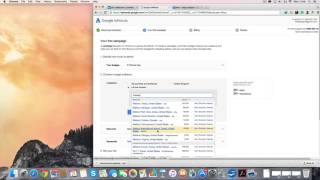
The transcript is a walkthrough of setting up a Google Ads pay-per-click campaign, focusing on the initial steps like budget, location, and keywords, with a request for the client to enter billing details.
The speaker instructs the client to click 'Continue' and sign into their Google account to start setting up the PPC campaign.
A daily budget of £1 is set temporarily for the initial setup, with the understanding that it will be adjusted later.
Location is set to Bristol as an example, but the speaker notes it should be area-specific for actual campaigns.
Networks are left as default. Keywords are added temporarily but will be changed later as they are not relevant.
Bids are set to automatic for the first week. The ad copy will be provided later by the speaker.
The client is asked to enter billing details and address to proceed, as the speaker cannot complete the campaign without this information.
The video is a practical guide for setting up a Google Ads campaign, emphasizing the need for client-provided billing information to proceed with the setup.
What is the first step in setting up a Google Ads PPC campaign according to the transcript?
Click 'Continue' and sign into your Google account.
What daily budget is set for the initial campaign setup?
£1.
00:15
Why are the keywords added during setup considered not relevant?
They are temporary placeholders and will be changed later.
00:30
What is the client asked to do that the speaker cannot do?
Enter billing details and address.
01:00
Budget Flexibility
Shows that initial budget can be set low and adjusted later.
00:15Location Targeting
Highlights the importance of area-specific targeting for campaigns.
00:20Billing as a Bottleneck
Emphasizes that billing details are critical for campaign activation.
01:00[00:00] Peter okay I'm going to send you some instructions on how to set up the pay -per -click campaign I need you guys to do a bit first and so you're going to end up coming to this screen I'll send you the logins to get here and you just click continue next you're saying to your Google account continue Let's just sign into your Google account. Continue. Computer's running a bit slow today. So what happens is we set
[00:38] our daily budget. So I'm going to put it at a pound just now because we're just setting it up. Location. This is just for the first campaign. You would obviously do it area specific. if it was you know east or if it was the midlands or whatever um it's not you know an area on there just say it was you know bristol and then we can add bristol that's the area coverage for that campaign and networks
[01:15] we want to just leave that as that keywords i will deal with this um At a later time we're just going to add a few, save them for now, that will be changed because these keywords are not relevant, you've just got to do this to set up the campaign. We're automatically going to set bids for the first week and then the ad which I'll copy in when I get over. I will go in and make sure
[01:53] that the better choice or the keywords that we have are on here and obviously the ad that we have are on there. I will go in and make sure that this, you know, the better choice. So I'm just going to click save and continue. This is the part I need you guys to do is enter the billing details and obviously your billing address because this is the part I can't set up the campaigns properly until that
[02:30] part is done. So if you do that, click review. and then I can then go back in behind you guys and set up the campaign properly but when you're setting up a campaign I always ask you for the billing details first which is obviously a problem for me just now so if you could sort that out that would be great all right cheers
⚡ Saved you 0h 03m reading this? Transcribe any YouTube video for free — no signup needed.