
New SEO Tool Sstat: Keyword Research & Competitor Analysis
45sIntroduces a new cost-effective SEO tool with a simple interface, appealing to marketers looking for budget-friendly solutions.
▶ Play Clip"The title accurately describes a tool overview; the video delivers a practical walkthrough as promised."
This video provides a quick walkthrough of Sstat, a keyword research and competitor analysis tool. The presenter demonstrates its key features, including organic and paid keyword data, competitor insights, and domain comparison, highlighting its affordability and ease of use for SEO professionals.
Sstat (seat.com) is a cost-effective tool for keyword research and competitor snooping, with a simple interface.
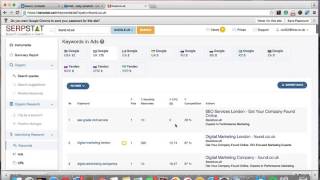
Searching 'iPhone' shows organic keywords, search volume, and AdWords keywords. Clicking numbers expands details.
Results can be exported to various file formats. Filters are available to refine data.
The tool provides 'SE H suggestions' and related keywords for broader research.
Entering a domain (e.g., 'Glasgow SEO services') shows organic keywords, AdWords, competition level, monthly searches, and positions.
Infographics can be screenshotted for clients. The tool lists website URLs (excluding blog posts) and subdomains.
The 'Competitors' section shows organic competitors, common/missing keywords, relevance, and visibility.
Domain comparison allows side-by-side analysis. The 'Paid Click' section reveals competitors' ad keywords, CPC, and ad copy.
For a keyword, the tool shows top-ranking sites and position changes over time (e.g., August vs. November).
Users can add projects to monitor specific domains and Google locales. The tool is competitively priced for 2016.
Sstat is a practical, affordable tool for SEO keyword research and competitor analysis, offering essential features without unnecessary complexity. It's worth considering for 2016 SEO strategies.
What is the name of the tool reviewed in the video?
Sstat (available at seat.com).
What are the two main purposes of Sstat?
Keyword research and competitor analysis.
How can you expand keyword details in Sstat?
Click on the number next to the keyword.
00:30
What file formats can you export data to?
Various file formats (not specified, but export option is available).
01:15
What does the 'SE H suggestions' feature provide?
Keyword suggestions related to the searched term.
01:45
When analyzing a domain, what metrics are shown?
Organic keywords, AdWords, competition level, monthly searches, and positions.
02:30
Does the URL list include blog posts?
No, it only includes website pages, not blog posts.
03:15
What information is available in the 'Competitors' section?
Organic competitors, common/missing keywords, relevance, and visibility.
04:00
What can you see in the 'Paid Click' section?
Competitors' ad keywords, average cost per click, and ad copy.
05:30
How can you track ranking changes over time?
Use the 'Position Changes' feature to select dates and see who ranked where.
06:00
Tool Introduction
Introduces Sstat as a cost-effective alternative for keyword research and competitor analysis.
Competitor Analysis Depth
Demonstrates how to uncover competitors' organic and paid strategies, a key SEO tactic.
04:00Position Change Tracking
Shows historical ranking data, enabling users to monitor SEO performance over time.
06:00[00:00] hi there just a quick r on a nice new tool I've come across and it's called sstat which you'll be able to find at seat.com which you can see here and and this creol is great for keyword research and obviously doing a bit of snooping on your competitors so to speak um quite a a C effective tool and it does provide accurate results um so yeah certainly one um to look at so I'll just give you
[00:34] a quick guide around what it does this is the kind of main dashboard you can do a support ticket if you want to ask a question to the chaps that uh own the tool um so and and basically it's got a nice simple easy to use interface which is which is also um great so the first thing I'm going to do is I'm just going to stick in a key a keyword just say iPhone for example
[01:07] um do a quick search on that and what it does is it will throw you up the organic keywords how often they searched for some adws keywords as well and uh you can obviously expand upon these if you just click on the number it will show you all of all of the information that you need to see and just go backwards and again if you just click in this it will show you all 600 nod keywords
[01:41] um that relate to the the old iPhone search um it's obviously going to show you 100 and you can see up to 500 and you can obviously scroll um along all the pages there and and you can export this into any of these files here and pass it on to someone if you were wanting to get that information for a client or or whatever it might be and now under that it also gives you set H
[02:14] suggestions and uh this will certainly show you that by the way you can also do filter in here um I forgot to mention that earlier um this gu just gives you some other kind of suggestions um relating to iPhone keywords and you can scroll through these and quite a good tool for for keyword suggestions um and you can also do related keywords and again it throws you up all this data you can export it you can
[02:48] filter it and uh all that type of stuff now as well as doing keyword research you can obviously do searches on the main names I'm just going to want to do one of mine just for example purposes well that's never good nothing found um ah right that's because I'm searching the similar keywords never mind that and so if I do a search on Glasgow SEO services will pop my organic keywords and some AdWords that that I
[03:21] use now and again um and you can obviously see the total amount of keywords competition can of level how many competing Pages there are monthly searches and my actual positions which are not the best but you never ever do focus on your own SEO mainly focusing client's SEO hence why they're kind of mediocre um down at the bottom here you can get some nice infographics you can screenshot and send on to your clients if you were
[03:55] want to do something like that it also gives you your URLs the pages that are on your website and that doesn't include that's just pages that that are on the website in general they don't that doesn't count any of the blog posts that are on there um and it also gives you a subdomain list I don't have any subdomains so it's just going to throw up my actual domain name and but if I was to use
[04:28] a subdomain name that would come in there um so there you go um now you've got this option here competitors so I can just check out who my competitors are in organic search and I can see names that I'm familiar with and of all you know I can see all of these kind of companies and they are all genuine competitors um and there's lots of them so uh it kind of shows you what how common keywords
[05:02] missing keywords relevance and all that type of stuff visibility and all that so I can see that uh some are doing a hell of a lot more than others and uh that's just the way it goes um you can obviously do domain comparison so if I wanted to compare my domain name to any of these guys I could certainly do that and I can also see who does H paper click and you can see these kind
[05:35] of companies here are all doing paper click alongside me um and what keywords they're using and stuff like that um I'll just go to this one here and you can see the kind of keywords they're using what monthly searches they've got the average cost per click um and that type of thing so you can do a fair B of research there on your competitors using in this part of it here um keywords you can certainly see
[06:09] the ads uh experts in Performance Marketing they don't appear to be using the full amount of space that they could um with the paid ads but you know each to their own um and it's showing you all the kind of specific ads and the keywords they're using for that ad um there which is all was good um to know and uh yeah so you can do that um and then the these two here are basically for
[06:43] the keyword so I'll go back to iPhone H I'll show you what else this tool does a be bit slow just now so if I go back to searching for iPhone and and just show you who's Top by these kind of keywords you wouldn't expect anything less than seen Apple up there and they're also second and you can scroll down and see Carone warehouse and a few other um big companies that you'd all expect to be
[07:16] up there and for that kind of search term and you can also check the kind of position changes um this two sort of shows you you know what happened back in August who was up there in November and in December and the same could go for you know if it was just SE and Glasgow I could certainly do the same kind of search and you can see some of these guys have been up there um for
[07:50] a while and uh it does change a lot I know that for a fact competing in it myself um the the competition is quite High and you can see these going up and down and but you certainly can pick your own dates and whatever and check who was ranking where which is always a a great part of the tool um so that basically covers all the kind of um things that this tool does you can also
[08:23] uh add your own project here and stick your domain name in and the the relevant Google that you are looking to rank in and constantly monitor specific projects and the price as I say is very competitive for this to um so it's certainly one worth looking at for 2016 um doesn't claim to do a huge amount of other things and we don't really need the tool to do anything other than analyze competitors and give you good
[08:57] data on uh the correct choice of keywords so um I will certainly update this post regularly as I use the tool more frequently all right cheers
⚡ Saved you 0h 09m reading this? Transcribe any YouTube video for free — no signup needed.