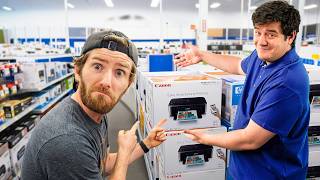

Printer Prices Are Insane
60sThe sticker shock of an $870 printer is relatable and sparks debate about printer costs.
▶ Play Clip"Delivers on the premise of printer buying difficulty, but padded with sponsor segments and banter."
In this video, Linus and Elijah navigate the overwhelming process of buying a printer, exploring the vast array of options, costs, and technologies available at a Staples store. They compare inkjet, ink tank, and laser printers, discuss the pros and cons of each, and ultimately make their purchases based on their specific needs and budgets.
Despite the digital age, printers are still necessary for printing assignments and documents, especially for families with kids.
The conversation shifts from toner to ink, noting that the cost dynamics have changed over the years, making ink a more common consideration.
The hosts are surprised by the high prices of printers, with one model costing $870, compared to their past purchases of $150-$200.
A key consideration is whether a printer works with Chromebooks, which is important for students. Chrome OS is a modified Linux, so compatibility is a factor.
Ink cartridges are described as the 'worst of all worlds' due to cost and drying out. Ink tanks offer cheaper ink by the bottle but still have inkjet drawbacks. Laser printers have cheap toner that never goes bad but lack photo quality.
The hosts have a positive bias towards Brother printers based on past IT experience, noting they are easy to set up and reliable on networks.
The ideal budget is between $150 and $300. Features like duplex printing (double-sided) are considered cool and useful.
A toner cartridge with a 3,000-page yield costs $40, while a 1,200-page yield is half the price. The hosts discuss how long it would take to use 3,000 pages.
An Epson EcoTank is estimated to print 4,500 pages, making it a cost-effective option for frequent printing.
Elijah chooses a Brother printer for its price and simplicity, while Linus opts for an Epson ink tank for its color versatility and cost per page, despite the longer initial setup.
The Epson printer setup was easy but took about 15 minutes for the initial charge. The Brother printer was set up via an app without needing an account.
Laser printers produce finer text and deeper blacks, while inkjet printers offer color versatility. The hosts note the difference in text crispness.
The video concludes that buying a printer is more complex than expected, with a wide range of options and prices. Both hosts end up satisfied with their choices, highlighting the importance of matching the printer type to your specific printing needs and frequency.
What is the main drawback of ink cartridge printers?
They are the 'worst of all worlds' due to cost and the print heads drying out.
06:06
What is the advantage of ink tank printers over ink cartridge printers?
Ink is bought by the bottle, which is dramatically cheaper, but they still have the inkjet drawback of print heads drying out.
06:19
What is the advantage of laser printers?
Toner is super cheap and basically never goes bad, but they lack photo quality.
06:33
What is the estimated page yield of an Epson EcoTank?
4,500 pages.
13:07
What is the cost of a toner cartridge with a 3,000-page yield?
$40.
11:59
What is the ideal budget range for a printer according to the hosts?
Between $150 and $300.
08:44
What is the initial setup time for the Epson printer?
About 15 minutes for the initial charge.
15:34
What is a key consideration for printer compatibility with students?
Whether it works with Chromebooks, which are a modified Linux.
04:17
Ink Cartridge vs. Ink Tank vs. Laser
Provides a clear comparison of the three main printer technologies, helping viewers understand the trade-offs.
06:06Brother Brand Reliability
Highlights the practical experience of IT professionals, showing that Brother printers are easy to set up and reliable.
07:26EcoTank Page Yield
Gives a concrete number (4,500 pages) that helps quantify the cost-effectiveness of ink tank printers.
13:07Print Quality Differences
Demonstrates the tangible difference in text crispness between laser and inkjet printers, a key factor for many buyers.
16:13[00:02] it's clear that we can't get rid of them. I need one because my kids are number of their assignments still need to be printed out, and I need one to documents. I actually don't remember the last time I did this. Like to give you
[00:17] some idea, my current printer is a Samsung. almost every major printer brand under the sun back when I did IT, but I don't walked into a store and bought one. What options are there? How much do they
[00:30] cost? And with toner sometimes being more expensive than some printers, are we possibly committing to a very expensive subscription if we want to >> I think you might mean ink. It used to be that toner was the play for low cost,
[00:44] changed the conversation over the last few years. That is a very good point. But one more question. Where the heck do we even buy a printer? >> Uh >> [music]
[01:09] >> That was. >> Alrighty, let's do this. >> Alrighty, let's do this. But first
[01:21] >> Okay, then first let's staple this segue to our sponsor. you need to run your business. I'm going to tell management.
[01:33] And then they'll have to promote me. >> [laughter]
[01:50] right here. Here. Here. >> Yeah. Yeah. Maybe we just switch. >> Yeah. Let's see. Let's Maybe they Maybe they go better on my feet. >> Can I put these on later? >> No.
[02:03] >> I don't even know where to go. >> I'll get the off-brand ones. I see ink. Are they all Oh, there's one. Canon. I think I want something that can handle a bit of a finer image. I don't just want holes in my paper. Tell me
[02:17] honestly, am I funnier or less funny with these on? It's hard to take you serious. I don't know if that helps or doesn't help. doesn't help. >> What about me?
[02:30] >> The stupidest part is Staples Langley totally gave us permission to film, so we're going to do it anyways. >> to do it anyway. >> So, they have a total of three options. >> Oh, dude, I thought it was shaming me. I
[02:42] have a little bit of very mild dyslexia. I thought it said, "Learn to lift more." >> Yes. >> So, you want a multifunction. a Fuji ScanSnap. >> So, we're looking for slightly different
[02:55] things, but I still think we're not in the right place. the right place. Ooh, there's laptops. am. Okay, this is definitely printer land.
[03:09] Okay, this is definitely printer land. >> Okay. >> We had the exact same reaction. >> This is $870.
[03:22] >> This is $870. >> Dude, I think for my Samsung ML-1610 or whatever it is. No, I had like the color one. I might have paid like 150 to 150 bucks. That's crazy. To be clear, I'm not blaming Staples for any
[03:36] hell of a drug. >> If I buy it though, it's a write-off. Okay, to be clear though, that was the fancy one with the pretty blue face plate. There's also cheaper ones. Like you can get a multifunction laser for
[03:51] >> That's not bad. >> I've used HP software though when I was doing IT. Hated it. Probably my least favorite one out of all of them. Okay. >> Oh my gosh, these ones are also expensive.
[04:04] >> Keep walking. >> No, okay. No, in all seriousness though. Okay, copy, scan. We weren't kidding in the intro. Neither of us knows basically having the noob experience here. Do you need color?
[04:17] that it works with a Chromebook. Is that really the marketing? okay. I'm so glad you brought that up because that is actually the thing that >> Really? >> Yep. My printer is a Samsung. I still
[04:32] before HP acquired them. >> And probably not on Chromebooks. >> It's like one or two generations too old to even like Chromebook. >> Oh, okay. I guess that makes sense then.
[04:45] >> Yep. Especially with students. >> Yeah, oh my gosh. >> [laughter] >> If it works with Chromebook, then I would basically assume it works with Linux because Chrome OS is a modified
[04:57] Linux. It's just more locked down and less flexible. So, we're getting color, I assume. >> Well, this has color. Wait, no. >> Oh, >> which is a color cartridge. You actually
[05:11] get fewer pages per minute in both black and color. They all have ethernet, which are unreliable enough without adding Wi-Fi to the mix, in my humble opinion. >> The middle one, you get this nice touchscreen color interface, but it's
[05:25] You're not going to be printing much. >> But, I yeah, I'm not printing a novel. and reprinting documents. >> Are you going to be faxing anything? >> Hell no. >> Then there's the last big player, Epson.
[05:39] >> If size is anything to go on, this one's the best size to price ratio. >> Oh, okay. >> Do you want a bigger printer? just going to crack a joke. >> think that's desirable.
[05:53] >> think that's desirable. >> [laughter] >> [laughter] >> There's some smaller Epsons. Hey, this is the cheapest one we've seen so far. >> It looks like an ink cartridge printer.
[06:06] From what I understand, ink cartridges, they're the worst of all worlds, other >> Got it. >> Ink tank, you have the benefits of >> You basically just buy it by the bottle and
[06:19] >> Pretty freaking awesome, but you still have the drawback of inkjet with the cartridges where the heads can dry out and they require maintenance and like >> Then there's laser, and that's everything you love about laser. Super
[06:33] cheap, toner basically never goes bad, but you're not going to get like Are you ever going to print a picture? >> Probably not. I don't think that matters >> Okay, then laser's probably the right call for you.
[06:45] >> Oh god, this is with instant ink. It's their like subscription thing. >> I'll pass. >> Okay. There's a whole other aisle over printers. >> This, I feel like, is more likely where
[06:57] I'm going to end up, where my print volumes are actually really low, but >> Mhm. >> Full color printing could actually laser does still work on many of the computers
[07:14] >> This is just more convenient for something that the kids have access to. >> The one thing I'm looking for that I haven't seen yet, though, is a relative >> What? >> A Brother.
[07:26] >> Oh, sh- >> For years, The Verge has had a standing article on their site that's like SEO'd like crazy, that's their like what the current model Brother is. >> When I was setting these up for clients,
[07:40] they were incredibly easy, always found over the network, drivers also installed >> Okay. >> I may have a little bias already towards >> I mean, it's a nepotism thing, right? >> Yeah, well.
[07:53] >> We try to eliminate it from our mindset, but it's hard. I mean, it's your >> Yeah. I I only have one brother. He doesn't >> Brother Elijah. >> Stop it. Wow, I'm kind of blown away at
[08:06] >> 80 Canadian dollars. >> Oh, yeah. Very That's very ink >> I just don't think I'd be willing to buy anything with an ink cartridge. Yeah. I >> Like, I don't need the multi-color printing.
[08:19] which is the color quality? >> Yeah. I thought you like Never mind. [music] Won't say that joke. >> I was wondering >> you need to print out the files.
[08:32] class, brothers. Brother in a suit. >> Yeah, that's the one that went through >> I don't think you're spending $650 on a printer. How much do you want to spend now that you've seen the range? >> I feel like between 150 and 300 would be
[08:44] ideal for me. Cuz again, I think I'm going to get enough quality out of that >> Duplex print. Oh, that's cool. Double-sided print. >> What? That's cool. >> I'm not saying it's not. I didn't I
[08:57] >> Your face and your tone said it's not. >> No, toner goes in there. >> Toner, I hardly know her. If she'll let me. There are clearly some reused parts between these. I think these are
[09:09] brother models. >> be related, yeah. >> [laughter] >> For faxes. Okay, this one doesn't have Only lies. >> Only knowledge? Oh, sorry.
[09:25] >> Okay, shout out to Langley Staples for letting us film here. You could benefit from like standardizing your information, so that it's like way easier to compare. >> It's hard to know what this one does
[09:39] have and this one doesn't have when they're just on the shelf next to each >> Like all the only difference that I can see between them is that that's a gray >> and that's a black brother. >> And I really didn't want to bring race
[09:51] into it. See, this is what's driving people straight into the arms of AI. Because is this right? I don't know, but now I have an answer that I couldn't get >> Okay. >> except the one that's on sale has facts
[10:07] and the bigger color display. It does two more pages per minute than that one. >> That's like the betterer one and it's on sale. Look at that. You just backs it. >> Well, I
[10:19] >> I don't really do a lot of testimonials, but this works. My name is Shaquille O'Neal. And now I got something you are going to love. The >> Well, he's who I'm going to send my email to if this breaks.
[10:32] >> Yeah, okay. [laughter] >> Oh, there's more. Linus, there's a whole brothers. These are all the EcoTank, SuperTank, These are all the EcoTank, SuperTank, MegaTank, UberTank. Basically, just like
[10:47] put in ink cartridges. >> Man, these are expensive. $500. You know of like ink and toners, either. Like that might alter my decision. If the ink is dramatically cheaper,
[11:00] multi-color, it might be worth going for an ink printer. >> Okay. >> My my Temu smart glasses did not serve me well. Okay. Well, why don't we have a look? So, this Brother one seems like a
[11:14] this one. >> It's a TN830. He likes anything with TNA Brother is over here. >> What what's TNA? What? >> I'm lost. >> TNA?
[11:30] T and A. >> Huh? >> I I Okay, but does it stand for something?
[11:44] >> I did not know that that's what it stood for. Okay, I got it now. It clocked now. >> That's hilarious. Include that. >> Uh What was the cost? >> Uh What was the cost? >> Right, right, right.
[11:59] >> 40 bucks. I mean, it's a big fat one with a 3,000 page yield. non-XL? >> 1,200 page yield at half the price. >> how long would it take you to print 3,000 pages, though?
[12:12] >> [laughter] >> Okay, not li- probably. >> 3,000 pages would be This is a 500 page >> 3,000 pages would be This is a 500 page ream, okay? So, this is 1,000 pages.
[12:27] >> That may be the only toner cartridge you ever buy. cost? >> So, a black bottle for me is about 30 >> Okay. >> And then, it's about 25 rubles for all
[12:41] EcoTank is going to cost about the same as you buying a new toner cartridge. >> Yeah. >> And how many pages do [music] you get? >> Well, see, that's the thing is it's always going to be an estimate.
[12:54] >> Because if I print just all black pages, then obviously, not very many. But, they're not even giving me anything to work with here. It just doesn't say. >> Okay, this website is saying 4,500 pages
[13:07] >> yeah. >> that's uh average. >> Yeah, I think I'm probably going to go ink tank, then. >> I mean, I'm leaning that way if that's
[13:20] >> So, the reason I'm leaning that way, though, is that my kids will use it with reasonable frequency. I would imagine you could go >> Yeah. >> And that is where toner really shines.
[13:34] >> Yeah, that's a It's a very fair point. I like a deal, though. like uh ink bottles? >> Oh, Brother. I'm getting choice paralysis. I I I
[13:47] >> Me too. >> I wasn't expecting this amount of choice. I thought there was going to be like good, better, best, couple key brands, and then
[13:59] >> You know what's funny is we just went shopping for your wife's phone. There than there are printers. >> There was less than a dozen options. >> Every aisle here has a dozen options. >> Oh, man.
[14:13] Wow. Mine's a lot bigger. pretty much what we went in for. >> Why'd you choose it? lot of the other Brother printers had kind of mass scan features to be able to
[14:27] >> Right. You don't need that. >> This is just a lift up, put some receipts down, scan it if I need to, and it was $200. So, I felt really good with the price. >> My decision was also heavily price
[14:41] influenced. There was another higher-end one, the 2980, [music] but the biggest printed slightly faster. My kids have all the time in the world. They can duplex printing, which for the kinds of things that I'm doing for poster board
[14:55] Are you looking at the back of it? >> No. I don't think that matters. Also, on >> Okay. Boom. Right in the same price range. >> All that [music] remains is to maybe do a quick test print and see if we're
[15:09] >> For your Epson printer, it was really easy because it honestly did a lot of the work itself. You basically just poured the ink in, and it was like, >> Thanks. >> [laughter]
[15:21] >> It basically just waited cuz it has to charge the actual print heads. >> Saturated. >> The one thing I would say is it took quite a while. Like the first initial charge was like 15 minutes, but it's the
[15:34] it fully charged. >> are so last minute that 15 minutes is assignment and not handing in your assignment, that's on you. entirely through the Brother app on my phone. It was obviously pushing me to
[15:48] but I was able to fully set it up without setting up a Brother account. >> And then I did a test print on each. Yours actually did several test prints every single time it does one of the steps, and I didn't do a test print
[16:01] >> Okay, let's have a look. And obviously I have a lot more color than you do. >> Yeah, you've only got one color. >> I have four colors.
[16:13] >> I have four colors. >> Inkjet really doesn't do text as well as >> That was the first thing I noticed with the fine text on this one. >> Uh-huh. Damn, that is some fine text. You know what I'm talking about?
[16:25] >> I'll do that, fella. >> Wow. >> Yeah, it is really fine line detail in some of those smaller squares there. >> I thought I was the smallest square. And you get a way deeper black.
[16:37] >> Yes, I did notice that as well. >> That's gray. >> I will say though the size of this one is quite hard to, >> I told you, Elijah. >> Yeah, size isn't everything.
[16:51] all? only because it was setting up the alignment, not because it actually then did a scan. It was just like, oh, put this paper in
[17:03] >> [music] >> So then I just skipped it. get home. >> Either way, I have pretty low expectations for both of them. These are both more budget-oriented printers, and
[17:16] dedicated scanner or you'll have to go with something higher end. >> I feel like out of all the options that were there, I was going to end up in happy. At the end of the day, this is what I was going to print anyways and it
[17:30] >> I'm pretty happy, too. No, I don't get the same kind of text crispness that you >> but I get the versatility and >> You know how the one in the store was like 3,000 finish pages? Yeah, the one
[17:46] they give you is 700 in the box. >> I still think that's going to take you years to go through. >> I will say I had one moment of regret though. I did not think about my wife if she wanted to do color prints.
[17:59] to take this home and I bought the wrong printer. But So I'll just buy another printer and write it off as a another company. >> else is free? >> The Segway.
[18:11] >> The Segway. >> To our sponsor. >> I was right, wasn't I? >> Craig? >> Craig? >> All you got to do is Odoo.
[18:23] >> So Craig recently found out Odoo has every app you need to run your business. Then management signed us up and canceled our other subscriptions, which is great. People here like Odoo. It's just Craig
[18:38] >> [laughter] >> It's so much better, right? and then you can switch right over to the inventory app and automate purchase orders on the same platform. Do you Do you understand it? It's the same place.
[18:54] Like what? Just one place. >> Asked him how his day was going and he now that I can use Odoo to send and receive invoices automatically." >> You need me, Craig. Own app. >> And if you only need one app, it's free.
[19:10] >> Yes, Mark. And yet you doubted me, you fool. >> [sighs] >> Use the link below for a free 15-day
[19:22] >> Use the link below for a free 15-day trial. No credit card required. love Linus and Elijah shenanigans energy, how about the time we did some >> Yeah, that was a lot of fun. >> Yeah, a lot of sweat.
[19:37] >> Yeah, a lot of sweat. >> We have part two coming out soon.


⚡ Saved you 0h 19m reading this? Transcribe any YouTube video for free — no signup needed.