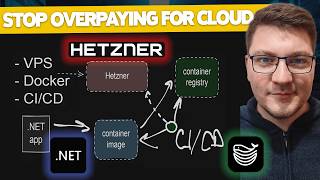

I Ditched Azure for a $3 VPS
60sThe dramatic cost reduction from $20 to $3 per month sparks curiosity and challenges the status quo of cloud hosting.
▶ Play Clip"The title accurately reflects the content: a cost-saving move to a VPS with push-to-deploy, though it's more of a walkthrough than a deep dive."
Milan shares his journey of moving from Azure App Service to a self-hosted Hetzner VPS, using Docker and Dokploy to maintain a push-to-deploy CI/CD pipeline. He highlights the significant cost savings and the trade-offs involved in self-hosting.
Milan was hosting .NET apps on Azure App Service, which was easy but expensive. He wanted to move to a self-hosted setup to save costs and challenge himself.
He needed a VPS, Docker for running apps, and a CI/CD pipeline that would allow him to push to GitHub and have the app deployed automatically.
He chose Hetzner for its low-cost, reliable VPSs. He emphasizes the affordability compared to cloud providers.
Hetzner offers cost-optimized machines like a 16 vCPU/32GB for €17/month, and performance-oriented machines starting at €6/month for 2 vCPU/4GB. He was paying $15-20/month on Azure and now pays €3/month for his VPS.
Instead of manually SSHing and managing Docker, he uses Dokploy, a PaaS that simplifies deploying apps and databases to a VPS. It provides a UI for management.
Dokploy allows managing projects with services (apps, databases, compose files). It has templates for ready-made services and a monitoring dashboard for CPU, memory, disk, and network.
Dokploy uses a reverse proxy (Traefik) to route traffic and automatically provisions HTTPS certificates via Let's Encrypt. You just need a domain pointed to your VPS IP.
He uses Uptime Robot to monitor his API's health check endpoint. His VPS has been up for over 21 days, showing reliability.
His GitHub Actions workflow sets up .NET SDK, builds, tests, publishes a container image, pushes to GitHub Container Registry, and then triggers a webhook to Dokploy for deployment.
Self-hosting with Hetzner and Dokploy offers significant cost savings and a streamlined deployment process, though it requires accepting trade-offs like managing your own infrastructure. This setup is ideal for non-mission-critical applications where cost is a priority.
What was the main reason Milan moved from Azure App Service to a VPS?
To save on costs and challenge himself to self-host.
00:28
What are the three requirements Milan had for his ideal solution?
Use a VPS, run apps with Docker, and have a CI/CD pipeline for push-to-deploy.
00:56
How much does a Hetzner cost-optimized 16 vCPU/32GB machine cost per month?
17 euros per month.
03:19
What is Dokploy?
A PaaS that simplifies deploying applications and databases to a VPS.
05:08
How does Dokploy handle HTTPS certificates?
It uses a reverse proxy (Traefik) to automatically provision HTTPS certificates via Let's Encrypt.
08:44
What monitoring tool does Milan use for his API?
Uptime Robot.
09:11
What is the final step in Milan's CI/CD pipeline?
Sending a webhook request to Dokploy to trigger the deployment.
10:03
Cost Savings
Shows a concrete example of how much can be saved by moving from a cloud provider to a VPS.
03:19Dokploy as a PaaS
Introduces a lesser-known tool that simplifies self-hosting, making it accessible to more developers.
05:08Automatic HTTPS with Traefik
Demonstrates how self-hosting can still have automated security features, reducing manual overhead.
08:44CI/CD Pipeline
Provides a clear example of how to automate deployment to a VPS, a key benefit for developers.
09:24[00:01] deployment that you get with the big cloud providers, but for a fraction of the cost? Hi, my name is Milan, and in this video I want to talk about my self-hosting setup. I'm going to walk you through my journey of setting up a
[00:13] Hetzner VPS, connecting it to Dock boy, deploy experience. So, let me walk you through how I landed where I'm currently on. For the longest time, I've been hosting my applications on Azure, and
[00:28] there are a few reasons for this. Azure is native to the .NET ecosystem, being a Microsoft product, it's super easy to have your .NET apps up and running on Azure, but the downside is you end up paying quite a bit for all of this ease
[00:43] of use. So, I wanted to do challenge myself to do two things, and that is move to a self-hosted setup, and also save on the cost. So, I had a couple of requirements that the ideal solution was supposed to give me, and these
[00:56] requirements were that I wanted to use a VPS, a virtual private server. I wanted to run my applications using Docker, and I wanted to be able to integrate a CI/CD pipeline where I can develop my applications locally, and push to
[01:12] something like GitHub, execute a GitHub Actions workflow, and have everything deployed on my VPS. So, the solution I landed on was using a provider called Hetzner, and it gives you awesome low-cost VPSs, which are also pretty
[01:27] damn reliable, I have to say. Docker is there just to be able to run my .NET apps on Linux without a lot of ceremony. I should be able to push my image to a container registry, download the image on my VPS, and just hit Docker run, and
[01:42] have this up and running. Now, this omits a lot of the things that a cloud provider would give you, such as HTTPS certificate provisioning, routing, load balancing, firewalls, and such, but I think you get the idea. Now, when it
[01:55] comes to a CI/CD pipeline, you do have a lot of options here. But, just to illustrate the overall workflow, let's say we've got our .NET application. So, I'm going to denote it this and I want
[02:08] to be able to take this and turn it into a Docker image. Now, you can either create a Dockerfile and define how that builds your application into an image or covered in a previous video. And the overall setup is pretty simple. You just
[02:23] do .NET publish, set your target as a container, and the SDK is able to produce a container image that you can run on a VPS. The next step after we have our container image is pushing this to a container registry. So, let me add
[02:38] this step here and let's use a slightly different color. For this, I'm using GitHub container registry, but you can use anything else you like. And lastly, I want to be able to combine these steps here into a CI/CD pipeline so that I can
[02:52] here into a CI/CD pipeline so that I can trigger a deployment to my VPS. And for this, I landed on a PaaS solution, platform as a service, called Docploy, a couple of other solutions that also give you this, but I don't see them
[03:07] talked about as much, at least in the .NET ecosystem. I'm guessing that .NET devs as a majority are more focused on the cloud, and I'm still not seeing a lot of talk about moving off of the cloud. Here's what the Hetzner UI looks
[03:19] like. And what makes them really awesome is how affordable they are compared to paying. So, if we look at their cost-optimized machines, you can get a cost-optimized machines, you can get a 16 vCPU and 32 GB machine for 17 euros a
[03:35] month. I think this is around $20 a month for my US folks. And if you're looking for more performance-oriented machines, then the pricing starts from 6 euros per month for a 2 vCPU and 4 GB machine, and then it scales upward. And
[03:47] even at 16 vCPUs and 32 GB, it's around 40 euros per month, which isn't all that this size. So, that's one of the core reasons why I wanted to move to a VPS because I was paying something like 15 to 20 bucks a month for an Azure app
[04:02] service because I needed to keep it running 24/7 to do some work, and I wanted to challenge myself to move this to a VPS, which I did successfully, and I'm currently paying 3 euros per month for this setup. You also have to pay
[04:14] like 50 cents a month on top of this for an IPv4 address, but this is really minor compared to the VPS cost. Then for the operating system, you are going to probably choose some sort of Linux distribution. I'm just running Ubuntu,
[04:27] other stuff such as adding your SSH keys, firewalls, configuring your backups, and so on. And then when you're happy with everything, you can create provisioned in a couple of minutes, and you're good to go and start deploying
[04:41] your applications on them. The next problem you're going to run into is how applications to your VPS. Now, I could have went with the native route and just SSH into the server, pull the Docker image there, start up the container,
[04:55] build a solution around that. You can also use a Docker Compose file where you databases or reverse proxies, but I didn't want to do all that work manually, so I landed on a platform as a
[05:08] service that's similar to what you get with something like Vercel or Heroku, and it's called Dokkuploy. In the simplest terms possible, Dokkuploy is a platform that simplifies how you can deploy your applications and databases
[05:21] and any other services to a VPS. All you need is to SSH into your VPS, download and install Dokkuploy, and then you can jump into their user interface, and you don't really have to go down to the bare metal on your machine to do something
[05:36] useful. Now, I'm going to make a separate video going over how to set all of this up from scratch. For right now, I just want to walk you through my setup. So, what I did was exactly this. Copy this command, SSH into my VPS,
[05:50] install Dokku This gives you a URL where you can access your Dokku instance, and from there you can start managing your applications. This is what my Dokku instance looks like. We're going to enter my user credentials to
[06:03] authenticate with the Dokku instance, and once I go inside, I can go ahead and start managing my services. So, the core unit here is a project where you can define one or more services that you want to run. I'll show you what you can
[06:16] do here in just a moment. You also get a monitoring dashboard where you can see CPU usage, memory usage, disk space, network IO. You can also observe any service doesn't get all that many requests, but the numbers here aren't
[06:29] also too accurate as well, so they don't really reflect the actual usage. Going a test project to show you what you can do here. So, once you got a project, you can say create service, and you can choose between application, database, or
[06:42] a compose file. They also have a bunch of templates for ready-made services that you can use. For application, you can give it a name, an app name, and a description. So, let's say test app or whatever. You go inside, and from here
[06:55] that. You can connect your repository where Dokku takes care of everything. Bitbucket, Gitea. What I'm using is running my Docker images, and here you just specify your Docker image name, the registry URL, and if you're using a
[07:11] in a username and password. Then you hit deployed. Now, there is a way to automate this. I'll show you what that and let's say you want to add a database. You can choose between some
[07:24] ready-made options like Postgres, MongoDB, MariaDB, MySQL, or Redis if you service is as simple as giving it a name, clicking create, and then Dokku is going to go ahead and create this for you, and get it deployed. So, right now
[07:39] click deploy. It's going to go ahead and pull the Docker image from the Docker Hub container registry, and in a couple up and running. If I wanted to add a Postgres database, I can go ahead and do
[07:52] that. I just need to give it a name. I can configure any other image if I want if I don't want to use the default one. Go into the service, deploy it, and in a couple of moments I'll have my Postgres database up and running. I can then
[08:04] applications. So, this takes care of a lot of the heavy lifting that you need to do in order to set up your complete application and have it up and running on a VPS. Now, I'm obviously just scratching the surface here and quickly
[08:17] but my hope is that some of you find this interesting enough to start exploring it on your own as I'm also doing, and I'm by no means an expert on Dokku ploy. There are also some other solutions that I want to explore so that
[08:30] I can compare them, and then see what the best one is for my use case. Now, how Dokku ploy works under the hood is by running traffic as a reverse proxy in front of all of your services. So, it handles the incoming traffic and routes
[08:44] running, so you don't really have to expose your services to the internet. proxy, which also takes care of automatically provisioning HTTPS certificates using Let's Encrypt. All you need to do is buy a domain, point it
[08:58] to your services IP address, and then traffic takes care of setting up the HTTPS certificate. For some simple monitoring, I'm using an Uptime Robot that I've pointed to the health check endpoint of my API, and you can see that
[09:11] it has some VPSs are pretty reliable with my current API instance being available for more than 21 days, which is basically the moment I created it almost 3 weeks ago from today. And lastly, I want to give you a quick
[09:24] overview of my CI/CD pipeline, which takes care of automatically deploying this to my VPS using Dokku ploy. And what's going on here is setting up the .NET SDK, restoring and building my solution, running any tests, and I'm
[09:38] doing .NET publish where I set the publish target as a container. This will produce the container image locally, which I can then use to push to my container registry. And I'm doing this by running a Docker login to my
[09:50] container registry, then I'm tagging my images that I produced in the previous step, and then I'm doing a Docker push. Once I've done this, I can go ahead and send a request to Dockploy, which is running on my VPS, and this is a webhook
[10:03] endpoint that's going to trigger the deployment. So, I can just build what I need locally, push the commit to my repository, and have this deployed on my VPS in a matter of a few minutes. And this is the rough sketch of my final
[10:16] solution to have my .NET apps up and running on a VPS. Now, obviously, this other things that you get with Azure, such as automatic backups, automatic scaling, but really, it all depends on what you're looking for. For my
[10:30] self-hosting needs, where I'm not running mission-critical applications need to break the bank, and a free dollar a month VPS can work just fine. As I said, in a future video, I'm going to cover this complete setup, but let me
[10:44] other solutions and how they compare to Dockploy, with the most popular one probably being Coolify. If you also want to get started with self-hosting your applications, I highly recommend taking a look at this video next, where I show
[10:58] applications into a container image using just the .NET SDK. If you enjoyed this video, go ahead and click the like button right below. Thanks a lot for watching, and until next time, stay awesome.



⚡ Saved you 0h 11m reading this? Transcribe any YouTube video for free — no signup needed.