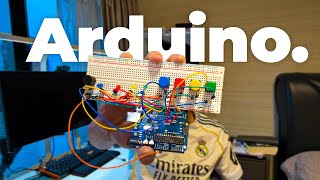

High schooler builds Arduino memory game
40sRelatable underdog story of a software dev failing at basic hardware, with a satisfying payoff.
▶ Play Clip"The title accurately reflects the 24-hour challenge, though the actual build time was less than 24 hours."
A high school student with software experience attempts to build two Arduino projects in 24 hours: a sequence memory game and a joystick LED controller. The video documents the challenges of transitioning from software to hardware, highlighting the steep learning curve.
The creator has built websites, APIs, and a mobile app as a high school student, but never worked with physical electronics.
Aims to build a Simon-says style game using Arduino, LEDs, buttons, and a buzzer.
Initially could not light a single LED, but learned circuit fundamentals through trial and error.
Took an hour to wire buttons correctly and faced difficulties coding the game logic in C++.
Uses an Arduino Nano and a joystick module to control LEDs; completed in under an hour after learning from mistakes.
Concludes that hardware and software are distinct skills; for software-focused individuals, electronics may not be practical but can be fun.
The creator successfully built two Arduino projects, but emphasizes that hardware and software require different mindsets. While electronics can be enjoyable, it may not be worth the investment for those already deep in software.
What was the first Arduino project built in the video?
A sequence memory game (Simon-says style).
0:43
What programming language does Arduino use?
C++.
1:14
What was the second Arduino project?
A joystick LED controller.
1:51
Which microcontroller was used for the second project?
Arduino Nano.
1:57
What was the creator's main struggle at the start?
Could not light a single LED.
0:55
How long did the second project take to complete?
Less than 1 hour.
2:13
What is the creator's conclusion about learning electronics?
Hardware and software are different skills; electronics may not be worth it for software-focused people but can be fun.
2:30
Can't light an LED
Humbling moment for a software developer who thought hardware would be easy.
0:55Wiring regret
Comedic frustration after spending an hour on wiring buttons.
1:10Hardware vs software insight
Key takeaway that software skills don't automatically transfer to hardware.
2:30[00:00] Recently, I've become obsessed with
[00:01] tech. Just this year, I created multiple
[00:04] websites, APIs, and even a mobile app
[00:06] all whilst being a high school student.
[00:07] But, what I haven't done yet is create
[00:09] real-life tangible electronics. Well,
[00:11] that changes today. I ordered a small
[00:14] amount of parts from Amazon, and by a
[00:16] small amount, I mean a module kit, some
[00:19] breadboards, which are basically just
[00:20] naked circuit boards, microcontrollers,
[00:22] sensors. Oh, yeah, it has two layers.
[00:25] Wires, even more wires, and an entire
[00:28] cupboard full of parts like LEDs,
[00:30] buttons, resistors, and more. And of
[00:32] course, you can't forget my MacBook Air.
[00:34] I'll be using this machine to do all the
[00:36] programming. Well, enough talk. Today, I
[00:38] have to build out two different working
[00:40] Arduino projects to prove that I
[00:41] understand electronics. For this first
[00:43] project, I want to build out a sequence
[00:44] memory game exactly like the one on
[00:46] Human Benchmark. Basically, an algorithm
[00:48] will create a random sequence that gets
[00:50] longer as you recall more of the pattern
[00:51] correctly.
[00:55] But, the bad news was I could barely get
[00:57] a singular LED to light up.
[01:01] The good thing is that now I know
[01:02] exactly how circuits work. So, I got to
[01:04] work trying to wire buttons, but I
[01:06] immediately regretted that a few seconds
[01:08] later.
[01:10] As you can see now that it's been
[01:11] another hour, I finally got all the
[01:13] wiring right and began coding the
[01:14] sequence memory logic. Arduino uses C++,
[01:17] which is a coding language I'm familiar
[01:18] with, so this part should be easy,
[01:20] right?
[01:22] Okay, I guess this was much harder than
[01:24] I thought. A few more blog articles
[01:26] later and many attempts of debugging, I
[01:28] finally got the sequence memory game to
[01:29] work, and I even added a buzzer for some
[01:31] sound effects.
[01:46] Okay, it's the second day, and now that
[01:47] project one is out of the way, that took
[01:49] way too long. I'm going to proceed with
[01:51] the second project, which is going to be
[01:52] a joystick LED controller. This time,
[01:55] I'm going to ditch the large
[01:56] microcontroller and use this teeny tiny
[01:57] one called the Arduino Nano, which
[01:59] shouldn't be an issue considering that I
[02:01] now know exactly how circuits work.
[02:03] Nevermind, I literally did the first
[02:05] step wrong. The joystick was a bit more
[02:07] complicated with five different wires,
[02:08] so I hopped on YouTube to find a
[02:10] tutorial. Luckily, this time I did a bit
[02:11] more thinking before actually doing, so
[02:13] I was able to bang out this project in
[02:15] less than 1 hour.
[02:24] I'll be honest, it's a bit less cool
[02:25] than my first project, but definitely
[02:27] teaches some important stuff about
[02:28] wiring and coding. Now, it's finally
[02:30] time. I want to address the question, is
[02:32] it worth learning electronics such as
[02:33] Arduino? Well, for me, probably not.
[02:35] This is because as someone who has
[02:37] experience in software, a lot of people,
[02:39] including me, think that software and
[02:40] hardware are basically interchangeable.
[02:42] Just because I can code and deploy a
[02:44] full stack website doesn't mean that I
[02:45] can light up an LED as you saw in this
[02:47] video. I see that hardware and software
[02:49] are two pretty different sub niches of
[02:51] tech, so it's probably better choosing
[02:53] one or the other. But, for fun, yeah,
[02:55] why not? Arduino is amazing.
⚡ Saved you 0h 03m reading this? Transcribe any YouTube video for free — no signup needed.