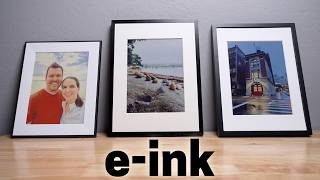

Why I'm DONE with Digital Frames
45sOpens with a relatable frustration about LED screens, hooking viewers who are tired of screen overload.
▶ Play Clip"Title promises a good-bad-ugly comparison and delivers exactly that with clear verdicts, though some fluff in the outro."
The video reviews three e-ink picture frames: Reflection, Aura, and SwitchBot, comparing their features, image quality, and value. The host highlights the benefits of e-ink displays over traditional LED screens, such as better aesthetics and battery life, and provides a personal recommendation based on his testing.
The host introduces three e-ink picture frames, including a prototype from SwitchBot, and explains his preference for e-ink displays over LED screens due to their pleasant look and long battery life.
The Reflection frame uses NFC to transfer images from a phone, requiring no Wi-Fi or cloud. It's simple but lacks remote access and multiple image storage.
The Aura frame connects via Wi-Fi and uses cloud storage, allowing easy remote adding of pictures and scheduling changes. It has no subscription fees and supports unlimited photos.
The SwitchBot frame stores up to 10 images locally, supports scheduling, and integrates with Home Assistant. It's a prototype with some image quality issues.
Reflection offers fixed frame colors, SwitchBot is compatible with IKEA frames, and Aura is smaller but has a front light with ambient sensor and motion detection.
Reflection has the most accurate colors, Aura is close but slightly blotchy, and SwitchBot over-saturates, looking unnatural. SwitchBot allows adjustments but still not as natural.
The host recommends Aura as a gift due to ease of use and premium feel, despite its $500 price. SwitchBot is $350 but has image issues, and Reflection is $350 with best image quality, making it his personal choice.
E-ink picture frames offer a superior alternative to LED screens for displaying photos, with trade-offs in convenience, image quality, and price. The host hopes the technology becomes more popular and affordable.
What is the main advantage of e-ink displays over LED screens?
E-ink displays are more pleasant to look at and have significantly better battery life, as they only use power when changing the screen.
00:27
How does the Reflection frame transfer images?
It uses NFC to transfer images from a phone to the frame, without Wi-Fi or cloud.
01:18
What is a key feature of the Aura frame?
It connects via Wi-Fi and uses cloud storage, allowing remote adding of pictures and scheduling changes.
02:00
Which frame is compatible with IKEA frames?
The SwitchBot e-ink frame is compatible with IKEA frames, allowing easy swapping.
03:33
What is the price of the Aura frame?
The Aura frame costs $500.
06:41
Which frame has the most accurate image colors?
The Reflection frame has the most accurate colors, with no weird color blotches.
05:07
What is a downside of the SwitchBot frame's image quality?
It over-saturates and boosts contrast, making images look unnatural, like an oil painting.
05:47
E-ink vs LED
Explains the core benefit of e-ink displays: better aesthetics and battery life.
00:27No subscription fees
Aura offers unlimited photos with no hidden costs, a key selling point.
02:39Home Assistant integration
SwitchBot's compatibility with Home Assistant appeals to smart home enthusiasts.
03:46Image accuracy ranking
Provides a clear comparison of color accuracy across the three frames.
05:07Recommendation for gifts
Suggests Aura as the best gift option due to ease of use and remote sharing.
06:13[00:01] before, but now there's something way better. Color e- paper, or some people call it e- in. And I don't just have one, but three. And one of them is the
[00:13] only one that exists in North America right now. Yeah, the engineers basically sent me the prototype. Crazy. Okay, so what's my beef with digital picture frames? Obviously, I like displaying pictures of our family or places we've
[00:27] traveled, but it's still a bright LED screen in the room, and I already have tons of bright LED screens in my life between my phone, iPad, and laptop. So, that's why I love e-aper displays. You know, the type of display that the
[00:41] Kindle uses. They're so much more pleasant to look at, and the battery life is significantly better since you only need to use the battery when changing the screen if it doesn't have a lightup display. So, with devices like
[00:53] these e-aper picture frames, you can hang them on the wall without any power cord attached. And it could be months or even years before you need to charge it again. Pretty sweet. All right, let's quickly go over these three e-aper
[01:05] picture frames. And in some ways, they're similar, but in other ways, they're very different. The first one is the reflection frame. It's the most simple out of the three, which you may or may not like. To add pictures, I open
[01:18] up the reflection frame app to select a picture for my phone. Then tap the bottom left corner with the phone and that's it. Using NFC, it makes a transfer the image to the picture frame. Like I said, it's simple. No Wi-Fi, no
[01:33] cloud. But there are some tradeoffs. Anytime you want to change the picture, you have to pull out your phone and select one. You can't load multiple on at once. And with no Wi-Fi, you can't remotely add pictures. That's where
[01:47] these next two e-aper picture frames come in. E-aper picture frame. Yeah, that's a tongue twister. One is from Ara. They're a popular digital picture frame company, and this is their first e-paper version. They have a completely
[02:00] different approach from the reflection frame, which I just showed you. The Aura connects with Wi-Fi, and all the pictures are added using the cloud. So, to add a picture, I select one or multiple from my phone and add it to the
[02:13] Aura app, which syncs those images to the cloud. Then I can choose if I want the pictures to change every day, multiple times a day, or just stay the same. This makes it way more convenient to regularly change out the pictures and
[02:25] makes it really easy to add pictures remotely using the cloud. So, if you want to add pictures to a parent or grandparents picture frame, it's no there's any subscription fees with this, and luckily there's not. Aura says you
[02:39] can add unlimited amount of photos, and there's no hidden costs or subscription fees, so that's great. There's also one huge difference between this and the comparing some of the extra features. And the last e-aper picture frame is
[02:53] from Switchbot. You know that prototype that I was mentioning earlier. This one kind of sits between the first two and how it functions. So instead of using the cloud, I can add pictures using the SwitchBot app directly to the picture
[03:06] frame, but unlike the reflection frame, I can store 10 images on the picture frame and they can rotate on a schedule. I like that the pictures can rotate on a schedule, but there are some massive differences when you look closer at all
[03:19] three of these. Some of them might be a deal breakaker for you. For example, not only do these e-aper displays look like picture frames, some actually are. The reflection frame offers different frame colors, but it doesn't seem like it can
[03:33] be changed later. The SwitchBot e-aper frame, on the other hand, is compatible with the IKEA rolome frames. You can just buy a very inexpensive IKEA frame and swap it out. That's pretty sweet. The SwitchBot picture frame is also
[03:46] Assistant, so you'll be able to use Home Assistant to swap out the images. And since I use Home Assistant to run my smart home, it's no surprise I'm a huge fan of that. But there's one feature on this that I might not be a huge fan of,
[04:00] AI art that I have to pay a subscription for. I don't know, call me old school, but I prefer to see pictures of my family. I guess someone could be married to AI and this is how they show their love. Hey, no judgments here. And to be
[04:14] fair, it can give life to old pictures, which is kind of cool. Ara can't change out the frame, but is significantly smaller than the other frames. Even though the image is the same size, the overall width, height, and depth of the
[04:28] frame are smaller. But the biggest difference is that the Aura has a front light that can light up the picture. There's an ambient light sensor that can lighting in the room and it helps the image pop more and does make a big
[04:42] difference. When I asked my family which picture they like the best, they all chose Aura and I think it's because of the light. It really helps fix some of the drawbacks with color e-aper displays. Obviously, a light is going to
[04:55] have a major drain on battery life, but there is a motion sensor on board to only use the light if someone is nearby, and it can be disabled by limiting the schedule of when it can turn on. The biggest difference between all three of
[05:07] these is how accurate the image is. The reflection frame is the most accurate out of the three. The colors look very close to the original image on my phone, and there are no weird color blotches. The aura is a close second, but it
[05:21] very well. Look at the difference between these two pictures. The reflection frame shows a yellow in the light and a yellow cones at the bottom. The aura picture is displaying those as almost white. When looking up at the
[05:34] steam cloud or whatever that is, the aura image looks a little blotchy compared with the reflection frame that has those colors blending in in a more natural looking way. Not a huge deal, but just something to be aware of. The
[05:47] SwitchBot frame is the least natural looking out of the three. I know this is kind of in beta, but they're boosting the saturation and contrast off the charts. They're going for like an oil painting look or something. Seriously,
[05:59] what is this? Uh, Instagram filter from 2012. They do allow some image adjustments when saving a picture to the frame where I can lower the saturation and contrast all the way. Even then, the image still doesn't look as natural as
[06:13] the others. But they're working on improving it since, like I said, this is a prototype. So, with all things considered, what is my favorite? Well, if I were buying one of these as a gift, I would choose the Aura. It's the
[06:26] easiest to add a bunch of pictures and would be perfect to give to a parent. of their grandkids and you can add them even if you live far away. Ara also feels the most premium out of the three, and it should because it is expensive.
[06:41] It's $500, which is very pricey. I know that price might be a definite no for some, but for others, it might be still worth it, especially if you're buying it for a parent and you're going in with a bunch of siblings to split the cost. It
[06:55] could be a really nice gift and it's available now. You would think that the SwitchBot would be my favorite because it will work with Home Assistant, but I can't get over how the image looks. It's still being developed, so Switchbot
[07:07] could make some adjustments. It does cost less at $350, but I recognize that's still not cheap. The reflection frame is also $350 bucks, and if I were buying one for myself right now, I would probably go with this one. The image
[07:20] looks the best, and even though I have to manually swap out the pictures, it's very easy to do. It's also available now, and I'll have links to everything right now saying how expensive these
[07:32] e-aper picture frames are. And I completely agree. Anytime there's new technology, it usually starts off high because it's brand new. But I can definitely see these e-aper picture frames becoming more and more popular.
[07:45] They look so much better than a bright LED screen, and it's something my whole family likes. We love seeing pictures of fun memories we've made together. I hope e-aper technology keeps growing so I can use it more in my smart home. Thanks for
[07:58] watching. >> Hey Ally, what should I have AI make for >> Maybe something about YouTube. >> YouTube? Oh, yeah. Generate an image of >> YouTube? Oh, yeah. Generate an image of the best smartome YouTuber. Okay. Well,
[08:13] uh, we'll see who it puts on there. >> I mean, you know who that kind of looks like. >> Uh, maybe the AI is broken. Hibbert. >> Paul Hibbert. Nah. No, that's No, that's
[08:27] >> Paul Hibbert. Nah. No, that's No, that's not Paul Hippert.


⚡ Saved you 0h 08m reading this? Transcribe any YouTube video for free — no signup needed.