

AI Content Tools Finally Work Together
45sThis segment introduces a groundbreaking integration that solves the major pain point of disconnected AI tools, making it highly shareable among creators.
▶ Play Clip"Title accurately reflects the impressive integration and capabilities shown."
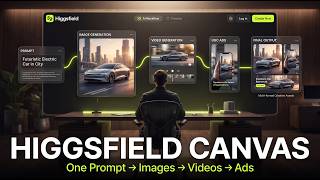
Higgsfield MCP integrates with Claude to enable AI content creation—images, videos, ads, and landing pages—directly within a single chat interface, eliminating the need for multiple disconnected tools. This video demonstrates the setup and showcases how creators can generate cinematic assets and full multi-scene projects seamlessly.
Most AI tools are separate—one for scripts, another for images, another for video—requiring manual integration. Higgsfield MCP solves this by giving Claude the ability to create within one pipeline.
Inside Claude, users can generate images, animate videos, create ads, build landing pages, and run full creative workflows from a single prompt.
The dashboard includes tools for creators, pre-built templates, and workflows for videos, ads, and short-form content.
Go to MCP section, choose Claude, copy server URL, add custom connector in Claude settings, and approve permissions.
Using GPT Image 2, Claude generates a cinematic cyberpunk alley image directly inside the chat. The generation can be watched live in Higgsfield.
Claude transforms the static image into a cinematic video using Seedants 2, maintaining context without re-uploading files.
Claude coordinates multiple AI tools (Nano Banana 2 for scenes, Seedants 2 for video) to generate eight cinematic cyberpunk scenes in parallel.
Claude automatically moves from scene generation to video generation, even choosing the best tool (Seedants 2 over Kling 3) for motion-heavy scenes.
Claude stitches all clips into a cinematic trailer. If automatic merge fails, manual upload still works.
Faceless channels can replace entire workflows; freelancers and businesses can create cinematic ads faster and cheaper.
Higgsfield MCP transforms Claude from a thinking tool into an executing one, enabling end-to-end content creation. This integration is a game-changer for creators seeking efficiency and consistency.
What is the main problem with current AI content creation tools according to the video?
Most AI tools are separate—one for scripts, another for images, another for video—requiring manual integration.
00:02
What does Higgsfield MCP enable Claude to do?
It gives Claude the ability to generate images, animate videos, create ads, build landing pages, and run full creative workflows from a single prompt.
00:17
What are the steps to connect Higgsfield MCP to Claude?
Go to MCP section, choose Claude, copy server URL, add custom connector in Claude settings, and approve permissions.
01:28
Which AI model was used to generate the initial cinematic image?
GPT Image 2.
02:37
Which AI model was used to animate the static image into a video?
Seedants 2.
03:35
How did Claude handle the multi-scene generation?
Claude used Nano Banana 2 to generate eight cinematic scenes simultaneously, then automatically moved to video generation.
04:46
Why did Claude choose Seedants 2 over Kling 3 for video generation?
Claude decided Seedants 2 would work better for motion-heavy scenes, camera movement, and atmospheric effects.
06:20
What should you do if the automatic merge of clips fails?
You can manually upload the generated clips, and Claude will still combine them inside the same workspace.
07:44
What are the implications of Higgsfield MCP for faceless channels?
It can replace the entire content workflow in one place, handling images, videos, sequencing, and final output.
07:57
Claude Gets Hands
Higgsfield MCP transforms Claude from a thinking tool to an executing one, enabling direct creation.
00:17Seamless Image-to-Video
Claude maintains context and animates the exact image without re-uploading, showcasing workflow continuity.
03:35Parallel Multi-Scene Generation
Claude coordinates multiple AI tools simultaneously, automating a complex production pipeline.
04:46AI Chooses Best Tool
Claude autonomously selects Seedants 2 over Kling 3 for better motion handling, demonstrating intelligent decision-making.
06:20Replacing Entire Workflows
Higgsfield MCP can replace multiple tools for faceless channels and freelancers, reducing cost and complexity.
07:57[00:02] upgrades we've seen for AI content creation so far. Until now, most AI tools felt separated. One tool writes the script, another generates images, another creates videos, and you still have to manually connect everything
[00:17] together yourself. But, Higgsfield MCP changes that. It basically gives Claude the ability to actually create, not just think. Inside Claude, you can now generate images, animate videos, create ads, build landing pages, and run full
[00:32] creative workflows from a single prompt using Higgsfield MCP. And the crazy part is that everything stays connected inside one pipeline. So, in this video, I'm going to show you exactly how to connect Higgsfield MCP to Claude, how
[00:47] the setup works, and how you can use it to generate cinematic images, AI videos, and even full multi-scene projects completely inside Claude. And once you understand why so many creators are paying attention to this right now. So,
[01:02] let me show you how this works. This is the main dashboard inside Higgsfield AI. Right away, you can see there are a ton of tools built specifically for creators, especially if you're making videos, ads, or short-form content. You
[01:16] also get access to pre-built templates and workflows, which makes things a lot easier if you don't want to start everything from scratch. You can literally pick a template, customize it, and start it generating content
[01:28] immediately. Now, to connect Higgsfield MCP with Claude, just head to the MCP section at the top. From here, you can choose which AI host you want to connect with. It supports Claude, OpenClaude, Hermes, and even NemoClaude. For this
[01:43] tutorial, I'm going to use Claude. Then, just click the settings link, and it'll take you directly to the Claude connector setup page. Once you're inside Claude, click your profile icon, head over to settings, open the connectors
[01:55] tab, and then click add custom connector. For the name, I'll just call it Higgs Field. Next, go back to the Higgs Field MCP page. Copy the server URL, then paste it into the remote server field inside Claude. Now click
[02:10] add and that's it. The connector should now appear in your list. Just hit connect. Approve the permissions on the next screen. Click allow and the integration is now fully active. So now Claude officially has access to the
[02:24] Higgs Field MCP tools. Let's open a fresh chat and actually test this out. I'm going to walk through this one step at a time so you can clearly see how the workflow works behind the scenes. To start simple, I'll ask Claude to
[02:37] start simple, I'll ask Claude to generate a cinematic image using GPT image 2. Just a single image first. Let me show you the exact prompt I'm going to use. I'll type something like, "Use GPT image 2 to create a cinematic
[02:51] cyberpunk alley at midnight with neon lights, rain reflections, dense fog, and a highly detailed sci-fi atmosphere." Now if this is your first time using the permission before generating the image, so just click allow. And there it goes.
[03:07] The image is now being generated directly inside Claude through Higgs Field MCP. You can even open Higgs Field itself, head over to the image section, and watch the generation happening live in real time. And there it is. What's
[03:20] really impressive is that this isn't happening in a separate app or another browser tab. The entire generation is happening directly inside the Claude chat. From here, I can instantly edit the image, animate it into a video, or
[03:35] download the final asset without leaving the conversation. And honestly, this alone already feels pretty futuristic. But now let's take it a step further. Right now the image is static. So I'm going to ask Claude to transform that
[03:49] going to ask Claude to transform that exact image into a cinematic video using Seed ants 2. Anytime Claude asks for permission to continue, just click allow and let it run. Now, give it a few seconds to process everything and watch
[04:02] this carefully. Claude is now taking that exact image and sending it directly into Seed ants 2 through the Higgs Field MCP connection. What's important here is that Claude already understands the context. It knows which image I'm
[04:16] referring to, what style I want, and how the motion should look. I didn't have to export the file, upload it somewhere else, or explain the scene all over again. Everything stays connected inside the same workflow. And now, the result
[04:31] the same workflow. And now, the result is ready. into a fully animated cinematic clip directly inside Claude from a single
[04:46] follow-up prompt. This is exactly why people are saying Claude finally has hands. But so far, we've only generated one image and one video. Now, let's scale this into a real creator workflow because this is where Higgs Field MCP
[05:00] becomes insanely powerful. Instead of generating assets one by one, I'm going and let it run the entire production pipeline automatically. Multiple scenes, multiple videos, one connected cinematic
[05:14] sequence. So, here's the prompt I'm going to use. Use Nano Banana 2 to generate eight cinematic cyberpunk scenes following the same main character traveling through a futuristic neon city, etc. Now, watch
[05:27] Claude is using Higgs Field MCP to coordinate multiple AI tools together automatically as part of one connected workflow. Right now, Nano Banana 2 is generating all the cinematic scenes
[05:40] simultaneously. And after that, the clips will automatically move into video The crazy part is that this is all happening in parallel. I'm not manually creating scenes one by one or jumping between different
[05:53] Claude is managing the entire production pipeline for me. So, let's give it a minute to finish generating the images. And there we go. All of the scenes have now been generated through Higgsfield MCP in a single workflow. And what's
[06:07] really impressive is that Claude immediately moved to the next stage on its own. I didn't have to manually organize files, rewrite prompts, or tell it which images to use. As soon as the scene generation finished, Claude
[06:20] automatically started preparing the video generation workflow. Originally, I asked it to animate everything using Kling 3, but this is actually pretty interesting. Claude decided that Seedens 2 would work better for this particular
[06:34] cinematic sequence, especially for motion-heavy scenes, camera movement, and atmospheric effects. All right. Now, everything has finished generating. And even if Claude occasionally marks a clip as failed during the process, when you
[06:48] check inside Higgsfield itself, you'll usually see that the video's actually completed successfully in the background. Now, let me preview a few of the scenes so you can see how this turned out. Here's the opening sequence.
[07:00] And then, there are rest of the scenes. What's impressive is how consistent everything feels from scene to scene. The character design, lighting, atmosphere, camera movement, all of it flows together like an actual cinematic
[07:14] sequence instead of disconnected AI clips. And finally, we reach the last scene where the entire story wraps up and the full sequence comes together. I'm going to give Claude one final instruction. The videos are finished.
[07:30] Combine all clips into one cinematic trailer. And now Claude is automatically stitching together every generated scene into a complete final video. Again, this is happening directly through the MCP workflow. And if the automatic merge
[07:44] ever fails for some reason, you can simply upload the generated clips manually, and Claude will still combine everything for you inside the same workspace. Now, think about what this actually means for creators. If you run
[07:57] a faceless channel, this can replace your entire content workflow in one place. Instead of juggling multiple AI tools, Claude handles the images, videos, sequencing, and final output through Higgs Field MCP. And for
[08:11] freelancers or businesses, this means you can turn a simple idea into cinematic ads or marketing content much faster and at a fraction of the usual cost. This is way bigger than just another AI video tool. The intelligence
[08:24] was already there. Now it can actually execute. And that's what makes this so interesting. If you want to try Higgs Field MCP yourself, I'll leave the link in the description below. The setup only takes a few seconds, and once it's
[08:37] connected, you can start building entire creative workflows directly inside Claude. If you enjoyed this video, make sure to leave a like and subscribe for more AI workflow tutorials and creator tools. Thanks for watching, and I'll see
[08:51] tools. Thanks for watching, and I'll see you in the next one.


⚡ Saved you 0h 08m reading this? Transcribe any YouTube video for free — no signup needed.