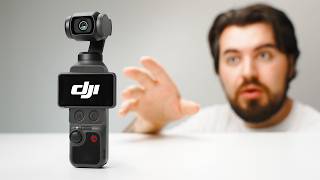

I Smuggled the DJI Pocket 4 Into the US
43sThe controversial opening hook about smuggling creates curiosity and FOMO.
▶ Play Clip"Title implies a change of heart but the video is a straightforward positive review; not misleading but a bit dramatic."
The DJI Pocket 4 is a significant upgrade over its predecessor, offering 4K 240fps slow motion, a 1-inch sensor with 14 stops of dynamic range, full D-Log, 37MP photos, and improved ergonomics with dedicated buttons and gesture controls. This hands-on review tests its real-world performance in stabilization, tracking, low light, and battery life.
The Creator Combo includes the Pocket 4, DJI Mic 3, wide-angle adapter, tripod, magnetic fill light, gimbal clamp, and pouches. Battery handle is not included but the internal battery is larger.
Slightly taller and heavier than Pocket 3 with better grip texture, microSD cover, protruding joystick, and faster USB-C port. Two new buttons: dedicated zoom and custom button for quick actions.
14 stops dynamic range improves highlight and shadow detail. Default mode overexposes slightly, so setting exposure compensation to -0.3 or -0.7 helps protect highlights. Color leans pink, especially skin tones.
New full D-Log profile offers flatter image, retaining more detail than D-Log M. It underexposes slightly but preserves highlights. Image is softer but can be sharpened in post.
Built-in color filters at 30-50% intensity give nice looks but are baked in. 4K 240fps slow motion offers superb detail; 2x lossless zoom retains quality, 4x zoom degrades significantly.
37MP photos with JPEG and RAW support. Still not as good as a smartphone but useful as a backup camera.
Three-axis physical gimbal provides smooth, cinematic footage even when running. Active Track 7.0 follows subjects reliably, even behind obstacles, and gesture controls (peace sign, hand out) start/stop recording or activate tracking.
Built-in microphone is good; DJI Mic 3 (included) provides clear, consistent audio with small magnetic clip, more comfortable than Mic 2.
Improved sensor gives usable results after sunset. New magnetic fill light attaches to gimbal, adjustable brightness and color temperature, helpful in dark conditions.
At 4K 24fps, Pocket 4 lasted about 3.5 hours vs Pocket 3's 2.25 hours. Significant improvement.
Still delicate and not weather-resistant. New gimbal clamp lacks dedicated accessory storage compared to Pocket 3's case, making it easy to lose small accessories.
Great for vloggers, travelers, and solo creators. Upgrades like dynamic range, battery, gesture controls, and buttons add up. Pocket 3 owners should wait for a full comparison video.
The DJI Pocket 4 refines the formula with meaningful upgrades that enhance usability and image quality, making it an excellent choice for content creators despite some accessory management issues.
What is the maximum video resolution and frame rate for slow motion on the DJI Pocket 4?
4K at 240 frames per second.
05:31
How many stops of dynamic range does the DJI Pocket 4 claim?
14 stops.
02:44
What is the built-in storage capacity of the DJI Pocket 4?
107 GB.
00:19
What is the maximum photo resolution of the DJI Pocket 4?
37 megapixels.
06:58
Name two new buttons added to the DJI Pocket 4 compared to the Pocket 3.
A dedicated zoom button and a custom button.
02:04
What is the approximate battery life improvement of the Pocket 4 over the Pocket 3 at 4K 24fps?
Pocket 4 lasts about 3.5 hours, Pocket 3 about 2.25 hours (about 1.25 hours longer).
13:43
What does the peace sign gesture do on the Pocket 4?
Starts or stops recording.
10:31
What is the main drawback of the new gimbal clamp compared to the Pocket 3's case?
It lacks dedicated storage for small accessories, making them easy to lose.
14:37
14 Stops Dynamic Range
Significant improvement over previous models, allowing better highlight and shadow detail retrieval.
02:44Full D-Log Profile
First DJI Pocket camera to offer full D-Log for better color grading flexibility.
03:51Physical Stabilization vs Digital
Three-axis gimbal provides smoother, more cinematic footage than digital stabilization on phones/action cameras.
08:16Battery Life Improvement
Over 50% longer battery life addresses a major pain point for vloggers.
13:15Accessory Storage Regression
The new clamp lacks the convenience of the Pocket 3's case, a notable downgrade in travel ergonomics.
14:37[00:01] this video. Guys, it's here. I finally got my hands on the DJI Pocket 4. How I got it into the US? I'm not allowed to say, but with this new camera we get features like 4K 240, a new 1-in sensor, full D-Log, 107
[00:19] GB of built-in storage, new buttons and accessories like this little magnetic fill light. There is a lot to cover, so let's put it to test to see if this little camera is worth smuggling for. >> [music]
[00:45] want to mention that this video is [music] not sponsored by DJI. We bought this camera ourselves to test, and as always, everything I say in this video is my honest opinion. Let's start by taking a look at what
[00:57] comes included if you pick up the Creator Combo. You get the Pocket 4, the DJI Mic 3 transmitter, wide-angle lens adapter, tripod and tripod adapter, a wrist strap, this new magnetic fill light. There's also a new gimbal clamp
[01:13] instead of the hard case that we had on the Pocket 3, and a couple soft carrying pouches to keep everything together. One thing we don't get, unfortunately, is the battery handle. It would have been really nice to have this included, but
[01:26] the Pocket 4 does have a larger battery built-in, so it should last longer on its own, but we'll touch on battery life a little bit later on in the video. Design-wise, this is still very similar to the Pocket 3. Holding them side by
[01:39] side, the Pocket 4 is slightly taller and a little bit heavier. There's also a slightly different texture on the sides, which I feel like gives you a better grip of the camera. There's also a cover for the microSD card slot. The new
[01:52] joystick sticks out a little bit more, so it's a little bit easier to adjust. And the USB-C port on the bottom is now faster for quicker charging and file transfers. When you flip open the screen, you'll notice underneath there
[02:04] are two new buttons. The first is a dedicated zoom button. By tapping this, you can quickly punch into your video without having to do that on the touchscreen. Right next to that is the new custom button. I have mine set so
[02:16] one press flips the camera around, two presses recenter the gimbal, and three presses lock the gimbal in place. After using this camera for a bit, I find that these buttons make the overall camera feel faster and easier to use cuz you're
[02:29] not relying so much on the touchscreen, which can be a bit fiddly at times. So, now let's talk about the image quality of the DJI Pocket 4. One of the biggest upgrades you're going to see is in terms of dynamic range. DJI claims 14 stops of
[02:44] dynamic range, which means we should see more detail in the highlights and in the when I'm filming outside, it retains more detail in the sky and keeps the shadows from getting too dark. Now, for these examples, I have the Pocket 4 set
[02:58] to its default setting, so it's automatic exposure, white balance, just noticed if you're shooting in the normal 10-bit mode is the camera tends to make the image a bit brighter overall, and I definitely notice this in my skin tones
[03:14] where it feels like my complexion is a bit brighter than usual. But because the camera is always overexposing the image a little bit, I do notice that the sky gets a little bit too bright, and you start to lose some detail. So, if I were
[03:26] planning to shoot like this, I'd probably set my exposure compensation down to -0.3 or 0.7 just so that I could protect the highlights a little bit more. Color-wise, the Pocket 4 seems to lean a little bit pink, especially in
[03:39] the skin tones. That being said, the image still looks sharp, detailed, and pleasing overall. In good lighting, you probably won't notice a huge difference, but in more difficult lighting scenarios, the Pocket 4 gives you just a
[03:51] if you want to get the best image quality out of the Pocket 4, I'd recommend shooting in the new D-Log profile. This gives you a flatter, more washed-out image, but it allows you to retain more detail in the highlights and
[04:05] advantage of the full 14 stops of dynamic range. This is an improvement over the D-Log M found on DJI's other cameras. D-Log M is still good, but sits somewhere in between the normal color and full log. I find D-Log just gives
[04:20] if you are color grading or want to match this camera with other more expensive cameras. For these examples, I just used DJI's LUT to keep it simple, and the image looks really good. Now, unlike the normal color mode, D-Log
[04:34] seems to underexpose the image a bit more, which is kind of strange, but I highlights. So, definitely keep this in mind if you are filming, it may look a might notice when shooting D-Log is the image is a little bit softer, especially
[04:48] compared to the normal mode, which is like crazy sharp, which I actually natural look, and you can just apply sharpening later if you want to get a sharper look. But, if you don't want to spend a ton of time color grading your
[05:01] videos, but still want a stylized look, the Pocket 4 has a few different color into your footage. I tested these filters at 100% so you could really see the effect, but I would recommend dialing down the intensity, especially
[05:15] these modes look really nice, and I would probably would use them at like a 30 or 50% intensity, but just remember, once you apply this look into your can't necessarily remove the effect later on. Another big upgrade is slow
[05:31] motion. The Pocket 4 can now shoot up to 4K at 240 frames per second. [music] And that is pretty crazy considering how small this little camera is. The Pocket 3 could shoot 240 frames per second, but only at 1080p, or if you wanted to have
[05:46] 4K, you were limited to 120 frames per second. So, now with the Pocket 4, you can get that super slow motion, but you have a lot more detail. Personally, I probably won't shoot 4K 240 very much, but I'd rather have it and not need it
[06:00] and need it and not have it. Now, one limitation of these Pocket cameras is you can't necessarily zoom in on the action. The Pocket 3 did get a firmware update where you could go into 2x mode, like a lossless zoom, and we have that
[06:13] here on the Pocket 4 as well. And you can actually go further up to 4x zoom if you really want to zoom in on the action. Having this dedicated zoom button makes this way more practical to actually enable zoom because you can
[06:27] quickly punch in without having to tap through the screen. Now, even though DJI calls this 2x zoom lossless, you can still tell it's not quite as sharp as usable, especially if you're just doing casual filming, but if you plan on using
[06:41] the 4x zoom, this is where the image quality really degrades. So, I would shy need to capture something really far away for some [music] reason. And if camera, the Pocket 4 actually has some pretty big upgrades here. On the
[06:58] original Pocket 3, you could shoot up to 9-megapixel photos, and that was [music] only JPEG, so it was very limited. But now the Pocket 4 can shoot 37-megapixel photos, and you have the ability to shoot JPEG and [music] RAW. Now, I still
[07:13] wouldn't consider the Pocket 4 a great photo camera. Your phone is going to be way better at photos, but if this is the only camera you have, it's going to be really nice to have that extra bit of resolution and the ability to shoot RAW.
[07:25] But no matter how good your camera is, there always moments where you don't have the time or the ability to capture every shot you want. Whether I'm making YouTube videos like this or more travel vlogs and I need extra B-roll, that's
[07:38] where I turn to today's sponsor, Storyblocks. Storyblocks gives you unlimited access to high quality stock footage, motion graphics, music, and subscription. [music] I use Storyblocks all the time if I need
[07:52] extra b-roll. Let's say I want a drone shot, I can just type [music] that into Storyblocks, find the one I want, download it, bring it into my editor, and I'm good to go. This is so handy because I don't have to go out to film
[08:04] more or build some graphics from scratch. I can just go to Storyblocks and they always have what I need. One of the things I really appreciate is their library is human-made, created by real filmmakers and artists, so your footage
[08:16] doesn't feel cheesy or overly stock. So, if you want to check out Storyblocks for limited-time discount for our audience. Go to storyblocks.com/thinkmedia down below. Now, of course, one of the biggest
[08:31] gimbal camera in the first place is stabilization. Yes, your phone and action cameras have really good stabilization, but this is often digital. With the Pocket 4 and Pocket 3, the camera is physically moving on this
[08:44] three-axis gimbal, and this allows you to pull off these camera movements that feel really natural and cinematic. So, we ran a few different tests. Here is me just walking around with the Pocket 4 more of a steady pace, and here I take
[08:58] it up a notch by running, and I'm really impressed with how smooth this footage looks. Now, comparing the Pocket 4 to the Pocket 3 directly, it's a little bit hard to tell, but to my eye, the Pocket 4 does feel slightly smoother. It has
[09:12] more of this floaty stable look to it that I think looks a bit better. Now, the Pocket 3 and the Pocket 4 that deserves its own video. If you want to comments down below. Next feature I wanted to test is the tracking mode. The
[09:26] wanted to test is the tracking mode. The Pocket 4 now has Active Track 7.0, and filming yourself. You can set the camera down, and tap on yourself, and the camera will follow you around as you move. Personally, I don't use this
[09:38] active track mode like that. I actually use it more so when I'm vlogging because I can just move the camera around [music] and it will easily reframe me if I'm not holding the camera perfectly. This makes it so much easier to make
[09:51] videos on the go. You can just focus on talking and capturing the moment and not camera is doing. To test this active track feature, I decided to kind of move around in this space just to see how well it would follow me even moving
[10:04] behind objects, ducking out of frame, just to see if it would lose me and how quickly it would pick me back up. I was really impressed with this new active track mode, especially compared to the Pocket 3 where sometimes it would feel a
[10:17] little bit jittery or sometimes it would lose you completely. A feature I didn't expect to like as much as I did is the gesture controls. [music] So, with the Pocket 4, you can hold up the peace sign and it will start and stop recording or
[10:31] you can hold your hand out in front and activate the active [music] track. Not only is this super useful if you are physically away from the camera and want to control it remotely, but even when I was just vlogging, I found myself using
[10:44] would. Because sometimes you're not totally sure where a certain setting is and have to do multiple taps [music] just to find the right setting. Instead gesture and let the camera do it and that was really easy. So, let's talk
[10:58] about the audio quality on the DJI Pocket 4. First, this is what the built-in microphone sounds like on the Pocket 4 at about an arm's length away. here. Just testing out the internal mics on both camera. First, we'll switch over
[11:13] to the Pocket 3. I've always been impressed with how good this internal microphone sounds. So, I'm curious if the Pocket 4 sounds better or just the sort of difference in the comments down below as I switch between the two. Now,
[11:29] with the DJI Pocket 4, you'll get the DJI Mic 3, which you're actually listening to right now. I really like pretty great, and it's a nice small profile. I have it just magnetically
[11:42] clipped to my shirt. So, great thing about this is if you step away and still going to get consistent audio. Now, if you get the creator combo on the Pocket 3, you'll get the DJI Mic 2, which is a bit more bulky and chunky,
[11:57] little bit more. So, I definitely prefer the comfortability of the Mic 3 paired with the Pocket 4. Next up, let's talk about low-light performance. The DJI Pocket 4 has an improved sensor, and that better dynamic range will certainly
[12:12] help it in those lower light conditions. Overall, I'm pretty impressed with the low-light capabilities. In these examples, the sun has just set behind me, and as you can see, we're still getting really usable results. And this
[12:24] is just the normal video mode. I did not shoot in the low-light mode. If you want to get a cleaner, more processed look, there's a little bit of denoising in the low-light mode you could use, but even in the normal mode, I think it looks
[12:36] really good. So, the sun has just set behind me, and things are getting dark really quickly. But as you can see, the low-light performance on the Pocket 4 is decent. But I want to test out this new
[12:49] fill light accessory that just attaches to the back of the little gimbal head, and it will automatically power on, and you can adjust things like the color temperature, as well as the brightness. So, this is
[13:02] at its brightest setting. As you can see, this thing gets pretty bright and helps just illuminate your scene overall. And so, if you are filming in dark, low-light, or no-light situations, obviously this is going to be really
[13:15] helpful when it comes to those situations. Now, in terms of the battery life, the Pocket 4 does have an improved battery. It has a larger battery built into [music] the camera, and on average, I did find that the Pocket 4 lasted a
[13:28] bit longer compared to the Pocket 3. But to give you a more tangible result, I decided to test both cameras indoors and I set them at 4K 24 and let them record until the battery died. The Pocket 3 lasted about 2 hours and 15 minutes and
[13:43] the Pocket 4 kept on chugging and actually the SD card filled up and but I quickly turned it back on and had it record again. In total, I got around 3 and 1/2 hours of battery [music] life on the Pocket 4. So you're getting a
[13:56] life compared to the Pocket 3, which is a pretty big difference. So I know I mentioned a lot of good things about the Pocket 4, but there are a few things I don't like about it so much. First of which, the Pocket 4 is still very
[14:09] delicate and that just comes with being a gimbal camera. You don't want to toss it around like an action camera, but I do wish it was more weather resistant. If I'm traveling with this camera and it starts raining, I'd love to have that
[14:23] peace of mind that the camera is well protected. The other thing I don't love is this new gimbal clamp. Yes, it does protect the camera, it does its job, but it seems just a little lackluster and I really miss the case that came with the
[14:37] Pocket 3. Because this case had spots for accessories like your wide-angle lens, other filters, and even a little spot to attach a microphone. With the Pocket 4, if you just want to grab the camera and put it in your pocket,
[14:51] bring those smaller accessories. The pouch and I feel like it's going to be so easy to lose because there is no dedicated spot for it. So yeah, I really wish there was some way to attach those
[15:04] smaller accessories without need to bring your big case with you. Something like the old Pocket 3 case was really convenient. And that brings us to the big question, should you buy the DJI Pocket 4? If you're wanting a simple
[15:17] camera for YouTube, vlogging, or travel, or just filming a lot by yourself, this is a really easy camera to recommend just like the DJI Pocket 3. You get great image quality, smooth stabilization, reliable tracking, and
[15:30] will actually bring it with you. And while on the surface the Pocket 4 doesn't feel like a massive upgrade, there are a lot of little things that really do add up. Things like better dynamic range, low light, longer battery
[15:43] life, gesture controls, the new buttons, internal storage. None of those things completely change the camera on their own, but together they make the Pocket 4 to use. So, if you're looking to buy your first camera or maybe your first
[15:57] consider the Pocket 4. But, if you already have the Pocket 3, that's a slightly different conversation because this camera still really holds up. Now, I plan on doing a full comparison between the Pocket 3 and the Pocket 4 to
[16:11] see who should actually upgrade. If you want to see that video, make sure you you can click or tap the screen to watch that video next.




⚡ Saved you 0h 16m reading this? Transcribe any YouTube video for free — no signup needed.