
Building a Random Winner Picker in JavaScript
43sShows real-time coding of a recursive async function to fetch YouTube comments, appealing to developers interested in API integration.
▶ Play Clip"Title accurately describes the video: JavaScript is used to pick a t-shirt winner with sound effects."
In this live stream, the host celebrates reaching 50,000 subscribers and demonstrates a JavaScript script that uses the YouTube API to randomly select a comment winner for a custom t-shirt giveaway. He explains the code, picks two winners, and discusses future content ideas like Google Maps and Google Photos APIs.
The host thanks viewers for reaching 50,000 subscribers and expresses gratitude for the support.
He plans to pull comments from the previous video using the YouTube API to select a winner for a one-of-a-kind t-shirt.
The shirt is a one-time design printed only once, making the winner the only person in the world with that shirt.
He shows a refined script using the browser for better UI, with an async recursive function that fetches comments in batches of 20 and picks a random unique comment.
The YouTube API can be used without authentication; only a Google Cloud project is required.
A 5-second timeout adds suspense, and Lodash ensures all comments are unique, giving each commenter equal chance.
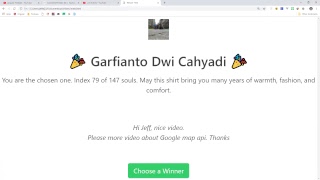
The first winner is 'garfi Anto' (index 179 out of 147 comments).
A second winner, Arturo Blanco, is picked, making it a two-of-a-kind shirt.
The host mentions interest in the Google Photos API, which recently exited Developer Preview, for potential business opportunities.
The livestream successfully combined a subscriber milestone celebration with a live coding demo of a JavaScript script that uses the YouTube API to randomly select giveaway winners, while also teasing future content involving Google Maps and Google Photos APIs.
What API is used to fetch comments for the giveaway?
YouTube API
1:11
How many comments are fetched per batch?
20
2:39
What method ensures all comments are unique in the selection?
Using Lodash to deduplicate by a deeply nested object property
5:59
What is the formula to pick a random index from the unique comments array?
Math.floor(Math.random() * uniqueValues.length)
6:24
Is authentication required to use the YouTube API for fetching comments?
No, it can be used unauthenticated; only a Google Cloud project is needed.
3:58
What is the purpose of the page token in the recursive function?
It handles pagination to fetch the next batch of comments until the end.
3:00
How many winners were selected in this livestream?
Two
8:23
What future API did the host mention as having business opportunities?
Google Photos API
9:59
50k Subscriber Milestone
Shows the host's gratitude and community engagement.
0:32One-of-a-Kind Shirt
Emphasizes the exclusivity of the giveaway prize.
1:45Async Recursive Function
Demonstrates a practical use of recursion for paginated API calls.
2:34No Auth Needed for YouTube API
Useful tip for developers wanting to quickly prototype with the API.
3:58Suspense via Timeout
Adds user engagement through a simple UI trick.
5:46Google Photos API Opportunity
Highlights a new API with potential for photo management apps.
9:55[00:03] hey what's up everybody can you hear me
[00:06] okay
[00:07] hey what's up everybody can you hear me
[00:10] okay if so let me know in the comments
[00:20] so yeah there's that a few second delay
[00:22] on my end so yeah everything's good let
[00:25] me know and then we'll get going
[00:27] cool so yeah first of all we're about to
[00:32] hit 50,000 subs so I just wanted to say
[00:34] thank you to everybody for that it's
[00:35] never really expected to get to that
[00:37] point so yeah I just really appreciate
[00:40] all the support and everything there and
[00:43] then yeah I wanted to just kind of
[00:45] experiment with these live streams I
[00:47] think in the future we could do like
[00:48] some ask me anything kind of videos and
[00:51] stuff like that cool are you guys
[00:55] getting an echo or do I sound okay cool
[01:04] um alright so I think the first thing
[01:07] I'll do is just will switch over to the
[01:09] code what I'm going to do is pull all of
[01:11] the comments from yesterday's video
[01:13] using that YouTube API so it kind of
[01:16] keeps with that same theme of using
[01:17] Google API is to get something done so
[01:20] if you haven't already commented on that
[01:22] on yesterday's video you've got about
[01:24] maybe two or three minutes to do that
[01:26] and then we'll pull all the comments in
[01:28] real time
[01:28] so I'm gonna go ahead and switch over to
[01:32] a screen share and then we'll just blow
[01:35] through the code in a couple minutes and
[01:36] then we'll pick the winner oops alright
[01:45] and so this is the actual shirt that is
[01:47] going to be going out it's a one of a
[01:49] kind like for these giveaways I just
[01:51] create a one-time design and it only
[01:53] gets printed once so if you win you'll
[01:55] be the only person in the world that has
[01:57] to share it and then I'm gonna switch
[02:02] over to vs code here and we'll see last
[02:06] time last time we use node to pick the
[02:08] winner but I did a little more refining
[02:10] to that script and we'll actually use
[02:12] the browser this time to provide some
[02:14] better UI elements and basically just
[02:18] what we have here is some simple HTML
[02:20] and I have a few empty elements and I'm
[02:24] gonna trigger this pick winner method
[02:25] and it's going to fire off this pick
[02:29] winner script that I'll show you here in
[02:30] a second
[02:31] and basically the script is an async
[02:34] it's an async recursive function so what
[02:37] it's going to do is pick comments from
[02:39] the YouTube API and batches of 20 and
[02:41] then it will put all of those into an
[02:44] array and then we'll do some random
[02:46] stuff with JavaScript to actually pick a
[02:49] random index from that array and make
[02:50] sure that only a unique comments can be
[02:53] picked so we'll set this up as an async
[02:57] function and then we'll make this
[03:00] recursive by passing in a page token
[03:02] argument that starts out blank and then
[03:05] it will end this function once the page
[03:07] token ends that means we've reached the
[03:09] end of like YouTube's comment pagination
[03:13] so to make a request to the API we're
[03:16] just using vanilla JavaScript and will
[03:19] preside up some URL search brands and
[03:22] that's going to take a key the video
[03:25] idea what this is the YouTube video ID
[03:27] from yesterday so you still have time to
[03:29] comment C from there we'll go ahead and
[03:34] request the snippet and then pass in the
[03:37] page token which again we use for
[03:39] pagination to know how to get like the
[03:41] next 20 comments in a batch so let's see
[03:47] here the actual YouTube API this is the
[03:49] URL for that and then we'll format the
[03:53] actual URL that we'll be making this
[03:55] request to and just a side note you
[03:58] don't need any authentication for this
[04:00] API you can just use it as an
[04:02] unauthenticated user all you need is
[04:04] that google gcpd project and so we use
[04:10] the browser or fetch API and that's
[04:13] going to be a promise or wait that
[04:14] that's the actual response from YouTube
[04:17] and we can one tip here is when you have
[04:20] a JSON response you can actually D
[04:22] structure it using this syntax here and
[04:27] just a cleaner way than setting up
[04:28] multiple variables for the different
[04:30] things that come back on the response
[04:34] from there we'll go ahead and map the
[04:36] items to the there's a bunch of data
[04:41] that comes back in the response so
[04:42] basically I'm doing here is just mapping
[04:44] it down to the top-level comment and the
[04:46] snippet on that comment which has the
[04:48] user name and user profile and stuff
[04:49] like that and we'll take this array and
[04:54] for each batch we'll go ahead and
[04:55] compose a new array so this wouldn't be
[04:57] it in a rainy it gets bigger and bigger
[04:58] and batches of 20 and this is what makes
[05:02] the function recursive so if we have a
[05:05] next page token then we're just going to
[05:07] call this function that we're define in
[05:09] some notes we're inside the size of
[05:11] pacing function if we have a page token
[05:14] then we're going to keep calling it
[05:16] until we run out until we get to the end
[05:18] of the pagination from YouTube so that
[05:24] takes care of the function and then
[05:27] we'll just define our array outside of
[05:28] the scope of this function and mutate it
[05:30] and then our event handler does its pick
[05:35] pointer and so what this is going to do
[05:37] is just grab a couple of elements from
[05:39] the DOM and we'll update some
[05:42] information in the DOM and what I want
[05:46] to do is add a whole bunch of suspense
[05:47] to this function so I have just wrapped
[05:49] it in a timeout for 5 seconds so we'll
[05:52] have to wait at least 5 seconds for the
[05:53] swag gods to respond with their decision
[05:57] and I'm kind of cheating here I'm using
[05:59] a low dash to make sure that all the
[06:02] comments are unique so that means if you
[06:04] if you commented on the video multiple
[06:05] times you'll have the same chance of
[06:07] winning as someone who just commented
[06:08] once and it's easier to do this with
[06:13] lodash because it's quite a bit more
[06:15] work in vanilla j/s when you have it
[06:16] like deeply nested object property like
[06:19] this and then to actually get a random
[06:24] value we'll take the floor of a random
[06:28] value and then we'll multiply that by
[06:31] the length of unique values in the array
[06:33] which last time I checked was about 110
[06:36] so that's your odds will be about 110
[06:38] Plus whoever commented in the last 10
[06:40] that's that we'll take that winner it'll
[06:46] be the index in our array and it'll just
[06:51] update a bunch of stuff in the DOM and
[06:52] that's it so if anybody has any any
[06:57] issues of that logic let me know now in
[06:59] the comments but otherwise I'm about
[07:00] ready to click the button and we'll
[07:02] figure out who wins so we can actually
[07:07] this is just plain HTML and JavaScript
[07:09] so we can actually just grab the path to
[07:12] this to this file and we'll just open up
[07:17] a new browser tab here and hopefully
[07:21] everything works I kind of just threw
[07:22] this together and I think I think it
[07:23] should be good but hopefully we don't
[07:27] run into any issues all right so here we
[07:31] go three two one and the winner is garfi
[07:42] Anto it should I he I'm not gonna say
[07:45] that right but congratulations you won
[07:48] that was index 179 out of 147 so yeah
[07:53] quite a few more people commented in the
[07:55] last few minutes and cool yeah thanks
[07:59] for the nice video and you requested the
[08:02] Google Maps API and that's definitely
[08:05] something I want to do more of I know a
[08:06] lot of people want to see a Google Maps
[08:09] extension to the ionic course so I might
[08:12] might add that to the ionic course here
[08:14] in the near future um let's see but
[08:20] that's one winner let's we might as well
[08:23] go ahead and pick one more while we're
[08:24] at it I think I said it was a
[08:27] one-of-a-kind shirt but I guess it's
[08:28] gonna be a two of a kind shirt now so
[08:32] we'll wait one more decision and see
[08:34] what happens and Arturo Blanco you're
[08:40] the second winner pool so dashboard for
[08:44] analytics with plotly and yan I did a
[08:48] plotly video quite a while back but
[08:51] that's definitely something that could
[08:53] be revisited
[08:56] so cool congratulations to the winners
[08:58] if you're on our slack channel the best
[09:01] place to give me your address and shirt
[09:03] size would be on the channel but you can
[09:06] also send me a direct message through
[09:07] YouTube as well so yeah that's pretty
[09:19] much all I have for the that random
[09:21] winner is I think there's definitely
[09:23] something I want to do more of because
[09:25] there's plenty of opportunities to do
[09:27] this and it's easy enough to do you know
[09:29] on a weekly basis I think and yeah if
[09:35] you guys have any questions in the
[09:36] comments I can maybe try to answer some
[09:38] of those now but I think that's pretty
[09:40] pretty much all I had for this
[09:41] livestream so I'll give that a few
[09:50] minutes and yeah definitely want to do
[09:53] some more stuff with the YouTube or with
[09:55] with Google API is a big one that just
[09:57] came out of Developer Preview recently
[09:59] was the Google Photos API so that's got
[10:02] gives you access to like at Google's
[10:04] users users albums and photos so there's
[10:08] a lot of I think business opportunity
[10:10] there if you want to do you know some
[10:12] kind of photo management app or even
[10:14] like a physical printing app for photos
[10:16] [Music]
[10:19] cool and I'm just kind of looking
[10:21] through the comments here
[10:32] well again yeah thank you everybody I'm
[10:34] gonna go ahead and wrap the stream up
[10:35] there we can chat more on slack and yeah
[10:38] again if you have any questions just let
[10:40] me know all right thanks everybody see
[10:42] you later

⚡ Saved you 0h 10m reading this? Transcribe any YouTube video for free — no signup needed.