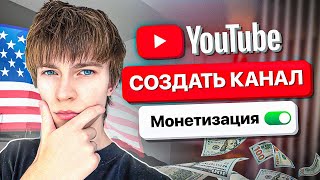

Don't Ruin Your YouTube Channel!
45sStarts with a strong warning about a common mistake that can ruin your channel, creating urgency and curiosity.
▶ Play Clip"Title accurately promises a guide on creating an American YouTube channel, and the video delivers practical steps and myth-busting."
This video provides a step-by-step guide on creating an American YouTube channel, emphasizing the importance of using separate Google accounts for each channel to avoid losing all channels if one is terminated. The creator debunks common myths about needing an American phone number or VPN, stating that YouTube is a global platform and content quality matters more than location.
Create each YouTube channel with a separate email address to prevent losing all channels if one is terminated.
Use any date of birth and a strong password. Phone number verification is possible with any country number; Russian users can use existing email.
You can create multiple Google accounts using the same phone number; the creator has done so.
After logging into YouTube, click 'Create Channel' and set a nickname and alias.
Display currency and country of residence are purely visual and do not affect earnings or reach.
YouTube does not care where the channel is created; content relevance to the target audience is what matters.
Add keywords related to your niche (up to 500 characters). Set channel as not for children to avoid restrictions.
Confirm phone number to upload videos over 15 minutes. Video verification can be done via face, passport, or waiting 2 months.
If monetization is unavailable due to sanctions, connect to an affiliate network after reaching 1,000 subscribers and 4,000 watch hours.
Creating an American YouTube channel is straightforward: use separate Google accounts, ignore myths about location, focus on quality content for your target audience, and leverage affiliate networks for monetization if needed.
Why should each YouTube channel have a separate Google account?
To prevent losing all channels if one is terminated.
00:14
Can you create multiple Google accounts using the same phone number?
Yes, you can.
01:35
Does the country of residence setting affect YouTube channel reach?
No, it is purely visual and does not affect reach.
03:14
What is the myth about needing an American VPN for an American YouTube channel?
It is a myth; YouTube is global and content matters more than location.
03:38
How many characters can you use for channel keywords?
Up to 500 characters.
05:13
What setting should you choose to avoid YouTube Kids restrictions?
Set channel as 'not for children'.
05:27
How can you upload videos longer than 15 minutes?
Confirm your phone number.
05:54
What are the two ways to complete video verification?
Show your face or passport, or wait 2 months for automatic confirmation.
06:06
What are the requirements for YouTube monetization?
1,000 subscribers and 4,000 hours of watch time (or 10 million shorts views).
06:35
How can creators in sanctioned countries receive YouTube earnings?
Connect to an affiliate network that transfers money.
06:49
Separate Accounts for Safety
Key principle: one channel per email to avoid losing all channels if one is terminated.
00:14Myth Busting: Location Doesn't Matter
Crucial insight: YouTube is global; content relevance trumps channel creation location.
03:38Not for Children Setting
Important setting to avoid monetization and feature restrictions.
05:27Affiliate Networks for Monetization
Practical solution for creators in sanctioned countries to receive earnings.
06:49[00:01] take a detailed look at how to properly create an American YouTube channel. Creating a clicking the wrong button, you can ruin your channel and all future videos. So take this very seriously. I won't waste
[00:14] we need to do is create a new Google account. Let me explain. We create each channel for a separate email address, because if we create, say, several channels for one email address, and God forbid, something happens to one of these channels
[00:28] God forbid, something happens to one of these channels , all the others on that email address will be lost. And if you have each channel on a separate email, then everything is okay with you. So let's get started. Let's create mail. In principle, this is not
[00:40] necessary if you already have a Google account. Let's say you do n't have one, so we just write, let's say, my nickname. And here we put the date of let's say, my nickname. And here we put the date of birth. It doesn't matter at all. Ah, let me
[00:52] put it like this. Let's go. And it also doesn’t matter what your address will be. Write a password, preferably a strong one. They wrote it in. Now, scan the QR code with your camera. Well, I'm scanning.
[01:06] In short, if you have problems with phone number verification and so on in Russia, just create a channel to the email you already have. Here. I will personally take it and confirm it. Yes, I confirmed everything.
[01:19] Click skip. And so on. That's it, our account has been created. Many people ask if it is possible to create multiple accounts using one phone number. Yes, you can. I created all my accounts under one number , so everything is okay. Oh
[01:35] yes, confirm again. We confirm once again. And it doesn’t matter what country the phone number is from. Let's say I put my Ukrainian number here. it has to be an American
[01:49] phone number. But in fact, these are all myths, it’s all nonsense. Tutube doesn't care what your phone number is, it cares what kind of content you film. If Belarus, you try to enter your number here , nothing comes up, and
[02:02] foreign number, rent it there for 15 minutes for pennies, there for 20 rubles. And, in principle, to use it, to lead it here. You won't need it any further, just for this. Here. So, we went to YouTube, and here we just need to go in and click the
[02:17] Create Channel button. Hey, let's write your nickname and alias here. This can be selected later. Well, you don’t yet know what niche you’ll be filming there, so I’ll just click create avatar. We'll set the nickname later, that's not a problem. And
[02:31] bam. That's it, we've gone and created a YouTube channel. [music] Let's set it up now. Let's go to YouTube's creative studio now. Welcome. Here, let's set it up. Default unit of measurement . Look. Once you
[02:44] this currency, in short, you can set the display currency. Let's say you have $100 there. If you put the currency dollars here, you will see it displayed in dollars. If you place your order in rubles, it will be
[02:58] in hryvnia, you will simply convert it into hryvnia. But the money is the same . That is, it is purely a display, it is purely visual. Many people there think, damn, if I put dollars, then more money will come there in dollars
[03:14] comes. It's just a display currency. In principle, it doesn't display currency. In principle, it doesn't change anything. The country of residence, in principle, also does not affect anything. It's purely visual. This will be purely in the channel description
[03:26] with, well, the country will be written. Well, let's put the United States, like we have an American YouTube channel, so the United States doesn't really matter . So, let me explain the most important thing to you now. Throw away
[03:38] all this infasigan crap now. Throw away everything you heard there. Listen up, in short. And YouTube doesn't care in which country you created your channel. That is, if you created a channel in Russia, you think that you have a Russian channel and you
[03:52] will only be visible in Russia. In fact, this is a myth. If you make content that is interesting to Americans, that is in English, that they understand, they will watch you, the views will come from that country, and
[04:05] American YouTube channel. YouTube just doesn't care. What number is your channel registered to? He doesn't care what country he does it in. They've just come up with all sorts of myths , like the idea that you need an American
[04:18] VPN and so on. Eh, if it worked like that, then, well, that's very strange logic. You think that if a channel is created in America, it means it is Russia, it means it is only visible in
[04:32] Russia. If it's only to Belarus, well, that's nonsense. If it worked like that, you would other videos. You should see purely Russian videos. Well, that makes sense. And since you see Mr. Beast's videos, Mr. Beast created a channel in America, then why is it
[04:46] visible in Russia? Yes, it's strange. That's why I'm telling you, YouTube is a global platform, and here, it doesn't matter in what country your channel is created, what matters is what you film, what content. If your content is interesting to Americans,
[04:59] Americans will watch it. This is how it works. In short, I think those who understand will continue to write to me in the comments about how an American VPN is needed for the video to be shown in America. In short, it's nonsense. We
[05:13] Keywords that are related to the topic of your channel. If you've already filming, let's write about it. Let's say, if you have a niche with animations, then we write it like this: animation, let's say, comma. And here we write it down. Here we have 500 characters
[05:27] . This will make it easier for your channel to be found. Next are the advanced settings. Here we put no, my channel is not for children and there is no children's content on it. And this is a must-have, because then your videos will be shown on
[05:40] YouTube Kids. There is practically no monetization there, comments are disabled, and so on. You don't need it. Put this here. Well, that's how it has to be. The next thing, previews, that is, pictures to your video. It will also be possible to upload videos longer than
[05:54] 15 minutes. To do this, you need to confirm your phone number. Try connecting to your phone number. If suddenly it doesn’t work, just take a website from my Telegram channel, rent a phone number there, put
[06:06] it here, confirm, everything is okay with you. Well, thirdly, advanced functions. video verification, which means showing your face , or showing your , or showing your passport, or waiting for a while
[06:20] , say, 2 months, and it will confirm it itself. Then you connecting monetization. But again, to monetize, you still need to get 4,000 hours of views and 1,000 subscribers, or 1,000 subscribers and
[06:35] 10 million views of shorts. So decide now on the topic of your channel, what you will film, and film, make your channel popular. Over time, you will get more views and you will be able to enable monetization.
[06:49] country there are sanctions, I can’t enable monetization, what should I do? In short, there are such companies, for example, affiliate networks or media networks. This company cooperates with YouTube and transfers money, it turns out,
[07:03] to users who are connected to these affiliate programs . Therefore, when you already have 1,000 subscribers, 4,000 hours of views, that is, you fulfill the conditions, you simply come and connect to this affiliate network. All affiliate networks are
[07:16] also listed on my Telegram channel, link in the description. Come on in, join in, wait. I also published all the niches for American YouTube in my Telegram channel, link in the description. Telegram channel, link in the description.
[07:28] sixth year, so you can just take it and start shooting. The most profitable, the easiest, with the follow the link in the description, read it, I think you will find it useful. how the algorithms work, everything you need to know. Therefore, if you
[07:41] should definitely subscribe to this channel, it will really help you. this channel, it will really help you. Link in the description.


⚡ Saved you 0h 07m reading this? Transcribe any YouTube video for free — no signup needed.