Laravel 12 Jetstream Secret: Not Listed But Works!
45sReveals a hidden workaround for a popular framework, sparking curiosity and saving developers time.
▶ Play Clip"The title promises a workaround and the video delivers exactly that, though it's a bit short and could have included more detail."
This video demonstrates how to install Laravel Jetstream in Laravel 12, despite it not being listed in the official starter kits. The presenter explains why Jetstream is still a valuable choice and provides a step-by-step installation process.
Laravel Jetstream is not included in the official list of starter kits for Laravel 12, but it remains possible to install and use it.
Jetstream offers features not available in the new starter kits, such as team management and two-factor authentication.
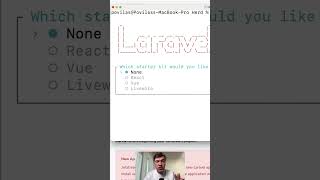
After installing a Laravel project, run 'composer require laravel/jetstream'. When using the new Laravel installer, select 'none' for the starter kit option.
The command successfully installed Jetstream version 5.3. Then run 'php artisan jetstream:install' with your preferred stack (e.g., Livewire).
After installation, the homepage shows Laravel 12 with login and register links that lead to the familiar Jetstream pages.
Jetstream can be easily installed in Laravel 12 by using the direct package and artisan commands, providing advanced features like team management and 2FA that are missing from the default starter kits.
Is Laravel Jetstream listed in the official starter kits for Laravel 12?
No, it is not listed, but it can still be installed.
What features does Jetstream provide that are not in the new starter kits?
Team management and two-factor authentication.
00:14
What command installs Jetstream?
composer require laravel/jetstream
00:26
What version of Jetstream was installed in the video?
Version 5.3
00:41
What command is used to install Jetstream with a specific stack?
php artisan jetstream:install
00:41
Jetstream Not Listed
Highlights a common confusion and provides a clear workaround.
Unique Features
Explains the value proposition of Jetstream over default starter kits.
00:14Installation Command
Provides the exact command needed to install Jetstream.
00:26[00:00] If you want to use Laravel Jetstream in Laravel 12, it is not listed in the official list of starter kits, but it's still possible to use and install. Let me show you how. Why you would want to use Jetstream? Because of some features that are not available in the new starter kits, like
[00:14] team management and two-factor authentication. And the official docs of starter kits in Laravel 12 doesn't list Jetstream, but the trick is to go directly to the page jetstream.laraval.com. So
[00:26] after installing Laravel project, you need to run composer-acquire-laraval-jetstream. But with a new Laravel installer, if you run laravel-new-project-name, the question is which starter kit to choose, and you need to choose none. So I have installed Laravel, and then I run that command,
[00:41] successfully installed version 5.3, and then you need to run phpartisan-jetstream-install with the stack that you prefer. For example, we'll run that with Livewire, and then the homepage will show Laravel 12 but with login and register on top that would lead to familiar Jetstream pages.


⚡ Saved you 0h 00m reading this? Transcribe any YouTube video for free — no signup needed.