

Dad Reacts to Son's Destroyed Laptop
45sThe comedic back-and-forth about the damaged laptop and the reveal that the son needs a new one for school creates relatable humor and immediate engagement.
▶ Play Clip"The title promises a shopping experience, and it delivers a genuine, educational walkthrough, though the sponsor segment and some tangents add filler."
In this video, Linus Tech Tips guides his son through the process of selecting a new laptop for high school, emphasizing hands-on experience and practical research over brand loyalty. The video covers key specifications like RAM, storage, and CPU cores, and explores different laptop classes to find the best fit for the student's needs.
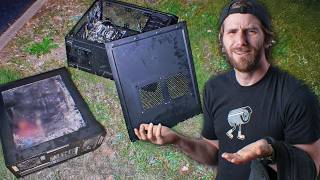
Linus's son shows his damaged Lenovo laptop, which has a bent corner, missing screw, and peeling material, prompting the need for a new one before school starts.
Linus encourages his son to do his own research for the first time, noting that he usually handles tech purchases for his kids.
The son lists specs he researched: gigahertz, p-cores, e-cores, and RAM purpose, showing he's learning the basics of laptop components.
The son wants a laptop that can handle 50 tabs, 16GB RAM, 4-8 cores, 4-5 GHz, and at least 512GB storage, with a preference for under 5 pounds.
The son considered a Mac but found it too expensive and noted the lack of ecosystem benefits since he doesn't own other Apple devices.
Instead of a store visit, Linus takes his son to the lab to try different laptop classes, using a shipping scale and backpack to test weight and portability.
The son says he has a PC at home for gaming, so the laptop doesn't need a powerful GPU, which is a smart consideration for battery life.
The son narrows down to a Lenovo IdeaPad Slim 5X (Snapdragon) and a VivoBook 16, comparing cores, price, and battery life.
The son realizes that a 5-pound laptop feels heavier than a 5-pound weight, highlighting the importance of physical testing.
The son chooses a Samsung Galaxy Book 4 Edge, which meets all his requirements (16GB RAM, 16-inch screen, 120Hz, touchscreen) at a reasonable price.
The video demonstrates a practical approach to laptop shopping, emphasizing the value of hands-on testing and understanding specs. The son ends up with a well-suited laptop that balances performance, battery life, and cost, showing that research and experience lead to better purchasing decisions.
Defining Requirements
Shows a practical method for specifying laptop needs based on usage, like 50 tabs and 16GB RAM.
02:23Hands-On Testing
Emphasizes the importance of physically testing weight and feel, which online research can't capture.
05:19Weight Perception
Highlights that a 5-pound laptop feels heavier than a 5-pound weight, a common misconception.
12:42Value Discovery
Finding a well-priced Samsung Galaxy Book that meets all requirements shows the value of thorough research.
17:22[00:00] What did you do to this? I mean, I've had this for five years. I didn't ask how long you had it, I asked what you did to it! I dropped it one time, off of a table like below my hip height, and landed on the corner and it just got completely bent.
[00:14] All the other damage is like... Oh! Yeah, one of the screws is missing. Uh, this thing is peeling here. Kinda like, there's a crack. I put tape over it.
[00:26] That's an awful lot of words for, Dad, I need a new laptop. At least the timing is good for this. He goes back to school in a week. But, with that said, just because you're not back to school yet, doesn't mean that you can't start learning.
[00:38] Every other piece of technology in his life. I've done the research, I've made the purchase, and pretty much handed it to him. This time, you're on your own. Oh, joy. To be honest, it wasn't that hard to do all the research.
[00:58] I mean, I just figured out what all the specs mean and, like, what I want for school. Okay, but are you sure you've actually made a good decision? I have a couple options, so I talked to you, and then I'll show those to you later. Okay.
[01:10] So I guess we'll get to find out what that means to him. You started, of course, by watching the OTC guide on how to use laptops, right? No. I didn't even know that was a thing. Classic.
[01:22] But you know what everyone knows is a thing? It's a segway. It's our sponsor. Oh, snap. The shameless, oh, snapperted story. Learn the tale of how one simple man with one grand invention helped a homestead get a grip and build a life for themselves.
[01:38] Tune in tonight, 7 p.m. Pacific, 9 p.m. Central on LPD. First things first, why don't you show me the initial research that you've done?
[01:57] Could we look at it on my phone instead? You know, I'll get my laptop. Let me have a look at what you got here. Sorry, the notes might be a little bit messy. I just kind of put everything in random order. Okay. Things I don't know.
[02:10] Gigahertz, p-cores, e-cores, purpose of RAM. And is that all stuff that you've figured out already? Yeah. I researched about all of these and then... Okay, so tell you what, without even looking at the docs then, why don't you try and summarize
[02:23] what exactly it is that you're looking for. I want a clip that is able to actually run like 50 tabs at a time. 50! Well, yeah, if I have five subs... Damn, it's rookie numbers! DRAM DROP!
[02:35] Oh, no! But okay, go on. Well, my old Chromebook would like crash if I had 50 tabs in it. Okay, I want no lag with 50 tabs. I probably need like 16 gigabytes of RAM.
[02:48] Okay. And a chip with maybe 4 to 8 cores and 4 to 5 gigahertz. Okay. For storage, I want at least 512 gigabytes of storage.
[03:00] 64 gigabytes was fine on my old Chromebook, but since it can't even access Windows apps, it doesn't really need much more storage. Right. So that's a major difference this time. He's going into high school.
[03:12] So all of a sudden, Wilder School... So Wilder School allows him to use a Chromebook. He actually doesn't have to anymore. Maybe awkward question though. I walked down the stairs while you were on your computer and I looked over your shoulder and I saw Apple.com.
[03:27] I was thinking about it, but no. It's so expensive and the main benefit of all your devices being connected to each other, I don't even get that because I don't have other Apple devices. I mean, you got AirPods, but that's just Bluetooth.
[03:40] I can connect that to whatever. That's fair enough. We actually had a short conversation about it and he just goes, why are these so expensive? Does anyone actually buy these? Yes. Yes, they do. It's like an addiction. Like, once you get into Apple, you can't get out.
[03:53] But it's like, you just have to get in first. So I'm trying not to do that again. Okay. Okay, that's fair enough. The Mac with Neo only has 8 gigs at nearly $1,000. Yeah. The Neo used to be a really good deal, though, when it first came out.
[04:05] But now the price has gone up. The price for everything went up. The RAM is so expensive. This is... AI is, like, taking over. It sounds like you actually want pretty reasonable specs.
[04:17] I even see your weight requirements here. You just want something that's under five pounds? I mean, five pounds is really heavy. Do you have any idea what a five-pound laptop feels like? No. You did all your research online, right? Yeah. Why don't we go look at some actual laptops and experience them a little bit
[04:32] before you make a final decision? Okay. Okay, let's do that. Where are we going? Where are we going? Where are you going? He's new to filmmaking. He doesn't know how to walk out of the frame as a transition.
[04:53] Okay but seriously where are we going The original plan was for us to go shopping but what I realized is two things First that since you did all of your research online the models that you would see in store
[05:07] might not even be the same ones that you saw in your research. And number two is we sent our request to Best Buy Langley to film in the store too late, so we did not get permission. So instead, we're going to drop by our inventory over at the lab.
[05:19] This will give you the chance to, while it's not necessarily the specific machine you're looking at, really get a feel for what different classes of machines feel like.
[05:31] I brought a shipping scale and a backpack so you can have a look at different weights of machines and like put them on and see how they feel to walk around with because you're gonna be carrying it basically all day. Can't possibly be that heavy. Five pounds is like one twentieth, one thirtieth
[05:46] of my weight. Okay, let's find a five pound machine then. Oh my goodness. Is that really what you want? I didn't think so. There's no way this is...
[05:58] This has to be, like, six pounds. 4.73 pounds. Okay. A five-pound laptop is a mondo, like, gaming machine-grade laptop.
[06:10] Which is actually a pretty good question. Now, obviously, I don't want it to distract from your studies, but do you want something that can run games at all? I mean, kind of, at least, but I do have my PC at home, so I can just come home and play games.
[06:22] That is such a good answer. Love it. Gold star. With all that said, I don't know that you want to go completely to the other end of the spectrum either. Wow, that is tiny. Yeah, that's one of the older LG Grams that really focused on being as light as possible
[06:37] at the expense of, you know, that it might come apart at some point. And also, you don't get really a very big battery. I need it to last the whole school day. If it dies, that sucks.
[06:49] Another thing you haven't mentioned is, do you care what kinds of ports it has? No, as long as it has a charging port. Okay. Doesn't matter. Fair enough. Then is there anything that you've seen then that has made you kind of change your mind about the research that you did so far?
[07:03] I don't think so. Okay, want to show me what you settled on then? Yeah. Oh, was it too heavy for you? No, the thing's fine. No, you like slammed the back of it onto the... Ah, chill.
[07:15] I mean, I don't know if that's what happened. It's like how you dropped something. Oh, 30%... We got, oh god, a nice mouse. Fastest upgrade ever. How much does your laptop cost?
[07:28] Don't worry about that. You're not getting one right. This is, I think, about $4,000 US dollars. What? It has 128 gigs of the fastest RAM and 16 core processor.
[07:40] We do press onboard graphics. It's not the kind of thing that I would actually buy. It's the kind of thing that our ACS rep just was like, hey, do you really want you to try this? and I was like, okay. You just get free stuff. That's cool. I mean, it's not really free.
[07:53] Like, I provided them a bunch of feedback on my experience with it. So, that has about one set of bytes. Yeah, so our Google Drive storage scales with how many people we have on the account.
[08:05] And we have, like, over 100 people, so. Oh, okay. I thought that was, like, all of your stuff. No, it happens now. Okay. Show me what you got. There's three other things we haven't talked about yet. Something with a touchscreen. because these trackpads, I hate them so much.
[08:19] Having to click on these all day, like, hurts your finger. They're not accurate. Nobody tell them about MacBook trackpads. They're really good. And then a large screen, too,
[08:31] because the old 13.3-inch screen was just a little bit too small. Okay. And then 120 Hz. Okay. After switching to my 120 Hz phone, 60 Hz just doesn't feel the same again. Okay.
[08:43] So let me look you up. You'd go back to Lenovo after what happened to your last one. That's bold. The last laptop had a pretty low quality build. It was like plastic and aluminum. These ones are just aluminum. Fifteen inches though.
[08:56] Yeah, I want a big laptop so I can have two tabs open at the same time. Alright. Ideas had slim 5X. Snapdragon! Interesting! Do you know what that means?
[09:08] A brand? It's already fascinating watching a more normie shopping experience. Snapdragon uses a different instruction set architecture, which basically means that not all Windows apps will necessarily run on that machine.
[09:24] They have good performance. They get great battery life, outstanding battery life. But you might occasionally run up against a piece of software that doesn't open. What are some examples of that software?
[09:36] Um, it's mostly not mainstream stuff. It's mostly like, oh, I wanna like run this weird mod launcher for a game, and it might just not be compatible. That's probably fine. This one also doesn't have a gigantic battery.
[09:52] 54 watt hours is on the low side which is part of why this one is at a more reasonable price What do you got next This is the one that was on sale So this is my You do not want a 16-inch laptop, right?
[10:05] No. Okay, let's go get one. I'll show you why. That is a 16-inch laptop. Beautiful. Do most people not like big laptops? I tried buying a mom a big laptop recently and she literally took it back to the store.
[10:20] Every time I lend you my laptop, you complain that the screen is too small. Well, as long as it fits in my LQQ backpack. It would be borderline. This is a really big laptop. Do you have an LQQ backpack here?
[10:32] Uh oh, kind of a question. Something to note about this thing, Clipso, is that it has a more square screen, so it's actually going to be even larger, but not as like side by side printed.
[10:44] So this is what a 16 inch laptop would look like in here. You could stretch it around the corners. Is this the... Can you hear? Can you do that? Can you do that? Okay. Coming very soon in this colorway, by the way.
[10:56] Sign up for a notification. LTTscore.com Okay, it's not even that much for you to know. Alright. Never mind. Oh, man! That would look bigger,
[11:08] because you realize it's diagonal, and it's like... Which is exactly why a 16-inch screen is so much larger than a 15.6. I mean, this would be nice. Having two tabs.
[11:21] Okay. Alright. And then these ones also have like the number pad. So when I'm in math, it's way easier to do stuff. Okay. Not everybody likes the number pad because what it means is that when you're sitting dead on on your laptop, you're kind of like this.
[11:35] The trackpad's centered relative to the keyboard though. Not all. This Lenovo does it and this VivoBook does it, but not all of them do. So sometimes it can be a little wonky. Show me your third choice. So I thought this was a bad deal until it went on sale and now I'm like, wow, it's a good deal.
[11:50] dedicated GPU, not a powerful one, but absolutely enough to play Rocket League, for instance. Very gaming-oriented. But check the weight.
[12:02] And also, whenever you have a dedicated GPU, you're going to get better performance in games, but anytime you're not running games, that GPU still has to be powered up a little bit, so you're going to give up a measurable amount of battery life.
[12:15] I don't know that there's any guarantee that this is going to get through the day. And also, that's in spite of it having a 90 watt hour battery. So that battery is physically 75-80% larger than that first machine you showed me.
[12:29] And you gotta carry all that weight around. 2.2 kilos. Yeah, that's a 5 pound sick boy machine. 5 pounds is way more than I thought. Well, yeah, but like a 5 pound weight is lighter than a 5 pound laptop.
[12:42] Huh? It's like how cable lateral raises are heavier than lateral raises. Just a little logic. Coming back to the fakebook 16 then, is this your top candidate at the moment? Yeah, because it has two cores more than the IdeaPad and it's only like $40 more expensive.
[12:57] Okay, now, not all cores are made equal. Did you learn about E cores and P cores? E cores efficiency cores and P cores performance cores. And there's even more to it than that. So depending on the generation of those cores,
[13:10] it can be like way better-er or way not nearly as good-er as the other ones. So 8 cores could be worse than 6 cores. If the 8 cores are like lower generation.
[13:23] Yeah. Okay, so how do you find the generation? The generation number for Intel is right here. So these are last gen. They're pretty okay, and the battery life should be pretty solid.
[13:35] This one, that's the newest generation, but these are those Snapdragon ones that have a bit less compatibility. So either of them is a pretty solid choice from a performance standpoint. You think they're about the same?
[13:48] It's hard for me to say for sure without benchmarking them. I would say depending on the application, this might be faster, especially in light single-sided tasks. But if you were to, say, render out a video or something like that, just having more cores is probably going to benefit you more than having faster ones.
[14:04] Is there anything else you want to see? Oh, did we have one of these? Right. Oh, cool. So we have a ThinkBook 16. Okay. You get to experience it in person then before you decide to buy it.
[14:16] So, start with the weight. It's not too bad, actually. I think that's more what I was expecting for 5 pounds, but, you know, it's okay. I think the truck has too off-center.
[14:28] That's a bit of a Lenovo-ism. You think the fans get really loud? The fans shouldn't be too bad. It has onboard graphics, so it's not really like a powerful laptop or anything. It's not like it's taken off. The backlit keyboard is actually something I appreciate more than I thought it would.
[14:43] Like when you're in the dark, and a lot of you are in the dark, but you can actually see all the letters. How come they always come with these chips Because the companies that make the chips inside them really want people to know about their chips So if a chip is bad I know who to blame about it Yeah I don think that the way they generally see it but yes
[15:05] Do you want to see any other machines in our inventory before you press record? Yeah, I do. Okay. I want to see some of the other, like, kinds of laptops. Sure. Let's level up. This would be a class of laptop that you haven't seen yet. Why does it have, like, an ammo box for a case?
[15:20] Because it's loaded for bear, boy! No, this was not a meme. This was a real product. Who bought this? Not many people. Not even
[15:32] portable. But it has a number pad. I can barely even hold it. And a full mechanical keyboard. This one's interesting for your use case. It was very expensive when it came out, but I suspect it's worth a fair bit less today. This is the Spectre Fold. It's full right
[15:46] too. Well, you don't have the keyboard yet. Okay. So. There's your laptop. Okay, wow, the keyboard is very heavy. But when it's time to get some work done, you pop the kickstand, and that's your screen.
[16:03] Do you think this is over or under 16 inches? Over. The performance kind of sucks, and it thermal flattles, and it's a little bit loud, but it is a giant screen.
[16:15] 2K USB? That's very expensive. That's very expensive, but not totally, totally outlandish. I could get two of the Idea pads for the price of one of these. That's true, but you can only use one laptop at a time, so... Is it your money I'm spending, or is it my money I'm spending?
[16:28] I mean, we're buying you a laptop for school, yeah. So it's your money. Yeah. Also, I already have this, so that's a factor. How good do you think the performance is? Not very. Never mind. Like, the worst.
[16:40] Okay. No thanks. Cool. Here's a 16-inch Galaxy Book. Does this have good performance? It's okay. How much is it? Ooh, that keyboard's nice. It looks like a Galaxy Book 4 Edge would be worth about a very similar budget, actually, to what you were looking at.
[16:55] So this is an older, last-generation Snapdragon chip, but those are already pretty decent. 16 gigs RAM, a terabyte of storage, and a 16-inch screen. What about battery life? Like, how many hours do you think you get? You will get through the day.
[17:08] So I guess that's something that I didn't really equip you with as part of your shopping, but secondhand is always an option, and it can be a very attractive one, as long as you're not giving up anything that really matters to you, which in your case it seems like mostly comes down to battery life.
[17:22] Are you ready to make a decision? Who will you give your rose to? I don't know, I kind of like this one. Does it have a touchscreen? Probably. Yes, a red touchscreen. Is it 120 hertz?
[17:34] Probably not. No, it's 120 hertz according to Gemini. And according to the book check, which I believe before Gemini. Okay, wow. It actually fits all the requirements. Okay, I'm going to double check the price because I feel like we may have been looking at the wrong models.
[17:47] No. No, they're actually, like, really reasonably priced. Wow, these book four edges might be a bit of a hack. Here it is. Here's the 16-inch AMOLED model for about $1,000 Canadian dollars. 16 gigs of RAM.
[17:59] It has a little bit less storage than this one, but this is clearly the same machine. I think this might be the one, then. All right, good moment. Borderline.
[18:11] That's so cool. Do we have a decision, then? Yeah. I'm going to take this laptop. All right, happy back to school. We settled on a whole figure. Samsung's one of those companies that I do know, cognitively, that they make laptops,
[18:24] but I always forget about them. But this ended up being a, well, it looks like a pretty solid choice. And this is a pretty solid segue. Leave me hanging.
[18:36] A lunch will fit. To our sponsor. In the fall of 2009, early settlers made their way west to begin on a homesteading adventure. They tilled their fields, grew their grain,
[18:48] and yet time and time again faced a troublesome dilemma. Well, they worked. The folks of this small town were distracted, or worse, dropped their slippery phones as they played bus stop borders and watched their favorite programs.
[19:01] As the cold of winter crept in, Seamus O'Snapperton knew the homes wouldn't finish on time when his friends kept dropping their phones, and he thought, damn, their phone accessories kind of suck.
[19:13] So for his people, he made something that didn't suck. And it stuck. Magnetic, ultra-thin, offering a handle and a way for them to plop up their devices. The O-Snap Grip Stand. Suddenly, the homesteaders were able to work while watching YouTube,
[19:27] doom-scrolling, or playing Cabbage Crush Saga. The premium and minimal build had the workers impressed, free to fidget, and worked with all of their devices. And now you, too, can have a piece of the O-Snap legacy with you in your pocket.
[19:41] 25% off site wide with the link down below. If you guys enjoyed this video and you like these kind of shopping vibes videos, maybe check out the time that Elijah and I were shopping for a printer.
[19:54] It's way more exciting than it is.



⚡ Saved you 0h 19m reading this? Transcribe any YouTube video for free — no signup needed.